The median Shopify store adds a product to the cart in about 6.7% of sessions, and anything under roughly 3.4% puts you in the bottom fifth. Your add to cart rate is the share of sessions where someone put something in the cart, and it is the first place a store leaks revenue after the click.
What’s in This Article
Most founders skip it. They stare at conversion rate, decide the checkout is broken, and spend a month tweaking a page that shoppers never reach. If only 4% of your visitors ever press the button, no checkout fix on earth will save you.
This guide gives you the current benchmarks by industry and device, shows you how to read your own number in Shopify in five minutes, and walks through nine fixes in the order we test them with members. If you want the wider picture first, start with our guide to conversion rate optimisation for Shopify.
What add to cart rate actually measures
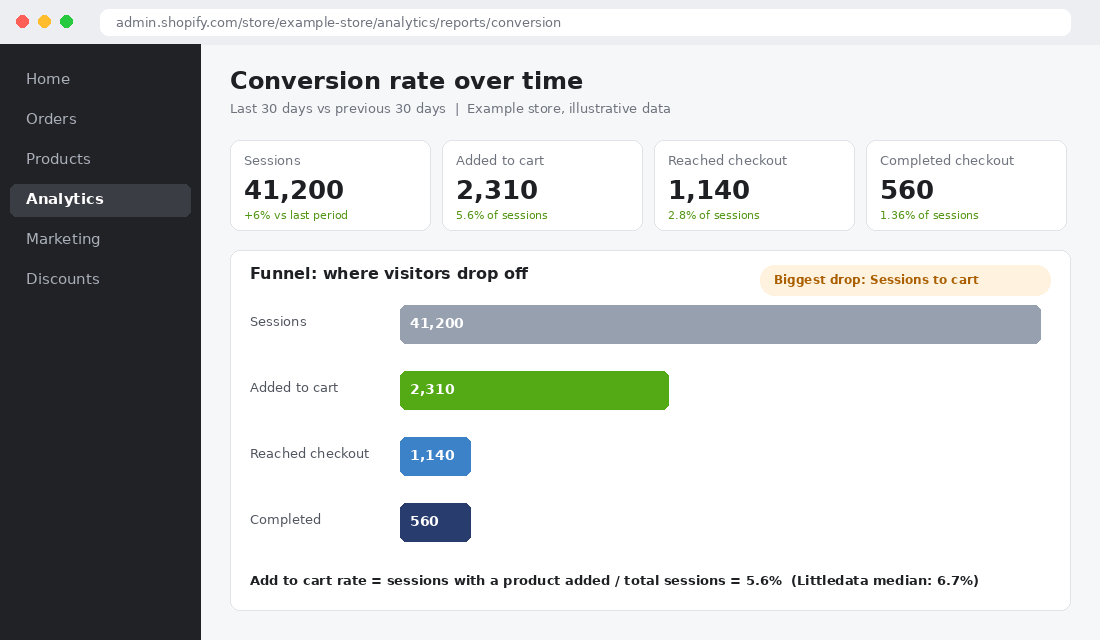
Add to cart rate is the percentage of sessions in which a visitor added at least one product to their cart. Add to carts divided by sessions, times 100. A store with 41,200 sessions and 2,310 sessions that added to cart has a 5.6% add to cart rate.
It sits in the middle of the funnel Shopify shows you: sessions, added to cart, reached checkout, completed checkout. That position is why it is so useful. It tells you whether the product page and the traffic behind it are doing their job, before checkout friction, shipping costs or payment issues muddy the picture.
Do not confuse it with conversion rate. Littledata’s current benchmark for Shopify stores puts median conversion rate at 1.4% and median add to cart rate at around 6.8% (433 stores, 20 July to 17 October 2026). The gap between those two numbers is everything that happens after the cart. Our Shopify conversion rate benchmarks post covers the back half. This post covers the front half.
Add to cart rate benchmarks for Shopify stores (2026)
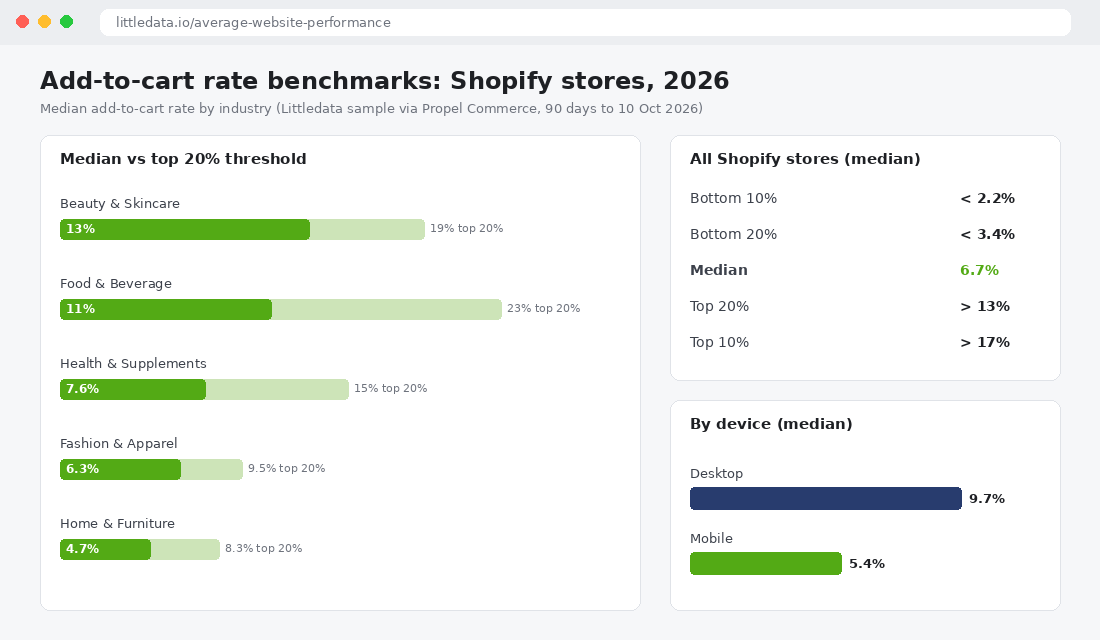
The numbers below come from Littledata’s Shopify benchmark, as reported by Propel Commerce for 424 stores in the 90 days to 10 October 2026. Littledata’s own page shows a median of 6.8% on a slightly different window (433 stores, 20 July to 17 October). Treat the 6.7% to 6.8% as the line to beat.
| Percentile | Add to cart rate |
|---|---|
| Bottom 10% | Below 2.2% |
| Bottom 20% | Below 3.4% |
| Median | 6.7% |
| Top 20% | Above 13% |
| Top 10% | Above 17% |
Benchmarks by industry
Industry changes the answer more than most founders expect. Beauty shoppers buy on impulse and replenish. Furniture shoppers compare for weeks.
| Industry | Median | Top 20% above | Stores in sample |
|---|---|---|---|
| Beauty and Skincare | 13% | 19% | 38 |
| Food and Beverage | 11% | 23% | 30 |
| Health and Supplements | 7.6% | 15% | 34 |
| Fashion and Apparel | 6.3% | 9.5% | 75 |
| Home and Furniture | 4.7% | 8.3% | 61 |
Benchmarks by device
Desktop has a median add to cart rate of 9.7%. Mobile sits at 5.4%. The top 10% of mobile stores reach 12%, so there is a ceiling worth chasing.
This matters for Australian stores because most of your visitors arrive on a phone. If your mobile rate is under 4% while desktop sits near 9%, you do not have a traffic problem. You have a mobile product page problem.
One warning. Littledata’s older benchmark put the Shopify average at 4.6%. The newer 6.7% is not proof that stores got better. The samples differ, and the new one only includes stores with at least 1,000 sessions and 90 purchases in the window. Use benchmarks as a rough guide and compare your store mostly against itself.
How to find your add to cart rate in Shopify in five minutes
You do not need a paid tool. Shopify Analytics already has the funnel, and Google Analytics 4 is your cross check.
- Open Analytics in the left menu of your Shopify admin.
- Pick your date range (use the last 30 days) and turn on a comparison period.
- Open the Conversion rate over time report. It shows sessions, sessions that added to cart, sessions that reached checkout and sessions that completed checkout.
- Divide sessions that added to cart by total sessions. That is your add to cart rate.
- Switch the grouping between day, week and month to see where the drop-off moves.
- Cross check in GA4 by comparing add_to_cart events against sessions. If the two are far apart, fix your tracking before you fix your store.
Tracking matters more than people admit. Littledata only counts stores that record add to cart events at least as often as purchases, because stores with broken events produce nonsense rates. If you suspect yours is off, run the checks in our Shopify CRO audit first.
Rule of thumb
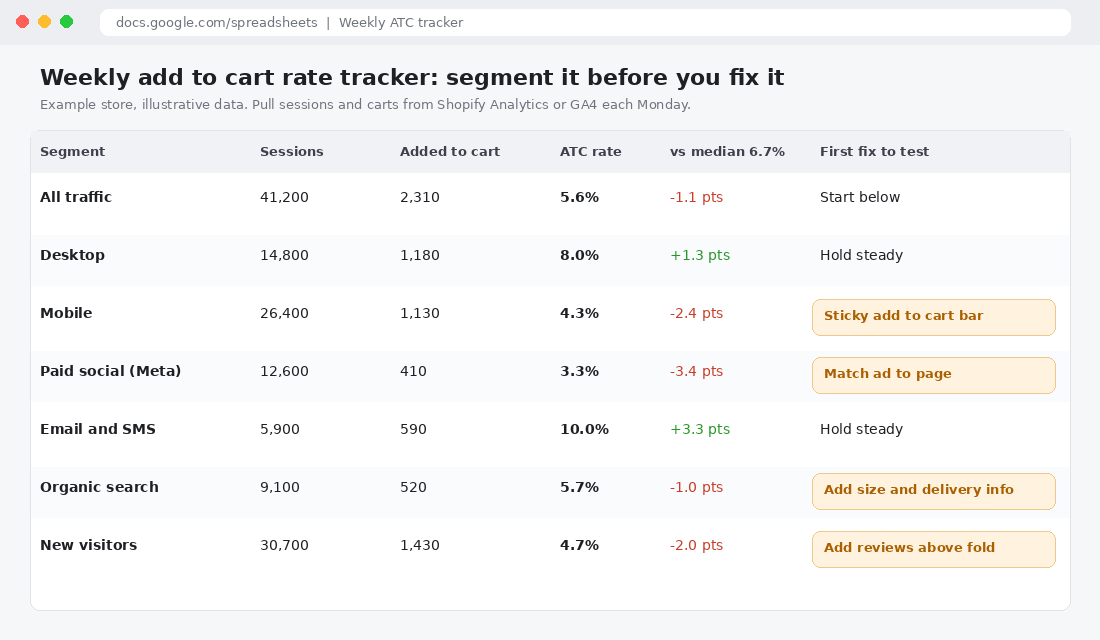
Always segment before you diagnose. A blended 5.6% can hide a desktop rate of 8% and a mobile rate of 4.3%. Those two problems have different fixes.
Add one more free tool to the stack: Microsoft Clarity. Once you know the rate is low on mobile, Clarity recordings show you whether shoppers are missing the button, fighting the variant picker or giving up on a long page.
Why shoppers do not add to cart
Before the nine fixes, understand the three reasons a shopper leaves without pressing the button. Every fix below attacks one of them.
- They are not sure it is for them. Weak images, thin copy, no reviews, unclear size or fit.
- They are not sure what it will really cost. Hidden shipping, unclear delivery, no returns information.
- The page is in their way. A button that sits below three screens of content, a variant picker that confuses, a slow mobile page.
Baymard Institute’s product page benchmark scored more than 155 leading US and European ecommerce sites and found 62% of mobile web experiences rate mediocre or worse. Desktop is only a little better at 52%. If the biggest brands in the world get this wrong, a small Shopify store has plenty of room to win by getting the basics right.
9 fixes to lift your add to cart rate (in the order we test them)
1. Show the full cost before the cart
A Baymard survey of 1,012 US adults in February 2024 found 48% had abandoned a cart because extra costs like shipping, tax and fees were too high. Baymard’s product page benchmark also found 67% of sites fail to show a total order cost estimate near the Buy button.
For Australian stores, that means a one line shipping message directly under the price: “Free shipping over $99. Delivered in 2 to 5 business days.” Add a postcode estimator if your delivery times vary. Surprise costs do not just hurt checkout. They teach shoppers not to start.
2. Add a sticky add to cart bar on mobile
On a long product page the button scrolls out of sight. A sticky bar keeps the price and button on screen. Blend Commerce published an A/B test for an unnamed apparel brand where a sticky add to cart button lifted conversion rate 16.27% and revenue per user 26.31% over two weeks. A separate Blend test on PerTronix, a brand whose buyers research specs before buying, showed a 25.95% conversion lift and a 14.76% rise in clicks on add to cart over 13 days.
Neither test publishes sample size or significance, so treat the percentages as direction, not promise. But it is a cheap test. Most modern Shopify themes include a sticky option in the theme settings.
3. Put proof next to the button, not three scrolls below it
Star rating and review count should sit directly under the product title. One strong customer line near the button beats a review carousel at the bottom of the page. Our guide to social proof on Shopify lists nine types and where each belongs.
Bared Footwear, a brand that sells on comfort claims people cannot verify online, shows “100,000+ 5 Star Reviews”, “60-Day Free Returns” and podiatrist endorsements on its homepage (checked 23 October 2026). Proof is doing the job a shop assistant would do in store.
4. Remove variant friction
Pre-select the most popular variant. Use buttons for sizes rather than dropdowns, which Baymard found 57% of sites still skip. Grey out sold out options instead of letting shoppers pick them and hit an error. If you have a messy option structure, these variant architecture rules will clean it up.
5. Make delivery and returns visible on the product page
Baymard found 60% of 1,032 respondents look for return policy information on the product page, yet 44% of sites do not link to it there. And 15% of 1,026 US shoppers had abandoned an order in the last quarter because the return policy was unsatisfactory.
Add a short returns line and a link under the button. If you offer free returns, say so in four words. If you do not, say clearly what you do offer. Australian Consumer Law applies either way, so make sure the message matches your policy.
6. Fix images before you fix copy
Baymard found 37% of sites lack in scale images and 23% lack human model images for wearable products, while 42% of users try to judge size from the pictures. Add one image with a hand, a model or a common object for scale. For apparel, show the model’s height and the size they are wearing.
7. Match the page to the ad
If your overall rate is fine but paid social sits far below the median, the page is not matching the promise. The ad showed a bundle and the page opens on a single unit. The ad led with a pain point and the page leads with features. Send ad traffic to the exact product or a landing page that repeats the hook in the first screen. Our Meta ads not converting guide goes deeper.
8. Cut the clicks on collection pages
When I checked Gymshark’s all products collection on 23 October 2026, cards showed a price, a rating score and short fit cues such as “oversized fit”, but no quick add button. Shoppers have to open every product to choose a size. That is a deliberate choice for a brand with strong demand and a lot to tell on each page.
A smaller store with simple products should test the opposite. A quick add button on collection cards for single variant items can lift add to carts from shoppers who already know what they want, particularly repeat customers.
9. Test one change at a time, for long enough
Run each fix as a clean test, not five changes at once. Our A/B testing guide covers sample sizes and how long to run. If you cannot run a proper split test, change one thing, wait two full weeks and compare against the same segment in the prior period.
Three mistakes that make the number lie
Before you act on a benchmark, rule out the usual distortions. We see these in almost every audit.
- Bot and click fraud traffic. Junk sessions inflate the denominator and drag your rate down. If a paid campaign shows thousands of sessions and almost no carts, check for bots before you rewrite a page.
- A sale or a send. A Friday email to your best customers can push the weekly rate to 12% and make the following week look like a collapse. Compare like for like weeks, and tag campaign traffic separately.
- Mixing intent. Brand search and returning customers add to cart at very different rates from cold paid traffic. A blended number hides which group needs the work, which is why the tracker above splits them out.
Fix the measurement first, then the page. It saves you from optimising a problem that was never there.
What a 1.1 point lift is worth: a worked example
Take the example store from the funnel screenshot: 41,200 sessions a month, 2,310 add to carts (5.6%) and 560 orders. That is 24.2% of carts turning into orders. Australia Post’s 2025 e-commerce report puts the average Australian online basket at $96, so use $96 as the order value.
| Scenario | ATC rate | Carts | Orders | Revenue at $96 |
|---|---|---|---|---|
| Today | 5.6% | 2,310 | 560 | $53,760 |
| Reach the median | 6.7% | 2,760 | 669 | $64,224 |
| Gain | +1.1 pts | +450 | +109 | +$10,464 a month |
That is about $125,000 a year from reaching the median, with no extra traffic and no extra ad spend. Compare that with what the same $10,000 a month would buy you in ads at your current blended return.
Australians spent $82.6 billion online in 2025, up 14% on the year, and the average household shopped across 16 brands. Shoppers are comparing you with other tabs. A product page that answers their questions faster wins the cart.
Your add to cart rate checklist
The ATC 5 Step Check (print it, tick it, repeat monthly)
1. Measure: Pull sessions and add to carts from Shopify Analytics. Cross check with GA4 add_to_cart events.
2. Segment: Split by mobile and desktop, then by paid, email, organic and new visitors.
3. Compare: Check each segment against the median for your industry, and against your own last 30 days.
4. Pick one: Choose the lowest segment and the matching fix (cost, proof, variants, delivery, images, ad match).
5. Test and log: Run it for two weeks, record the result, then move to the next fix.
How the fixes compound
None of these changes is dramatic. A shipping line, a sticky bar, a scale image, a returns link. But they stack, because each one removes a different reason to leave.
The shipping line takes away the cost worry. The proof near the button takes away the trust worry. The sticky bar takes away the effort. Together they move a shopper from “maybe” to “yes” on the same page, with the same ad spend. And because add to cart rate feeds every number after it, a half point gained here carries into checkout, revenue and your return on ad spend.
That is why we start here with members before touching ads or checkout. It is the cheapest lift in the funnel.
Where to go from here
Pull your number today, split it by device, and pick one fix for the weakest segment. If you want to see the full list of what to fix first across your whole store, the complete product page framework is your next read.
Inside eCommerce Circle, add to cart rate is one of the first numbers we check with every member. If you want to see exactly where your store is being capped, take the free More Orders Scorecard. It takes two minutes and shows you which of the 10 P’s to fix first.
Sources: Littledata Shopify benchmarks (littledata.io, generated 21 October 2026); Propel Commerce analysis of the Littledata benchmark; Baymard Institute product page benchmark (updated 18 March 2026) and February 2024 cart abandonment survey via eMarketer; Blend Commerce A/B test library; Australia Post e-commerce report via Internet Retailing (19 March 2026). Store examples checked 23 October 2026.