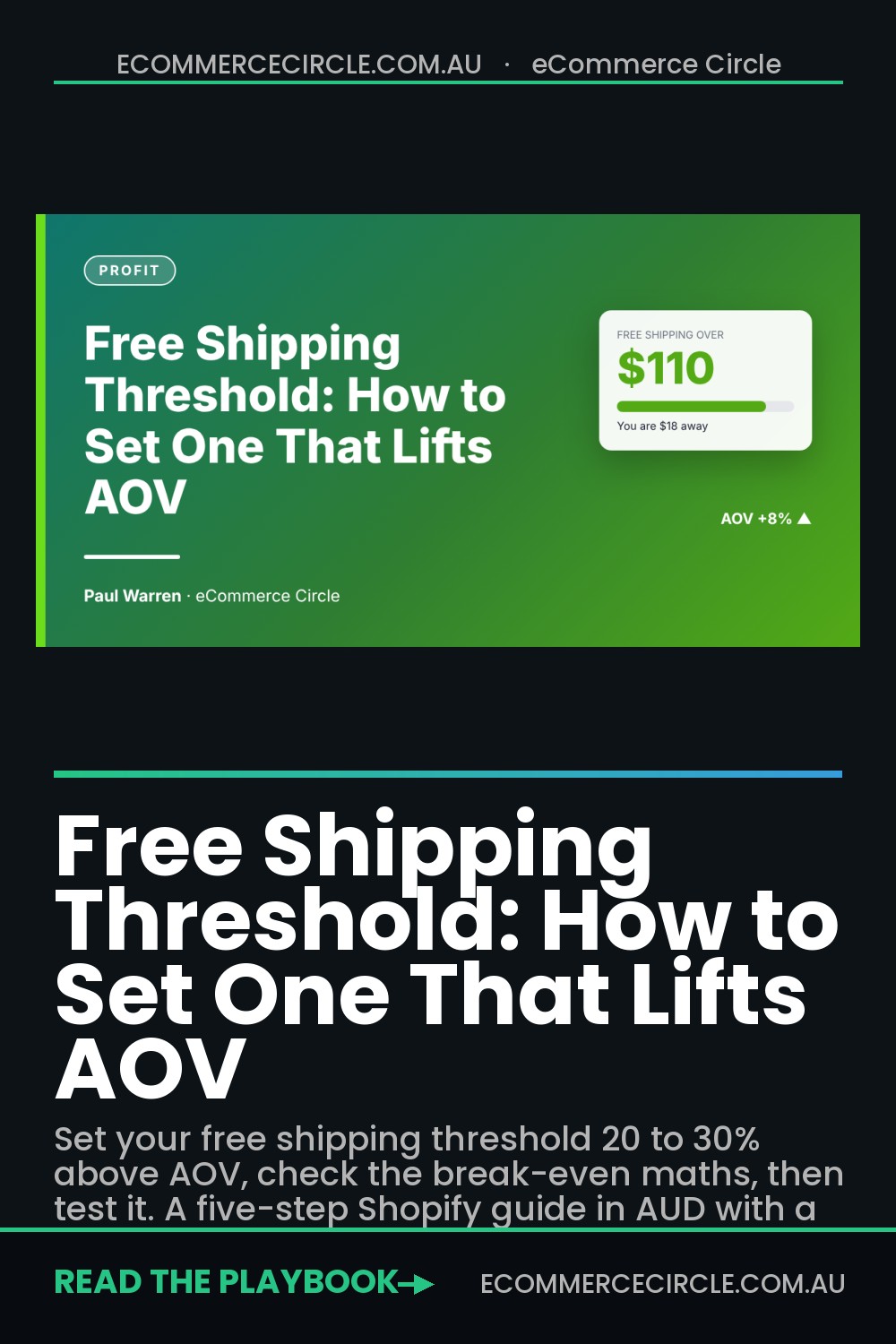
Set your free shipping threshold 20 to 30 percent above your average order value, check that the extra spend covers the shipping you absorb, then test it for at least two weeks. That is the whole answer. The rest of this article shows you how to do it with your own numbers.
Most Aussie Shopify stores skip all of that. They pick $100 because it looks tidy, switch it on in Settings and never touch it again. Meanwhile the number sits at the centre of your checkout: it decides whether a shopper adds a second item, abandons the cart, or pays $9.95 for a postage bag you quoted at $6.
The stores that treat the threshold as a profit lever, not a postage setting, quietly add 6 to 15 percent to their average order value. This guide walks through the five steps we use with coaching members, including a break-even formula, a worked example in AUD and a test you can run before Black Friday on 27 November.
Why Your Free Shipping Threshold Matters More Than Your Discount
Shipping is the cost shoppers resent most, because it feels like money for nothing. Baymard Institute’s research puts the average cart abandonment rate at 70.22 percent across 50 studies, and about 40 percent of shoppers who abandon (excluding people who were just browsing) say extra costs such as shipping, tax and fees were too high. That is the single biggest reason on their list.
Flip it around and you have the opportunity. A 2019 BigCommerce survey of nearly 3,000 consumers across Australia, the US and the UK found that four in five Australian shoppers had bought from a retailer because it offered free shipping, and four in five had added items to their cart to reach a free shipping minimum in the previous 12 months. The same survey found 71 percent of Australians had decided not to buy something because of limited shipping options. The data is a few years old, but the behaviour has only hardened since.
Free shipping is also now the default, not the bonus. Metorik’s 2026 Insights report, covering more than 65 million WooCommerce orders placed in 2025, found 74 percent of orders included free shipping, up from 65 percent in 2023. When charged, the average shipping fee was $9.27 per order. The platform is WooCommerce rather than Shopify, but the shopper is the same person with the same expectations.
So you cannot ignore free shipping. The real question is where you draw the line, and that is a margin decision. If you want the bigger picture on profit levers like this one, our guide to contribution margin is the best companion read.
Step 1: Find Your Real Order Value Distribution (Not Just the Average)
Your average order value is a blunt number. Two stores can both report an $85 AOV, but one has everyone clustered around $80 to $90 and the other has half its orders at $45 and the rest at $125. They need completely different thresholds.
Before you touch a setting, pull the last 90 days of orders and sort them into price bands. Do it in Shopify like this:
- Go to Analytics > Reports and open the Average order value over time report to see your AOV trend. Note the 90-day figure.
- Go to Orders, filter to the last 90 days and click Export. Choose a CSV for all orders.
- Open the file in Google Sheets. Use the Subtotal column (before shipping) and count how many orders fall in each $25 band.
- Calculate the share of orders in each band and the median order value (the middle order, which ignores big outliers).
- Note your average shipping fee paid and your average carrier cost per order. You will need both in Step 2.
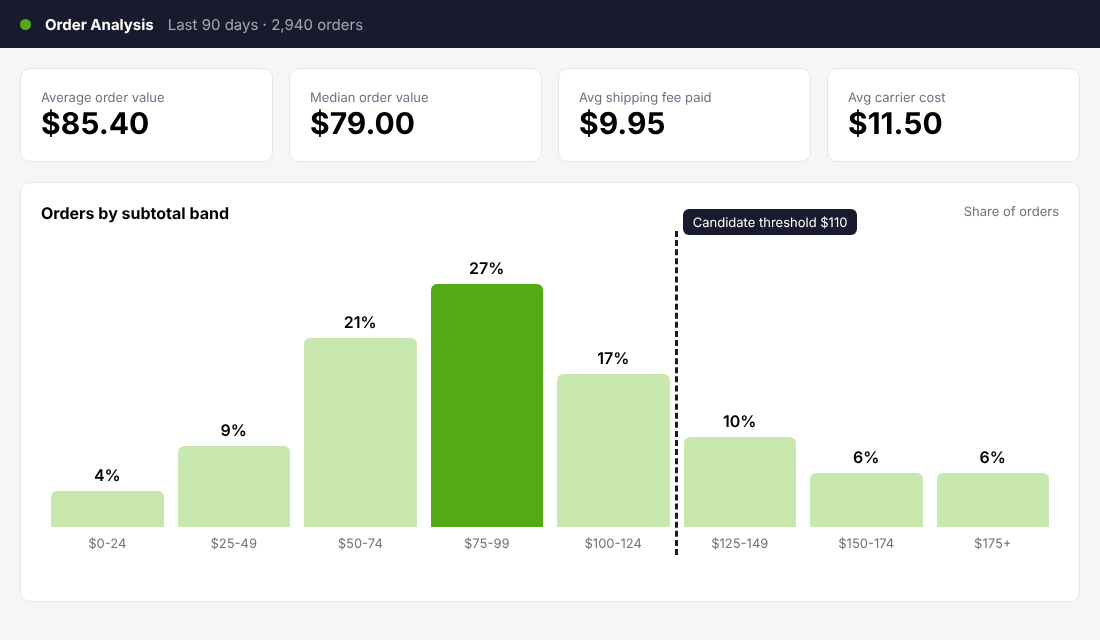
What you are looking for is the cluster. If 60 percent of your orders land between $60 and $110, a threshold of $125 asks a lot of them. If the cluster is $70 to $95, a threshold around $110 asks for one extra item. The shape of the chart tells you whether a nudge is realistic.
Use the median as your anchor if a few huge wholesale or bulk orders drag the average up. Thresholds are built for the typical shopper, not your best customer last March.
Step 2: Run the Break-Even Maths Before You Pick a Number
This is the step almost everyone skips, and it is where free shipping quietly eats margin. The rule is simple:
The extra product spend must be at least the shipping fee you stop charging, divided by your gross margin.
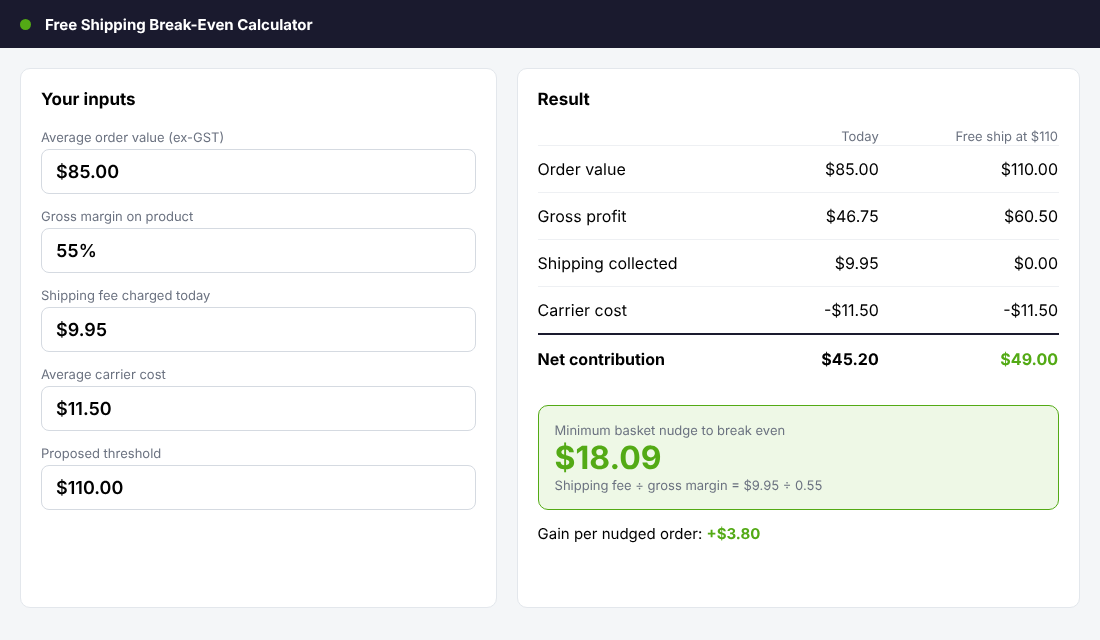
Here is a worked example with illustrative AUD numbers. Your store has an $85 AOV, a 55 percent gross margin on product (worked out ex-GST), a $9.95 shipping fee charged to the customer and an average carrier cost of $11.50.
- Today, order at $85: gross profit is $46.75. You collect $9.95 for shipping and pay $11.50, so shipping costs you $1.55. Net: $45.20.
- Free shipping at $110, shopper adds $25: gross profit is $60.50. You collect nothing for shipping and pay $11.50. Net: $49.00.
- Gain per nudged order: $3.80, plus the conversion lift from a clear free shipping message.
- Minimum nudge to break even: $9.95 ÷ 0.55 = $18.09. Anything above that is profit.
Now the uncomfortable part. Shoppers who were already above $110 get free shipping they used to pay for. If 20 percent of your orders sit above the threshold and each used to pay $9.95, you hand back about $2 per order across the whole store. Your nudged orders have to earn that back.
Run the same maths for a worst case, where nobody adds anything and everyone above the line was a former shipping payer. If the worst case sends contribution margin negative, raise the threshold, trim your carrier cost or switch to a flat-rate free shipping band for one region only. Our Black Friday discount calculator uses the same break-even logic if you are stacking a sale on top.
Step 3: Choose the Number (The 20 to 30 Percent Rule)
Once the maths works, the starting point is easy. Multiply your median or average order value by 1.20 to 1.30, then round to a believable price point. An $85 AOV gives $102 to $110.50, so you would test $110. A $45 AOV gives $54 to $58.50, so $60 or $55.
Rules of thumb that hold up in practice:
- Stay within one add-on of the typical basket. If your cheapest popular item is $25, a threshold $25 above AOV feels reachable. If your add-on is $9, even a 10 percent stretch can work.
- Use a price ending shoppers recognise. $99, $100, $110 and $150 all read cleanly. $107.43 does not.
- Stretch higher where margins allow. Fashion and beauty stores can usually push toward the upper end of 25 to 30 percent because the add-ons are cheap relative to the basket. Bulky or heavy goods need a higher threshold or a flat rate.
- Watch GST. Shopify shoppers see GST-inclusive prices in Australia, so check whether your shipping rate condition compares against the inclusive subtotal before you announce the number.
What Australian retailers actually do
Look at how bigger Aussie retailers structure theirs and you will notice two patterns: tiers by speed, and tiers by location.
| Retailer | Free shipping rule | What you can borrow |
|---|---|---|
| Mecca | Free standard shipping in Australia on orders of $25 or more; free priority shipping at $75 or more | A very low entry threshold for standard, with a second step for faster delivery |
| The Iconic | Free standard delivery from $75 for most of Australia, rising to $100 for SA regional, NT and WA regional from 1 October 2026 | Regional thresholds that reflect real carrier costs |
| Amazon Australia | Cut its free shipping minimum from $49 to $39 in 2019, according to Internet Retailing | Even the biggest player treats the number as something to adjust, not fix forever |
Thresholds are checked from each retailer’s own help pages, and they change, so verify the current figure before you quote any of them. The lesson is the structure. Mecca anchors a cheap standard threshold, then sells speed higher up. The Iconic prices distance honestly instead of absorbing remote postcodes. You can copy either idea on Shopify in an afternoon.
Our Black Friday shipping guide covers carrier choice and cut-offs, which feed straight into the carrier cost number in your break-even.
Step 4: Set It Up in Shopify and Make It Visible
A threshold nobody sees does nothing. The setting takes five minutes. Making shoppers aware of it is what moves AOV.
Set the rate. In your Shopify admin go to Settings > Shipping and delivery and open your general shipping profile. Add or edit a rate for Australia, set the price to $0 and under conditions choose based on order price with your minimum. Keep your paid rate for orders below it. Shopify has been moving shipping rates to a shipping-options-by-market layout, so the menu labels may differ slightly on your store. Do one test checkout on mobile to confirm the right rate shows.
Show the progress. Put the threshold in three places:
- Announcement bar: “Free shipping Australia-wide over $110.” Specific beats vague.
- Cart or cart drawer: a progress bar that says “You are $18 away from free shipping” with two or three suggested add-ons priced under the gap. Your theme may already include a version, or apps such as the free-shipping-bar options in the Shopify App Store will add one.
- Product pages: a one-line message under the price, so shoppers build the basket with the target in mind.
The suggested add-ons matter more than the bar. When the gap is $18, the best-converting suggestion is a $15 to $22 product that is obviously relevant: socks with shoes, a refill with a bottle, a spare filter. Choose them deliberately and rotate them with stock levels. Our shipping policy template has wording you can paste so your policy page matches the number in your cart.
Step 5: Test It Properly With Intelligems
You now have a number backed by maths. Treat it as a hypothesis. The cleanest way to test shipping thresholds on Shopify is a split test that shows different thresholds to different visitors at the same time, so seasonality and ad spend do not muddy the result. Intelligems is a tool built for exactly this.
Setup steps:
- Install Intelligems from the Shopify App Store and connect it to your store.
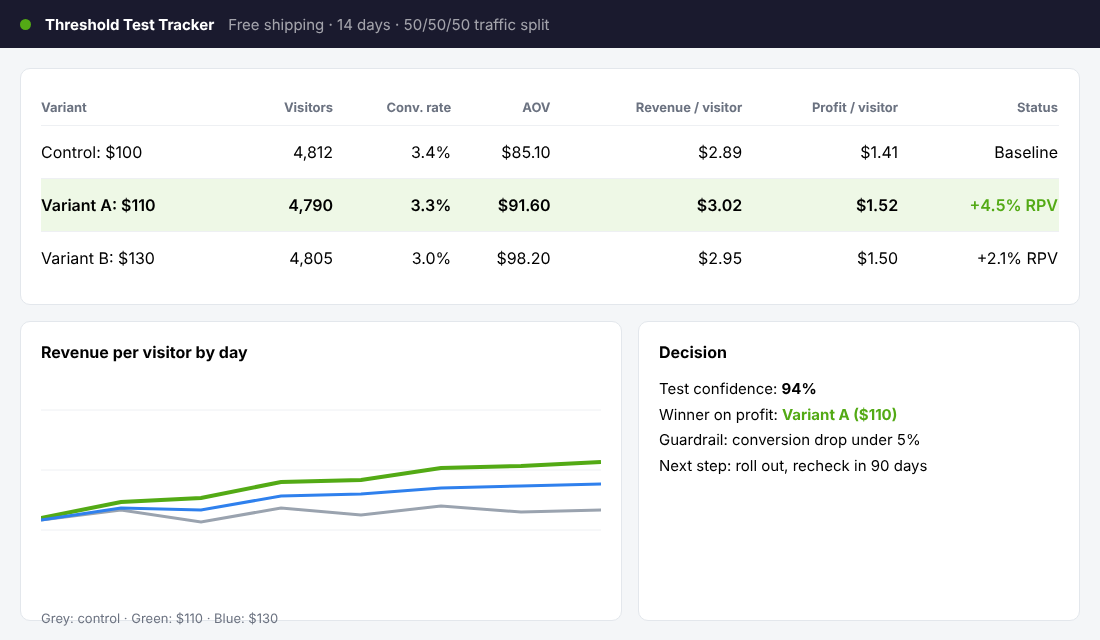
- Create a new shipping test. Set the control to your current threshold and one or two variants at +20 and +30 percent.
- Split traffic evenly, and exclude any traffic you do not want in the test, such as wholesale logins.
- Set your primary metric to revenue per visitor, not conversion rate. A higher threshold can lower conversion slightly and still win on revenue and profit.
- Add your cost data so the tool reports on profit per visitor if available, and run the test for at least two full weeks, ideally across a payday.
What good results look like: Intelligems published a case study of a merchant that tested a $100 control against a $500 free shipping threshold. The higher threshold lifted average order value by about 6 percent and revenue per visitor by about 12 percent. The page reports the conversion effect inconsistently (a headline lift in one place, no impact in another), so read that part with caution, and do not expect a jump from $100 to $500 to suit your store. The point is that the right threshold is an empirical question.
If you cannot afford a testing tool yet, run a simple before-and-after: change the threshold, keep everything else stable for two weeks and compare AOV, conversion and revenue per session against the previous two weeks. It is weaker evidence, but far better than guessing.
Five Mistakes That Make Free Shipping Cost You Money
- Setting the threshold below your AOV. Then nearly everyone qualifies, nobody adds anything, and you have simply cut your shipping income.
- Ignoring weight and zone. A $110 order of heavy goods to Perth is not the same as a $110 order of candles to Sydney. Use zones or weight profiles for outliers.
- Stacking free shipping with a deep discount. The discount shrinks the basket below the threshold, or the shopper pays less and costs you more. Check the maths on the post-discount subtotal.
- Never revisiting the number. Costs, AOV and carrier rates move. Review the threshold every quarter and before every major sale.
- Hiding the cost of delivery speed. Free standard delivery is fine, but offer paid express so impatient shoppers do not drag your support inbox into every Christmas parcel conversation.
How the Pieces Compound
A good threshold does not work alone. It sits inside a system, and each piece lifts the others.
The threshold sets the target. The progress bar makes the target visible. Add-on suggestions make it easy to hit. Your email and SMS flows can promote the same number so shoppers arrive already thinking about it. Your ads can lead with “free shipping over $110” for a cheaper click-to-order path. Better AOV then lets you spend more to acquire a customer, which improves every other channel.
Put numbers on it. A store doing 1,000 orders a month at $85 AOV that lifts AOV 8 percent to $91.80 adds roughly $6,800 in monthly revenue, with most of the gross profit dropping through to the bottom line because no extra ad dollars were needed. That is why the threshold belongs on your pre-Black Friday checklist, not in the settings menu you set once in 2022.
Your Free Shipping Threshold Checklist
Copy this into your team’s task list and work through it this week.
- Export 90 days of orders and record AOV, median and the share of orders by $25 band.
- Record your average shipping fee collected and average carrier cost per order.
- Calculate gross margin ex-GST on your top 20 products.
- Work out the break-even nudge: shipping fee collected ÷ gross margin.
- Set the candidate threshold at 20 to 30 percent above AOV and round to a clean price.
- Check the worst case: what happens if nobody adds anything?
- Decide on exceptions: remote zones, heavy items, wholesale.
- Set the rate in Shopify and complete a mobile test checkout.
- Add the threshold to your announcement bar, cart drawer and product pages.
- Choose three add-on products priced below the typical gap.
- Run a two-week split test on revenue per visitor and profit per visitor.
- Review the result, lock in the winner and diarise a quarterly recheck.
Inside eCommerce Circle, pricing and shipping decisions like this are core to the Profit pillar we work on with every member. If you want to see exactly where your store is being capped, take the free More Orders Scorecard. It takes two minutes and shows you which of the 10 P’s to fix first.