Meta Ads gets all the attention, but Google Ads is quietly the most profitable acquisition channel for many Shopify stores. The reason is simple: Google captures intent. When someone searches “organic face serum australia,” they are not scrolling through a feed, they are actively looking to buy.
What’s in This Article
Google Shopping campaigns put your products directly in front of these high-intent buyers, complete with images, prices, and reviews. For Australian Shopify brands, a well-structured Google Shopping setup routinely delivers 4-6x ROAS, often higher than Meta Ads, with less creative effort required.
The problem is that most store owners set up Google Ads wrong, burn through $500-1,000 with no results, and conclude “Google Ads does not work for ecommerce.” It does. You just need the right structure.
Standard Shopping vs Performance Max: Which to Start With
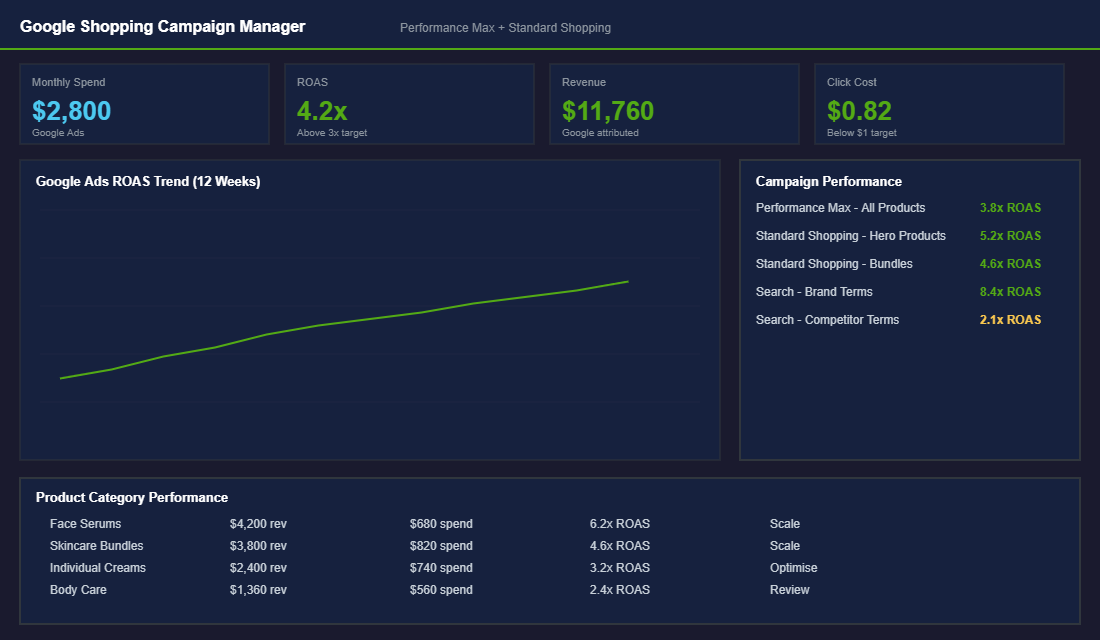
Google now pushes Performance Max (PMax) hard, and for good reason, it uses AI to serve your ads across Shopping, Search, Display, YouTube, and Gmail. But here is the nuance most agencies will not tell you: PMax works brilliantly when it has data, but it can waste budget quickly when you are starting from scratch.
Our recommendation for Shopify stores spending under $5K/month on Google:
- Start with Standard Shopping campaigns. You get more control over bids, search terms, and product groups. Segment your products by margin and performance so you can bid higher on products that convert and lower on ones that do not.
- Add Performance Max after 30 days once you have conversion data. PMax learns from your existing conversion patterns. Starting with zero data means it is guessing, and guessing with your money.
- Run both simultaneously. Standard Shopping for your proven best-sellers (where you want tight control) and PMax for discovery and new customer acquisition.
Your Product Feed Is Everything (Fix It Before Spending a Dollar)
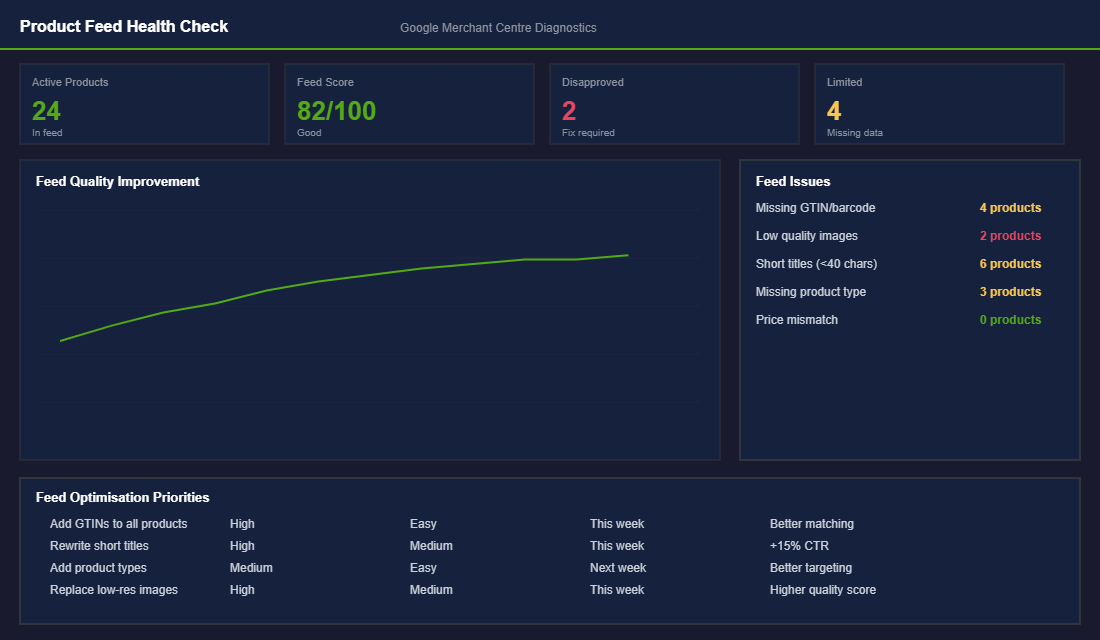
Google Shopping ads are only as good as your product feed. The feed is the data that tells Google what your products are, what they cost, and who they are for. A bad feed means your ads show for the wrong searches, your products get disapproved, and your budget gets wasted.
- Write descriptive product titles. “Organic Vitamin C Face Serum – 30ml | Australian Made | For All Skin Types” converts better than “Face Serum.” Include your primary keyword, key attributes, and brand naturally.
- Add GTINs (barcodes) to every product. Google prioritises products with GTINs in Shopping results. If you do not have official barcodes, get them from GS1 Australia for $250/year.
- Use high-quality images with white backgrounds. Google Shopping is visual. Products with clean, professional images get significantly higher click-through rates.
- Set the correct product type and Google product category. This helps Google match your products to the right searches. Be specific: “Health & Beauty > Skin Care > Facial Moisturisers” not just “Beauty.”
- Keep prices synced. If your Shopify price does not match your feed price, Google will disapprove the product. Use an app like DataFeedWatch or the Shopify Google Channel to keep everything synced automatically.
Mine Your Search Terms Weekly (This Is Where the Gold Is)
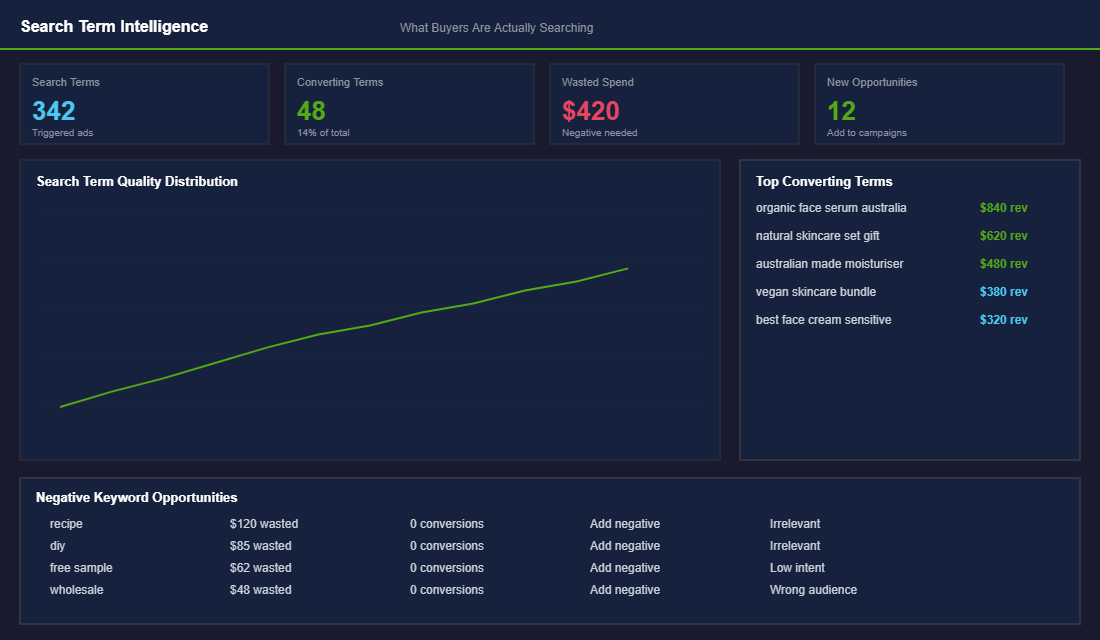
Every week, download your search term report from Google Ads. This shows you the actual phrases people typed before clicking your ad. It is the single most valuable optimisation activity you can do, and it takes 15 minutes.
- Add negative keywords aggressively. If you are a premium skincare brand and people are clicking your ads after searching “cheap moisturiser” or “free skincare samples,” those clicks cost you money with zero chance of converting. Add them as negative keywords immediately.
- Identify high-converting search terms. If a specific long-tail search is driving conversions, create a dedicated ad group or campaign around it. This lets you bid more aggressively on terms that are proven to convert.
- Spot new product opportunities. Sometimes your search terms reveal demand you did not know existed. If people keep searching for “organic skincare gift set” and you do not offer one, that is market intelligence telling you to create one.
Bidding Strategy: Start Manual, Then Automate
Google’s smart bidding strategies (Target ROAS, Maximise Conversion Value) are powerful but they need data to work. Starting with automated bidding on a new campaign is like handing the wheel to a self-driving car that has never been on this road before.
- Weeks 1-4: Manual CPC bidding. Set bids at $0.50-1.00 per click and adjust based on performance. This gives you control while gathering conversion data.
- After 30+ conversions: Switch to Target ROAS. Set your target at your break-even ROAS initially (typically 2-2.5x), then gradually increase it as the algorithm optimises. Google needs at least 30 conversions in 30 days to optimise effectively.
- Scale gradually. Increase your daily budget by 15-20% every week when ROAS is above target. Like Meta Ads, aggressive budget jumps reset the learning period and can tank performance.
The Compound Effect: Google + Meta + Email = Unstoppable
Google Ads works best as part of a multi-channel strategy. Meta Ads creates awareness and demand. Google captures that demand when people search. Email converts the ones who did not buy on the first visit. Together, these three channels create a flywheel where each one amplifies the others.
The Shopify brands inside eCommerce Circle that run all three channels profitably typically reach $50-80K/month within 4-6 months. Google usually accounts for 20-30% of that revenue, often with the highest ROAS of any paid channel.
Shopping Campaign Benchmarks: Are You Actually Winning?
One of the most common questions Aussie founders ask inside eCommerce Circle is “what should my Shopping ROAS actually be?” The honest answer is “it depends on your category, margin, and AOV”, but you still need numbers to navigate by. Here are the realistic benchmarks we see across hundreds of Aussie Shopify stores running Google Shopping in 2026. Use these as a sanity check, not gospel.
- Click-through rate (CTR), 0.8% to 2.5% is healthy. Above 3% usually means cheap traffic on a high-intent keyword. Below 0.6% means your image or price is uncompetitive.
- Average CPC (AUD), $0.40 to $1.80 for most consumer categories. Apparel and beauty trend lower. Tools, supplements, and home appliances trend higher (think $2-4 CPC).
- Conversion rate, 1.5% to 3.5% on Shopping traffic for established brands. New stores often start at 0.5-1% and need feed and landing-page work before scaling spend.
- ROAS targets, 3x is break-even for most brands with a 35% gross margin. 4-5x is healthy. 6-8x usually means you are leaving scale on the table by under-spending.
- New customer revenue share, Shopping should drive 60-75% new customers (versus Brand Search at 20-30%). If you are below 50%, your campaign is harvesting branded demand and inflating your ROAS.
The 7 Feed Errors That Quietly Drain Your Budget
A bad feed does not just lose impressions, it actively burns money on the impressions you do win. We routinely audit Shopify Merchant Center accounts inside the More Orders Operating System and the same seven errors show up over and over. Fix these before you touch a single bid.
- Generic titles, “Blue Shirt” is worth nothing. “Blue Linen Button-Up Shirt – Mens – Australian Made” is worth everything. Front-load the most-searched attributes.
- Missing GTINs, Items without a GTIN get throttled. If you do not sell branded products, set the brand field to your own brand and add “identifier_exists: no” to the feed correctly.
- Wrong category tree, Google’s taxonomy is specific. “Apparel & Accessories > Clothing > Shirts > Polos” performs very differently from a generic “Apparel” tag.
- Price mismatch between feed and landing page, The fastest way to get disapproved. Sync your feed with Shopify in near real-time using the official Google & YouTube channel app or a tool like DataFeedWatch.
- Low-quality images, White background, 1200x1200px minimum, no watermarks, no text overlays, and no lifestyle-only shots for the main image. Lifestyle goes in the additional_image_link.
- Empty custom labels, Custom labels are how you segment campaigns later (margin tier, season, bestseller). Set them at feed level on Day One, even if you do not use them yet.
- Missing or wrong availability/shipping, Out-of-stock products that are still serving ads is the cheapest way to hate Google. Use Shopify’s stock sync and double-check shipping settings reflect your actual cost.
Tools worth knowing: the free Google & YouTube Shopify app for the basic feed, DataFeedWatch or Feedonomics if you need rules-based feed optimisation, and Channable for multi-channel feed management. For ongoing diagnostics, Google’s Merchant Center Diagnostics dashboard tells you exactly which products are disapproved and why, most Aussie founders ignore it. Do not be that founder.
Build a Negative Keyword Library on Day One
Shopping campaigns do not let you choose keywords directly, but negative keywords are your most powerful lever. Without them, Google happily spends your budget on “free”, “DIY”, “second-hand”, and competitor brand searches that will never convert. Build a master negative list before launch with these categories:
- Free, cheap, DIY, “free”, “diy”, “homemade”, “how to make”, “tutorial”, “cheap” (unless that is your positioning).
- Used and second-hand, “used”, “second hand”, “ebay”, “gumtree”, “marketplace”, “facebook” (when paired with “buy”).
- Information seekers, “what is”, “what are”, “how does”, “definition”, “meaning”, “wikipedia”.
- Wrong intent, “jobs”, “career”, “salary”, “review of” (unless reviews convert for you), “complaint”.
- Competitor brands, Add your top 10 competitor brand names as negatives if you are not running competitor-conquest campaigns separately.
- Geo mismatches, If you only ship within Australia, add “USA”, “UK”, “Canada”, “shipping to” as negatives in Standard Shopping.
Audit your search terms report every Monday morning for the first 90 days. Add anything irrelevant as a negative the same week. By Day 60 your negative list should have 200-400 terms, your CPC should drop by 15-25%, and your conversion rate should climb. This is the single highest-ROI hour of work in a Shopping account.
Reading Your Reports Like a Pro (Weekly, Monthly, Quarterly)
Most Shopify founders open Google Ads, glance at the ROAS number, and close the tab. That is how you stay stuck. The accounts that grow are the ones where someone is actually reading the data on a cadence. Here is the rhythm we run with our coaching clients, adapt to your own time budget but do not skip levels.
- Weekly (15 min), Search Terms report (add negatives), Product Performance report (pause anything spending more than 1x AOV with zero conversions), bid adjustments based on the last 7 days only if you have 50+ clicks per product group.
- Monthly (45 min), Auction Insights to see who is out-spending you, Geographic report to find your strongest postcodes, Device report to confirm mobile is converting (it usually is on Shopping), and a margin-weighted ROAS calculation by product set.
- Quarterly (2 hours), Full account restructure based on what is actually working. Promote top performers into their own campaigns with higher daily budgets, archive long-term losers, refresh creative on Performance Max asset groups, and recalibrate targets using your last 90 days of contribution-margin data.
If you are running Google Shopping alongside Meta and email, layer attribution properly using Triple Whale, Northbeam, or Shopify’s own marketing attribution. Last-click in Google Ads usually undercounts new-customer impact by 20-35%, meaning Shopping is doing more for you than the platform admits. For more on connecting your channels into one system, read our piece on cohort analysis so you can see Google’s real LTV contribution.
Server-Side Tracking: Why Your ROAS Looks Worse Than It Is
Here is a problem almost every Aussie store has and most never diagnose: Google cannot see a large slice of the conversions it actually drove. Since iOS privacy changes and the slow death of third-party cookies, browser-based tracking misses anywhere from 10 to 30% of sales. If Google does not know a click led to a purchase, its bidding optimises blind, and your reported ROAS reads lower than reality.
The fix is server-side tracking. Instead of relying only on the customer’s browser to fire a conversion, you send the purchase event from Shopify’s servers straight to Google. Three things to set up:
- Enhanced Conversions for Google Ads. Passes hashed first-party data such as email and phone so Google can match more sales back to clicks. This alone often recovers 5 to 15% of previously invisible conversions.
- The Google and YouTube channel inside Shopify. The native integration now supports server-side events and keeps your product feed in sync automatically. For most stores it is the simplest reliable setup.
- A dedicated tracking app like Elevar. If you are spending serious money across Google, Meta and TikTok, a tool built for data-layer accuracy pays for itself fast by feeding cleaner signals to every platform at once.
Better data does not just flatter your reports. It makes Performance Max and Smart Bidding genuinely smarter, because the algorithm learns from complete information. Pair clean tracking with high-converting product pages and a strong collection page structure, and every dollar Google sends lands somewhere built to convert. Spending on traffic before fixing what happens after the click is the fastest way to burn a budget.
Want Help Setting Up Your Google Ads?
Inside the eCommerce Circle, Google Ads is a key part of the Promotion pillar in our More Orders Operating System. We help members set up their product feeds, structure their campaigns, and optimise their bids so they are capturing high-intent buyers profitably. Reach out if you want help getting started.