Open your support inbox and read the last twenty messages. Be honest about how many are genuinely new. On most Aussie Shopify stores, the same handful of questions come back again and again: where is my order, do you ship to my postcode, what is your returns window, will this fit me, is this in stock. Your team types the same answer for the hundredth time, and the queue never empties.
What’s in This Article
That repetition is annoying, but it is not the real cost. The real cost is the shoppers you never hear from. For every person who emails to ask a question, far more hit the same doubt, find no answer on the page, and quietly close the tab. They do not complain. They just do not buy.
Here is the number that should change how you think about this: 81% of customers try to resolve an issue themselves before they ever contact a business, and 67% say they prefer self-service over talking to a representative for simple questions. Your FAQ is not a dusty support afterthought. It is the page that answers objections at the exact moment of doubt, when the buying decision is still live. Most brands treat it as an afterthought. The ones who treat it as a conversion asset quietly win the sale and shrink the support queue at the same time.
Why Your FAQ Page Is Really a Conversion Asset
Think about when someone actually reads an FAQ. They are not browsing for fun. They have a specific worry standing between them and the checkout. “Will it arrive before the weekend?” “What if it does not fit?” “Can I pay later?” An unanswered worry at that moment is a lost sale, full stop.
This is why the FAQ deserves the same attention you give a product page. The average ecommerce conversion rate sat at about 2.5% through 2025, which means roughly 97 in 100 visitors leave without buying. A meaningful slice of those leave because of an unaddressed question you could have answered in two sentences. Customers say they prefer a knowledge base over every other self-service channel, so the channel itself is not the problem. The gap is that most stores either bury the answers or never wrote them in the first place.
There is a second payoff. Self-service deflection rates for routine questions like order status, shipping and returns sit above 50% when the answers are easy to find. That is half your repetitive ticket volume gone, without hiring a single extra person. The FAQ does double duty: it lifts conversion at the front of the funnel and protects your team’s time at the back. Few assets on your store pay you twice like this one.
Part 1: Mine Your Real Questions (Do Not Guess Them)
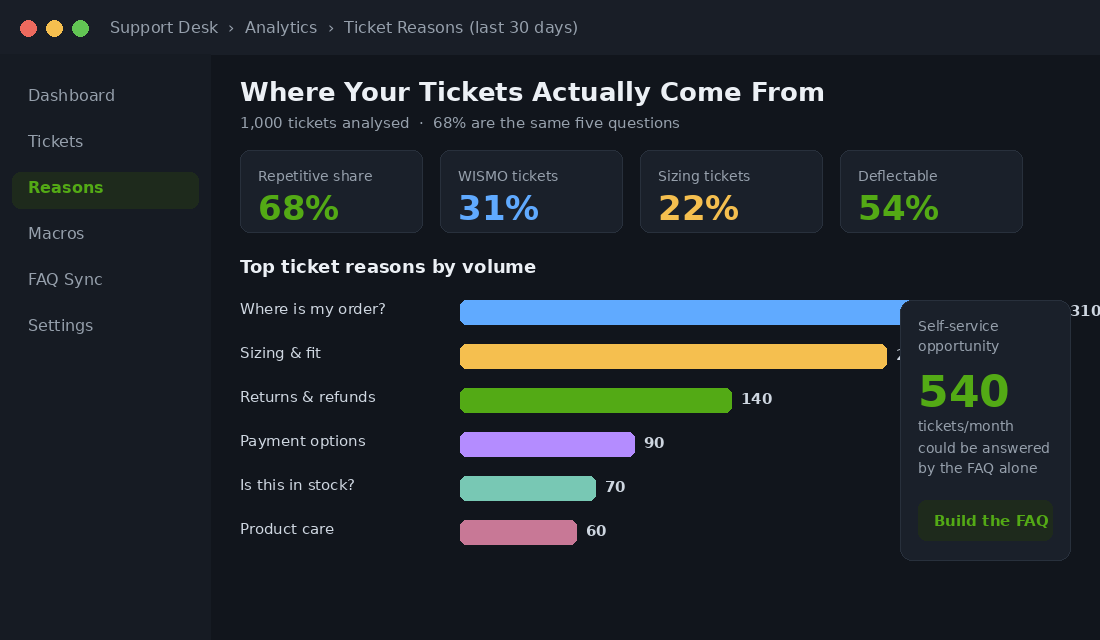
The fastest way to build a useless FAQ is to invent the questions from your desk. You will write what you think people want to know, and miss the ones they actually ask. Your real FAQ already exists. It is scattered across four sources you are sitting on right now.
- Your support inbox and chat logs. Tag the last 200 messages by theme. You will see the Pareto curve fast: a small number of questions drive most of the volume. WISMO (“where is my order”) alone is 20 to 40% of ecommerce tickets, and climbs past 50% during peak periods. For apparel and footwear, sizing questions run 40 to 60% of all inbound tickets. Those are your headline FAQs.
- Your on-site search queries. Open your search reports and read what people type into the search bar. “Returns”, “shipping”, “afterpay”, “size”, “ingredients”. A search with no useful result is a customer telling you exactly what is missing. If your search itself is weak, fix that first with our Shopify site search playbook.
- Your product reviews and post-purchase surveys. Reviews are full of “I was worried about X but…” Those worries are objections every future buyer shares. The fix-it line in a review is often the perfect FAQ answer, in the customer’s own words.
- Your refund and return reasons. If people return because the item ran small or the material was not what they expected, that is a pre-sale question you failed to answer. The FAQ is where you head it off next time.
Pull these into one spreadsheet and rank by frequency. Aim for a shortlist of 15 to 25 questions that cover the overwhelming majority of what people ask. Resist the urge to pad it to 60 entries. A bloated FAQ is as useless as an empty one, because nobody can find the one answer they need.
Part 2: Structure It So People Find the Answer in Seconds
A wall of 40 questions in one long list is where good answers go to die. Structure is what turns a document into a tool. You need two layers working together.
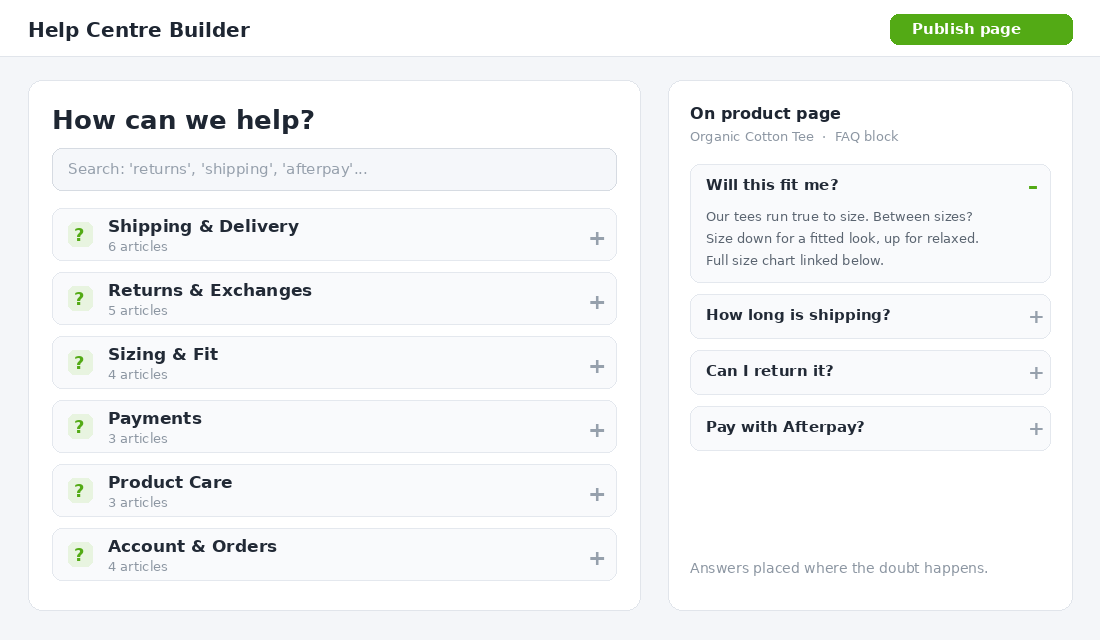
Layer one is a dedicated FAQ or help centre page. Group questions into clear categories: Shipping and Delivery, Returns and Exchanges, Sizing and Fit, Payments, Product Care, Account and Orders. Put a search box at the top and make each category collapsible so the page is scannable, not a scroll marathon. This is the page you link from your footer, your order confirmation emails, and your support auto-replies.
Layer two is the on-page FAQ, placed where the doubt actually happens. A shipping question belongs on the product page and in the cart, not three clicks away in the footer. Add a short FAQ block to your product pages answering the three or four objections specific to that product or category. This is the highest-impact placement, because you are removing friction at the precise moment the shopper is deciding. The dedicated page handles depth; the on-page block handles the moment.
Two questions deserve their own dedicated pages rather than an FAQ entry, because they carry legal and trust weight: your full returns policy and your shipping policy. Link to them from the FAQ, but give them room to breathe. While you are at it, a dedicated, branded order-tracking experience kills a huge share of WISMO questions before they start. We break that down in the Shopify order tracking page playbook.
Part 3: Write Answers That Sell, Not Just Inform
Most FAQ answers are written like a legal disclaimer: short, defensive, and slightly cold. That is a wasted opportunity. The shopper reading this answer is on the fence. The answer can either nudge them toward “yes” or leave them flat. Write to reassure and advance, not just to inform.
Compare these two answers to “What is your returns policy?”
- Flat: “Returns accepted within 30 days. Item must be unused with tags attached.”
- Selling: “Changed your mind? No stress. You have 30 days to send it back for a full refund or exchange, as long as it is unworn with tags on. We will email you a return label and most refunds land within 3 business days of us receiving it.”
Same policy. The second one removes fear instead of adding it. Apply these rules to every answer that touches a buying decision:
- Lead with the reassuring part. “Yes, we ship Australia wide” before the caveats. Put the relief first.
- Be specific with numbers. “3 to 5 business days to most metro areas” beats “shipping times vary”. Vagueness reads as evasion. Specificity reads as confidence.
- Answer the question behind the question. “Do you ship to Perth?” really means “will it get here in time and what will it cost?” Answer all of it.
- Link onward. End sizing answers with a link to your size guide, and product-care answers with a link to the product. Keep the shopper moving toward the cart, never into a dead end.
Sizing is worth singling out because it drives 50 to 70% of fashion returns and a huge share of pre-sale anxiety. Your FAQ answer should not just say “check the size guide”. It should give the one piece of fit intelligence people actually want: “Our tees run true to size, but if you are between sizes, size down for a fitted look.” Pair the FAQ with a proper chart using the Shopify size guide playbook.
Part 4: Build It on Shopify (The Native Path and the App Path)
You have two real options, and the right one depends on how complex your needs are.
The native path (free). If you are on an Online Store 2.0 theme, you can build a clean FAQ without an app. Create a page, use a collapsible content or accordion section if your theme has one, and add an FAQ block to product templates using theme sections or metaobjects. This keeps your store fast and your stack lean. The trade-off is more manual maintenance and no built-in FAQ schema, so you would add that markup yourself.
The app path. Once your FAQ grows past a dozen questions or you want it on product pages, search, and a branded help centre, a dedicated app earns its keep. HelpCenter by Shark Byte is a solid pick: it builds a standalone FAQ page, adds FAQ tabs to product pages, includes 25-plus templates, and bundles a help desk and live chat if you want to grow into them. Here is a clean 5-step setup:
- Step 1. Install the app and import your ranked question list from Part 1 into categories.
- Step 2. Build the dedicated help centre page, set the category order by frequency, and switch on the search box.
- Step 3. Add FAQ blocks to your product page template, and assign category-specific questions so each product shows the right ones.
- Step 4. Turn on FAQ schema so your questions become eligible for Google rich results. This can win you extra search real estate and pull in question-based traffic.
- Step 5. Link the help centre from your footer, your order emails, and your support auto-replies so every channel points back to it.
One note on the AI features many FAQ apps now ship with. Auto-generated answers are a fine first draft, but never publish them raw. They will miss your shipping zones, your real returns window, and your brand voice. Use them to save typing, then rewrite every answer with the selling rules from Part 3. For the live questions an FAQ cannot cover, layer a chat option on top using the Shopify live chat playbook.
Part 5: Measure It and Keep It Alive
An FAQ is not a set-and-forget page. Your products change, your shipping partners change, and new questions appear every season. Treat it like a living asset with five numbers you check once a month.
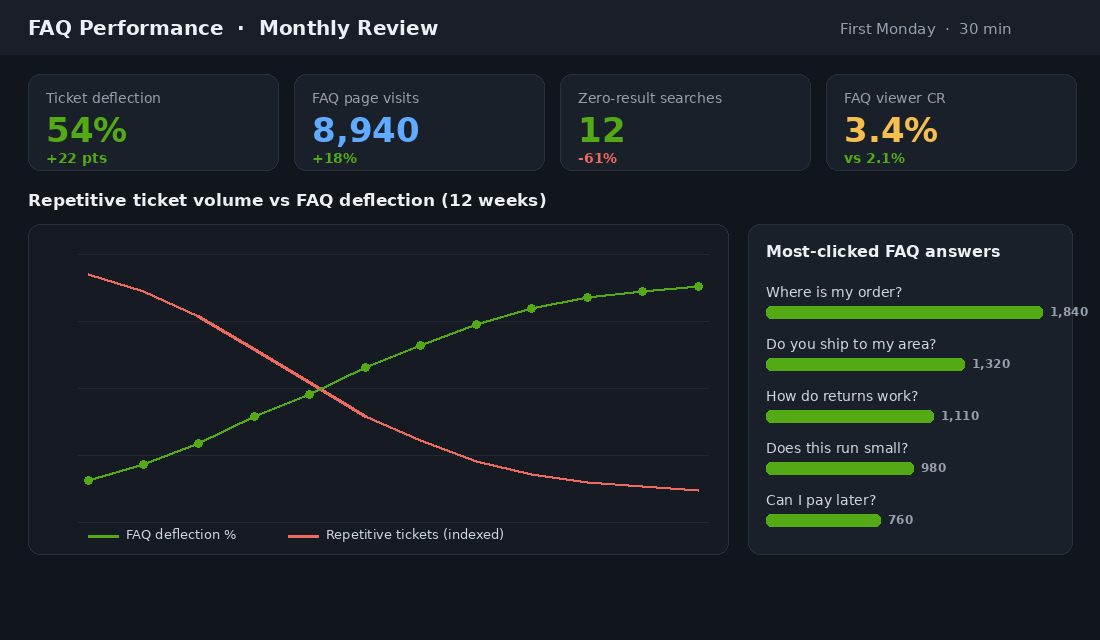
- Ticket deflection. Track the volume of your top repetitive questions in support over time. A working FAQ should pull routine tickets down past the 50% mark for those categories within a couple of months.
- FAQ page engagement. Watch visits, time on page, and which questions get the most clicks. The most-clicked questions tell you what to promote onto product pages.
- On-site search with no result. Your zero-result searches are a live feed of missing answers. Every recurring one becomes a new FAQ entry.
- Conversion of FAQ viewers. Set up a simple event so you can compare the conversion rate of shoppers who view an FAQ answer against those who do not. Done well, the FAQ viewers should convert higher, because they got their objection resolved.
- The “still contacted us” log. When someone reads the FAQ and emails anyway, that answer was unclear. Rewrite it. These are your highest-value edits.
Book a recurring 30-minute review on the first Monday of each month. Add the new questions, retire the dead ones, and rewrite the worst-performing answer. Thirty minutes a month keeps the asset earning.
What Belongs in the FAQ (and What Does Not)
An FAQ earns its keep by removing buying friction, so the test for every entry is simple: does this answer help someone decide to purchase, or help them after they have purchased? Shipping, returns, sizing, payments, stock, and product care all pass. They are the worries that stall a checkout or generate a ticket.
What does not belong is the long tail of one-off edge cases and anything that really wants its own page. A complex wholesale enquiry, a detailed warranty claim process, or a full ingredients glossary deserves a proper page you link to, not a cramped accordion row. If an answer needs more than a short paragraph and a link, it is a page, not an FAQ. Keep the FAQ tight and let it route people to depth when they need it.
Four Mistakes That Turn an FAQ Into Dead Weight
- Burying it in the footer only. If the only path to your FAQ is a tiny footer link, most shoppers never find it. Surface the relevant answers on product pages and in the cart where the doubt happens.
- Writing answers you wish were true. “Fast shipping” when it takes 10 days breeds returns and chargebacks. An honest, specific answer converts better than an optimistic vague one and protects you under Australian Consumer Law.
- Letting it rot. An FAQ that still lists last year’s shipping cut-off or a discontinued payment option destroys trust. Outdated is worse than absent.
- Hiding the policies that matter. Returns and shipping are the two answers shoppers hunt for hardest. Make them obvious and generous in tone, not a maze of conditions designed to discourage claims.
Worked Example: How a Brisbane Furniture Brand Cut Tickets by 41% in Six Weeks
Picture a Brisbane furniture and homewares brand, around $150K a month, with one full-time support person drowning in about 900 tickets a month. Gorgias tagging over 60 days showed 58% of tickets fell into just four buckets: delivery timeframes to regional postcodes, assembly, returns on bulky items, and “is this in stock”. Not one of those was answered clearly on the site.
The rebuild took six weeks and did not touch the theme. A dedicated help centre on Shopify pages, one FAQ block on every product template pulling from metafields (assembly time, box dimensions, delivery zone), a delivery estimator by postcode above the add-to-cart button, and FAQ schema on the four main hub pages.
- Tickets fell from 900 to 530 a month, a 41% drop, with the biggest fall in delivery questions (down 64%).
- Product page conversion rose from 1.6% to 1.9% on the templates with the FAQ block, tracked as a before-and-after on the same traffic mix.
- Returns on bulky items fell 18% once box dimensions and “will it fit through a standard door” were answered before purchase, not after delivery.
- Four FAQ pages picked up rich results in Google within five weeks, adding roughly 1,400 organic sessions a month on questions like “how long does delivery to Townsville take”.
The support person did not lose a job. She moved to proactive post-purchase check-ins on orders over $1,000, which is exactly where a human earns their keep.
The Tool Stack: What to Use at Each Stage
You do not need an enterprise help desk to do this well, but the right tools at the right revenue level make the difference between a FAQ that stays alive and one that rots.
- Under $50K a month: native Shopify pages with a simple accordion section in your theme, plus Shopify Inbox or Gorgias Starter for tagging. Mine questions from the last 90 days of email and Instagram DMs by hand. Budget: $0 to $60 a month.
- $50K to $250K a month: Gorgias or Re:amaze for macros and tagging, a dedicated help-centre app such as HelpCenter or EasySlide for structured search, and Judge.me or Okendo Q&A on product pages so customer questions become content. Budget: $150 to $400 a month.
- $250K a month and up: Gorgias with automation rules that surface the matching FAQ article inside the ticket before a human touches it, Klaviyo flows that link the relevant help article in shipping and delivery emails, and Hotjar or Microsoft Clarity recordings on the FAQ page to see where people still scroll past the answer. Budget: $500 to $1,500 a month, and it should pay for itself in deflected tickets inside a quarter.
Three numbers keep the stack honest: FAQ page search-to-click rate (above 60% means people find the answer), contact-form submissions per 100 orders (aim to halve it within 90 days), and the share of tickets tagged “answered in FAQ” (should trend toward zero). If the delivery bucket is your biggest, the shipping and fulfilment playbook covers the operational fixes that sit behind the answers. And if returns questions dominate, the returns reduction playbook shows how to answer those objections before checkout, not after.
The Compound Effect: Why This Page Pays You Twice
Run the maths on a store doing 1,000 orders a month at a 2.5% conversion rate. That store gets roughly 40,000 sessions a month. If a sharper FAQ recovers even half a percent of the shoppers who currently leave on an unanswered question, that is around 200 extra orders a month. At an average order value of 90 dollars, you are looking at roughly 18,000 dollars in monthly revenue that was walking out the door over questions you could answer in two sentences.
Now stack the support side. If the same FAQ deflects half of your repetitive tickets, and you were handling 1,000 tickets a month at a conservative 5 dollars each to resolve, that is 2,500 dollars a month in time your team gets back. Time they can spend on the hard tickets that actually need a human, the ones that save an unhappy customer or upsell a loyal one.
That is the quiet power of the FAQ. It is one of the only assets on your store that lifts revenue and cuts cost at the same time, and it compounds. Every objection you answer once keeps working for every future visitor, around the clock, with no extra spend. Aussie brands with comprehensive help centres, from Who Gives A Crap’s detailed subscription answers to the warranty and care pages on premium brands like July, are not being thorough for its own sake. They are removing reasons to say no.
Your 30-Day FAQ Rollout Checklist
- Days 1 to 5: Tag your last 200 support messages, export your on-site search queries, and pull return reasons. Build one ranked question spreadsheet.
- Days 6 to 10: Shortlist 15 to 25 questions. Group them into clear categories. Flag the three or four that belong on product pages.
- Days 11 to 16: Write every answer using the selling rules. Lead with reassurance, use real numbers, link onward, never dead-end.
- Days 17 to 22: Build the dedicated help centre page, native or via an app, with a search box and collapsible categories. Add FAQ schema.
- Days 23 to 26: Add on-page FAQ blocks to your top product templates. Link the help centre from the footer, order emails, and support auto-replies.
- Days 27 to 30: Set up your five tracking numbers and book the recurring first-Monday review. Ship it.
Inside eCommerce Circle, turning support friction into conversion is one of the core pillars we work on with every member. If you want a second opinion on your FAQ and the objections it should be answering, let’s talk.