Yes, your Shopify store should sell gift cards, and you can have them live in about ten minutes. In Australia a gift card must be redeemable for at least three years, it can’t carry post-purchase fees, and the expiry has to be shown clearly. Get those rules right and a gift card becomes one of the cheapest ways to pull Christmas cash forward.
Most store owners treat gift cards as an afterthought. They tick the box in Shopify, forget the product exists, and wonder why it sold twice in December. The brands that make real money from them treat the gift card like a hero product. It has its own page, its own email flow, a place in the navigation and a plan for what happens when the card is redeemed.
This guide covers the rules you can’t skip, the exact Shopify setup, the denominations to offer, what MECCA and Frank Green do on their buying pages, and the email flow that turns one gift card into a second and third order. At the end there’s a launch checklist you can copy.
Why gift cards earn their place before Christmas
Gift cards solve a problem your normal products can’t. The buyer doesn’t know what the recipient wants, it’s the week before Christmas, and they’d rather hand over a choice than guess. According to Blackhawk Network’s 2025 Australian trends report, 51% of Australians choose gift cards for holiday gifting because the recipient can pick what they want. The same report found 68% of gift card sales are planned ahead, which means buyers are already thinking about this well before the last-minute rush.
The demand is also specific. A Pureprofile survey of 1,001 Australians published in December 2025 found 73% planned to buy retail gift cards at Christmas. Of those planning a spend, 36% budgeted $25 to $50 and 41% budgeted $51 to $100. That’s 77% of buyers sitting between $25 and $100, which tells you exactly where to put your denominations.
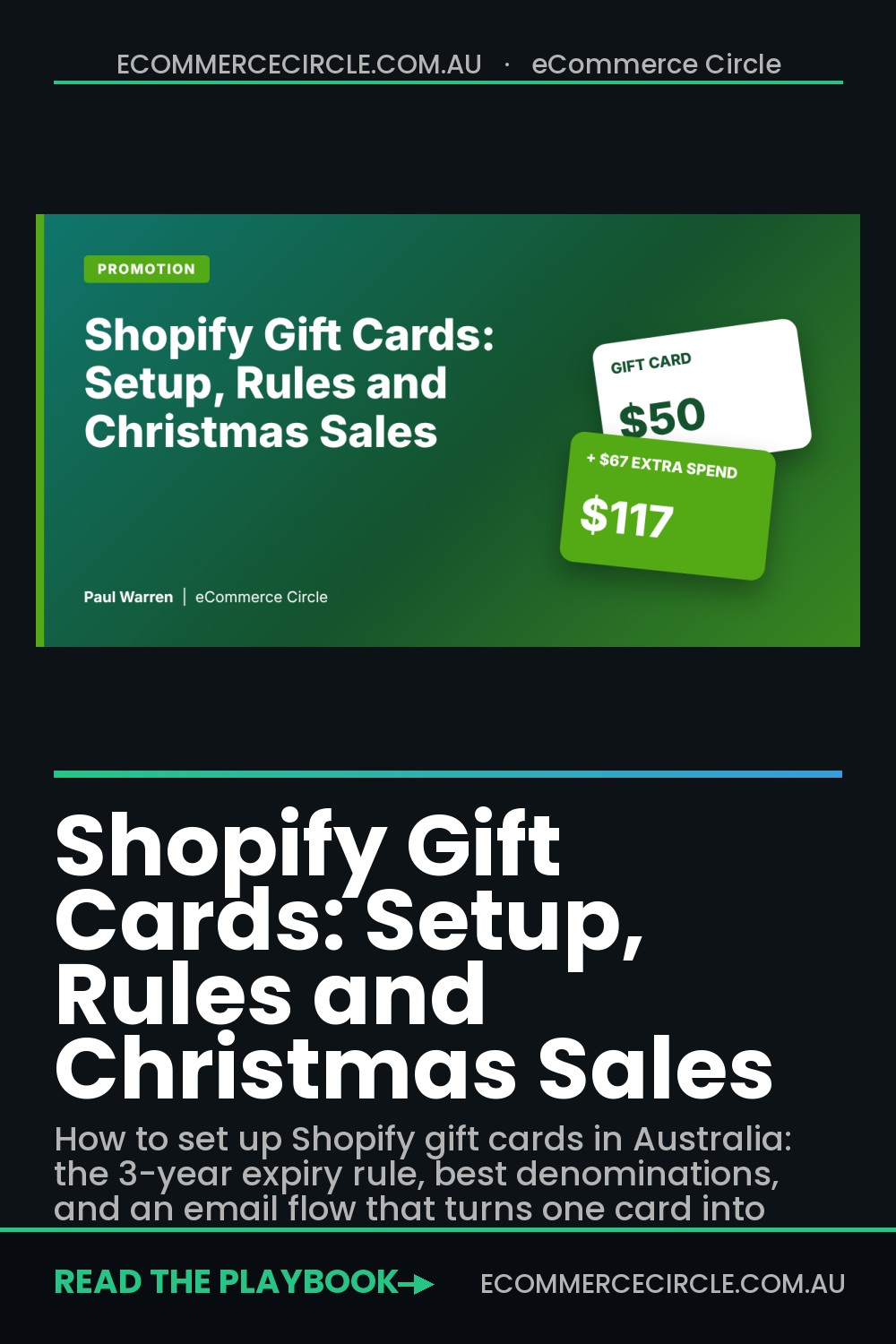
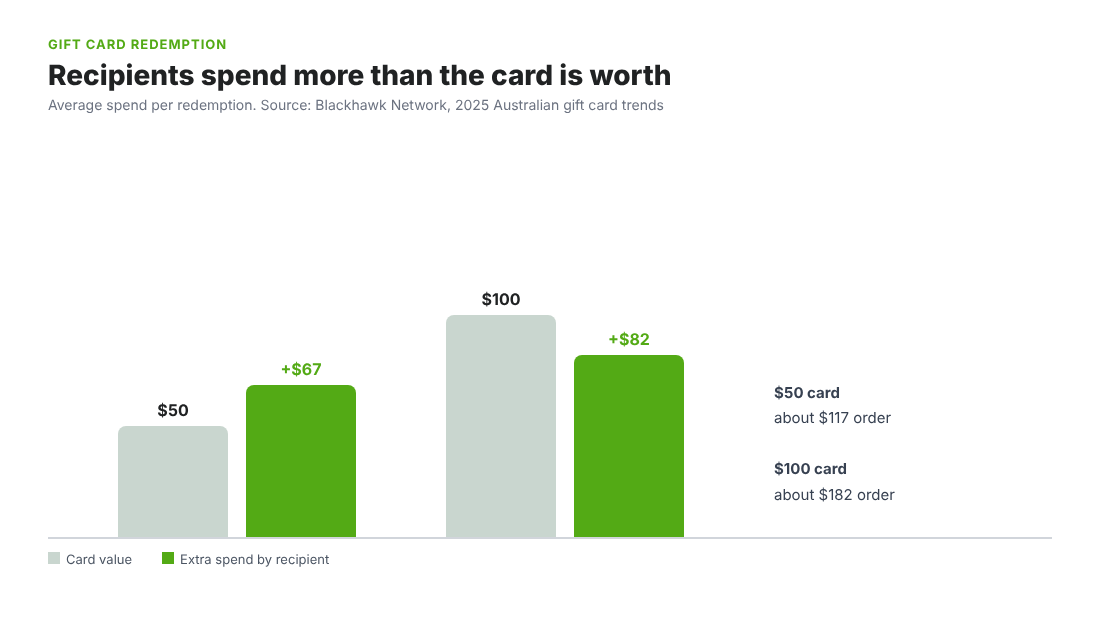
Then there’s the part that makes gift cards a profit play rather than a convenience. Blackhawk’s data shows recipients spend more than the card is worth. A $50 gift card leads to about $67 of additional spend, and a $100 card leads to about $82 more. You receive the cash up front, you don’t pay for ads to bring the recipient in, and you often get a new customer who would never have found you otherwise.
If you’re already planning your festive sends, pair this with the sequences in our guide to Christmas email ideas for Shopify and the product angles in the gift guide playbook. Gift cards are the safety net underneath both.
The Australian gift card rules you can’t skip
This is the section most Shopify guides skip because they are written for the US. Australian Consumer Law applies to every gift card you sell, including digital ones. The ACCC sets out the rules, and they are clear. This is general information, not legal advice, so check anything unusual with your accountant or solicitor.
- Three-year minimum. Gift cards bought on or after 1 November 2019 must be redeemable for at least three years from the day they were purchased. A 12-month expiry is illegal for a standard card.
- No post-purchase fees. You can’t charge activation, account-keeping, balance enquiry or inactivity fees after the card is sold.
- Show the expiry prominently. If you state the expiry as a period, the issue date must also be shown. If the card never expires, say so, for example “No expiry date”.
- State every condition. Any restriction, such as online only or one transaction per card, has to be clearly stated at the point of sale.
- No cash back. A card can be exchanged for goods up to its value but usually can’t be exchanged for cash.
- Know the exemptions. The ACCC lists exemptions including reloadable cards, promotional giveaways, genuine-discount cards and loyalty or reward cards. Don’t assume your bonus offer qualifies; confirm before you promote it.
There’s one more rule that matters if you ever sell the business. New owners must honour existing gift cards when a business is sold as a going concern. Unredeemed balances are a liability on your books, so ask your accountant how to track them in Xero or MYOB rather than letting them sit in a Shopify report nobody reads.
How to set up gift cards in Shopify (step by step)
Shopify treats a gift card as a special product. Each denomination is stored as a variant, and when you fulfil an order for it, Shopify creates a unique gift card code. Here’s the setup based on Shopify’s own help documentation.
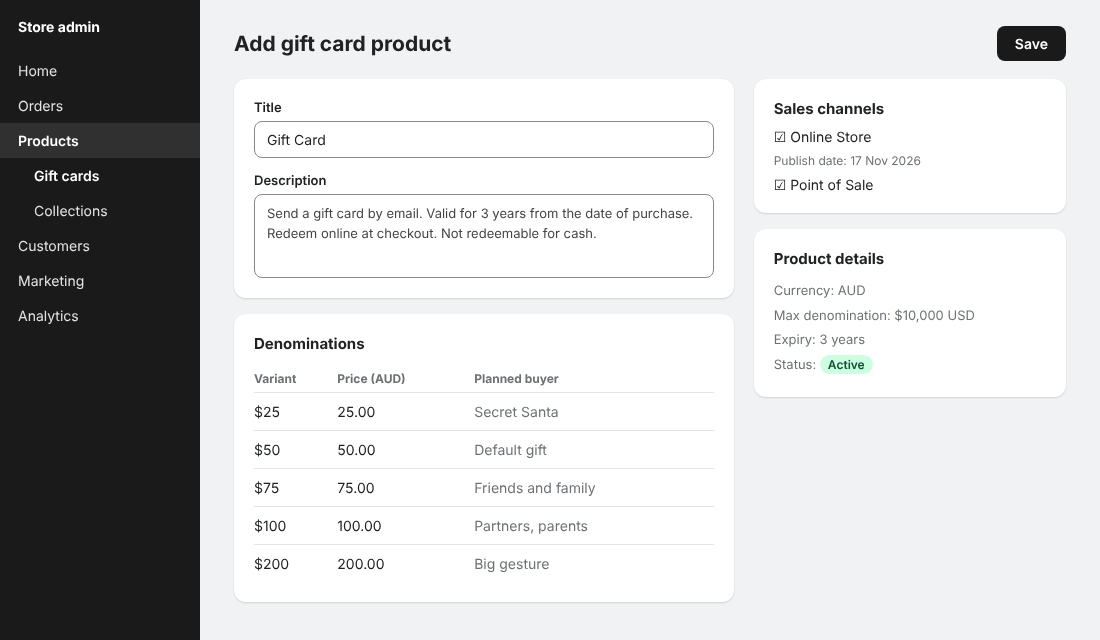
- Go to Products, then Gift cards. In your Shopify admin, open the gift cards area and click “Add a gift card product”.
- Write a real product page. Add a clear title (“Gift Card” is fine), a description that explains delivery, expiry and how to redeem, and good images. This page is what ranks and converts, so treat it like any hero product.
- Set your denominations. You need at least one. Each one can be any value above zero, up to $10,000 USD or the local equivalent, and that limit can’t be raised. Customers can’t type their own amount on the online store.
- Choose your sales channels. Publish to Online Store, and use the calendar icon beside it if you want the product to go live on a future date.
- Check your catalogs. If you sell in local currency, gift card products aren’t published to a catalog by default. Publish the product to the right catalog or customers in that market won’t be able to buy it.
- Place a test order. Buy a $25 card yourself, fulfil the order, and confirm the email arrives and the code works at checkout.
- Add the page to your navigation. Link it from the main menu, the footer and the cart. A gift card nobody can find is a gift card nobody buys.
One trick worth knowing: if a customer asks for a custom amount, such as $137, create a draft order for that amount, take payment, and then issue a gift card for it. Shopify’s documentation confirms gift cards created from draft orders can be sent to the customer.
You can also change the expiry on an individual card from its listing, including expired ones. That is handy for customer service, but remember the three-year rule when you set defaults.
Pick denominations that match what Aussies actually spend
Remember the Pureprofile numbers: 77% of buyers planned to spend between $25 and $100. Your denominations should cluster there, with a couple of options above for the big-gesture buyer.
| Denomination (AUD) | Who it’s for | Why it earns its spot |
|---|---|---|
| $25 | Secret Santa, teachers, colleagues | Low-risk entry point for the 36% budgeting $25 to $50 |
| $50 | The default gift | Sits at the top of the most common budget bracket |
| $75 | Friends and family | Gives you a step between the two biggest brackets |
| $100 | Partners, parents | Captures the 41% budgeting $51 to $100 |
| $150 to $200 | Big-gesture buyers | Only 11% budget $101 to $200, so keep it to one or two options |
Don’t offer ten amounts. More options slow the decision, and you want the buyer to click, not calculate. Five or six is plenty. If your average order value is $120, a $150 option is also a nudge: the recipient now has a reason to build a cart that goes over the card’s value.
Check your numbers against your free shipping threshold too. If your threshold is $100, a $50 card plus $50 of the recipient’s own spend gets them to free shipping, which is exactly the behaviour you want. Our guide to the free shipping threshold for Shopify shows how to set it so the maths works for your margin.
What MECCA and Frank Green do on their gift card pages
You don’t need to guess what a good buying experience looks like. Two Australian brands show the pattern clearly.
MECCA sells e-Gift Cards in a three-step flow: choose a design, choose an amount, enter delivery details. It offers 15 fixed amounts from $25 to $1,000 and seven designs, three labelled Holiday and four labelled Any Occasion. The buyer adds the recipient’s name and email, writes a message of up to 430 characters, and picks a “Send on” date. Cards go out from 6:00am AEST on that date. The terms are stated on the page: no cash exchange, no replacement if lost or stolen, no purchase using Afterpay, and unused balance carries over.
Frank Green offers $25, $50, $75, $100 and $200 AUD options, lets buyers customise the design, add the recipient’s name and a personal message, and set a send date. The recipient gets a unique code by email, enters it at checkout and selects Apply. A buyer can also send the card to themselves and pass it on later.
Both brands do three things you can copy this week:
- Personalisation. The Pureprofile survey found personalisation was the top factor when choosing a gift card, named by 34% of respondents, ahead of discounts or bonuses at 22%.
- Scheduled delivery. The buyer who shops on 2 December can send the card on 25 December. That removes the biggest objection to buying early.
- Plain terms on the page. The conditions are written for humans, not buried in a PDF.
One caution. Both pages I reviewed didn’t state an expiry on the buying page itself, and the terms are linked separately. Under the ACCC rules the expiry date has to be prominent. Put yours on the card page and in the delivery email, and you’re ahead of brands twice your size.
Make the gift card the easiest thing to buy
A gift card works because it’s a decision shortcut. Your job is to put it in front of people at the moment they are stuck.
- Announcement bar. From mid-November, add “Not sure what to buy? Send a gift card” with a link. If you already run one, see our announcement bar playbook.
- Cart drawer. Add a small gift card line under the cart items. People who are about to abandon because they can’t pick a size will often switch to a card.
- Product pages with sizing risk. For apparel, shoes and anything with fit issues, add “Not sure about size? Send a gift card instead” near the add to cart button.
- Search and 404 results. If someone searches “gift”, “present” or “voucher”, send them straight to the card page.
- Homepage hero in the last two weeks. Before your shipping cut-off passes, push physical products. After it, the gift card becomes your hero because it’s the only item that arrives instantly. Check the dates in our Christmas cut-off guide.
That last point is the real Christmas play. Once your last-order date for shipping passes, every visitor you used to lose becomes a gift card buyer. A digital card sent by email on 24 December doesn’t need a courier.
Design for the top-up: the overspend maths
The Blackhawk figures are the reason to build the whole programme. A $50 card brings about $67 of extra spend, which means the average redemption is closer to a $117 order than a $50 one. A $100 card brings about $82 more, a $182 order.
Here’s what that does to your margin. Say your gross margin is 55% and the recipient redeems a $50 card plus $67 of their own money. You have received $117 of revenue but only $67 of it was new cash on the day (the $50 was collected weeks earlier). The gross profit on the order is about $64. You paid nothing to acquire the buyer, and you hold the $50 interest-free in the meantime.
Use that to design your redemption experience:
- Show the balance at checkout. Shopify applies the card when the code is entered, so make sure the code field is easy to find.
- Build a “your gift card is waiting” collection. Link it from the delivery email and feature your best sellers priced to land just above common card values.
- Add a threshold nudge. If the cart is within $20 of free shipping after the card is applied, show it. Gift card holders respond well to “you’re $18 away from free shipping”.
- Keep your bundles visible. Our guide to Shopify product bundles covers pricing that lifts order value without discounting.
A caution on bonus offers. “Buy a $100 gift card, get a $20 bonus card” can lift sales sharply, but it is a discount and it creates a second card with its own rules. Set a short expiry on the bonus card, state the terms clearly, and confirm with your adviser that your structure qualifies under the promotional exemption. Never run a bonus offer without checking.
The gift card email flow that turns one sale into three
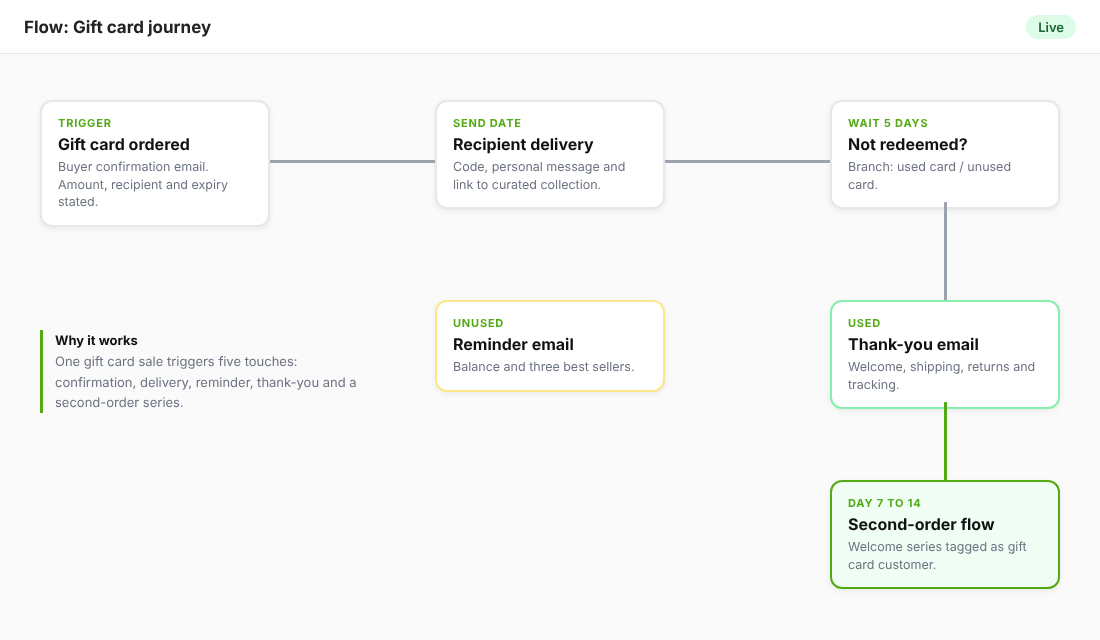
The card gets sold. Now what? Most stores send one email with a code and stop. A good flow has five touches and runs on autopilot.
| Step | Trigger | What it does |
|---|---|---|
| 1. Buyer confirmation | Order placed | Confirms amount, recipient and send date. States the expiry in plain words. |
| 2. Recipient delivery | Send date reached | Branded email with the code, the buyer’s message and a “Shop now” button to a curated collection. |
| 3. Day-5 reminder | Card not yet used after 5 days | A short, friendly nudge with the three best sellers and the balance. |
| 4. Redemption thank-you | First order using the card | Welcome the new customer, explain shipping and returns, show how to track the order. |
| 5. Second-order flow | 7 to 14 days after delivery | Normal welcome and post-purchase flow, tagged as a gift card customer. |
Tool to use: Shopify plus Klaviyo. Shopify sends the gift card email itself, and you can edit that notification template in your admin so it matches your brand. Klaviyo handles everything after. Set it up like this:
- Connect Klaviyo to Shopify so orders sync. In Shopify, orders paid using a gift card show gift card as a payment method.
- In Klaviyo, build a segment of customers who placed an order paid with a gift card (use the order payment details Shopify passes through, or tag these orders with Shopify Flow). Name it “Gift card redeemers”.
- Build a flow triggered by that segment with a welcome email on day 0, a product education email on day 3, and a review request after delivery.
- Add a second segment for gift cards sent but not yet redeemed, using the gift card purchase order date, and send the day-5 reminder to the buyer, not the recipient, unless you hold the recipient’s email.
- Review the flow after Christmas. Look at redemption rate, average order value with a card and the second-order rate at 60 days.
That last metric is the one to watch. A gift card customer who orders again without a card is a real customer. Pair it with the benchmarks in our post on repeat customer rate, and feed them into your loyalty programme. Our guide to a Shopify loyalty program covers how.
Six mistakes that cost stores money
- Setting a 12-month expiry. It breaks the three-year rule for standard cards.
- Hiding the card page. If it’s not in your main menu and cart, you won’t sell many.
- Sending physical cards after your courier cut-off. Offer digital delivery late in December and say so clearly.
- Ignoring fraud. Stolen credit cards are used to buy gift cards because they are instant. Watch for large first-time orders sent to a new email address and hold them for review. MECCA lists in its own terms that orders may be held for review.
- Forgetting returns. A gift card can’t usually be exchanged for cash, and your returns page should explain what happens when a gift is returned. See our gift returns guide.
- Not tracking the liability. Unredeemed balances belong in your books. Ask your accountant how to treat them.
Your gift card launch checklist
Copy this and work through it before the first week of December.
- Gift card product created with 5 to 6 denominations between $25 and $200
- Product page includes expiry (at least three years), conditions and redemption steps
- Card page linked from the main menu, footer, cart and search results
- Notification email edited with your branding and the expiry stated
- Test purchase completed, fulfilled and redeemed by you
- Scheduled send date available or clearly explained
- Klaviyo flow built: buyer confirmation, reminder, redemption thank-you, second-order
- Fraud rules checked for large first-time orders
- Accountant briefed on tracking unredeemed balances
- Homepage switch planned for the day after your last shipping cut-off
The compound effect: one card, three revenue events
Put the pieces together and a single $50 gift card does more than it appears to. First, you collect cash early, often in late November when your ad costs are highest and your cash is tightest. Second, the recipient spends around $67 on top, so the order you fulfil is bigger than the card. Third, the recipient is now a customer you can email, retarget and invite into your loyalty programme without paying to acquire them.
Stores that stop at “we sell gift cards” see a bump in December. Stores that build the page, the denominations, the late-season homepage switch and the flow see a new-customer channel that runs every Christmas, Mother’s Day and Valentine’s Day.
Inside eCommerce Circle, building simple revenue systems like this one is a core part of how we work with every member. If you want to see exactly where your store is being capped, take the free More Orders Scorecard. It takes two minutes and shows you which of the 10 P’s to fix first.