You did the hard thing. You ran the numbers at stocktake, worked out which SKUs were dead weight, and cut eighty of them from the catalogue. Good decision. Then you clicked delete and moved on.
What’s in This Article
Six weeks later organic traffic is down and nobody can explain why. Google Ads is quietly disapproving products. A customer emails asking why the link in your own email from March goes nowhere. None of that shows up in a dashboard with the word “catalogue” on it, so nobody connects it back.
Retiring products is an operations decision with a storefront consequence, and most Aussie founders only handle the first half. A product URL that has been live for two years carries rankings, backlinks, ad history, email links and social links. Delete the product and all of that lands on a 404. This playbook is the six steps that turn a catalogue cull into a clean handover instead of a slow leak.
Step 1: Build the Retired SKU Register Before You Delete Anything
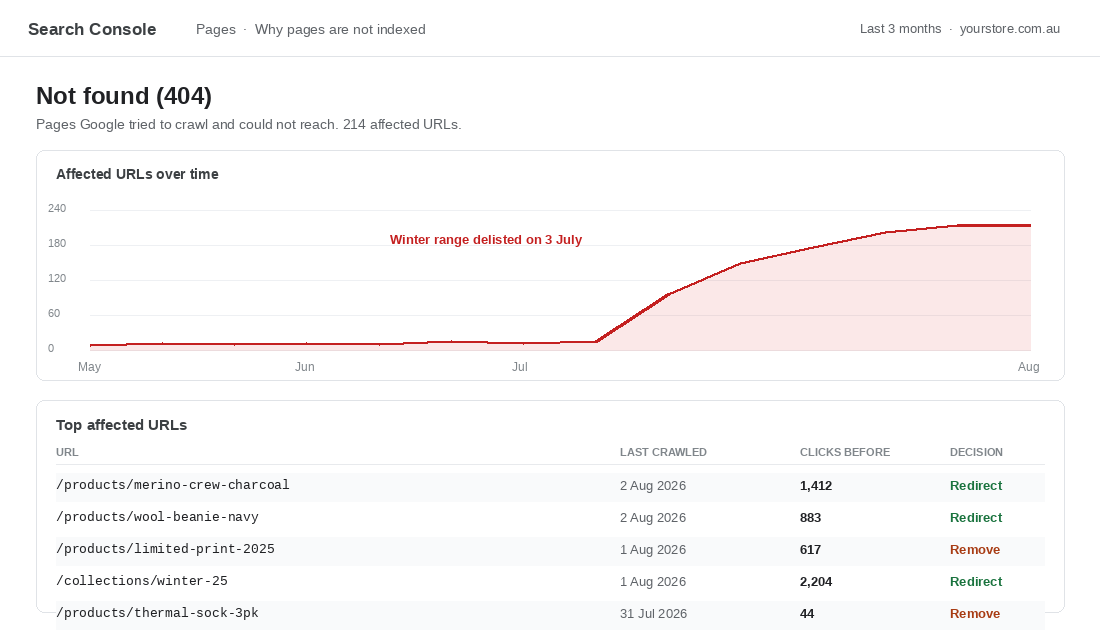
The single biggest reason this goes wrong is sequencing. Once a product is deleted from Shopify, the data you need to decide what to do with its URL is gone with it. You cannot see how much traffic it earned, what it was called, or which collection it sat in.
So build the register first. Before anything gets archived or deleted, export a row per retiring SKU with these fields:
- Full product URL. The handle matters. You need the exact path, not the product title.
- Organic clicks over the last 12 months. From Search Console, filtered to that URL.
- Referring domains. Any external site linking to it. Even one good link changes the decision.
- Revenue over the last 12 months. From Shopify reports, so you know what the page was actually worth.
- Nearest replacement. The product or collection a shopper who wanted this would want instead. Leave blank if there genuinely is not one.
- Is it in a live ad or feed. Google Shopping, Meta catalogue, Amazon, anywhere the URL is syndicated.
That last column is the one people skip and regret. A URL sitting in a Google Merchant Center feed does not just stop working when the product goes. It generates a disapproval, and Google will disable that item for both mobile and desktop until the landing page is reachable again.
If you are still deciding which SKUs to cut rather than what to do afterwards, start with our catalogue audit and SKU rationalisation playbook, then come back here for the cleanup.
Step 2: Triage Every Retired URL Into One of Four Outcomes
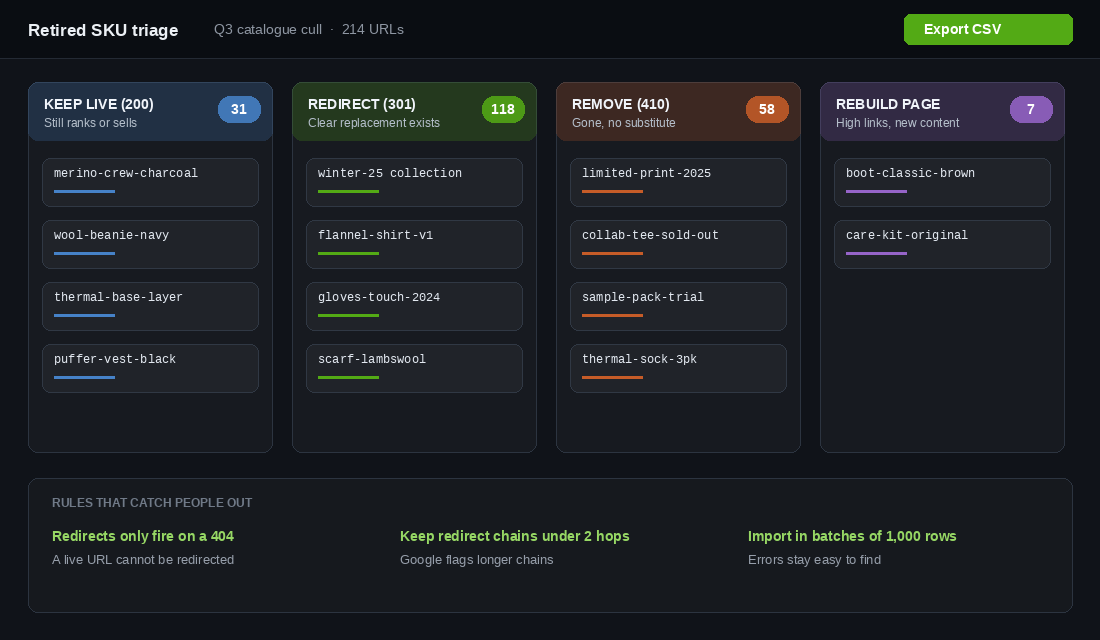
Every retired URL gets exactly one of four treatments. Not a judgement call each time, a rule you apply to the whole register in one sitting.
Keep the page live and return a 200. Use this when the product is temporarily gone rather than permanently gone, or when the page still earns meaningful traffic. The page stays up with full description, images and reviews intact, plus a clear availability message and a back-in-stock capture. A page that ranks and collects email addresses is worth more than a redirect.
Redirect with a 301. Use this only when a close replacement exists. Same product type, same job, similar price band. A shopper who lands on the new page should feel like they arrived where they meant to go. This moves the ranking equity across.
Remove with a 404 or 410. Use this when the product is genuinely gone, has no substitute, and the URL carries no meaningful traffic or links. Google treats both codes as the page being gone, and John Mueller has said the practical SEO difference is negligible. Use 410 when you are certain it is permanent and you want it dropped from the index faster. Use 404 when the product might come back.
Rebuild the page as something else. The rare but valuable case. A URL with strong backlinks and no product to sell can become a guide, a comparison, or a category landing page. You keep the authority and give it a new job.
The mistake almost every store makes is redirecting everything to the homepage. Google treats a redirect to an irrelevant page as a soft 404 and the equity does not transfer. It also frustrates the shopper, who now has to start their search over.
Step 3: Set Up the Redirects Properly in Shopify
Shopify handles redirects natively. You do not need an app for this unless you are managing thousands of rules with complex pattern matching.
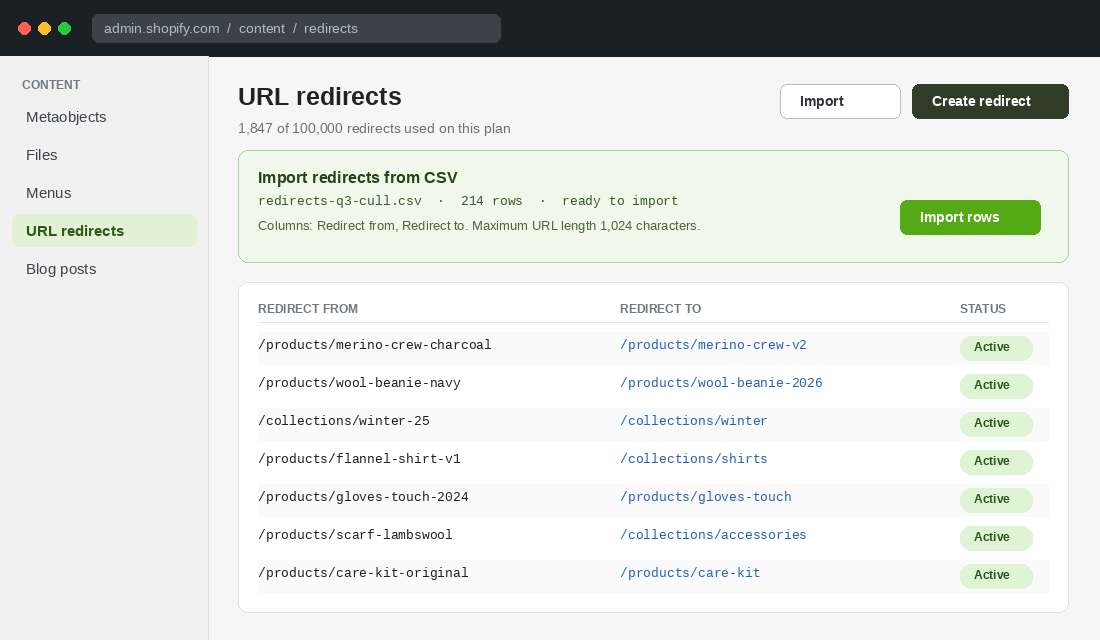
In your admin, go to Content, then Menus, then URL redirects. You can create rules one at a time, or click Import and upload a CSV with two columns: Redirect from, and Redirect to.
Four rules will save you a lot of pain:
- A redirect only fires when the old URL returns a 404. It cannot override a page that is still live. If you build the redirect before you delete the product, nothing happens and you assume it failed. Delete or archive first, then redirect.
- Keep chains to a maximum of two hops. Google Merchant Center explicitly flags landing pages that redirect more than twice. If you have redirected the same URL across three site changes, point the original straight at the current destination.
- Import in batches of about 1,000 rows. A failed 5,000-row import tells you very little. A failed 1,000-row batch is quick to diagnose and re-upload.
- Watch the URL length limit. Shopify caps URLs at 1,024 characters. Long parameterised URLs from old campaigns will silently break an import.
On capacity, you have plenty of headroom. A standard Shopify plan supports up to 100,000 URL redirects, and Shopify Plus supports up to 20,000,000. Nobody is running out. The constraint is discipline, not storage.
The Four Shopify URL Behaviours That Catch Founders Out
Shopify has some specific quirks in how it generates and retires product URLs. Understanding them turns a confusing cleanup into a predictable one.
Every product has two paths, not one. A product is reachable at /products/handle and also at /collections/collection-name/products/handle. The canonical tag points at the short path, which is why you build redirects against that one. If you have been linking to the long collection-scoped path in emails or ads, those links break separately and you need to catch them too.
Archiving and deleting are not the same thing. Archiving a product removes it from the storefront but keeps the record, the order history and the handle reserved. Deleting removes it entirely and frees the handle. Archive first, confirm the redirect works, then decide whether you ever need to fully delete. Very few stores actually need to.
Changing a handle is a URL change. Renaming a product to something clearer will change its URL. Shopify offers to create the redirect for you at that moment. Take it every single time. This is the most common source of quiet 404s on stores that have never done a formal catalogue cull, because it happens one product at a time during ordinary merchandising work.
Variant parameters ride along. URLs shared from a specific variant carry a ?variant= parameter. Redirects match on the path, so the rule still fires, but the shopper lands on the destination product with no variant preselected. If a retired product had one dominant variant, point the redirect at the closest matching variant of the replacement rather than the bare product URL.
Retired collections deserve the same treatment. A seasonal collection like /collections/winter-25 often earns more organic traffic than any single product inside it, because it targets a broader search term. When you archive the season, redirect the collection URL to the evergreen equivalent rather than letting the strongest page in the whole group die quietly.
Step 4: Fix the Pages You Decided to Keep
A kept page that just says “Sold out” with a greyed-out button is a wasted asset. It still ranks, it still gets traffic, and it converts nothing.
Give it a job. On any retired-but-live product page:
- Keep the full content. Description, images, specs, reviews. Stripping the page back tells Google there is nothing here and invites a soft 404 classification.
- Replace the buy button with a capture. A back-in-stock or waitlist signup turns a dead page into an email acquisition channel. Our back-in-stock playbook covers the notification architecture behind this.
- Say what happened, plainly. “This design was a limited run and will not be restocked” beats an ambiguous sold-out badge. Ambiguity generates support tickets.
- Show three genuine alternatives above the fold. Not your best sellers. Products that solve the same problem at a similar price.
- Update the structured data. Availability should reflect reality. Leaving it as InStock on a page that cannot be bought is a rich result problem waiting to happen.
Brands built on limited runs live in this territory permanently. Culture Kings, the Brisbane streetwear business that scaled globally on Shopify Plus, runs a catalogue where drops and collaborations sell through and never return. So does Who Gives A Crap, the Melbourne B Corp whose limited-edition wrapper designs are the point rather than an accident. When scarcity is your model, the retired product page is not an edge case. It is a recurring surface, and it deserves a designed state rather than a default one.
Step 5: Clean the Systems That Still Point at the Old URLs
Redirects catch the traffic. They do not clean up the systems that keep sending it. Work through this list the same week you run the import.
Google Merchant Center. Open the Products diagnostics and look for crawl errors. A retired URL shows as page not found and disables the item from Shopping ads and free listings until it resolves. Confirm your feed has dropped the SKU rather than relying on the redirect to paper over it. If your feed setup is messy generally, our Google Shopping feed playbook is the fix.
Paid ad landing pages. Search your Google and Meta accounts for the retired handles. A redirect keeps the ad functional, but you are now paying for a click that lands on a substitute the shopper did not ask for. Pause or repoint those ads deliberately.
Email flows and templates. Evergreen flows are the worst offender because they run unattended. Check your welcome sequence, your abandoned cart flow, your post-purchase series, and any hardcoded product blocks in Klaviyo templates.
Internal navigation and merchandising. Menu items, homepage sections, blog post links, collection descriptions, and any manually curated product blocks in your theme. These are internal 404s, which look worse to Google than external ones because you control them.
On-site search and collections. If shoppers keep searching the retired product name, add a synonym or a redirect rule pointing to the replacement. That query volume does not disappear just because the product did.
Sitemap and Search Console. Shopify regenerates the sitemap automatically, but confirm it. Then request validation on the Not found report so Google reprocesses the URLs rather than waiting for a natural recrawl.
Step 6: Make It a Quarterly Ritual With Two Numbers
This work decays. Every season you add products, every stocktake you cut some, and the register goes stale. Put it on a quarterly cadence attached to something you already do, like your end-of-quarter stocktake.
The quarterly pass is short:
- Pull the Not found report in Search Console and sort by clicks the URL used to earn.
- Triage anything new into the four buckets. Most quarters this is under twenty URLs.
- Check Merchant Center for landing page errors and clear them.
- Audit your redirect list for chains longer than two hops and flatten them.
- Review kept pages. Anything sold out for more than two quarters with no restock date should move to redirect or remove.
Track two numbers and nothing else. Unresolved 404 URLs, which should trend toward zero and never spike after a catalogue change. And disapproved products in Merchant Center, which should sit at zero for landing page reasons. If either moves, something got deleted without going through the process.
One process change makes the ritual almost unnecessary. Add a single line to your product retirement checklist, wherever that lives: no SKU gets archived until its URL has a decision recorded against it. Ten seconds per product at the point of retirement replaces an hour of forensic work a quarter later, and it means the person doing the archiving is the person who knows why the product went.
Why This Compounds Instead of Being a One-Off Cleanup
Each individual redirect is worth very little. One retired jumper, a few hundred clicks a year, a handful of links. Nobody would build a process for that.
The compounding happens because catalogue churn is continuous and the losses are permanent. A store retiring 60 to 80 SKUs a year for three years has cycled through a couple of hundred URLs. Handled properly, the ranking equity from all of them keeps rolling forward into the current catalogue. Handled badly, each one is written off the moment it is deleted, and you rebuild that authority from scratch every season.
There is a second compounding effect on the paid side. Merchant Center disapprovals are sticky. An account that accumulates landing page errors every quarter runs with a permanently reduced share of its catalogue eligible for Shopping ads, and most founders never see it because they look at overall spend and return rather than the diagnostics tab.
The third effect is the one nobody measures. Customer trust. A shopper who clicks a link from your own email and hits a dead page has learned something about how carefully you run things. It costs nothing to avoid and it is very hard to win back.
Your Retired SKU Decision Table
Print this. Every retiring product goes through it in under ten seconds.
- Coming back within 90 days. Keep the page live, add back-in-stock capture, set availability honestly.
- Gone for good, close replacement exists. Redirect 301 to that replacement product.
- Gone for good, no single replacement but a clear category fits. Redirect 301 to the collection, not the homepage.
- Gone for good, no replacement, still earns traffic or holds links. Keep the page live and rewrite it into a guide or comparison.
- Gone for good, no replacement, no traffic, no links. Let it 410. Do not clutter your redirect list.
- Limited run that will never return but is part of the brand story. Keep the page live as an archive, link to the current range, capture emails for the next drop.
Then the four checks before you close the job: redirect imported, Merchant Center clean, email flows updated, internal links fixed.
Cutting dead SKUs is one of the best decisions you can make for margin and focus. Just do not let the cleanup cost you the rankings and the ad eligibility you spent years building. The delete button is the start of the job, not the end of it.
Inside eCommerce Circle, catalogue hygiene sits inside the Platform pillar we work through with every member, because it is the kind of work that quietly protects revenue nobody thinks to defend. If you want a second opinion on yours, let’s talk.