Your supplier sends through an invoice for the next stock run. Same email thread you have used for two years. Same signature block, same PDF layout, same slightly abrupt tone. One line is different: the bank account number. There is a short note above it saying they have changed banks. You pay it, because of course you do.
What’s in This Article
Three weeks later the supplier rings asking where the money is. That is usually the moment an Aussie founder learns the money is already offshore and the bank cannot claw it back.
This is not a rare event. Payment redirection scams cost Australians $166.8 million in 2025, up 9.3 per cent on the $152.6 million lost in 2024, which makes it the second largest scam category in the country behind investment scams, according to the ACCC’s 2025 scam losses report. Small businesses lodged 2,228 reports with $9.5 million in losses, and false billing was the single most reported scam type for that group. Most ecommerce founders spend months optimising a checkout to lift conversion by half a per cent, then wire a five figure stock payment on the strength of one email. This article fixes that.
How a Payment Redirection Scam Actually Runs
Almost nobody gets hit by a random fake invoice from a supplier they have never heard of. That version is easy to spot. The version that empties your account starts inside a real mailbox, on a real thread, about a real order.
The pattern is consistent. Someone gets into an email account, usually yours or your supplier’s, usually through a password reused from an old breach. They do not steal anything straight away. They create a quiet forwarding or filing rule so they can read your invoice conversations without you noticing new activity. Then they wait, sometimes for weeks, learning who approves payments, what your order cycle looks like, and how your supplier writes.
When a genuine invoice lands, they intercept it, swap the bank details, and send it on from a lookalike domain. You reply to what looks like the same thread. They answer, because they control the mailbox. The Australian Signals Directorate found that business email compromise accounts for 15 per cent of all business related cybercrime reports, with another 19 per cent being email compromise that did not result in a direct loss, in its Annual Cyber Threat Report 2024 to 2025. Roughly one in three business cybercrime reports starts in an inbox.
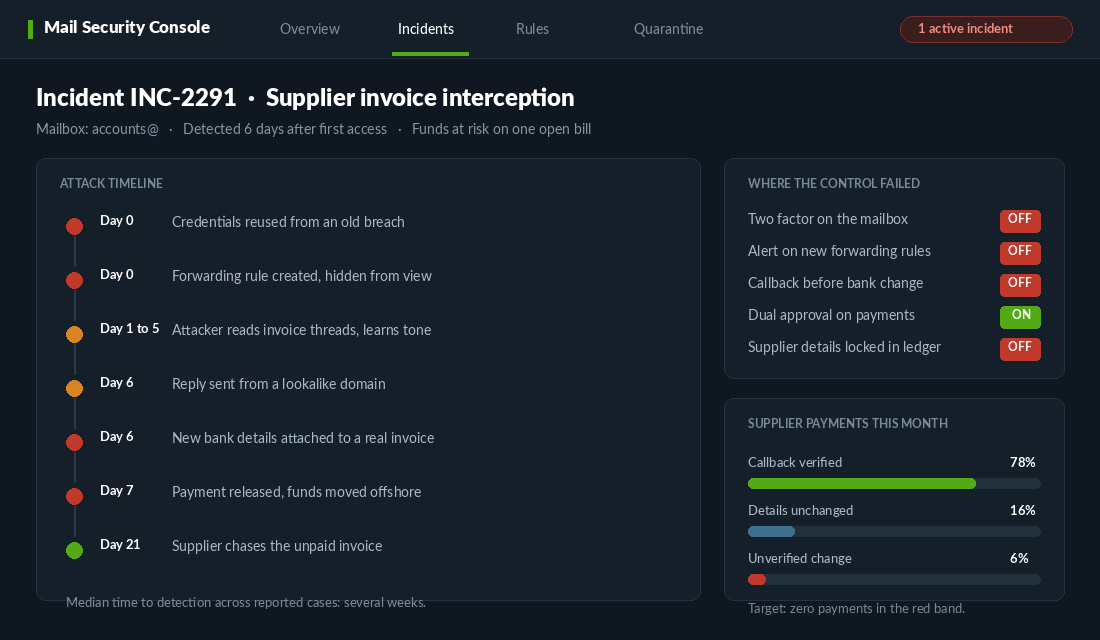
The cost is not trivial for a business your size. The same ASD report puts the average self reported cost of a cyber incident at $56,571 for small businesses and $97,166 for medium businesses, the latter up 55 per cent year on year. For a brand doing $150k a month with 20 per cent net margin, a single redirected stock payment can wipe out a full quarter of profit.
The Court Ruling That Moved the Loss Onto You
Founders often assume that if the supplier’s email was hacked, the supplier wears the loss. That assumption got tested in Australia and it did not hold.
In Mobius Group Pty Ltd v Inoteq Pty Ltd [2024] WADC 114, Mobius invoiced Inoteq for work totalling $234,400. Attackers who had gained access to Mobius’s email system sent messages that appeared to come from a Mobius director, carrying altered bank details. Inoteq paid. On 20 December 2024, Judge Massey ordered Inoteq to pay more than $190,000 to Mobius anyway, as reported by the ABC.
Inoteq argued the compromise was on Mobius’s side and pointed to an indemnity clause. The court was not persuaded. The reasoning that matters to you: Inoteq had the ability to protect itself by verifying the change on a number it already held, and did not. Paying the invoice did not discharge the debt. Inoteq lost the money to the scammer and still owed the supplier.
I am not a lawyer and this is not legal advice, so take specific matters to yours. But the practical read for an operator is simple. If you pay a fraudulent invoice, you are likely to be out of pocket twice, and the supplier will still be waiting to be paid. That reframes everything below from an IT problem into a cash flow problem.
Layer 1. Harden the Mailbox Before You Touch the Bank
Every control further down this list assumes the attacker is outside your systems. Layer one is what keeps that true. Do this in your Google Workspace or Microsoft 365 admin console this week.
- Enforce two factor on every mailbox, not just yours. The accounts@ and orders@ inboxes are the ones attackers want, and they are usually the ones shared with a VA on a weak password.
- Turn on alerts for new mail forwarding and filter rules. In Google Workspace this sits under Rules and alerts in the admin console. A forwarding rule created outside business hours is one of the highest signal warnings you will ever get.
- Kill automatic external forwarding at the domain level. If nobody in your business legitimately needs it, disable it entirely rather than monitoring it.
- Remove ex staff and ex agency access the day they leave. Old contractor accounts sitting dormant with mail access are a standing invitation.
- Get your email authentication in order. SPF, DKIM and a DMARC policy set to quarantine or reject make it harder for anyone to spoof your domain at your suppliers. We covered the full setup in the email authentication defence playbook.
Same logic applies to your Shopify admin and your bank portal. If you have not audited who holds staff accounts and what permissions they carry, the admin lockdown playbook walks through it properly.
Layer 2. The Callback Rule That Kills the Attack
This is the single highest value control in the entire article, and it costs nothing.
No supplier bank detail change is ever actioned from an email. Ever. It is verified by voice, on a phone number you already had before the request arrived.
The wording matters. Not “call the number on the invoice”. Not “call the number in the email signature”. Attackers change those. You call the number already stored in your supplier record, the one you have used to chase a late shipment. If you do not have one on file, you find it on the supplier’s official website, not in the email.
Then say something specific. Do not ask “did you send me new bank details”, because a yes is easy. Ask them to read the last four digits of the new account number back to you, and confirm the account name. If the person on the phone hesitates or offers to email confirmation instead, you have your answer.
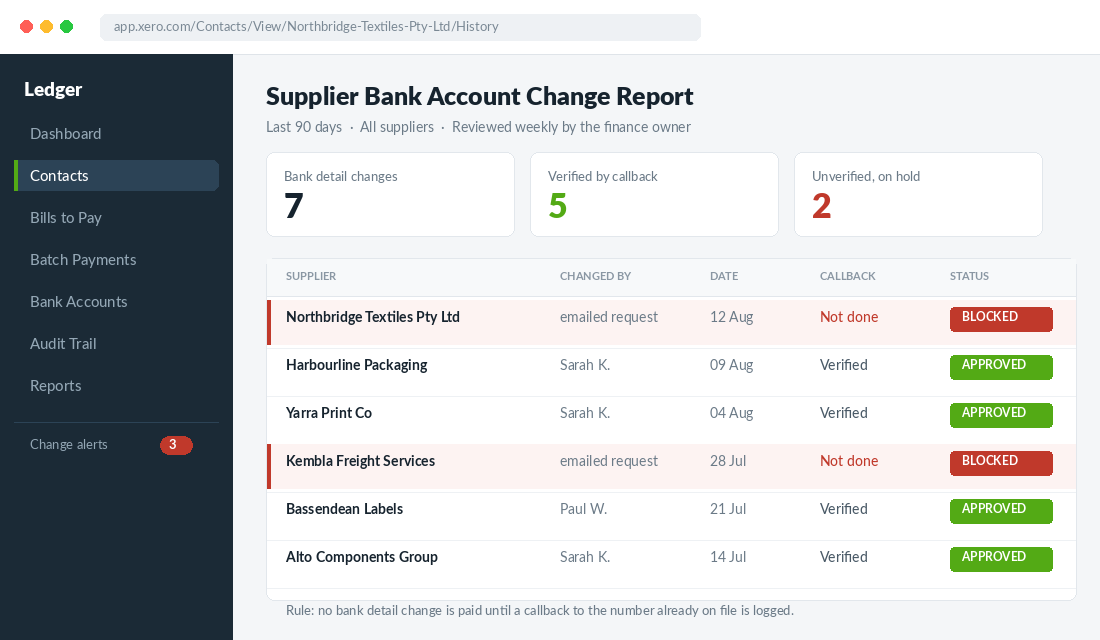
Log the callback. Date, who you spoke to, what they confirmed, who made the call. A one line note against the supplier record is enough. This is what turns a good intention into a control you can point at when a payment is questioned later, and it is exactly the step the court found missing in the Inoteq case.
Layer 3. Lock Supplier Bank Details in the Ledger
Most Aussie brands run Xero. Xero will happily let anyone with contact edit rights change a supplier’s bank account, and the change notification goes to the person who made the change, which is not much use if that person is the problem. You have to build the review yourself.
Here is the setup, and it takes about twenty minutes.
- Restrict who can edit contacts. In Xero, go to Settings, then Users. Anyone who does not need to create suppliers should sit on a role without contact edit rights. Your VA almost certainly does not need it.
- Run the bank account change review weekly. Open Accounting, then Reports, then Contacts, and check the contacts whose bank accounts have been edited. Cross reference every change against a logged callback from layer two.
- Use the contact History and Notes tab as evidence. Xero records what the bank account was, what it changed to, and who changed it. Screenshot it into your callback log so the two sit together.
- Never let a bank change and a payment happen in the same session. Put a 24 hour cooling off period between updating details and releasing funds. Urgency is the scammer’s main weapon, so remove it.
If you are moving real volume through supplier payments, look at a dedicated verification tool. Eftsure is the Australian option most finance teams here land on. It checks the payee name, ABN and bank account against a database of verified business account details before you release the payment, and flags accounts it has never seen before. Setup is short: connect it to your accounting file, let it run an initial scan across your existing supplier master list, then review whatever it flags as unverified before your next payment run. For a brand paying a handful of overseas suppliers, the manual callback discipline in layer two gets you most of the way. Once you are running dozens of suppliers and a bookkeeper you rarely see in person, the tool pays for itself the first time it stops one payment.
Layer 4. Put Real Gates on the Payment Run
Batch payments are where a single compromised record turns into a large loss, because nobody eyeballs individual lines in a batch file. Build four gates that every bill has to clear before the file is uploaded.
- Gate one: details unchanged. Bank details match what you paid last time. If they changed, the bill drops out of the run automatically.
- Gate two: callback logged. Any changed detail has a dated verification note attached before it goes back in.
- Gate three: name match at the bank. Confirmation of Payee is now live across 82 financial institutions covering more than 143 million accounts as at March 2026, per the Australian Banking Association. When you enter a new BSB and account number, your bank checks the account name against the real account holder. Treat a no match or partial match as a hard stop, not a typo to work around.
- Gate four: second approver. Any payment above a threshold you set, and every payment to a new or changed account regardless of size, needs a second person to release it. If you are a solo founder, that second person can be your bookkeeper or accountant.
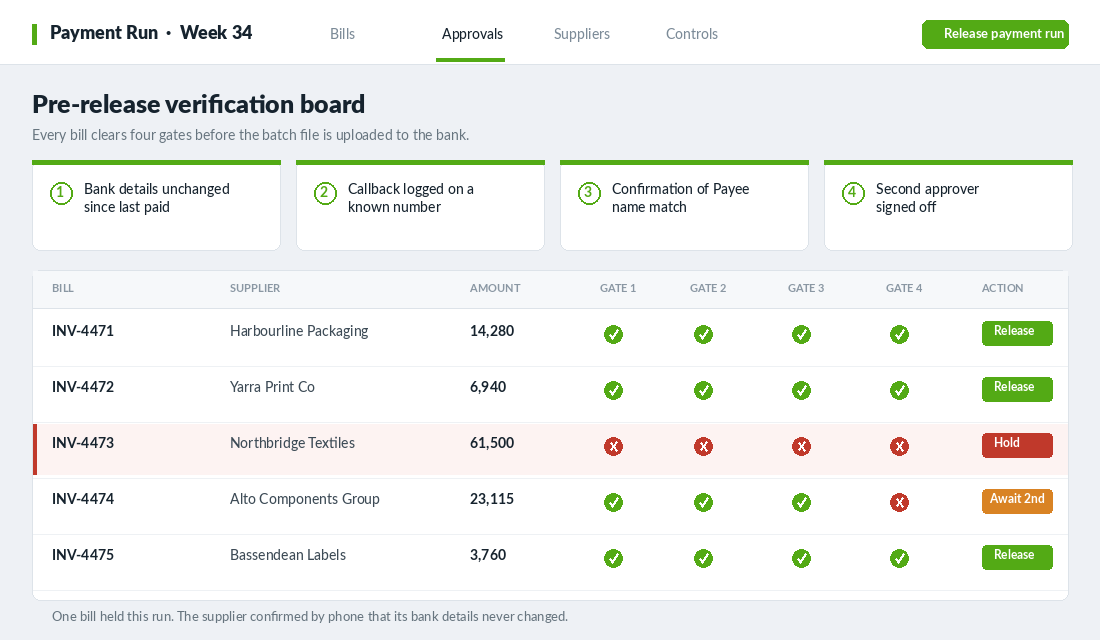
One more habit worth building for first time payments to a new supplier: send a small test transfer first, confirm receipt by phone, then release the balance. Losing the test amount to a scammer is a cheap lesson. Losing $61,500 is not.
Layer 5. Train the One Person Who Actually Pays
In most brands doing $100k to $500k a month, exactly one person touches the bank. A part time bookkeeper, an ops manager, sometimes a VA overseas. That person is the entire control surface, and they are usually the least trained on this.
Give them explicit authority to stop. The reason scams work on staff is that the fake email is urgent, comes from someone senior, and implies consequences for delay. If your bookkeeper believes that holding a payment will get them a rocket from you, they will pay it. Say the opposite out loud and put it in writing: you will never be annoyed at a held payment, and you will never send payment instructions that need to be actioned immediately without a call.
Then run the drill. Once a quarter, send a test: an email from a lookalike address of yours asking them to update a supplier account and pay it today. See what happens. If they pay it, that is a training gap you found for free. If they ring you to check, buy them lunch. This costs an hour a quarter and it is worth more than any software you will buy.
Write the rule into your payment SOP so it survives staff turnover. Supplier concentration is a related risk worth mapping at the same time, which we walked through in the supplier risk playbook.
Layer 6. The First 24 Hours When It Happens Anyway
Recovery depends almost entirely on speed. Funds are usually moved out of the receiving account within hours, so the difference between calling at 9am and calling at 4pm is often the difference between a recall and a write off. Have this written down before you need it.
- Call your bank’s fraud line immediately. Not the general number, the fraud team, and ask specifically for a recall or trace on the transaction. Do this before you investigate anything else.
- Call the real supplier on a known number. Confirm they did not receive it and warn them their mailbox may be compromised, because it might be the source.
- Lock down the mailboxes. Force password resets, revoke active sessions, and check for forwarding rules you did not create. Assume the attacker is still reading.
- Report it. Lodge with ReportCyber and Scamwatch. It generates a reference your bank and insurer will ask for.
- Check your cyber policy. Many business policies exclude social engineering losses unless you have bought that extension specifically. Find out now, not during a claim.
- Write the incident up within a week. What control was missing, what you have changed. The data breach response playbook covers the wider version of this if customer data was also exposed.
Why the Six Layers Compound
None of these six layers is impressive on its own. A scammer who gets into a mailbox can beat layer one. Someone who spoofs a phone number can, with effort, beat layer two. Any single control has a failure mode.
The point is that they have to beat all of them in sequence, and the attack economics stop working. To take your money now they need mailbox access, a phone number you already trust, edit rights in your ledger, a bank account whose registered name matches your supplier, a second approver who waves it through, and enough time before your weekly change review catches it. That is no longer a cheap opportunistic attack on a business your size. It is a targeted operation, and they will go and find an easier brand.
This is the same logic you already apply to conversion. No single change on a product page doubles revenue. Six changes stacked in the right order do. Protection works identically, except the return is measured in losses you never have.
Worth keeping in perspective: Australians reported $2.18 billion in scam losses across 274,577 loss reports in 2025. The brands that avoid becoming a line in that number are rarely the ones with the best software. They are the ones who made a phone call.
The Insurance Question Most Aussie Founders Get Wrong
Once the money has left the account, the recovery path narrows fast. Confirmation of Payee has made misdirection harder, but it is not live on every account type, and it does nothing when the attacker has taken over a genuine supplier mailbox and the account name matches perfectly.
This is where founders find out what their policy actually says. Three distinctions decide whether you are covered.
- Cyber policies generally cover the cost of the incident: forensics, notification, business interruption, sometimes extortion. They frequently exclude the transferred funds themselves.
- Crime or fidelity policies cover money, but often only for employee theft unless a social engineering extension has been added.
- Social engineering fraud extensions are the clause that responds when your own staff member was deceived into authorising the transfer. Cover is usually sublimited, commonly $50k to $250k, which is well under a single stock run for a store doing $200k a month.
Ask your broker three questions in writing. Does the policy respond when funds are transferred voluntarily by an authorised employee who was deceived. What is the sublimit for that extension. What controls must be in place for a claim to be valid.
That third question is the one that bites. Most social engineering extensions require a documented verification procedure, usually a callback to a pre-agreed number, before funds are released. If you cannot show the insurer that the callback rule in Layer 2 was written down and followed, the claim can fail on procedure even though the cover exists on paper.
So the controls and the insurance are not alternatives. The controls are the precondition for the insurance paying. Write the payment verification procedure into a one-page document, date it, have whoever runs the payment run sign it, and store it somewhere you can produce it in a week rather than a month. None of this is financial or legal advice, and your broker and accountant should confirm what applies to your entity.
One timing note. Report to your bank and to ReportCyber within hours, not days. Banks can sometimes recall a domestic transfer while the funds are still sitting in the receiving account, and that window is measured in hours. The same urgency logic applies to your admin access, which is why the Shopify admin lockdown playbook pairs with this one.
Your Supplier Payment Fraud Checklist
Print this, or paste it into your payments SOP. If you can tick every line, you are ahead of almost every brand at your revenue level.
- Mailbox. Two factor on every account, alerts on new forwarding rules, external forwarding disabled, ex staff removed, DMARC at quarantine or reject.
- Callback. Written rule that no bank change is actioned from email. Verified on a number held before the request. Callback logged with date and name.
- Ledger. Contact edit rights restricted. Weekly review of changed supplier bank accounts. History tab screenshot attached to each verification.
- Cooling off. Minimum 24 hours between a bank detail change and any payment to that supplier.
- Payment run. Four gates cleared per bill. Confirmation of Payee mismatch is a hard stop. Second approver on new or changed accounts at any value.
- New suppliers. Small test transfer, phone confirmation of receipt, then the balance.
- People. Whoever pays has explicit authority to hold anything. Quarterly test email run. Rule documented in the SOP.
- Incident plan. Bank fraud line number saved. ReportCyber and Scamwatch steps written down. Cyber policy checked for social engineering cover.
Start with the callback rule and the weekly bank change review. Those two take an afternoon and remove most of your exposure. Everything else is hardening around them.
Inside eCommerce Circle, protecting the cash you have already earned is one of the core pillars we work on with every member, and it comes up far more often than founders expect. If you want a second opinion on your payment controls before something goes wrong, let’s talk.