Ask a room full of Aussie Shopify founders where their ad budget goes and you will hear the same two answers: Meta and Google Search. Ask how many are running YouTube ads properly and the room goes quiet.
What’s in This Article
That silence is costing them. YouTube’s ad reach in Australia sits at 21 million people, roughly 78% of the entire population. It is the single biggest advertising audience in the country, bigger than Facebook, bigger than Instagram, bigger than TikTok. And because most DTC brands never move past “we tried a video ad once”, the auction is far less crowded than the Meta feed you are bidding into every day.
The numbers back the opportunity. Google reports that 87% of viewers have bought from a brand after seeing it on YouTube, and viewers are 4 times more likely to use YouTube to research a brand than any other platform. Meanwhile ecommerce CPMs on YouTube typically run $5 to $10, with Shorts inventory closer to $4. Most Aussie brands I coach are paying well above that for the same thousand eyeballs on Meta.
The problem is not the channel. The problem is that founders treat YouTube like Meta with longer videos, burn $3,000, see no purchases in the platform dashboard, and declare it dead. This playbook is the 5-part system we use to launch YouTube ads that actually produce orders: the job, the creative, the campaign architecture, the measurement, and the scale loop.
Why YouTube Is the Cheapest Big Reach Left in Australia
Every ad platform goes through the same lifecycle. Early on, attention is underpriced because advertisers have not caught up to where audiences are. Then the crowd arrives, CPMs climb, and the easy wins disappear. Meta in Australia is deep into the crowded phase. YouTube, for DTC specifically, is not.
Three things changed in the last two years that most founders missed.
Demand Gen replaced the old video campaign types. Google’s Demand Gen campaigns now serve across YouTube, Shorts, Discover and Gmail, and they behave much more like Meta’s Advantage+ than the old TrueView campaigns did. Google reports a 26% increase in conversions per dollar across Demand Gen since its AI bidding overhaul, and campaigns using target ROAS goals typically see a 20% lift in conversions.
Product feeds turned video views into shoppable sessions. Connecting your Shopify catalogue means your products appear alongside the video. Advertisers with larger catalogues typically see a 33% increase in conversions when they add product feeds to Demand Gen.
The audience is incremental, not recycled. This is the stat that should get your attention: on average, 68% of Demand Gen conversions come from people who never saw the brand’s Search ads. That is new demand, not your existing brand searchers wearing a different hat.
None of this means YouTube is easy money. It means the structural conditions are right. The rest of this playbook is about not wasting them.
Part 1: Nail the Job Your Ad Is Doing Before You Brief a Single Video
The biggest YouTube mistake I see from Circle members is launching one video and asking it to do everything: introduce the brand, explain the product, handle objections and close the sale. One ad, four jobs, zero results.
Before you brief creative, pick one primary job for your first campaign:
- Cold acquisition. You want new customers who have never heard of you. The ad must earn attention from a stranger and give them one clear reason to care. This is where Demand Gen prospecting with a product feed lives.
- Consideration capture. You sell a considered purchase (mattresses, appliances, skincare routines) and want to be present while people research. Remember, viewers are 4 times more likely to research a brand on YouTube than on other platforms. Longer, proof-heavy videos win here.
- Remarketing and recovery. You want to close people who visited, watched or carted but did not buy. Short, direct, offer-led creative. This is the cheapest win in the whole system and where I tell most brands to start.
Start with remarketing if you have more than 20,000 monthly sessions, because you already own the audience and the creative bar is lower. Start with cold Demand Gen if your traffic is thin, because remarketing pools under a few thousand visitors a month will not spend enough to learn.
Write the job down as a sentence before anything else. “This campaign exists to get cold viewers who care about back pain to click through to our mattress PDP for under $1.50 a click.” Every creative and targeting decision now has a referee.
Part 2: Build Creative Around the First Five Seconds
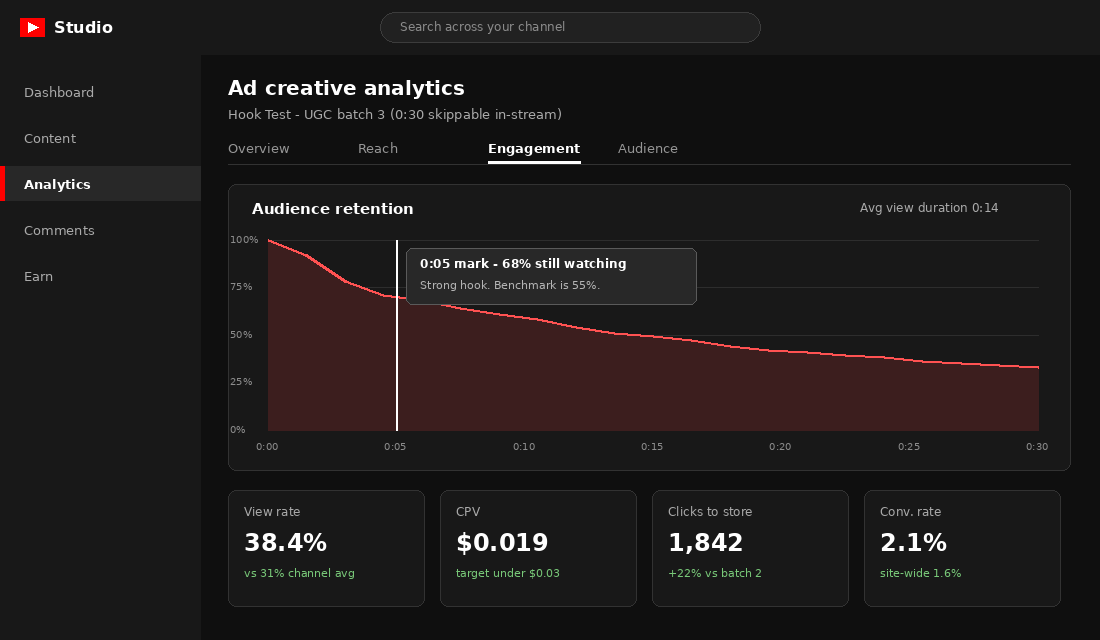
On skippable in-stream ads, the skip button appears at five seconds. That is your entire audition. If the first five seconds do not earn the next ten, nothing else in the video matters, no matter how beautiful it is.
The structure that works for DTC, over and over, is hook, problem, proof, offer:
- Hook (0 to 5 seconds). Name the viewer or name the problem. “If your kid’s school shoes are destroyed by term two, this is for you.” Show the product doing something visual in the first two seconds. Never open with a logo animation.
- Problem (5 to 12 seconds). Agitate the specific pain your buyer already feels, in their language. Pull phrasing straight from your reviews and post-purchase surveys.
- Proof (12 to 25 seconds). Demonstration beats claims. Show the stress test, the before and after, the review count, the real customer clip. One strong proof point beats three weak ones.
- Offer and CTA (final 5 seconds). One product, one destination, one instruction. “Shop the range” underperforms “Get the Weekender in tan” almost every time we test it.
Two Australian brands are worth studying here. Koala built its entire early growth on video creative so effective that both YouTube and Facebook used it as a benchmark for click-through, view-through and conversion rates, and its “Never Uncomfortable” campaign lifted purchase consideration more cost-efficiently than competitors spending 4 to 5 times more. HiSmile on the Gold Coast took a different route: massive volume of short, punchy video creative, tested relentlessly, which carried it from a $20k start to a global brand. Different styles, same lesson. Creative volume and testing discipline beat production polish.
Practically, brief creative in batches of three to five variants that share a body but swap the first five seconds. Film on a phone if you must. A founder talking to camera with a strong hook will outperform a $15,000 brand film with a slow open. Aim for 30 seconds for in-stream, plus a 15 second vertical cut for Shorts, where Google reports campaigns using Shorts creator-style inventory saw a 30% conversion lift.
Part 3: Set Up the Campaign Architecture That Google Actually Rewards
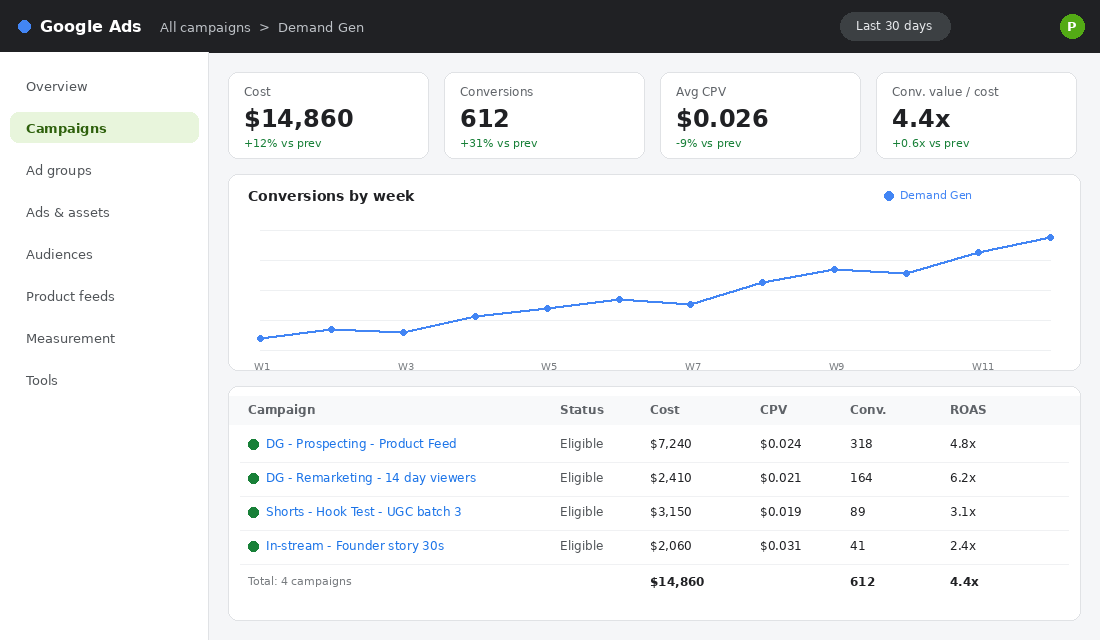
Here is the account structure we set up for Circle members adding YouTube to an existing Meta and Search mix. Three campaigns, nothing exotic:
- Campaign 1: Demand Gen prospecting with product feed. Your workhorse. Target ROAS bidding once you have 30 plus conversions a month, Maximise Conversions before that. Feed connected from Shopify. Start at $70 to $100 a day. Audience signals from your customer list and top lookalike-style segments, then let Google expand.
- Campaign 2: Demand Gen remarketing. Site visitors, video viewers and cart abandoners from the last 14 to 30 days. Offer-led creative. Start at $20 to $40 a day and watch frequency; past 4 to 5 impressions per person per week you are burning money.
- Campaign 3: Creative testing. A separate low-budget campaign where new hooks fight it out before winners graduate into campaign 1. Keeps your learning machine running without destabilising the workhorse.
The tool that makes this work end to end is the free Google & YouTube app for Shopify. Setup takes about 20 minutes:
- Install the Google & YouTube app from the Shopify App Store and sign in with the Google account that owns your Ads account.
- Connect or create your Google Merchant Center account and approve the automatic product sync. Fix any disapprovals (usually missing GTINs or shipping settings) before spending a dollar.
- Link your Google Ads account inside the app, then confirm the link in Google Ads under Tools and Linked Accounts.
- Turn on enhanced conversions and confirm your purchase conversion is recording with cart data. Do not skip this; smart bidding is blind without it.
- Link your YouTube channel to Google Ads so you can use viewer audiences and run product feeds on your videos.
If you are already running Performance Max, keep it. Demand Gen and PMax hunt in different territory and the overlap is smaller than most founders fear. We covered the feed and asset group side of that system in our Performance Max playbook, and the same feed hygiene rules apply here.
Part 4: Measure Like an Operator, Not a Platform
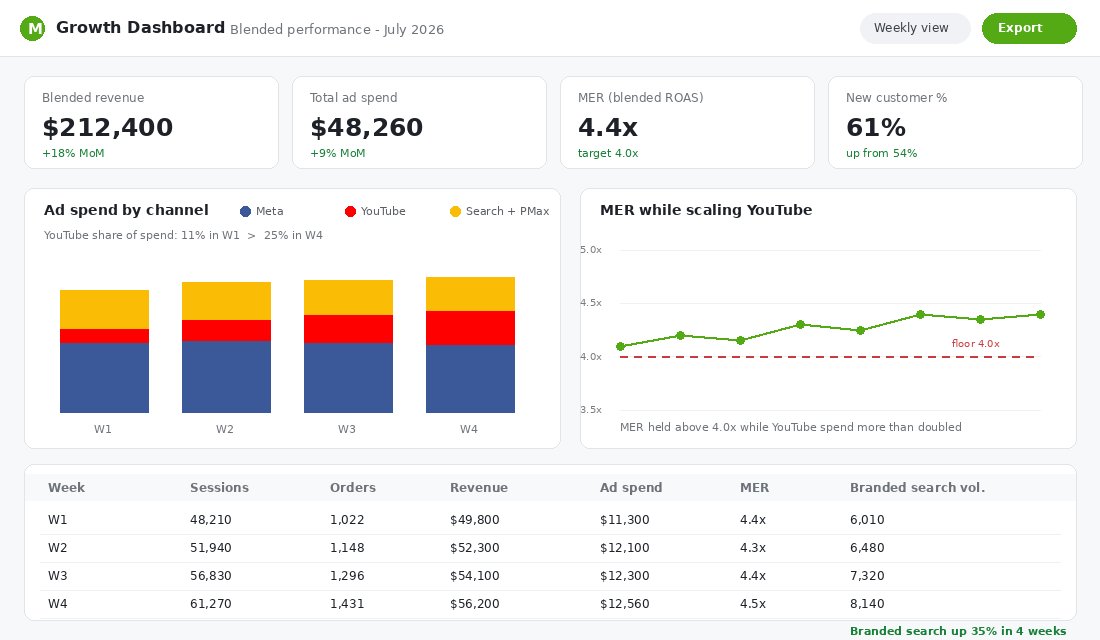
YouTube will look like it is failing in the first month if you judge it the way you judge Search. Video creates demand that closes later, through branded search, direct visits and Meta remarketing. Last-click attribution hands those wins to other channels and tells you YouTube did nothing.
So measure at two levels.
Platform level, for creative decisions. CPV between $0.02 and $0.03 is healthy for ecommerce skippable in-stream; above $0.05 usually means the creative or targeting is off. Watch five second retention, view rate against your account average, and click-through to the store. These numbers tell you which ad wins, not whether the channel works.
Business level, for budget decisions. Track blended revenue divided by total ad spend (your MER), new customer percentage, and branded search volume, week by week, before and after YouTube enters the mix. If MER holds above your floor while total spend grows and branded search climbs, YouTube is working regardless of what its own dashboard claims. We walk through this exact discipline in the blended ROAS playbook.
One more foundation: your tracking has to be watertight before you scale anything. Server-side purchase data and enhanced conversions are the difference between smart bidding that learns and smart bidding that guesses. If you have not audited yours since iOS made a mess of everything, run through the conversion tracking playbook first.
Part 5: Run the Weekly Scale Loop
YouTube rewards patience and punishes fiddling. Smart bidding needs two to three weeks of stable settings to learn, and every dramatic budget or bid change resets part of that learning. So we run a boring, repeatable weekly loop:
- Monday: read the board. Pull CPV, five second retention, CTR and conversions per campaign, plus your blended MER row for the week. Fifteen minutes, one spreadsheet.
- Tuesday: kill and promote. Any test ad with retention under 50% at five seconds or CPV above $0.05 after $150 of spend gets paused. The best performer graduates to the prospecting campaign.
- Wednesday: brief one new batch. Three new hooks on the current winning body. Your creative pipeline should never be empty; creative fatigue on YouTube is slower than Meta but it still arrives.
- Friday: adjust budgets, gently. If the account beat its ROAS target for the week, lift budgets 20%, no more. If it missed, hold and let the algorithm stabilise rather than slashing.
That 20% rule matters. Founders who double budgets overnight watch CPAs spike, panic, cut spend, and conclude YouTube does not work. The brands that win treat it like compound interest: small consistent increases on top of a stable, learning account.
The Three Mistakes That Kill Most YouTube Accounts
Before the pieces come together, a quick word on how they usually fall apart. After watching hundreds of Aussie Shopify founders take a run at this channel, the failures cluster into three patterns.
Repurposing a Meta ad and calling it a YouTube strategy. A square video built for a sound-off feed lands differently on a sound-on platform where people settle in to watch. Cut for the placement: 16:9 with audio doing real work for in-stream, vertical and fast for Shorts.
Judging the channel in week one. Smart bidding needs conversion volume to learn, and view-through demand takes weeks to show up in branded search. Commit to a six week test with a budget you can sustain, or do not start.
Scaling before tracking is clean. If enhanced conversions are not firing and your feed has disapprovals, every dollar of extra budget just teaches the algorithm faster in the wrong direction. Foundations first, then fuel.
How the Five Parts Compound
Here is what actually happens when the system runs for a quarter, because no single part explains it.
The job definition keeps your creative honest. Honest creative holds the five second mark, which drops your CPV, which means the same budget buys more qualified attention. The campaign architecture feeds that attention into a product feed that turns views into sessions. Clean measurement catches the demand YouTube creates in other channels, so you scale with confidence instead of killing a working channel. And the weekly loop keeps fresh hooks flowing so the whole machine does not fatigue.
Meanwhile something quieter is happening. Remember that 68% of Demand Gen conversions come from people your Search ads never touched. Those people start searching your brand name. Your Meta remarketing pools grow. Your email list fills with subscribers who already trust you because they have watched you for 30 seconds instead of scrolling past a static image. YouTube is not just a channel; it is a demand engine that makes every other channel cheaper.
Your 7-Day YouTube Ads Launch Checklist
Steal this and run it next week:
- Day 1: Foundations. Install the Google & YouTube app, connect Merchant Center, fix product disapprovals, confirm enhanced conversions fire on a test purchase.
- Day 2: Define the job. Write the one-sentence job for your first campaign. Pick remarketing or cold prospecting based on your traffic.
- Day 3: Mine the language. Pull your last 100 reviews and survey responses. Write down the exact phrases customers use for the problem you solve. These become your hooks.
- Day 4: Brief the batch. Script three 30 second videos with the hook, problem, proof, offer structure, sharing a body and swapping hooks. Add one 15 second vertical cut.
- Day 5: Film and edit. Phone plus founder plus product is enough. CapCut covers the edit.
- Day 6: Build campaigns. Demand Gen prospecting with feed, Demand Gen remarketing if your audience is big enough, plus the test campaign. Set budgets you can hold for three weeks without flinching.
- Day 7: Set the scoreboard. Build the weekly tracker: spend, CPV, retention, conversions, blended MER, branded search volume. Book the Monday review in your calendar.
Then do not touch it for two weeks except to kill obviously broken ads. Let the machine learn.
Where This Fits in Your Growth System
YouTube ads sit inside Promotion in the 10 P’s, but the reason they work for some brands and not others usually lives elsewhere: a product feed that is a mess, tracking that leaks, or an offer that was never strong enough to survive cold traffic. Fix the system, not just the channel.
With 21 million Australians watching and most of your competitors still ignoring the platform, the window is open. It will not stay underpriced forever. Meta did not either.
Inside eCommerce Circle, paid acquisition is one of the core pillars we work on with every member, and YouTube is the channel we are pushing hardest right now for brands stuck at a Meta plateau. If you want a second opinion on your setup, let’s talk.