Open Shopify analytics. It says you did 42 sales yesterday. Open Meta Ads Manager. It claims 61. Open your Google Ads dashboard. That one wants credit for 28 of the same orders. Three tools, three numbers, and you are about to decide where to put tomorrow’s budget based on figures that do not agree with each other.
What’s in This Article
This is the quiet problem eating margin in most Aussie Shopify stores. Not the ad creative. Not the landing page. The measurement layer underneath every decision you make. When the data is broken, your best optimisation work is just guessing with extra steps.
Here is the part most founders never get told: a 30 to 60 percent gap between what Shopify reports and what Meta reports is completely normal, and a 2x gap is not rare. So if you have been staring at those mismatched dashboards thinking one of them is “wrong”, relax. They are both right, in their own way, and that is exactly the issue. This playbook is the five-layer system we use with hundreds of Aussie Shopify founders to close the data gap and get back to making ad decisions you can actually trust.
Why Your Numbers Lie (And Why It Got Worse)
Before you fix anything, you need to understand the three forces quietly deleting your conversion data. Get these clear and the rest of the playbook makes sense.
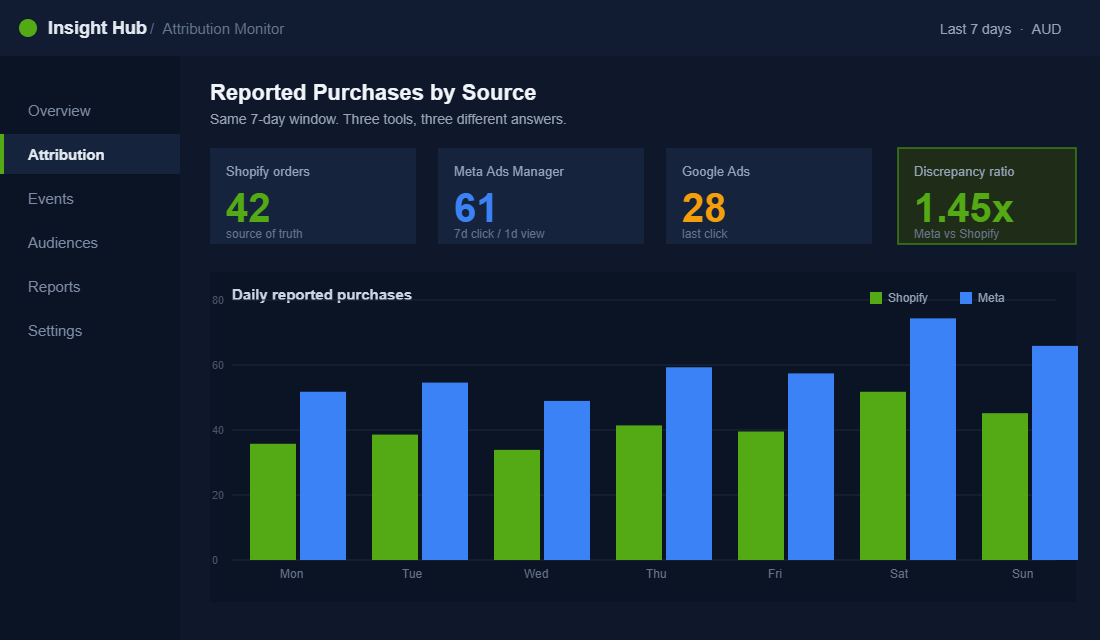
The first is browser-side signal loss. The old model relied on a pixel firing in the customer’s browser. Apple’s App Tracking Transparency broke that. Tracking dropped by roughly 70 percent after ATT rolled out, and the global opt-in rate sat at just 13.85 percent by Q2 2024. In plain terms, fewer than two in every ten iPhone users let the pixel follow them. For an Aussie store with a heavy mobile audience, that is most of your traffic going dark.
The second is pixel capture decay. Ad blockers, browser privacy settings, and ITP (Intelligent Tracking Prevention) all chip away at events before they ever reach Meta. Facebook Pixel signal loss has been measured between 12.5 and 37 percent post iOS 14.6, with pixel capture rates falling from 80 to 95 percent of backend sales down to just 60 to 70 percent. That means up to four in ten of your real sales never get matched to the ad that drove them.
The third is attribution philosophy. Shopify mostly uses last-click on the same device. Meta uses multi-touch across devices, plus view-through, plus modelled (machine-learning estimated) conversions to fill the gaps. Someone sees your ad on their phone at lunch, then buys on their laptop that night. Meta proudly claims it. Shopify never saw the connection. Neither is lying. They are answering different questions.
Stack those three forces together and you get the mess on your screen. The good news: you can recover most of the lost signal. Brands that add server-side tracking on top of the pixel typically recover 20 to 30 percent of lost conversion data, dragging event loss from 30 to 40 percent down to around 5 percent. That recovered signal is what feeds Meta’s algorithm better targeting and gets you cheaper conversions. Let’s build it.
Layer 1: Fix the Foundation With Shopify Customer Events
You cannot bolt advanced tracking onto a broken base. Layer one is making sure Shopify itself is emitting clean, complete events before you send them anywhere. Most stores skip this and wonder why their fancy attribution app still reports garbage.
Shopify’s Customer Events (found under Settings, then Customer events) is the native event layer. Since Checkout Extensibility replaced the old checkout.liquid, this is the only sanctioned place to manage tracking on checkout and thank-you pages. If you are still running scripts hardcoded into a legacy checkout, that is a ticking deadline, not a setup.
Here is your foundation checklist:
- One pixel, not five. Audit your theme and apps for duplicate Meta pixels. Two pixels firing the same Purchase event double-count sales and corrupt your numbers worse than no tracking at all.
- Use the native channel. Install Meta through the official Facebook & Instagram channel and Google through the Google & YouTube channel. These route through Customer Events properly instead of injecting fragile theme code.
- Confirm the full funnel fires. You want ViewContent, AddToCart, InitiateCheckout, and Purchase all reporting. Missing mid-funnel events starve the algorithm of the signals it optimises on.
- Match your currency and values. Every Purchase event should pass the real order value in AUD. Events firing without a value tell Meta nothing about what is actually profitable.
Get this layer right and you have a clean signal at the source. Everything above this point is amplification. Everything below a broken foundation is wasted spend.
Layer 2: Go Server-Side With the Conversions API
This is the single highest-impact move in the entire playbook. The browser pixel asks the customer’s device for permission, then loses the argument most of the time. Server-side tracking does not ask. The Meta Conversions API (CAPI) sends the event from Shopify’s servers directly to Meta’s servers, bypassing ad blockers, ITP, and the ATT prompt entirely.
The mechanism that matters here is deduplication. You run the browser pixel and the server-side CAPI at the same time, each event tagged with a shared event ID. When both arrive, Meta keeps one and discards the duplicate. When only the server version arrives (because the browser one was blocked), you still get the conversion. That redundancy is how stores claw back the 20 to 30 percent of events the pixel alone drops.
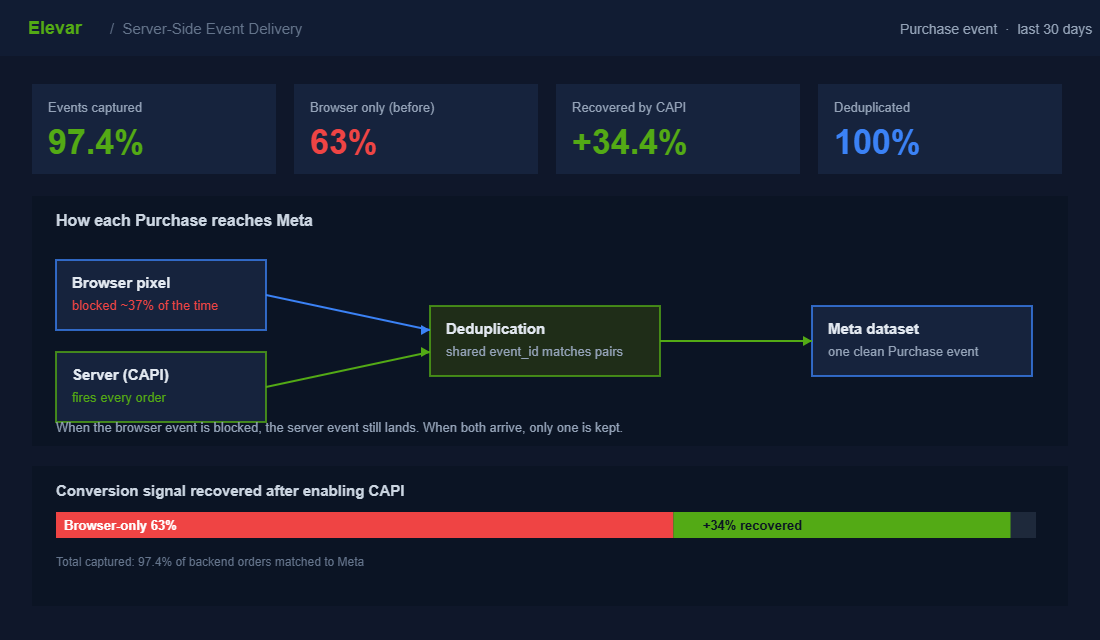
Shopify’s native Facebook & Instagram channel includes a CAPI integration out of the box. Turning it on is the baseline. But the native version sends a limited set of customer parameters, which caps how well Meta can match your events to real accounts. For stores spending serious money on ads, a dedicated server-side app such as Elevar or a server-side Google Tag Manager container gives you control over exactly what gets sent and dramatically lifts match quality.
Treat the native CAPI as the floor, not the ceiling. If you are spending five figures a month on Meta and still relying on the browser pixel alone, you are handing the algorithm a blindfold and asking it to find your best customers.
Layer 3: Win the Event Match Quality Game
Sending events server-side is only half the job. The events have to actually match to real Meta accounts, and that is scored. Event Match Quality (EMQ) is Meta’s 0 to 10 rating of how well your conversion data connects to genuine Facebook and Instagram users. A higher EMQ means better attribution, better optimisation, and lower cost per acquisition. It is the most ignored lever in DTC tracking.
EMQ is driven by how many customer identifiers you pass and how clean they are. The more matching signals you send, the more confidently Meta connects the sale to the account that saw the ad. Aim for an EMQ of 7 or higher on your Purchase event. Most stores running pixel-only sit well below that and never check.
The identifiers that move EMQ, roughly in order of impact:
- Email and phone number. Hashed before sending, these are the strongest matching signals. Server-side tracking can pass the real checkout email even when the browser cannot.
- First and last name. Cheap to include, and they meaningfully lift the match rate when combined with email.
- Address fields. City, state, postcode, and country from the shipping form add another matching dimension Meta can use.
- External ID and IP. A stable customer identifier plus the server IP address help stitch sessions together across visits.
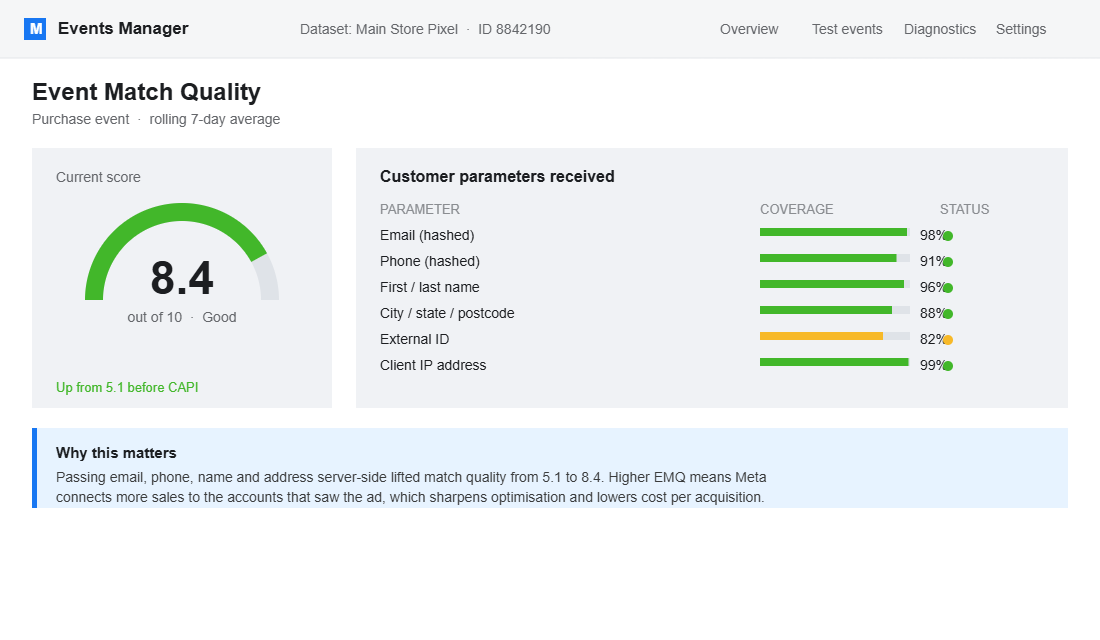
Check your current score in Events Manager under your dataset’s diagnostics. If your Purchase EMQ is sitting at 4 or 5, you are leaving conversions and cheaper acquisition on the table. Pushing it to 8 or 9 is often the difference between a campaign that scales and one that stalls.
Layer 4: Pick One Source of Truth and Hold the Line
Here is where most founders sabotage themselves. They fix their tracking, then keep flicking between three dashboards and believing whichever number is highest that day. Better data with no decision discipline is just better confusion.
You need one source of truth for the business, and a clear rule for how you read the ad platforms. The model we coach is simple. Shopify (or your backend) is the single source of truth for revenue, because it counts actual booked orders and real AUD in the bank. The ad platforms are directional inputs you use to allocate budget between channels, never the figure you report as company revenue.
Then lock your Meta attribution window and stop changing it. Most Shopify stores read cleanest on 7-day click plus 1-day view. For a conservative view, use 7-day click only. The reason this matters: switching from 7-day click plus 1-day view down to 1-day click cuts reported conversions by around 40 percent. If you change the window every week you will think your campaigns are crashing and recovering when nothing actually moved.
For the real arbiter across channels, a blended metric beats platform-reported ROAS every time. Marketing Efficiency Ratio (total revenue divided by total ad spend) ignores the attribution squabble entirely because it only uses numbers you can bank. We go deep on this in our Marketing Efficiency Ratio playbook, and it is the number we steer most member ad accounts by.
Layer 5: Run a Weekly Tracking Health Check
Tracking is not a set-and-forget job. Apps update, themes get edited, a developer ships a change, and suddenly your Purchase event stops firing on mobile and nobody notices for three weeks. By then you have made a month of budget decisions on broken numbers. The fix is a five-minute weekly ritual.
Every Monday, before you touch a single campaign, run this check:
- Discrepancy ratio. Divide Meta-reported purchases by Shopify orders for the same window. If your normal is 1.4x and it suddenly reads 0.6x or 3x, something broke. Investigate before you optimise.
- EMQ score. Glance at your Purchase event match quality in Events Manager. A sudden drop means a parameter stopped passing, usually after an app or theme update.
- Event freshness. Confirm all four funnel events fired in the last 24 hours. A silent zero on AddToCart is a fire, not a footnote.
- Spend versus blended return. Check total spend against total revenue. Your blended return is the honest scoreboard, and it never argues with itself.
Write these four numbers in the same spreadsheet row every week. Within a month you will spot breakages the day they happen instead of the day your accountant asks why ad spend doubled. Pair this with the diagnostic habits in our Shopify A/B Testing playbook and you stop flying blind on both measurement and optimisation.
How to Turn On the Conversions API This Week
Enough theory. Here is the exact sequence to get server-side tracking live, starting with the free native option and ending with the version serious spenders run. You can complete the first half in an afternoon.
- Install the official Facebook & Instagram channel. In Shopify admin, go to Settings, then Apps and sales channels, and add the channel published by Meta. Avoid third-party “all-in-one pixel” apps for this step; you want the source of record clean.
- Connect your Business Manager and dataset. Link the channel to your Meta Business account and select the pixel (now called a dataset) you already run ads against. Do not create a fresh one and split your history.
- Enable Conversions API and maximum data sharing. Inside the channel’s data-sharing settings, switch tracking to the highest level. This is what activates the server-to-server feed alongside the browser pixel.
- Verify deduplication in Events Manager. Open your dataset, check the Purchase event, and confirm you see both “Browser” and “Server” as active sources with deduplication flagged. If you only see one, the loop is not closed.
- Scale with a dedicated tool. Once the native version is humming, stores spending heavily move to Elevar or a server-side Google Tag Manager container for richer parameters and cross-platform control (Meta, Google, TikTok from one clean data layer).
This is not just enterprise territory. Plenty of recognisable Aussie Shopify brands run server-side tracking as standard now. Skincare and beauty names like Frank Body, oral-care disruptor HiSmile, and luggage brand July all operate at the scale where measurement precision directly decides ad budget, and the same approach works for a store doing a fraction of their volume. The tooling has come down market. The only thing standing between most founders and a clean signal is an afternoon of setup.
A Word on Speed: Tracking and Performance Are Linked
One trap worth naming. In the rush to recover lost data, founders stack five tracking apps, three pixels, and a Google Tag Manager container heavy enough to sink a barge. Then their store loads like it is 2009 and their mobile conversion rate, already 30 to 40 percent lower than desktop, drops further.
Server-side tracking actually helps here, because it moves the work off the customer’s device and onto a server. That is one of the underrated wins of going server-side: better data and a lighter page at the same time. But it only holds if you remove the redundant browser-side scripts you no longer need. Audit your tag load the same way you audit your event quality. If you have not looked at your store’s load speed lately, start with our Shopify Site Speed playbook, because a fast store that tracks cleanly converts on both fronts.
The Compound Effect: Why These Five Layers Multiply
Each layer is useful alone. Together they compound, and that is the whole point.
A clean foundation (Layer 1) means the events you send are accurate. Server-side delivery (Layer 2) means they actually arrive. High match quality (Layer 3) means they connect to real people, so Meta’s algorithm learns who your buyers are and finds more of them cheaper. A single source of truth (Layer 4) means you act on the recovered data with confidence instead of second-guessing. And the weekly health check (Layer 5) means the whole system stays honest over time instead of quietly rotting.
Here is what that does to the business. When your tracking recovers 20 to 30 percent more conversion signal and your EMQ climbs from 5 to 8, Meta’s optimisation gets sharper, your cost per acquisition falls, and your reported ROAS finally lines up with your bank balance. You stop turning off winning campaigns because the pixel under-reported them. You stop scaling losers because a generous view-through window flattered them. For a store sitting at the average Shopify conversion rate of 2.5 to 3 percent, fixing the measurement layer is often what opens the climb toward the top 20 percent (above 3.2 percent) without changing a single thing about the product.
Most founders chase a new ad angle or a fresh creative when growth stalls. The operators who pull ahead fix the lens they are looking through first. You cannot optimise what you cannot measure, and right now, if you are running the browser pixel alone, you are measuring about 60 percent of your own business.
Consent Mode and the Australian Privacy Shift: Track Cleanly Without Breaking the Law
Tracking is getting harder, not easier, and the privacy rules are tightening at the same time. With the Privacy Act reforms reshaping how Australian businesses handle customer data, the days of dropping every cookie on every visitor and sorting it out later are over. The good news is that clean, consent-aware tracking and accurate data are the same project, not competing ones.
The piece most Aussie stores are missing is Google Consent Mode v2. Without it, when a shopper declines cookies you lose that conversion from your reporting entirely, which makes your real performance look worse than it is and starves Meta and Google of the signals they need to optimise. With Consent Mode wired to a proper consent banner, the platforms model the gaps and recover a meaningful share of those lost conversions instead of dropping them.
- Install a real CMP. Tools like Cookiebot or Pandectes manage consent properly and feed the signal into Consent Mode, rather than a cosmetic banner that blocks nothing.
- Lean on server-side events. Meta’s Conversions API and server-side GA4 typically recover 10 to 15% of events lost to browser restrictions and ad blockers, and they degrade far more gracefully than pixels alone.
- Chase event match quality. Passing hashed email, phone and name with each server event lifts your Meta Event Match Quality score, and pushing that score from the 4-range into the 7-plus range visibly sharpens attribution and retargeting.
Once your signal is clean, the downstream decisions get easier. Accurate conversion data is what makes your monthly analytics review trustworthy, and it is the foundation every retargeting audience is built on. Garbage in, garbage out applies to ad spend more than anywhere else in the business.
Your Tracking Health Checklist
Run through this once to set up, then the bolded items weekly:
- Audit for and remove duplicate pixels across theme and apps
- Install Meta and Google via Shopify’s native sales channels
- Confirm ViewContent, AddToCart, InitiateCheckout and Purchase all fire with AUD values
- Enable the Conversions API (native as the floor, Elevar or server-side GTM to scale)
- Verify event deduplication is working with a shared event ID
- Pass email, phone, name and address as hashed parameters to lift EMQ to 7 or higher
- Lock your Meta attribution window at 7-day click plus 1-day view and leave it
- Name Shopify your single source of truth for revenue
- Adopt a blended return metric as the cross-channel arbiter
- Weekly: check discrepancy ratio, EMQ, event freshness, and blended return
Inside eCommerce Circle, conversion tracking and attribution is one of the core pillars we work on with every member, because every other decision in the business rides on top of it. If you want a second opinion on whether your numbers can be trusted, let’s talk.