You launch the campaign on a Thursday. The creative is the best you have shot all year, the hero image is doing the heavy lifting on the homepage, and by Sunday the ROAS is finally where you wanted it. Then on Monday morning an email lands with a subject line that has a file reference number in it, and someone you have never heard of is asking for money because of a photo you paid an agency for two years ago.
What’s in This Article
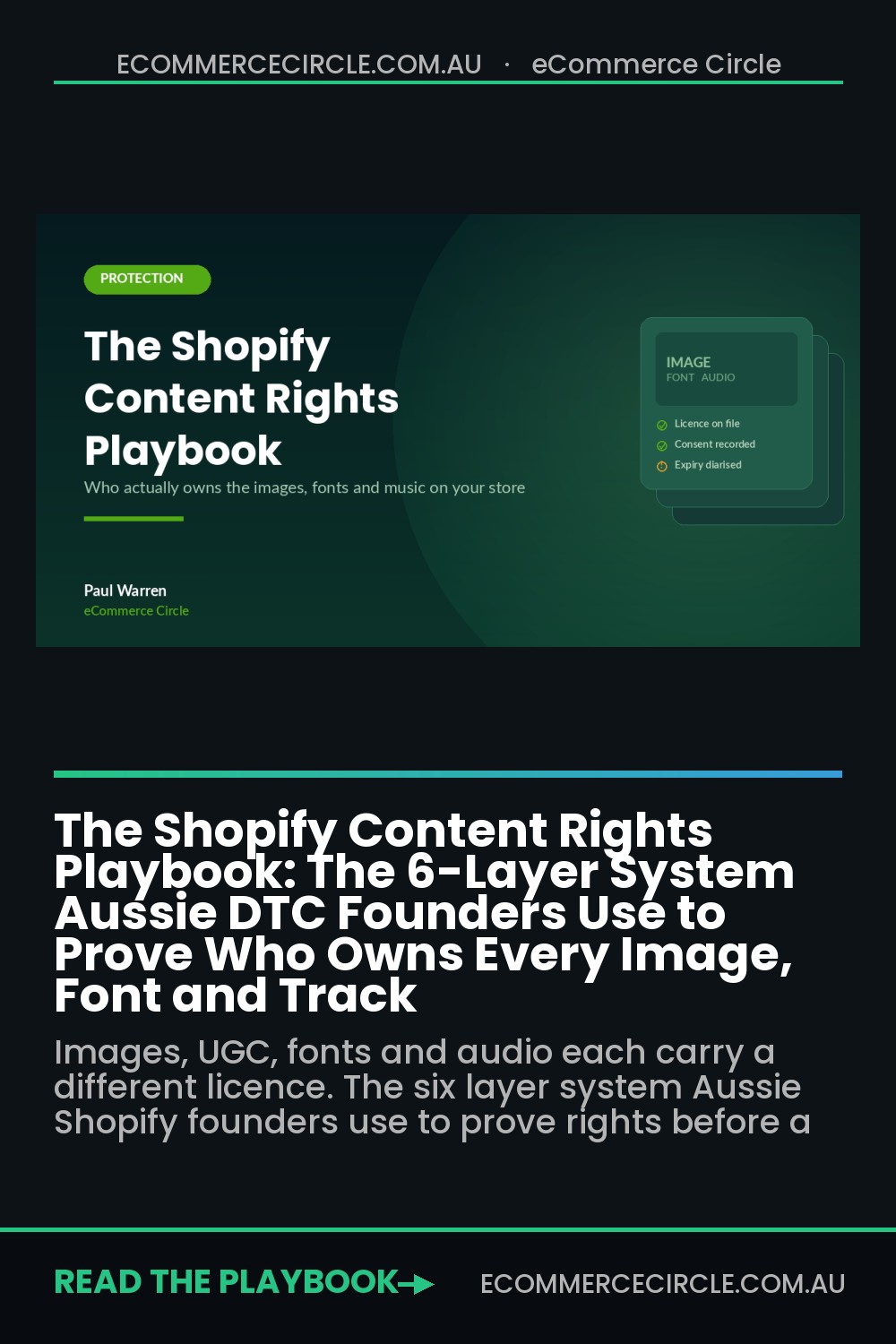
Most Aussie founders treat content rights as a legal problem. It is not. It is an operations problem that shows up as a legal bill. The photo, the customer video, the font in your theme and the track under your Reel are four separate licences, each with different terms, and almost nobody has them written down anywhere.
The numbers make it worth fixing. Getty Images runs an automated enforcement programme that crawls the open web for its licensed images and sends settlement demands that typically land between 800 and 5,000 US dollars per image. Under the Copyright Act 1968, an Australian corporation found to have infringed can face financial penalties up to 585,000 dollars, and individuals up to 117,000 dollars. Those are ceilings, not averages, but the point stands: a five dollar shortcut on an image can turn into a four figure invoice, and a lazy UGC repost can turn into a takedown mid-campaign.
This is the six layer system we run with members to make content rights boring again. Boring is the goal. You want this to be a fifteen minute weekly habit, not a fire drill.
Why “I found it online” is not a defence in Australia
Here is the thing that catches out founders who read a lot of American marketing content. Australia does not have fair use. We have fair dealing, which is a much narrower set of specific exceptions: research and study, criticism and review, parody and satire, reporting news, and legal advice. Running a product photo on a collection page is none of those things.
Copyright in Australia is also automatic. There is no register you need to check and no notice the creator has to file. The moment a photographer presses the shutter or a customer films a clip on their phone, they own it. Public visibility does not change that. A hashtag is not a licence. Tagging your brand is not a licence. A comment saying “feel free to share” is closer, but it is still a screenshot of a conversation, not a written grant of rights.
The other misconception worth killing early: taking the image down does not undo the exposure. If a photo was live on your product page for eleven months, the infringement happened across those eleven months. Deleting it stops the bleeding. It does not close the file.
So the whole system has to be preventative. You cannot audit your way out of this after the demand letter arrives. You have to know what you own before you publish.
Layer 1: Build the rights register before you build the next campaign
Every store I have looked at that got burned had the same root cause. Nobody could answer the question “where did this file come from?” without asking a freelancer who left eighteen months ago.
The fix is a single sheet. Not a legal document, not a system you buy. One tab, six columns, and a rule that nothing gets published until it has a row.
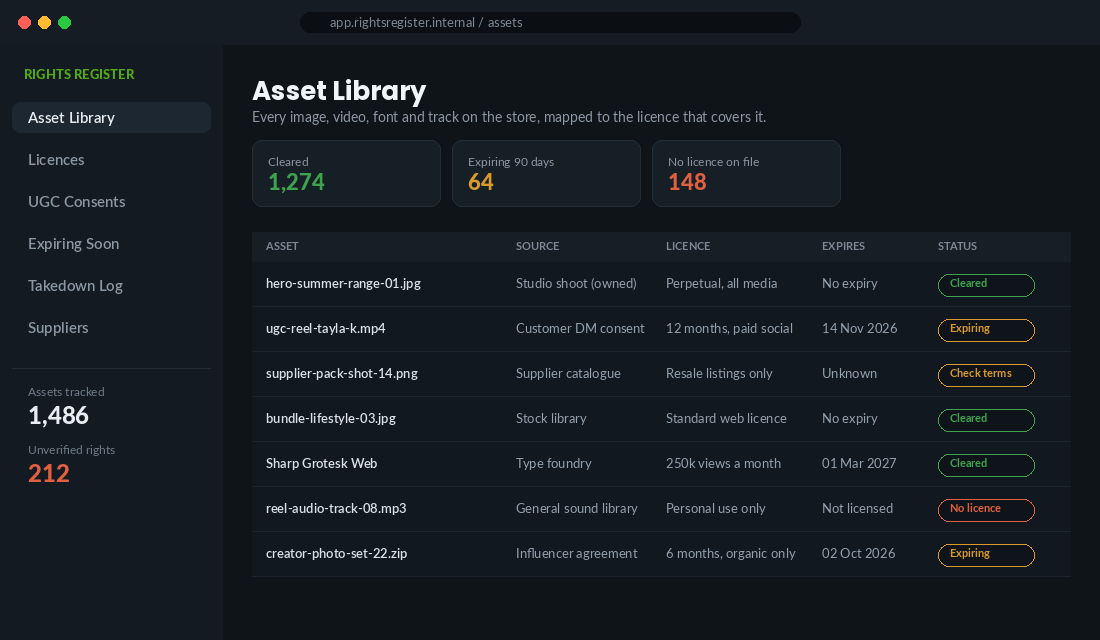
Your six columns:
- Asset filename. The exact file as it sits in Shopify Files or your DAM. Vague names like “hero final v3” are how assets get orphaned.
- Source. Owned studio shoot, stock library, supplier catalogue, customer DM, influencer agreement, type foundry, sound library. Six sources cover almost everything.
- Licence scope. What you are actually allowed to do. “Organic social only” and “all paid media” are wildly different permissions and people conflate them constantly.
- Territory. Matters the moment you turn on Shopify Markets. Plenty of stock and talent agreements are Australia only.
- Expiry. Most creator and talent licences run 6 or 12 months. Put the date in, then put a calendar reminder 30 days before it.
- Evidence link. A link to the signed agreement, the invoice, the licence PDF or the consent email. If you cannot link to proof, the status is not “cleared”.
Do not try to backfill 1,400 assets in one weekend. Start with the twenty highest exposure files: the homepage hero, the top five product page image sets, and every creative currently running in a paid ad. That is where a claim actually hurts, because that is where the traffic is.
Layer 2: Get UGC consent in writing, with a template you actually send
Customer content is the highest converting creative most Aussie brands have, and it is also the most casually stolen. If you are still building your UGC engine, our Shopify UGC playbook covers the collection side. This layer covers the part everyone skips.
The creator owns the copyright in their photo or video. They also have separate personality and privacy interests in their own face. A repost to your Story under an implied nod is one thing. Cutting that clip into a Meta ad with spend behind it is another, and that is where photographers and creators start engaging lawyers. In 2017 a North Carolina photographer sued Anheuser-Busch after the brand allegedly lifted a registered photo from her Facebook page and used it in a retail campaign. Big brand, small photo, real litigation.
Your consent request needs five things in it. Send it as a DM or email, and save the reply.
- The specific asset. Link to the exact post or attach the file. “Your content” is not specific enough to enforce.
- The uses you want. Name them: website, product pages, email, organic social, paid social, in store screens. If you might run it as an ad, say so now, because going back later is awkward and often gets a no.
- The term. 12 months is the sensible default. Perpetual is cleaner for you but a lot of creators will push back, and a 12 month grant you can prove beats a perpetual one you cannot.
- The territory. “Australia and New Zealand” or “worldwide”. Pick deliberately.
- The confirmation ask. End with a line like “reply YES to confirm you are happy for us to use this as described”. A one word reply against a clear scope is a workable record.
One more thing that sits right next to this and catches Australian brands specifically. If you gift product in exchange for a review or a post, the relationship has to be disclosed. In its first ever penalty of this kind, the ACCC issued infringement notices totalling 39,600 dollars to Tomsem Consolidated, trading as PhotobookShop, after the business instructed influencers on 107 occasions not to disclose they had been gifted product, and edited review wording to be more favourable. The gifted items were worth roughly 50 to 400 dollars each. The investigation started because one influencer reported the agreement to the regulator.
Read that last sentence again. The risk in your creator programme is not just the platform. It is the creator you asked to stay quiet. Our Shopify consumer law playbook goes deeper on the ACL side of this.
Layer 3: Read what your supplier’s image terms actually say
This one quietly affects thousands of Australian stores, especially anyone reselling imported or wholesale ranges.
Suppliers hand you an image pack and everyone assumes it is a free-for-all. Read the terms and you usually find something narrower: permission to use the images “in connection with the resale of the goods”. That covers your product page. It very often does not cover a paid Meta ad, a billboard, a printed catalogue, or a lifestyle composite you built in Canva using their studio shot as the base.
Worse, the supplier frequently does not own the images either. They licensed them from a photographer for their own catalogue, and that photographer never agreed to twelve Australian retailers running the shots in paid social. When the photographer’s monitoring service finds the image on your ad, you are the one holding it.
What to do, in order:
- Ask the supplier one email question. “Do you own the copyright in these images, or licence them? What uses are we permitted, and in which territories?” Save the answer in your register. That email is your evidence.
- Never use supplier images in paid media unless the answer above explicitly allows it. This is the single most common gap I see.
- Shoot your own hero and lifestyle images for your top 20 SKUs. Supplier pack shots are fine for the fifth thumbnail. They should never be the image carrying your ad spend, both for rights reasons and because they look identical to every competitor. Our product photography playbook shows how to do this without a studio budget.
- Treat differentiation as the bonus. Owning your images gives you clean rights and a store that does not look like a catalogue reprint. That is a genuine conversion advantage, not just a compliance one.
Layer 4: Audit the licences you cannot see, fonts and audio
Images are the ones people worry about. Fonts and audio are the ones that actually blindside operators, because both look free at the point of use.
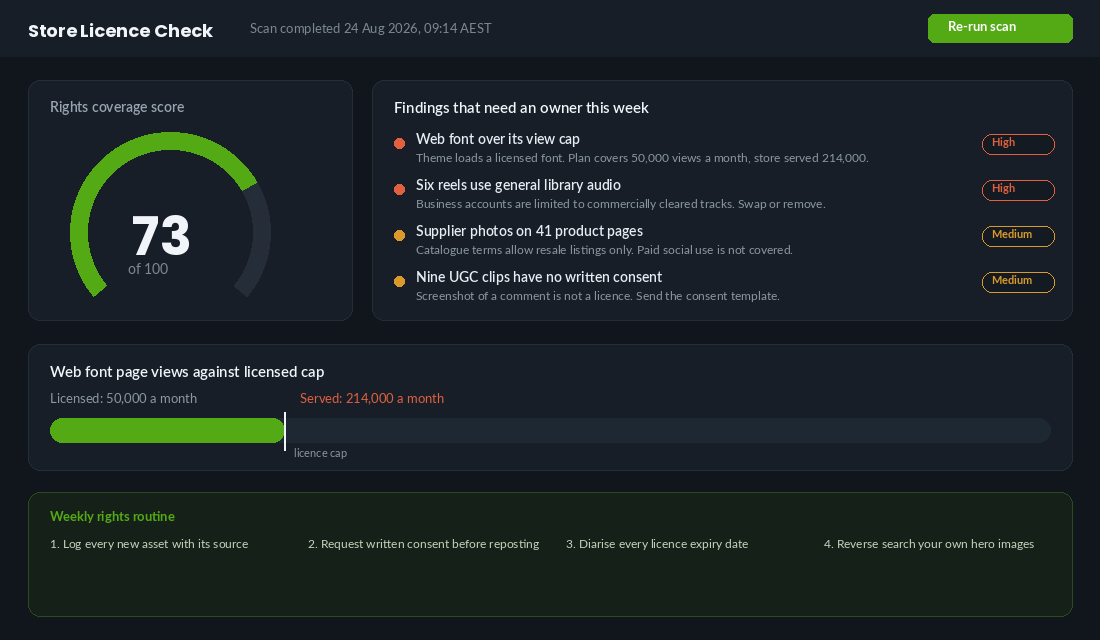
Web fonts are metered. Commercial web font licences are frequently sold against a page view cap. Under Monotype’s pay once web font terms, if no page view number is stated on the invoice, the licensed volume defaults to 50,000 page views per month. A store doing decent traffic blows through that in a fortnight, and the obligation to track usage and top up sits with you, not the foundry. Nobody switches your font off. You just accumulate an unlicensed position quietly until someone asks.
Check three places: the font files sitting in your theme assets, any foundry script tags in theme.liquid, and whatever your designer installed in a page builder app. Then compare your actual monthly sessions in Shopify analytics against the cap on the invoice.
Audio is stricter for you than it is for your customers. Once your account is a business account, the platforms assume everything you post is commercial. TikTok restricts business accounts to the Commercial Music Library by default, and it is not a toggle you can override. Instagram limits business accounts to the Meta Sound Collection, roughly 14,000 commercially cleared tracks, even for organic posts.
Two traps follow from that. First, if a track was added while the account was personal, or by a creator on their personal account, the clearance does not travel with the file. Second, a Commercial Music Library licence applies on TikTok only. Download that video and repost it to Reels or YouTube and you can trigger a mute or a claim on the other platform.
Practical rule for your team: creators deliver two versions, one with audio for their own channel and one clean cut with no music for yours. You add cleared audio at your end. It takes an extra line in the brief and removes the whole category of problem.
Layer 5: Monitor your own images, because the theft runs both ways
Layers one to four are defence. This one is offence, and it is the layer founders enjoy.
If you have invested in real photography, that photography is being lifted. Marketplace sellers use your hero shots on listings for inferior product. Offshore copycat stores clone your entire product page. Comparison and coupon sites scrape your imagery. Every one of those is a copyright infringement you own the rights to enforce, and unlike a trade mark dispute, you do not need a registration to act.
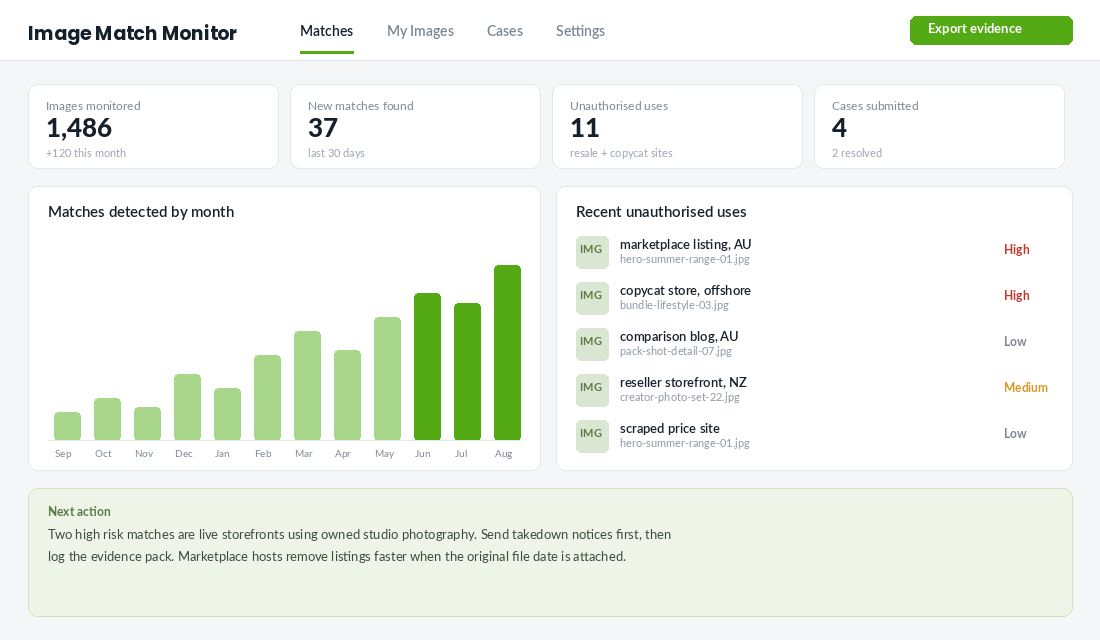
The tool to set up: Pixsy. It does reverse image matching across the web on an ongoing basis rather than a one-off search, and it handles case submission if you want to pursue a match. Setup takes about twenty minutes:
- Create an account and choose the option to upload images directly rather than connecting a social account. You want your studio originals in there, not compressed reposts.
- Export your top 30 to 50 hero and lifestyle images from Shopify Files. Prioritise the ones on your best selling product pages and your current ad creative.
- Upload them and let the first scan run. It usually takes a few hours, and the first batch of matches will be noisy.
- Triage every match into three buckets: authorised (your own retailers, press, affiliates), harmless (a blog crediting you), and unauthorised commercial use (someone selling something with your photo).
- Only the third bucket matters. Work it monthly, not daily.
If you want to test the idea before paying for anything, run your three best selling product images through TinEye and Google Lens by hand this week. Most founders find at least one listing they did not know about. That five minute exercise is usually what convinces people the monitoring layer is worth it. For the broader copycat problem, our brand protection playbook covers trade marks and marketplace enforcement.
Layer 6: The runbook for when a claim lands in your inbox
Two things go wrong when a demand letter arrives. Founders either panic and pay immediately, or they ignore it and hope. Both are expensive. Here is the sequence.
- Do not reply on day one. Nothing good comes from an emotional email. There is no same day deadline that matters.
- Verify the sender and the claim. A settlement demand from an enforcement programme is a private commercial letter, not a court order and not a fine. Confirm the sender is who they say they are before engaging, because this space attracts imitators.
- Find your evidence. Go to the register. If you have an invoice, a licence PDF or a written consent covering that exact asset and that exact use, the conversation is short and usually ends there. This is the moment layer one pays for itself.
- Preserve the page, then decide. Screenshot the live page and note the dates before you change anything. You need to know how long the asset was up, because that drives the number.
- Take it down and replace it. Removal does not erase past exposure, but leaving it live while you argue makes everything worse.
- Get advice before you agree to a number. Reported settlements are often negotiated well below the opening demand. An hour with an IP lawyer costs less than the gap between the first number and the last.
- Log the root cause. Which asset, which source, which process failed. Then close that hole so it cannot happen twice.
Keep this runbook in the same document as your rights register. The point is that whoever opens the inbox on a Monday morning knows exactly what to do without waiting for you.
The AI-Generated Asset Question Every Aussie Store Now Has to Answer
Half the product mock-ups, lifestyle backgrounds and ad variations flowing through Shopify stores in 2026 were generated or heavily edited by a tool: Shopify Magic, Canva Magic Studio, Midjourney, Adobe Firefly. That creates a rights gap most founders have not noticed, because nobody sent an invoice.
Two problems sit here. The first is ownership. Under the Copyright Act, protection attaches to works with a human author. An image produced purely from a text prompt, with no meaningful human creative input, is unlikely to attract copyright in Australia. You can use it, but you probably cannot stop a competitor using it either, and you cannot licence what you do not own. The second is input risk. If you upload a supplier photo, a stock image or a customer’s clip as the base for an AI edit, every restriction on the source still applies to the output. Generating a new background does not launder the licence.
- Add an “AI” source row to the register. Record the tool, the prompt, and any input files. If an input file was licensed for product pages only, the output inherits that limit.
- Keep humans in the creative. Owned photography as the base, AI for cleanup, extension and variation. That keeps a human author in the chain and gives you something you can actually defend.
- Check the tool’s commercial terms once, then note the date. Adobe Firefly and Shopify Magic are built on licensed or owned training sets and permit commercial use; other tools change terms often. Save a PDF of the terms on the day you start using them.
- Never generate a real person, a competitor’s product or a recognisable brand mark. Copyright is one exposure; misleading conduct under the ACL is the bigger one if a generated “customer” ends up in an ad.
Practical benchmark: for the creative you push into paid testing, aim for at least 70% of ad variations to be built on assets you own outright. AI can widen the funnel of variations you test, but the winning ad that ends up carrying $20,000 a month of spend should be one you can prove you own.
Why the six layers compound
Any one of these on its own is admin. Together they change how fast your marketing team can move.
The register means your media buyer can grab an asset at 9am and launch by 10am without a Slack thread asking whether they are allowed to. The consent template means your UGC pipeline produces ad-ready creative by default rather than organic-only content you have to re-clear. Clean supplier terms mean the images carrying your spend are yours, which lifts differentiation at the same time it removes risk. The font and audio audit removes two entire classes of surprise. Monitoring turns your photography from a cost into an asset you defend. The runbook means a claim costs you an afternoon instead of a fortnight.
The brands that get this right are not more cautious than everyone else. They are faster, because nobody has to stop and ask permission questions nobody can answer. Speed on the creative side is a real growth lever, and rights clarity is what makes it possible.
Your fifteen minute weekly rights routine
Put this in your calendar on a Friday and give it to whoever owns content. It is short on purpose, because a routine you skip is worth nothing.
- Minutes 1 to 4. Add every asset published this week to the register with its source, scope, territory, expiry and evidence link. No row, no publish.
- Minutes 5 to 7. Send consent requests for any customer or creator content you want to use. Use the five point template. Save the replies to the same folder every time.
- Minutes 8 to 10. Filter the register for licences expiring in the next 90 days. Renew, replace or diarise a swap date.
- Minutes 11 to 13. Review new matches from your monitoring tool. Sort into authorised, harmless and unauthorised. Only action the third bucket.
- Minutes 14 to 15. Spot check one live ad and one product page. Can you point to the licence for every asset on it in under sixty seconds? If not, that is next week’s first job.
Once a quarter, add two bigger jobs. Re-check your web font page view cap against actual sessions, and re-read the image terms for your three largest suppliers. Both change more often than you would expect.
Start with the twenty assets carrying the most traffic and spend. If you can prove your rights to those, you have removed most of the exposure in your business, and you will have built the habit that keeps the next 1,400 assets clean.
Inside eCommerce Circle, protecting the content and creative that drives your orders is one of the core pillars we work on with every member. If you want a second opinion on where your store sits, let’s talk.