Every unsubscribe on your Shopify store is a customer telling you the same thing: “I did not want to leave, I wanted less.” And most Aussie founders never hear it, because the only door they built is the one marked exit.
What’s in This Article
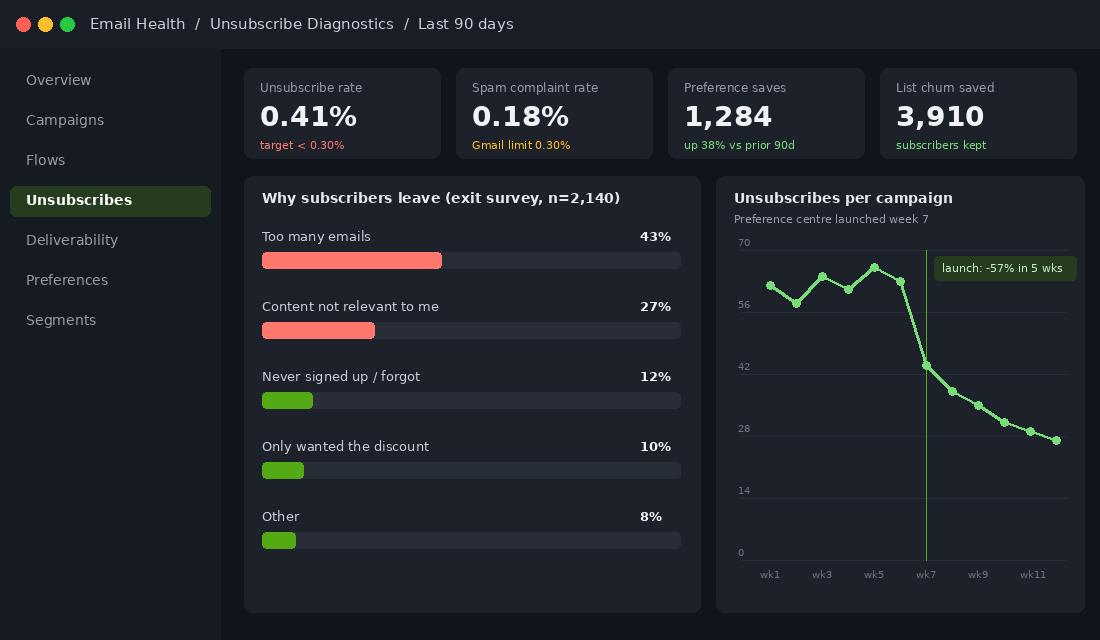
The numbers make that expensive. MarketingSherpa found the top reason people unsubscribe is simply getting too many emails (26%), and HubSpot’s survey put “emails come too often” at 51%. GetApp found 56% of consumers will unsubscribe from a brand that sends four or more messages in 30 days. Almost nobody in those surveys said “I never want to hear from this brand again”. They said “less”, and you gave them “none”.
It got worse in 2024. Gmail and Yahoo started enforcing one-click unsubscribe for anyone sending 5,000 or more emails a day, and Gmail now puts an unsubscribe button right next to the sender name. Unsubscribe rates more than doubled from 2024 to 2025 across the industry. Leaving your list is now one tap. Staying on your list at a pace that suits the customer takes a page most brands have never built. This is the playbook for building it.
Why a Preference Centre Is a Retention Tool, Not an Email Setting
Here is the retention maths. A subscriber on a typical Aussie DTC list is worth somewhere between 15 and 40 dollars a year in attributable email revenue, depending on your AOV and how good your flows are. A subscriber who unsubscribes is worth zero from that day forward, and you cannot legally email them back. A subscriber who drops to a weekly digest is worth maybe 60% of full value. Sixty percent of something beats a hundred percent of nothing, every time.
The industry data backs this up. A well-built preference centre cuts unsubscribes by 20 to 30% in most published studies, and one analysis of senders who added a snooze option saw unsubscribes drop by an average of 82%. Klaviyo’s benchmark for a healthy campaign is an unsubscribe rate under 0.30%, with well-managed accounts sitting around 0.21%. If your campaigns run at 0.5% or higher, you are shedding roughly one in 200 subscribers per send. At three sends a week, that is your entire list turning over in about 15 months.
The best evidence comes from the UK flower brand Bloom & Wild. In 2019 they noticed customers asking to be temporarily unsubscribed before Mother’s Day. So they emailed everyone a one-click opt-out for Mother’s Day content. Close to 18,000 customers took it, positive feedback rose fivefold, and the brand later found that customers who opted out of those emails had a lifetime value 1.7 times higher than customers who did not. People who are given control stay longer and spend more. That is the whole thesis of this article.
Part 1: Give Them Three Doors (Topics, Frequency, and Pause)
Most Shopify stores running Klaviyo are using the default preference page, which is a single list checkbox and an unsubscribe link. That is one door. A real preference centre has three, and each one catches a different kind of leaver.
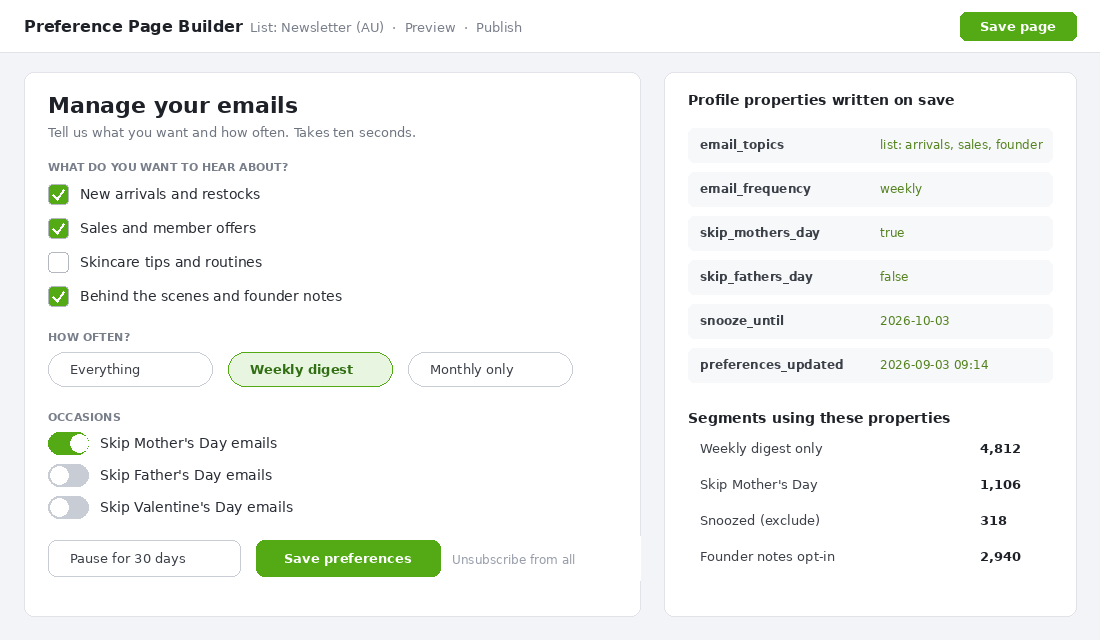
- Topics. Three to five checkboxes, no more. New arrivals and restocks, sales and member offers, education (routines, recipes, how-to), and behind the scenes or founder notes. This catches the “content not relevant to me” group, which is 17 to 27% of unsubscribers depending on the survey.
- Frequency. Three options: everything, weekly digest, monthly only. This catches the biggest group, the 26 to 51% who say “too many”. The weekly digest is the workhorse. Most people who pick it would otherwise have left.
- Pause. A 30-day snooze button. This catches the people who are moving house, broke this month, or just bought a six-month supply. They are not done with you. They are done with you for now.
Keep the full unsubscribe link on the page, in plain text, below the save button. Under the Australian Spam Act 2003 it must be clear and conspicuous, and hiding it is both illegal and pointless. You are not trying to trap anyone. You are trying to make the middle options more visible than the exit, which is the opposite of how most preference pages are laid out.
One design rule that matters more than any other: the page must load pre-filled with what the customer currently gets. A blank form with every box unticked reads as “you are subscribed to nothing”, and people either bail or tick everything and get annoyed later. Show them their current state, let them dial it down.
Part 2: Build It in Klaviyo (The 20-Minute Setup)
Klaviyo ships a preference page for every list, and the fields on it mirror the fields on that list’s subscribe page. Anything a customer changes there is written to their profile as a custom property, which means every choice becomes a segment condition. That is the mechanism that makes the whole system work. Here is the build.
- Open your main list. In Klaviyo go to Audience, then Lists and Segments, open your newsletter list and click the “Subscribe and Preference Pages” tab. Preference pages live on lists, not segments, so if you subscribe people to several lists, pick the one every marketing email goes to.
- Add your fields to the subscribe page first. Add a multi-select for topics (property name email_topics), a single-select for frequency (email_frequency with values everything, weekly, monthly) and boolean toggles for occasions (skip_mothers_day, skip_fathers_day). Fields only appear on the preference page once they exist on the subscribe page.
- Edit the preference page copy. Replace the default headline with something human. “Manage your emails. Tell us what you want and how often.” Keep it to one screen on mobile.
- Add the pause option. Klaviyo has no native snooze, so add a date property (snooze_until) as a field, or use a “Pause for 30 days” button that links to a Shopify page with a Klaviyo form that sets the property. Then build a segment “snooze_until is in the future” and exclude it from every campaign send.
- Swap the footer link. In your email templates, change the footer from a bare unsubscribe link to “Too many emails? Manage preferences or unsubscribe”, with the first link using the {% manage_preferences %} tag and the second staying as a true one-click unsubscribe.
- Build the segments. “Weekly digest only”, “Monthly only”, “Skip Mother’s Day”, “Snoozed (exclude)”. Save them, then open your campaign checklist and add a line: exclude Snoozed and Monthly from every non-digest send.
If you run Omnisend or Shopify Email instead, the logic is identical: add the properties as custom fields, build a landing page with a form that writes to them, and exclude on send. Shopify Email has the weakest tooling here, which is one of the reasons stores past about 40,000 dollars a month tend to move to Klaviyo.
Part 3: Honour It on Every Send (Where Most Stores Fail)
Building the page is the easy half. The hard half is that every campaign you send from now on has to respect what people told you, and in a two-person team on a Thursday afternoon, that is where it falls apart. The fix is to make honouring preferences the default rather than something someone remembers.
- Build a “Campaign Ready” segment and send to it, not the list. Definition: on newsletter list, AND email_frequency is not monthly, AND snooze_until is not in the future, AND not suppressed. Every regular campaign goes to this segment. You never pick the raw list again.
- Turn the weekly digest into a real product. One email, same day each week, that rounds up the week’s launches and offers. The “weekly” segment gets only this. Set a recurring Klaviyo campaign or build it as a flow so it cannot be forgotten.
- Topic exclusions live on the campaign, not in someone’s head. When you build a sale campaign, the audience is Campaign Ready AND email_topics contains “sales”. Write this into your campaign brief template so the person building it fills it in every time.
- Flows keep running. Abandoned cart, order confirmations, shipping updates and back-in-stock alerts are triggered by the customer’s own action and should ignore the frequency setting. The exception is the snooze: if someone paused you, hold marketing flows like win-back and cross-sell until the date passes.
- Audit monthly. Pull the last month’s campaigns and check the audience on each. If any went to the raw list, that is a process failure, not a person failure. Fix the template.
There is a legal edge here too. Under the Spam Act, an unsubscribe must be actioned within five business days and the facility has to keep working for at least 30 days after the send. Preferences are not covered by the Act, but the customer does not know that. If they set “monthly” and get four emails the next week, they will report you as spam, and spam complaints are the metric Gmail actually punishes. Stay under 0.3% and you keep the inbox. Go over it and no amount of good content gets you back in.
Part 4: Intercept the Exit (The Preference Rescue Flow)
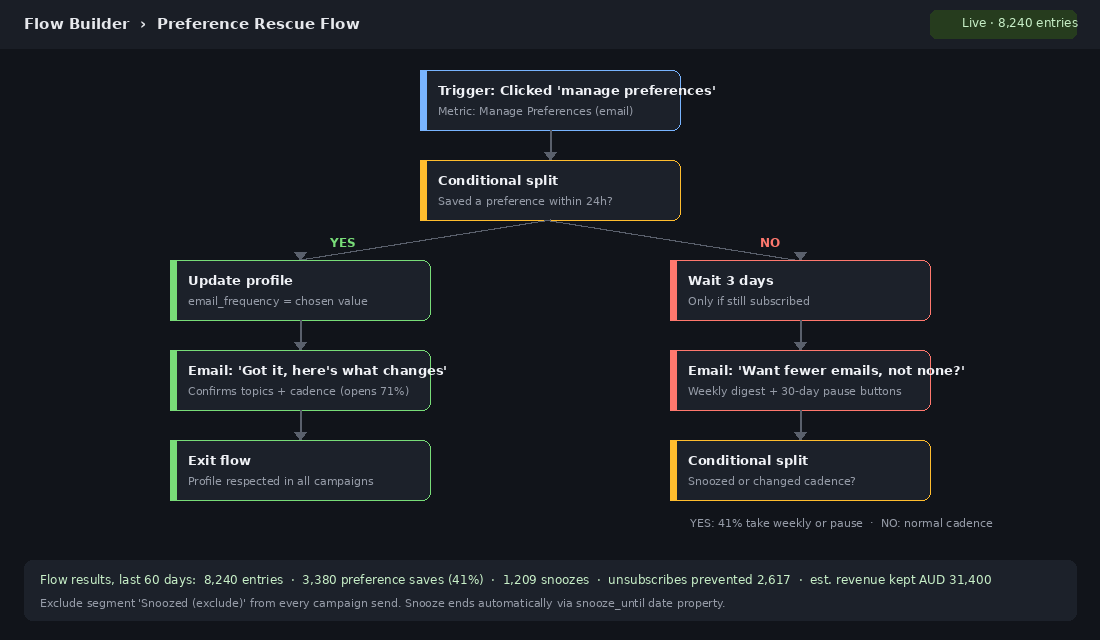
You cannot put anything between a one-click unsubscribe and the unsubscribe itself. Gmail requires that link to work in one step and Klaviyo enforces it. What you can do is make sure the “manage preferences” path is the one people see first, and that anyone who clicks it but does not save gets one gentle follow-up. That follow-up is the Preference Rescue Flow.
- Trigger: the customer clicked the manage preferences link in any email. Klaviyo tracks this as a click on that specific URL, so use “Clicked Email” filtered to the preference page URL.
- Conditional split: did a preference property change in the last 24 hours? If yes, send a short “Got it, here is what changes” confirmation and exit. Confirmation emails like this open at 65 to 75% because the customer just asked for something.
- If no change and still subscribed: wait three days, then send one email with two buttons. “Switch me to the weekly digest” and “Pause for 30 days”. Both buttons write the property directly via a Klaviyo form or a tracked link with a profile update.
- Final split: if they took either option, exit. If not, exit anyway. One email. Never a second nudge. The moment this feels like pressure it becomes the reason they leave.
For a store with a 30,000 subscriber list sending three campaigns a week at a 0.45% unsubscribe rate, roughly 400 people leave every week. If the rescue flow converts even a third of the people who visit the page into a digest or a pause, you keep 100 to 130 subscribers a week who were on their way out. Over a year that is 5,000 to 7,000 subscribers still on the list, at 20 dollars a head in annual email revenue, which is 100,000 to 140,000 dollars you did not have to re-acquire through a popup at 3 to 6 dollars a lead.
Part 5: The Occasion Opt-Out (Mother’s Day, Father’s Day, and the Loyalty It Buys)
Why this one email outperforms most sale campaigns
Around three to four weeks before Mother’s Day (early to mid April in Australia, since ours falls on the second Sunday in May) send a plain email: “Mother’s Day can be a hard time. If you would rather not hear about it from us this year, tap here and we will leave it out. You will still get everything else.” One tap sets skip_mothers_day to true. Every Mother’s Day campaign excludes that segment. Repeat for Father’s Day in late August and, if you sell gifts, Valentine’s Day.
This has moved from a nice gesture to an expectation. Melbourne flower brand LVLY has run a Mother’s Day opt-out since 2021. Go-To Skincare and Aesop both offer it. Bloom & Wild’s version launched a movement that more than 100 brands have signed onto, and their opted-out customers turned out to be their most valuable cohort. The email itself typically gets reply rates and social shares that no discount code has ever produced, because it is the one message in the inbox that is obviously not trying to sell something.
The rules that keep it sincere
- No offer in the email. Not a code, not a banner, not a product grid. The moment it sells, the goodwill evaporates.
- One tap, no form. The link sets the property and lands on a page that says “Done. We will skip it.” Do not make a grieving person fill in a survey.
- Remember it next year. The property persists. Do not ask again. Do add a line to the preference page so they can turn it back on.
- Check your flows. A Mother’s Day product recommendation in an abandoned cart email will leak through if the flow does not exclude the segment. Audit every flow with seasonal content two weeks before the occasion.
The Four Mistakes That Turn a Preference Centre Into a Leak
- Too many options. Twelve topic checkboxes and six frequency settings is a form, not a preference centre. People bail from forms. Three to five topics, three frequencies, one pause. That is it.
- Hiding the unsubscribe. Some stores bury it three clicks deep to game the numbers. Under the Spam Act that is a breach, ACMA fined Telstra 626,000 dollars in 2025 largely over non-compliant unsubscribe facilities, and Gmail’s one-click rule bypasses your page entirely anyway. Make the middle doors big. Leave the exit visible.
- Building it and never sending to the segments. The most common failure. The page works, the properties write, and every campaign still goes to the raw list. Build the Campaign Ready segment on day one and delete the habit of picking the list.
- Treating flows and campaigns the same. Someone on “monthly” still wants their shipping confirmation. Someone who paused you still wants to know their back-in-stock item landed. Frequency governs campaigns and marketing flows. Transactional and customer-triggered emails run regardless.
The Compound Effect: How Preferences Feed Everything Else
Once you look at it properly, a preference centre is the cheapest zero-party data capture you will ever run. Every topic tick tells you what a customer cares about, and that feeds straight into the zero-party data system you should already be using to personalise product recommendations and ad audiences. The frequency choice tells you engagement intent more accurately than opens, which Apple Mail Privacy Protection has made nearly useless.
Deliverability improves as a side effect. Fewer unsubscribes and fewer spam complaints lift your sender reputation with Gmail, which lifts inbox placement for everyone on the list, including the people who never touched the preference page. If you have been fighting the spam folder, pair this playbook with the email deliverability playbook, because the two problems are the same problem from two ends.
Then it compounds into revenue. The weekly digest segment is a warm, self-selected audience that has told you exactly how often it wants to hear from you, and a digest sent to people who asked for it will usually out-click a broadcast sent to people who did not. Layer the topic properties onto your customer segmentation and the sale campaign goes to sale people, the routine content goes to routine people, and every send gets a little more relevant. Relevance is what keeps the second order alive, and the second order is where a Shopify store’s profit actually lives.
Put numbers on it for a store doing two million dollars a year with a 45,000 subscriber list. Cutting campaign unsubscribes from 0.45% to 0.30% keeps roughly 10,000 extra subscribers over 12 months. At a conservative 18 dollars each in annual email revenue, that is around 180,000 dollars kept, plus 30,000 to 60,000 dollars not spent re-acquiring them. For about 20 minutes of Klaviyo setup and one process change, it is one of the highest-return jobs on the list.
The Preference Centre Launch Checklist
Work through this in one sitting. Most stores finish it in an afternoon.
- Properties created: email_topics, email_frequency, skip_mothers_day, skip_fathers_day, snooze_until.
- Preference page live with three to five topics, three frequencies, a 30-day pause and a visible plain-text unsubscribe.
- Page pre-fills with the customer’s current settings. Tested on a phone.
- Footer updated in every template: “Too many emails? Manage preferences or unsubscribe.”
- Campaign Ready segment built and set as the default audience in your campaign brief template.
- Weekly digest scheduled as a recurring send to the weekly segment.
- Snoozed segment excluded from all campaigns and marketing flows; transactional flows untouched.
- Preference Rescue Flow live with the confirmation branch and the one-email digest-or-pause offer.
- Occasion opt-out emails in the calendar: early April (Mother’s Day), early August (Father’s Day), late January (Valentine’s Day).
- Monthly audit booked: unsubscribe rate per campaign, spam complaint rate in Google Postmaster, and a spot check that no campaign went to the raw list.
Inside eCommerce Circle, retention is one of the core pillars we work on with every member, and the email preference centre is one of the first things we check because it is so often missing. If you want a second opinion on yours, let’s talk.