Pull up your Google Ads account and look at the device split on your Shopping campaigns. For most Aussie Shopify stores I sit down with, desktop is 30 to 40% of orders and carries the highest average order value in the account. Now ask yourself a harder question: where are the desktop shoppers you are not reaching?
What’s in This Article
Here is the number most founders have never seen. In August 2026, Statcounter put Bing at 16.51% of desktop search in Australia. Not 3%. Not “a rounding error”. One in six desktop searches in this country runs through Microsoft, because Bing is the default on every Windows machine, in Edge, and inside Copilot. Across all devices the figure is 9.41%, which is still roughly double where it sat a few years ago.
The wrong approach is to treat Microsoft Advertising as a novelty you will “get to eventually”. The founders who do get to it usually find the same thing: cheaper clicks, an older and more affluent audience, and a return that makes their Google account look tired. One Aussie bathroomware retailer, Bathroom Sales Direct, booked $183,900 in revenue in its first month on Microsoft Ads at a 4.86 ROAS. This playbook is the five-step system to get you there without building a second ad account from scratch.
Why Microsoft Ads Is the Cheapest Search Traffic You Are Ignoring
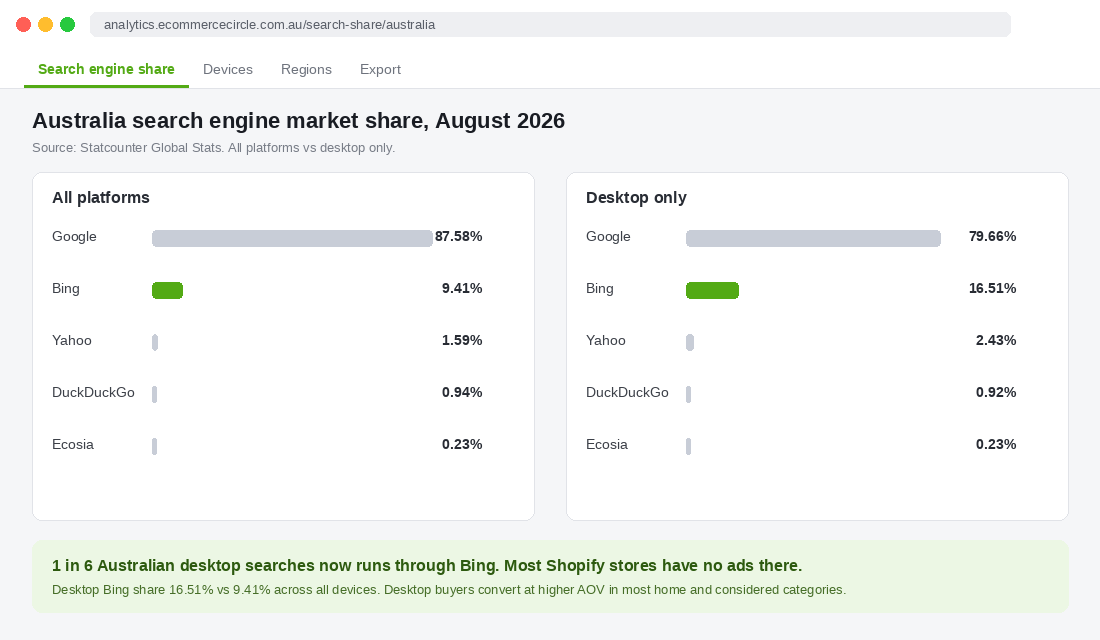
Search advertising is an auction. Price is set by how many advertisers want the same click. On Google, every brand in your category is bidding, plus the marketplaces, plus the comparison sites. On Microsoft, a fraction of them bother. That gap is the whole opportunity.
Improvado’s 2026 comparison put the blended average CPC on Microsoft Advertising at roughly US$1.54 against US$2.96 on Google, a 33 to 40% discount for the same intent. That is US data, but the mechanics hold in Australia: fewer bidders, lower clearing price. Agencies running parallel accounts here consistently report clicks 25 to 40% cheaper.
Then there is who is searching. The Bing user in Australia skews older, more desktop-heavy and more likely to be sitting on a corporate laptop at 1pm on a Tuesday. That is not the audience for a $29 phone case. It is exactly the audience for furniture, appliances, tools, premium skincare, supplements, wine, outdoor gear and anything else with a considered purchase cycle and a healthy AOV.
The case studies back this up. Watches of Switzerland Group, running Microsoft Shopping through its agency Kinase, added 3,200 extra clicks at an 84% lower CPC than its base campaigns and hit a 16x ROAS on target-ROAS campaigns. Kalley, a Latin American appliance retailer, lifted its Microsoft ROAS from 12x to 20x in a single quarter by moving to automated bidding. Different markets, same pattern: a lightly contested auction full of buyers with money.
Step 1: Decide If You Qualify (Most Stores Past 40k a Month Do)
Before you install anything, run a two-minute qualification. Microsoft Ads is not for everyone, and I would rather you skip it than launch it badly and write it off. You are a strong candidate if at least two of these are true.
- Google Shopping is already profitable. If your Google Shopping campaigns clear your target ROAS, you have a proven feed, proven products and proven search intent. Microsoft lets you reuse all three. If Google is not working, fix that first; a cheaper version of a broken campaign is still broken.
- Desktop is 25% or more of orders. Check Shopify Analytics under Sessions by device, then compare it to orders by device. If desktop punches above its weight on AOV, Bing’s desktop-heavy audience will suit you.
- Your AOV is above $120. Below that, the monthly spend needed to get statistically meaningful data is hard to justify. Above it, a few dozen orders a month tells you plenty.
- Your buyer is 35 plus. Home, garden, health, hobby, gifting and professional categories all over-index on Microsoft. Gen Z fashion does not.
- You have at least $1,500 a month to test with. That buys around 1,000 clicks at Aussie CPCs, enough to see conversion rate settle over 30 days.
Two out of five and you are in. If you tick all five and you are still not running Microsoft, you are leaving one of the easiest wins in paid search on the table.
Step 2: Install the Microsoft Channel App and Sync Your Feed
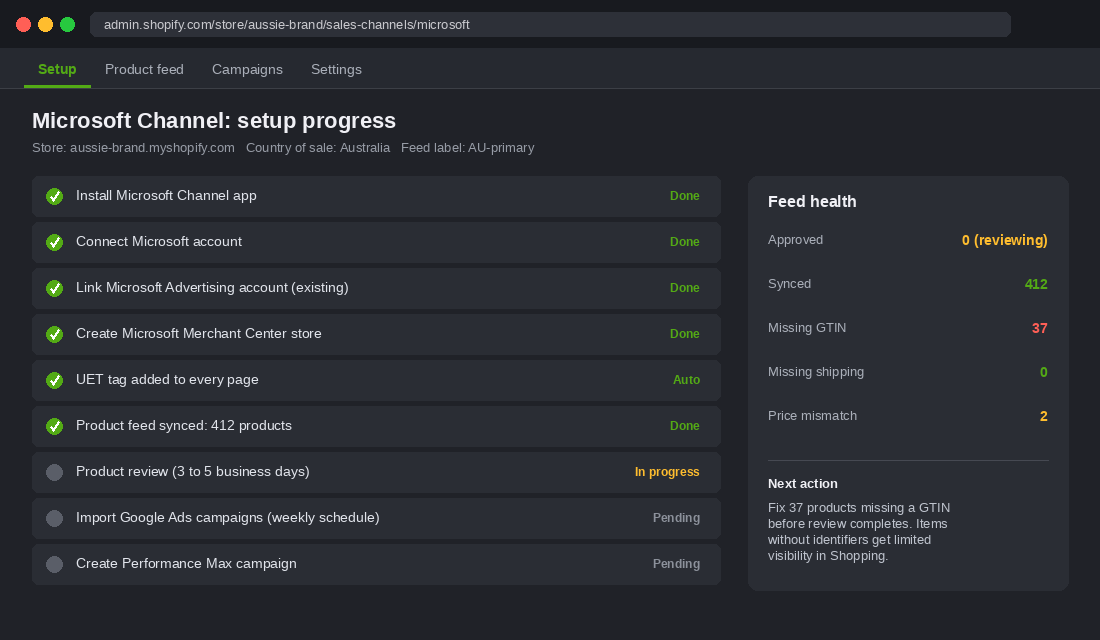
Until mid-2025 this was the painful bit. You had to build a Merchant Center store manually, export a feed through a third-party app and paste a tracking script into your theme. Microsoft’s official Channel app for Shopify landed in Australia in June 2025 and collapsed all of that into a guided setup. Here is the exact sequence.
- Install the Microsoft Channel app from the Shopify App Store. It appears under Sales channels in your admin sidebar, next to Google and YouTube.
- Connect a Microsoft account. Use a business Microsoft account (an Outlook or Microsoft 365 login), not a personal one belonging to a staff member who might leave.
- Connect or create a Microsoft Advertising account. If you already have one from an old agency, connect it so the history stays in one place. Otherwise create new; the wizard takes two minutes.
- Connect or create a Microsoft Merchant Center store. Set Country of sale to Australia, language to English, and give your feed label something you will recognise later, like AU-primary. You cannot rename the store afterwards, so get the name right.
- Complete setup and let the feed sync. Your products are reviewed over 3 to 5 business days. Once approved they show as free listings in Bing Shopping straight away, before you spend a cent.
- Check the UET tag. The app adds Microsoft’s Universal Event Tracking tag to every page automatically. Confirm it is firing with the UET Tag Helper browser extension, because conversion tracking, remarketing and every smart bidding strategy depend on it.
While the review runs, clean the feed. The same product data rules that govern Google Shopping apply here, and I covered those in detail in the Google Shopping feed playbook. The three that matter most on Microsoft: every product needs a GTIN or a valid identifier_exists flag, titles should lead with brand and product type, and your shipping settings in Merchant Center must match what checkout actually charges. A price or shipping mismatch is the fastest way to get products disapproved.
Step 3: Import Your Google Ads Campaigns (Then Change Four Things)
Do not build campaigns from scratch. Microsoft Advertising has a native Google Ads import tool that copies campaigns, ad groups, keywords, negatives, ads and extensions across. You authorise your Google account, tick the campaigns you want, and it lands in minutes. You can schedule the import to re-run daily, weekly or monthly so changes you make in Google flow through automatically.
The mistake is importing everything and walking away. Bing is a different auction with a different audience, and a straight copy leaves money on the table. Change these four things on day one.
- Cut bids by 25 to 30%. Google bids are calibrated to Google’s competition. Import them unchanged and you overpay on every click. Start 30% lower and let the data pull you up if impression share is too low.
- Import only what is already working. Bring across your Shopping campaigns and your top brand and non-brand search campaigns. Leave the experimental stuff, the broad match tests and anything under your target ROAS in Google. You want a clean read on the channel, not a copy of your problems.
- Turn off search partner syndication for the first 30 days. Microsoft’s partner network includes some low-quality placements. Run Bing and Copilot owned-and-operated only until you have a conversion baseline, then test partners separately.
- Set location targeting explicitly to Australia. Imported campaigns sometimes arrive with “people in, or who show interest in” targeting. Change it to “people in” your target locations, otherwise you will pay for expat browsing from overseas.
Then rebuild your conversion goals. Microsoft imports the campaign structure but not your Google conversion actions. In Microsoft Advertising, create a Purchase goal tied to the UET tag with revenue tracking on, and make it the only goal used for bidding. Newsletter sign-ups and add-to-carts can be tracked, but they must not count toward the number your bid strategy optimises.
Step 4: Structure the Account for a Small Budget
You are running Microsoft at maybe 15 to 20% of your Google budget, so the account has to be simpler than your Google account. A $3,000 a month budget spread across twelve campaigns never exits the learning phase. Three campaigns, run well, will.
- Campaign 1: Shopping, all products. One Shopping campaign with product groups split by your top category or margin band. Manual CPC for the first two weeks so you can see real click prices, then switch to Target ROAS once you have 15 to 20 conversions. This is where 60 to 70% of your budget goes.
- Campaign 2: Brand search. Exact and phrase match on your brand name and product names. It is cheap, it converts at 8 to 15%, and it stops competitors and resellers sitting on your name in Bing where you have never defended it.
- Campaign 3: Non-brand search, top 20 terms. Take your 20 best-converting non-brand search terms from Google (Search terms report, last 90 days, sorted by conversion value) and run them here in phrase match with the same negatives. Nothing else. Expand only once these are profitable.
Once Shopping has a month of conversion data, test Performance Max. It is Microsoft’s equivalent of Google’s PMax and pulls your feed into Bing Shopping, the Microsoft Audience Network (MSN, Outlook, Edge and Copilot placements) and search. In EaseUS’s published results, Performance Max drove 22% more conversions at a 17% lower CPA than its existing search campaigns. Treat it the way you would treat PMax on Google: brand-excluded, feed-only to start, and judged on incremental revenue rather than reported ROAS. The Google Shopping playbook covers the brand exclusion logic, and it applies here word for word.
Step 5: Measure It Like a Second Channel, Not a Rounding Error
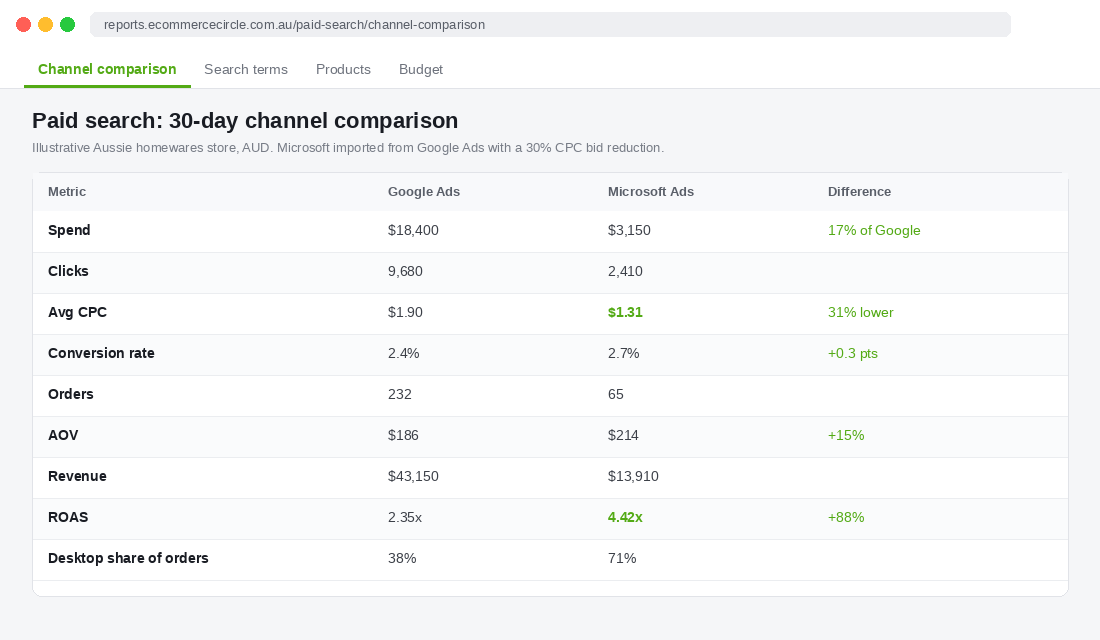
Here is where most founders go wrong. They launch Microsoft, glance at it after a fortnight, see $600 of spend and eleven orders, and conclude it is “too small to matter”. Eleven orders on $600 is a 3.9x ROAS at a $214 AOV. That is not small. That is a channel that deserves more budget.
Measure it on the same terms as Google, and give it the same 30-day window before judging. Build a simple weekly line in your reporting with five numbers.
- Spend and average CPC. Your first sanity check. If Microsoft CPC is not at least 20% below Google for the same campaigns, your imported bids are too high.
- Conversion rate by device. Desktop should be the majority of orders. If mobile is dominating and converting poorly, add a mobile bid adjustment of minus 30 to 50%.
- AOV versus Google. In most considered categories Microsoft AOV runs 10 to 20% higher. If it does not, check that your Shopping product groups are not skewed toward your cheapest lines.
- Platform ROAS. Use Microsoft’s own reported figure for week-to-week optimisation, and set the target the same as Google’s. If Google needs 2.5x to be profitable, so does Microsoft.
- Contribution to MER. The number that actually matters. Add Microsoft spend to your total marketing cost and watch whether blended revenue moves. If you are new to that discipline, the MER framework explains why it beats platform ROAS every time.
One trap specific to Microsoft: Shopify’s own marketing attribution will not see Microsoft traffic as a paid channel unless your final URLs carry UTM parameters. Microsoft supports auto-tagging (called “UTM auto-tagging” in account settings). Turn it on, or add utm_source=bing and utm_medium=cpc to your tracking template. Otherwise every Microsoft order lands in Shopify as “direct” or “bing / referral” and you will underrate the channel for months.
The Three Mistakes That Kill Microsoft Ads in the First Month
I have watched Microsoft accounts get switched off for reasons that had nothing to do with Microsoft. These are the three to avoid.
Mistake 1: Judging it on Google’s search volume. Microsoft has a tenth of Google’s volume. You will never spend $20,000 a month here at your target ROAS, and that is fine. The question is not “can this replace Google” but “is this the cheapest profitable traffic I can buy”. Usually it is. Cap expectations at 15 to 25% of your Google spend and be pleasantly surprised if it grows past that.
Mistake 2: Leaving the scheduled import on with “update existing items” ticked. This silently overwrites every bid, budget and status change you make in Microsoft with whatever Google has, every week. Either schedule the import to add new items only, or run it manually after a big Google restructure. If your Microsoft campaigns keep mysteriously reverting, this is why.
Mistake 3: Ignoring free listings. Once your feed is approved, your products appear in Bing Shopping organically at zero cost. Most stores never look at the free listings report in Merchant Center. Check it monthly. Products getting free clicks and conversions are the ones to bid on first, because Bing has already told you they resonate with its audience.
How the Five Steps Compound Into a Second Search Engine
Put the steps together and you can see why this is one of the better uses of an afternoon in your calendar. Step 1 makes sure you only run it where it will work. Step 2 gives you a feed, a Merchant Center and conversion tracking in an hour, plus free listings from day one. Step 3 turns twelve months of Google learnings into a live Microsoft account with a bid discount already applied. Step 4 keeps the budget concentrated so the campaigns actually learn. Step 5 makes sure you judge it on contribution, not gut feel.
What you end up with is a second search engine that costs 30% less per click, reaches an older buyer with a bigger basket, and needs perhaps an hour a fortnight to maintain because the heavy lifting is imported from work you already do. For an Aussie store doing $100k a month, that typically means $2,000 to $4,000 of monthly Microsoft spend producing $8,000 to $15,000 of revenue that Google was never going to see. It will not double your business. It will add a reliable 5 to 10% at a better return than anything else in the account.
And it gets better over time. As Copilot pushes more Australian search through Microsoft (that 9.41% was closer to 4% two years ago), you will already have the account history, the conversion data and the approved feed. Founders who set this up now are buying a growing channel at today’s prices.
Your Microsoft Ads Launch Checklist
Copy this into your project tool. Every item is a single action, and the whole list fits inside one working week plus the feed review.
- Qualify: Google Shopping profitable, desktop 25% plus of orders, AOV over $120, buyer 35 plus, $1,500 a month test budget. Need two of five.
- Install: Microsoft Channel app from the Shopify App Store, business Microsoft account, Merchant Center store named and set to Australia.
- Verify tracking: UET tag firing on every page, Purchase goal created with revenue, UTM auto-tagging switched on.
- Clean the feed: GTINs on every product, shipping settings matching checkout, titles leading with brand and product type.
- Import: Shopping plus top brand and non-brand campaigns from Google, bids cut 25 to 30%, search partners off, location set to “people in” Australia.
- Structure: three campaigns only. Shopping (60 to 70% of budget), brand search, top 20 non-brand terms.
- Review at day 14: CPC at least 20% under Google, desktop majority of orders, no disapproved products.
- Review at day 30: platform ROAS against the same target as Google, contribution to MER, free listings report checked.
- Day 45 plus: switch Shopping to Target ROAS, launch a feed-only Performance Max test with brand excluded, reassess budget.
Inside eCommerce Circle, Promotion is one of the ten pillars we work on with every member, and paid search channel discipline is a recurring conversation because it is where most of the money goes. If you want a second opinion on your search accounts, or a sanity check before you switch Microsoft on, let’s talk.