Product bundles work when the bundle earns you more gross profit per order than selling the hero product alone, and when the customer can see exactly why the set is the better deal. Most Aussie stores get the first part wrong: they stack three products, knock 25% off, and wonder why revenue rose while cash in the bank did not.
A bundle is not a discount with a nicer name. It is a merchandising decision about which products belong together, what you charge for the set, and where the customer meets the offer. Get those three things right and bundles lift average order value (AOV) without a single extra dollar of ad spend. Get them wrong and you train your customers to wait for deals.
This guide gives you the exact process we walk coaching members through: pick the pairs from your own order data, price them with a simple profit test, build them in Shopify’s free Bundles app (or know when to move beyond it), and measure whether they worked. There is a worked AUD example and a one-page checklist at the end.
Why Bundles Beat Site-Wide Discounts
Start with the problem bundles solve. Baymard Institute pools 50 studies and puts average cart abandonment at 70.22%. When it asks shoppers why they left, 40% say extra costs such as shipping, tax and fees were too high. Your biggest leak is not a lack of traffic. It is customers who arrive, add something and decide the total does not feel worth it.
A bundle attacks that from the other side. Instead of cutting the price of one product, you raise the size of the basket and make the larger basket feel like the smarter buy. The customer pays more in total, you pay for one pick, one parcel and one payment transaction, and your acquisition cost is spread over more gross profit.
The brands doing this well see big swings. In Shopify’s own case study, teeth-whitening brand HiSmile reports a 4x increase in average cart size with product bundles, and over 80% of its orders are bundled products. Closer to home in scale, Pumper reports that Australian Standard tested bundle pairings with volume incentives and saw a 65% lift in AOV and 29% revenue growth. Your results will be smaller if your catalogue is smaller, but the direction is the same: the store with a deliberate bundle strategy outsells the store that only runs percentage-off sales.
Two honest caveats. These are vendor and platform case studies, so treat them as proof that the lever exists, not as a promise. And a bundle only helps if it is built from products people already buy together. A random set with a discount is just a clearance sale in a box.
The Four Bundle Types (and When Each One Fits)
Most stores only ever build one type and then conclude bundles “don’t work.” Here are the four, in the order I would test them.
- Fixed bundle. Specific products, specific quantities, one price. A “Morning Glow Set” of cleanser, serum and moisturiser. Best when the products clearly belong together and you want a clean, giftable offer. This is the easiest to build and the easiest to measure.
- Multipack. The same product in a larger quantity. A 3-pack of your best-selling consumable at a lower price per unit. Best for anything people run out of: coffee, supplements, pet food, skincare refills. It lifts units per order and quietly improves repeat purchase timing.
- Mix-and-match. The customer picks any three from a collection for one price. Best when taste varies (flavours, colours, scents) and your range is deep. Higher conversion potential, but more complexity in stock and picking.
- Tiered offer. Buy 2 save 10%, buy 3 save 15%. Best when you want the cart to climb in steps and you have strong single-product sellers. It rewards larger baskets directly.
Where the sales channel matters: Shopify’s help centre notes that bundles can sell through the Online Store, Shop and Shopify POS, but on Google and YouTube only fixed product bundles are supported. If Google Shopping is a major channel for you, fixed bundles are the type to start with.
Step 1: Choose Bundles From Your Own Order Data
Do not build a bundle because it “looks good together.” Build it because your customers already buy the products together.
Here is the five-minute method:
- Export 90 days of orders. In Shopify admin go to Orders, filter to the last 90 days and export to CSV.
- List the order lines for orders with two or more products. In a spreadsheet, pivot by order number so each row shows the products in that order.
- Count the pairs. Which two products appear in the same order most often?
- Keep pairs that show up in at least 5% of multi-item orders. One industry guide on bundle strategy suggests a 5% co-purchase threshold. Treat it as a starting filter, not a law. If your catalogue is small, the top two or three pairs are enough.
- Add one “hero plus consumable” pair. Even if the data is thin, pair your best seller with the thing it needs (a refill, a filter, a care kit). This is the bundle most likely to raise lifetime value.
If you have fewer than a few hundred orders, skip the spreadsheet and use common sense plus your customer emails. Ask five recent buyers what they wish they had ordered with their purchase. Their answers beat any app suggestion.
Coaching tip: pick two to three bundles for your first test. A store with 12 bundles has no idea which one worked, and a customer facing 12 choices on a product page buys none of them.
Step 2: Price It With the Bundle Profit Test
This is where most bundles fail. The discount feels generous, the AOV goes up, and gross profit per order quietly goes down. The Bundle Profit Test fixes that with three numbers.
The Bundle Profit Test
- Hero alone profit = hero price minus hero cost of goods (COGS).
- Bundle profit = bundle price minus the combined COGS of everything in it.
- The rule: bundle profit must clearly beat hero alone profit. Compare it with the profit from selling both items separately, and only give away as much of that gap as the extra conversions justify.
Here is a worked example in AUD, using round numbers. Your hero product sells for A$60 and costs you A$22, so it earns A$38 gross profit. Your add-on sells for A$35 and costs A$12.
- Hero alone: A$60 – A$22 = A$38.00
- Both sold separately: A$95 – A$34 = A$61.00
- Bundle at 10% off (A$85.50): A$85.50 – A$34 = A$51.50
- Bundle at 25% off (A$71.25): A$71.25 – A$34 = A$37.25
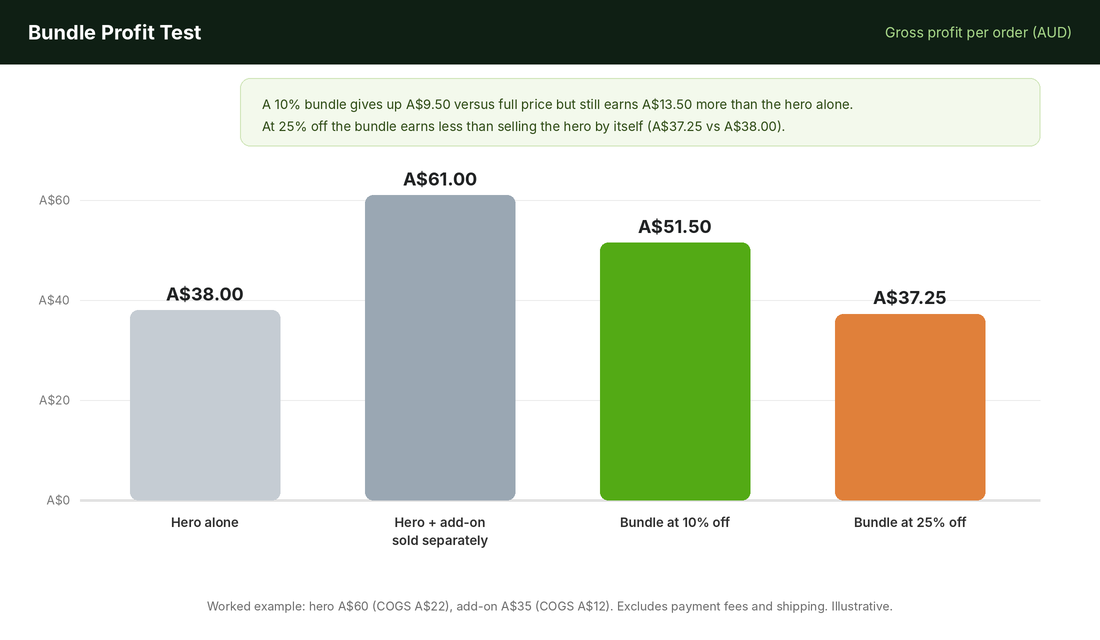
At 10% off, the bundle gives up A$9.50 compared with a full-price sale of both items, but it earns A$13.50 more than the hero alone. That is a good trade if the bundle converts customers who would otherwise have bought only the hero. At 25% off, the bundle earns less than selling the hero by itself. You have discounted your way to a lower profit per order and a bigger parcel to pack.
Notice this ignores payment fees and shipping, which you should add to your own calculation. Our Black Friday discount calculator walks through the same maths with fees included.
Pricing rules we use with members:
- Start at 10 to 15% off the combined price. One guide to bundle strategy warns that discounts above 25 to 30% make customers question your regular prices and teach them to wait for deals. Our own rule is stricter: if the profit test fails, the discount is too deep.
- Show the “bought separately” price crossed out next to the bundle price. The anchor does the persuading, not the percentage.
- Round to a clean number. A$119 reads better than A$120.60, and you stay in control of the margin.
- Consider a gift or free shipping instead of a deeper discount. If your free shipping threshold sits just above the bundle price, the bundle feels like the cheapest way to reach it.
Step 3: Build the Bundle in Shopify
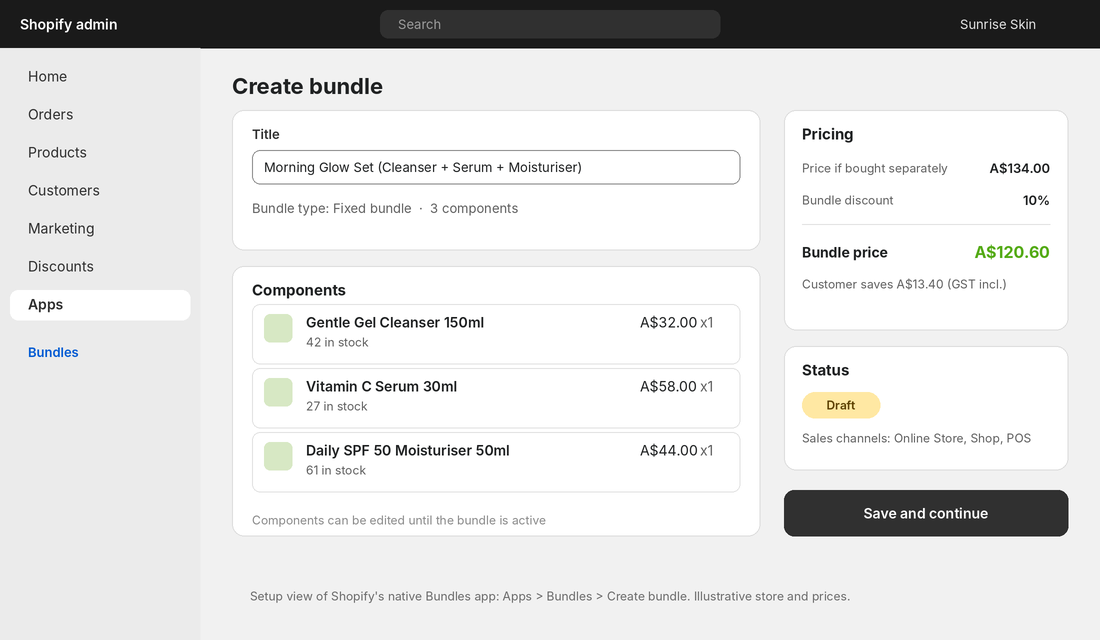
Shopify’s own Bundles app is free and handles most first bundles. Here is the setup, following Shopify’s help centre:
- Create the component products first. Each item in the bundle needs to exist as a normal product with its own stock count.
- Go to Apps, then Bundles, then Create bundle.
- Add a title and select your products. Set the quantity of each component. For a multipack, duplicate the same product and set the quantity.
- Click Save and continue, then add the product details: images, description, price.
- Choose your sales channels. New bundles start as Draft. Set the status to Active when you are ready.
- Save.
Know the limits before you commit. Per Shopify’s documentation, a fixed bundle can hold up to 30 components, and a bundle can have a maximum of three options and 100 variants. Stock is tracked as overall stock, not by location. Discounts built around a product or collection need the parent bundle product included, and bundle prices do not update when a component price changes, so you must update them by hand. Bundled products also do not appear under option filters in Search and Discovery.
Third-party reviewers add more. BOGOS’ review of the native app says it cannot create mix-and-match bundles, volume or tiered pricing, or subscription bundles, and that bundles cannot contain other bundles. That is the point where you move to a dedicated app. Options named in eCommerce Fastlane’s 2026 roundup include BOGOS (free plan, paid plans listed at US$29.99 to US$89.99 a month), Fast Bundle, MaxBundle and Simple Bundles. Pick on the bundle type you need, trial it for two weeks, and check it against your theme before you pay.
Whichever route you take, test the bundle as a customer: add it to cart on mobile, apply a discount code, and place a test order. Confirm the order in your admin shows the right component SKUs, because your 3PL will pick from that.
Step 4: Put Bundles Where Decisions Get Made
A bundle nobody sees is just an extra product in your catalogue. Place each one in four spots:
- On the hero product page. Directly under the add to cart button, show “Complete the set and save 10%” with a small image of the bundle. This is where most bundle sales happen.
- In the cart. A one-line offer: “Add [add-on] and save A$9.50.” The customer has already decided to buy, which is the best moment to raise the basket.
- On a dedicated collection or landing page. Called “Sets” or “Bundles and Gifts.” Useful for paid traffic and for email links.
- In your emails. Your post-purchase flow can feature the multipack of whatever the customer just bought. See our repeat customer rate guide for the timing.
Write the bundle title for the outcome, not the contents. “Morning Glow Set” beats “Cleanser + Serum + Moisturiser Bundle.” List the contents beneath it, and show a single photo of everything together. If you cannot shoot a new image this week, a clean flat lay from existing product shots works.
Step 5: Australian Rules You Cannot Skip
Bundles come with a few Australian specifics that overseas guides miss.
- Show GST-inclusive prices. Under Australian Consumer Law the price you display must be the total price including GST and mandatory charges. Make sure your “bought separately” and bundle prices are both GST-inclusive.
- Keep “was” pricing honest. If you show a crossed-out price, it must be a genuine price you have sold at. Our sale price compliance guide covers how to run savings claims safely. A bundle’s “bought separately” price is safe when it is the real sum of your current full prices.
- Plan freight and returns before launch. A bundle ships heavier and returns messier. Decide now whether a customer can return one item from a bundle, and write that into your returns policy.
- Set your AOV target with freight in mind. A June 2026 analysis from eightx puts the global median AOV at roughly A$113 and the top quartile around A$170 after currency conversion, and suggests Australian brands aim 10 to 20% above the global median to absorb higher freight. That is a rule of thumb rather than a measured benchmark, but it gives you a sensible bundle price target.
Step 6: Measure Whether It Worked
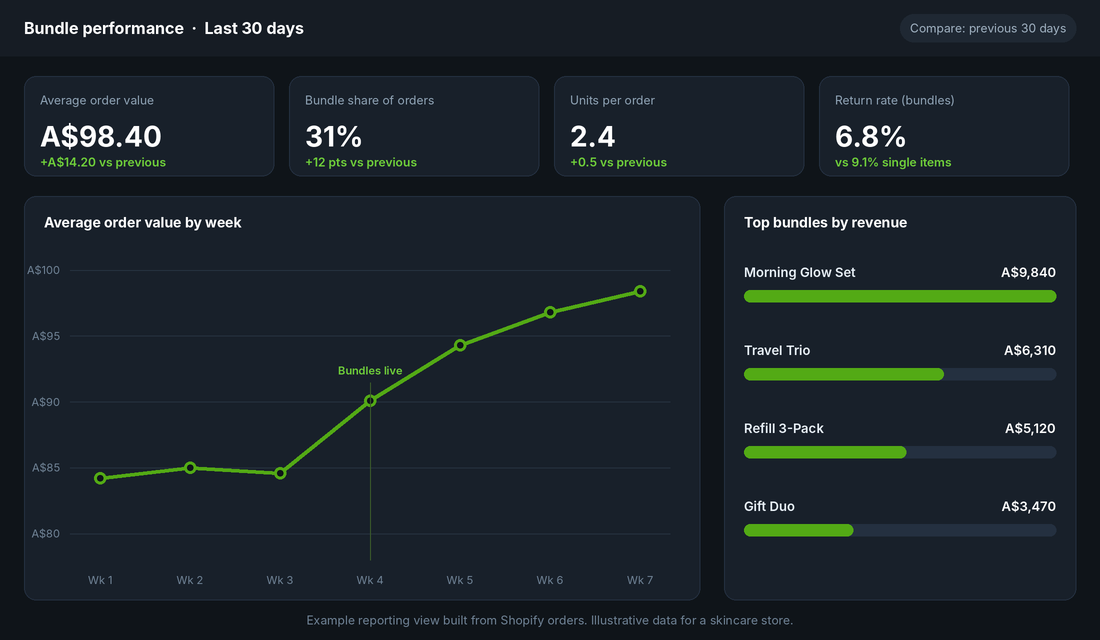
You launched bundles to change four numbers. Watch them for at least two weeks, which is the minimum test window one bundle guide recommends, before you judge.
- Average order value. Compare against the previous period. A lift of a few dollars is a win if margin held.
- Bundle share of orders. The share of orders that contain a bundle. HiSmile sits above 80%, but 15 to 30% is a healthy first target for most stores.
- Units per order. Confirms the bundle is adding items, not just swapping a cheaper set for a pricier one.
- Return rate on bundled orders versus single-item orders. Some vendor content claims bundle buyers return items more often, so check your own data. If bundles come back more, the bundle may be wrong for the customer.
Then check the number that matters most: gross profit per order, not revenue. If AOV rises 15% but gross profit per order falls, the bundle is a gift to your customers and a cost to you. Our CRO audit covers how to read this with the rest of your funnel.
For Black Friday on 27 November, build and test your bundles by mid November so the theme, tracking and stock counts are proven before traffic spikes. Bundles are one of the few BFCM offers that protect margin, because the discount is attached to a bigger basket.
The Compound Effect: How the Pieces Work Together
None of these steps is dramatic on its own. The compounding comes from the sequence.
Order data tells you which pairs belong together. The profit test tells you how much to discount without burning margin. The bundle builder turns that into a clean product page. Placement puts it in front of the customer when they are about to decide. And measurement tells you which bundle to keep, fix or retire.
Run that loop every quarter and your average order grows steadily without extra ad spend. The brands that win at this are not the ones with the cleverest bundles. They are the ones that review the data, adjust the pricing and keep the offer simple.
Five Bundle Mistakes We See Constantly
- Bundling slow movers to clear stock. If customers did not want it alone, a discount rarely changes that. Clear dead stock with a clearance offer, and keep bundles for products people already love.
- Discounting too deep. If the profit test fails, change the price, not your standards.
- Too many bundles. Two to three well-placed bundles beat twelve nobody can compare.
- No inventory plan. A bundle that sells out because one component ran out costs you the sale. Keep a buffer on the component that sells fastest, and check how your app counts bundle stock.
- Hiding the bundle. If it is not above the fold on the product page and in the cart, it will not sell.
Your Bundle Launch Checklist
Copy this into your task manager and tick it off.
- Export 90 days of orders and list your top five co-purchased pairs
- Choose two to three bundles, including one hero-plus-consumable
- Run the Bundle Profit Test on each (target 10 to 15% off, profit beats hero alone)
- Check GST-inclusive pricing and “bought separately” price accuracy
- Build each bundle in Shopify (or your chosen app) as a Draft
- Test on mobile: add to cart, apply a code, place a test order
- Confirm component SKUs show correctly for your picker or 3PL
- Add the bundle under the add to cart button and as a cart offer
- Update your returns policy for bundled items
- Set a two-week review date and record AOV, bundle share, units per order and gross profit per order
Inside eCommerce Circle, bundles and pricing structure are part of the core work we do with members, because a bigger basket makes every other channel more profitable. If you want to see exactly where your store is being capped, take the free More Orders Scorecard. It takes two minutes and shows you which of the 10 P’s to fix first.