Google Ads Black Friday success comes down to three jobs done before 20 November: a clean product feed with approved promotions, a bidding plan that expects conversion rates to jump for four days, and a daily budget split that puts most of your money on Friday and Monday. Do those three and the campaign mostly runs itself. Skip them and you pay peak-season click prices for traffic Google cannot match to your sale.
Black Friday is Friday 27 November 2026 and Cyber Monday is 30 November. That gives you 22 days from today. Most Aussie stores spend those days building email flows and ignoring Google, then panic on the Wednesday when Shopping ads show last month’s prices and Performance Max has no idea a sale is on.
This is the plan we walk members through. It covers what changes on Google during the sale, a dated timeline, the Merchant Center promotion steps, how to set a seasonality adjustment, a day-by-day budget split, and a one-page checklist you can copy. If you want the Meta side, read our Meta Ads for Black Friday plan alongside this one.
What Actually Changes on Google During Black Friday
Three things move at once: what you pay, what you earn, and who you compete against. Treat each one separately.
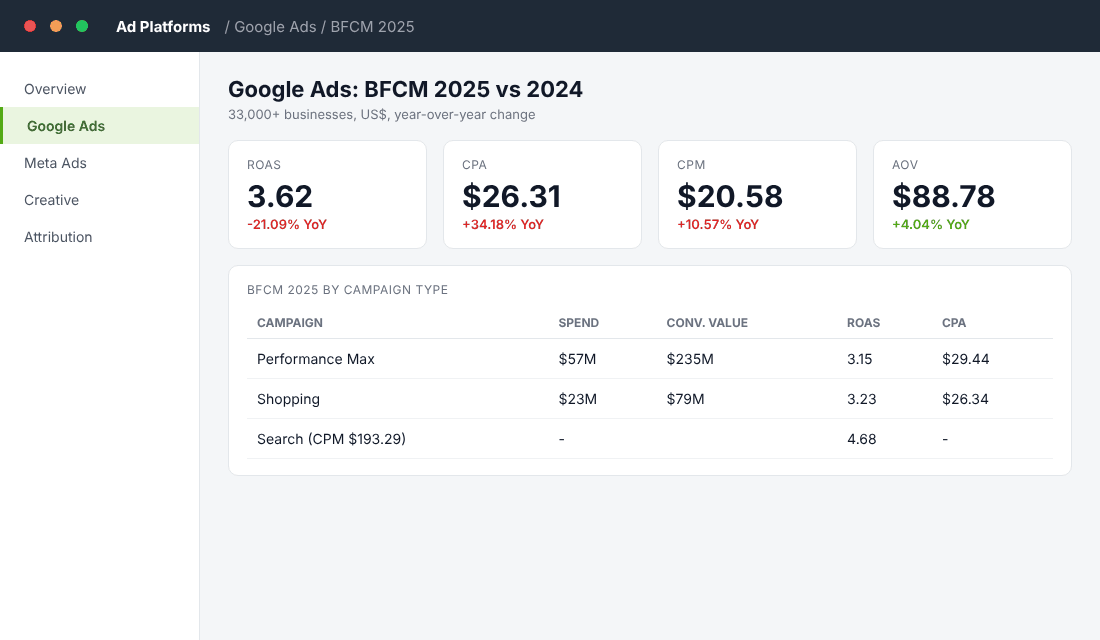
Costs rise. Triple Whale’s BFCM 2025 report, covering more than 33,000 businesses, put Google CPM at US$20.58 (up 10.57% year on year) and CPA at US$26.31 (up 34.18%). Blended Google ROAS came in at 3.62, down 21.09% on the year before. In Europe, SMEC’s Black Friday 2025 recap measured Google Ads CPC up 24% year on year, with 12% more unique competitors in Shopping auctions.
Intent rises too. The same SMEC data showed a median 16% lift in conversion rate. People are searching with a credit card in hand. That is why a cost jump of 24% can still be profitable, as long as your bidding is allowed to chase the extra conversions.
Your own sale is invisible to Google by default. Smart Bidding does not know you are discounting 25% for four days. Unless you tell it, it will bid as though Tuesday’s conversion rate applies on Friday.
In Australia, the prize is bigger every year. Australia Post reported about A$1.5 billion in online spending over the 2025 Black Friday and Cyber Monday weekend, with 3.1 million households shopping. Use our Black Friday Australia statistics to size your own target.
The takeaway: expect to pay more per click and to convert better. Your job is to avoid two mistakes, bidding too tightly so you miss volume, or bidding blind so you burn margin. Both are fixed with the steps below.
The 22-Day Timeline (Today to Cyber Monday)
Here is the order of operations. Dates are for 2026.
| When | Job | Why it matters |
|---|---|---|
| Now to Sun 8 Nov | Fix every Merchant Center disapproval and check the purchase conversion tag | Disapproved products cannot enter the auctions that matter most |
| Mon 9 to Fri 13 Nov | Build sale asset groups, headlines and images in Performance Max (paused) | Ready to switch on without rushing |
| Mon 16 to Fri 20 Nov | Create and submit your promotions in Merchant Center | Google reviews promotions in 24 to 72 hours, so you need buffer |
| Sat 21 Nov onward | Stop structural changes. Only budgets and pauses | Edits to structure can restart learning |
| Wed 25 Nov | Lower target ROAS and schedule the seasonality adjustment | Gives Smart Bidding a day before the peak |
| Fri 27 to Mon 30 Nov | Run the sale. Check at 9am, 1pm and 7pm AEDT | Spot stock-outs and spend leaks quickly |
| Tue 1 Dec | Restore original targets and pause sale assets | Stops you discounting after the sale ends |
If you are reading this and it is later than 8 November, compress the first two rows into one weekend. Do not skip the feed work. It is the one thing nobody can fix on the day.
Step 1: Fix Your Feed and Promotions First
Shopping and Performance Max can only advertise what Merchant Center approves. A single pricing mismatch between your feed and your landing page will get products disapproved, and the sale price you show on Friday must match what the shopper sees at checkout.
Clean the feed (this weekend)
- Open Merchant Center, then Products, then Diagnostics. Fix every price mismatch, missing GTIN and availability error. Our Google Shopping feed guide shows the common causes.
- Check your Shopify Google & YouTube app sync. Confirm the last sync is recent and that sale-priced variants carry the correct compare-at price.
- Add custom labels now. Label your hero sale products, your high-margin products and your low-margin products. You will use these to split campaigns in Step 3.
Submit promotions by 20 November
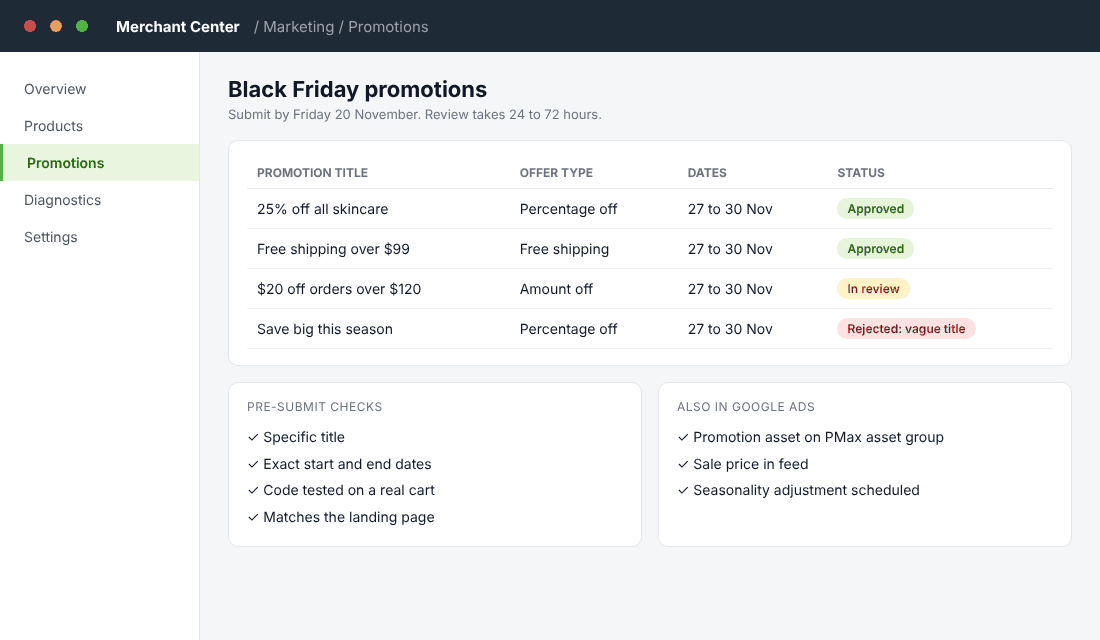
Google now shows offer badges in Shopping and AI Mode results for brands with approved promotions. Commentary from Common Thread Collective advises submitting every BFCM promotion by about 20 November. Google’s review takes 24 to 72 hours, so a 25 November submission leaves no room if something is rejected.
- In Merchant Center, go to Marketing, then Promotions, and choose your offer type: percentage off, amount off, or free shipping.
- Write a specific title, for example “25% off all skincare, 27 to 30 Nov”. A vague line like “save big” gets rejected.
- Set the exact start and end dates, with Melbourne time as the reference.
- If you use a code, place a real test order with it first. Google tests promotions against a real cart.
- For Performance Max, also add the promotion as an asset at campaign or asset group level inside Google Ads.
Google began scanning landing pages in October and attaching discounts automatically to eligible Search and Performance Max campaigns. If you want control over the wording, add your own promotion assets. Doing so removes those campaigns from the automated scope.
Step 2: Choose a Campaign Structure You Can Control
Triple Whale’s BFCM 2025 numbers are useful here. Performance Max spent US$57M and returned US$235M in conversion value, a ROAS of 3.15. Standard Shopping spent US$23M for US$79M, a ROAS of 3.23, with a lower CPA (US$26.34 against US$29.44). Search delivered the highest ROAS of the lot at 4.68, even though its CPM was far higher at US$193.29.
Read that carefully. Performance Max wins on scale, because it reaches more placements. Shopping and Search win on efficiency. You want all three, each with a clear job.
| Campaign | Job during BFCM | Starting share of Google budget |
|---|---|---|
| Brand Search | Protect your name from competitors bidding on it | 5 to 10% |
| Standard Shopping or PMax with feed-only | Hero products with healthy margin | 40 to 50% |
| Performance Max with sale assets | Reach new buyers and remarket | 35 to 45% |
| Non-brand Search (exact match) | Capture “black friday [your category]” queries | 5 to 10% |
Treat those shares as a starting point and adjust after your first 24 hours. If you run only Performance Max, at minimum split your low-margin products into a separate campaign with a higher ROAS target. Otherwise Google will happily spend your sale budget on the cheapest-to-convert, lowest-profit items.
For the full structure, our Performance Max playbook covers asset groups and exclusions in detail.
Audience signals help Performance Max start faster. Add your customer list, 30-day site visitors, and a custom segment built from searches like “black friday [your category] australia”. These guide Google but do not restrict who sees the ads.
Step 3: Tell Google a Sale Is Coming (Seasonality Adjustments)
This is the most useful feature most stores never touch. A seasonality adjustment tells Smart Bidding that conversion rates will change for a short window. Google says it is ideal for events of one to seven days and warns against windows longer than 14. It works with Target ROAS and Target CPA in Search, Shopping, Demand Gen and Display, and with any bid strategy in Performance Max.
How to set one up
- In Google Ads, go to Tools, then Shared Library, then Bid Strategies, and choose Seasonality adjustments.
- Click the plus button and select Conversion rate.
- Pick your campaigns. Use a separate adjustment for any campaigns where the discount differs.
- Set the start for Friday 27 November, 12:00am, and the end for Monday 30 November, 11:59pm.
- Enter the expected conversion-rate lift. Use your own sale history: if last year’s sale days converted at 3.6% against a normal 2.4%, enter 50%.
- Save. You do not need to reverse it afterwards, because performance returns to normal when the window ends.
Be conservative if it is your first sale. A lift entered too high makes bids too aggressive, and a stock-out on your hero product makes it worse. Our Black Friday discount calculator helps you work out your real break-even before you choose a number.
Pair the adjustment with a lower ROAS target. Many practitioners drop target ROAS by 20 to 30% for the peak days, so a 500% target becomes 350 to 400%. Make that change on Wednesday 25 November, not on Friday morning, so Smart Bidding has a day to settle. Keep the same bid strategy type. Switching it resets learning.
Step 4: Split Your Budget by Day, Not by Week
Black Friday weekend is not four equal days. Most stores see their biggest spikes on Friday and Cyber Monday, with a quieter weekend between. Set daily campaign budgets instead of shared budgets so one campaign cannot swallow another’s allowance.
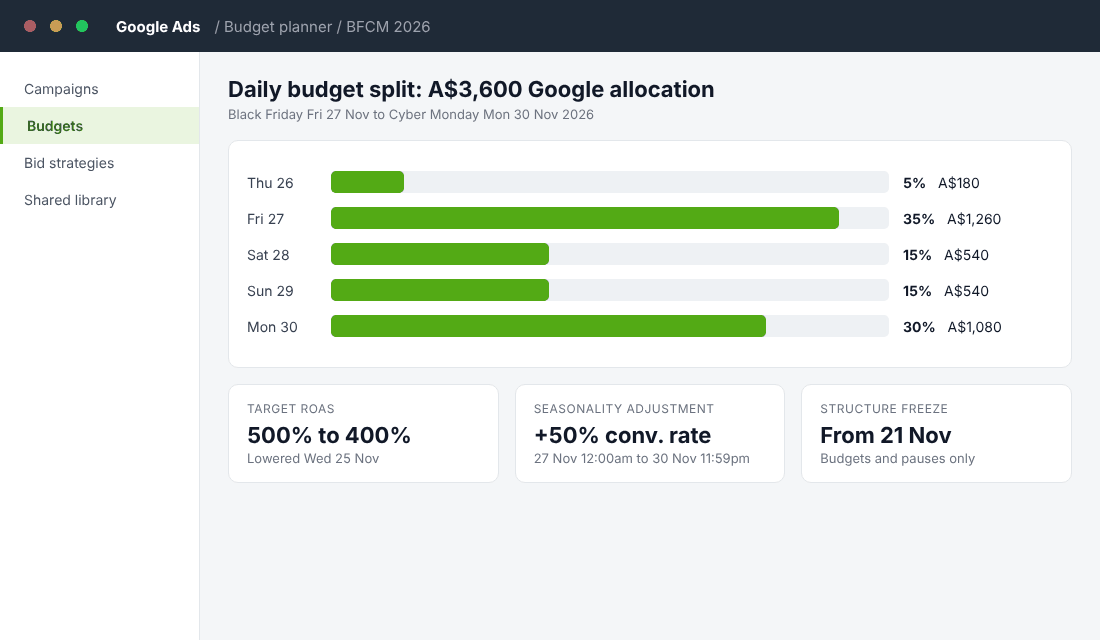
Start with how much Google should get. An Australian store spending A$12,000 across all paid channels for the sale might give Google 30%, which is A$3,600, and Meta the rest. Our Google Ads budget guide explains how to decide that number from your own margins.
| Day | Share of Google budget | A$ on a A$3,600 budget |
|---|---|---|
| Thu 26 Nov (pre-launch) | 5% | A$180 |
| Fri 27 Nov (Black Friday) | 35% | A$1,260 |
| Sat 28 Nov | 15% | A$540 |
| Sun 29 Nov | 15% | A$540 |
| Mon 30 Nov (Cyber Monday) | 30% | A$1,080 |
The Thursday spend is deliberate. It is a test day, 5% of the budget, to confirm tracking fires, the promotions appear and the checkout works on mobile. Roughly 72% of Australian BFCM transactions on Shopify happen on a phone, according to merchant data summarised by Process Creative, so test on a phone.
Remember what your costs look like. In Australia, plan on roughly A$1 to A$4 per click for ecommerce in a normal month (see our Google Ads cost in Australia breakdown), then add a buffer of 20 to 25% for sale days. Before you commit any budget, run your break-even ROAS number. If your discounted margin means break-even ROAS is 4.0, a 3.62 industry average will lose you money.
Step 5: Run Sale Day Like a Pilot
During the sale, you are not optimising. You are monitoring. Check three times a day and follow rules you wrote in advance.
- 9am, 1pm, 7pm AEDT: look at spend, conversions and ROAS by campaign. Compare against the same hour on the Tuesday before.
- Stock check: pause or exclude any product with under three days of inventory. Selling out inside a Performance Max campaign wastes spend and trains the algorithm on lost clicks.
- Stop-loss rule: if a campaign has spent twice its target CPA with no sales, pause it. Do not wait for a perfect read.
- Scale rule: if a campaign is profitable and capped by budget before 3pm, lift its budget by 20%. Smaller increases avoid shocking the bidder.
- Do not change: bid strategy type, conversion goals, or product groupings.
Brand lessons: Socks for Living, an Aussie Shopify merchant, reported sales up 228% year on year in 2018, its first Black Friday using Shopify Plus Launchpad to schedule offers, with a 49% lift in conversion rate. The detail that matters is that offers were scheduled and could not conflict. Your Google setup needs the same discipline: start and end dates written down, not remembered. Pattern Australia, an ecommerce growth agency, also reports driving more than A$50 million in sales over Cyber 2023 across its client brands, which shows how much volume moves when feeds and bids are ready early.
Four Mistakes That Drain a Black Friday Google Budget
These show up in almost every account audit we run in the first week of December.
- Discounting every product equally. A 25% sitewide offer on a 40% gross margin leaves 15 points before ad costs. Put your low-margin items in their own campaign with a higher ROAS target, or leave them out of the sale ads entirely.
- Forgetting negative keywords. Sale traffic pulls in searches like “free”, “voucher codes” and “wholesale”. Add them as negatives on Search before 25 November. Our negative keyword guide has the starter list.
- Changing too much mid-sale. Every edit to a campaign can disturb bidding. Pause, scale budgets in 20% steps, and leave everything else alone until Tuesday.
- Ignoring the day after. Cyber Monday ends at midnight, but Google keeps serving sale creative until you pause it. Set a calendar reminder for Tuesday morning to restore targets and swap in your standard assets.
One more point on timing. Australian shoppers do not behave like Americans on the day. Early morning and lunchtime browsing on phones drives a large share of sales, so schedule your own checks around that, not around US Thanksgiving articles written for a different time zone.
Why These Steps Compound
Each step feeds the next. A clean feed means your promotions get approved. Approved promotions make your ads stand out, which lifts click-through rate. A higher click-through rate improves your quality signals, and a seasonality adjustment lets Smart Bidding spend into that extra demand. A daily budget split then makes sure the money is there on the days that count.
Skip any link and the chain breaks. A messy feed kills the promotion. A missing seasonality adjustment means bids stay timid on Friday. A flat budget runs dry by lunchtime on Cyber Monday. That is why stores that prepare for three weeks often beat bigger competitors who start on the Wednesday.
And what happens after matters as well. Every first-time buyer your Google campaigns bring in during the sale should land in your post-purchase flow. Our Black Friday Australia 2026 plan covers how to turn sale buyers into repeat customers.
Your Black Friday Google Ads Checklist
Copy this into your project tool and tick it off.
- Merchant Center has zero price or availability disapprovals (by 8 Nov)
- Purchase conversion tracking tested on mobile and desktop (by 8 Nov)
- Custom labels set for hero, high-margin and low-margin products (by 13 Nov)
- Sale asset groups built and paused (by 13 Nov)
- Promotions submitted and approved in Merchant Center (submit by 20 Nov)
- Break-even ROAS calculated at sale prices (by 20 Nov)
- No structural changes after 21 Nov
- Seasonality adjustment scheduled for 27 to 30 Nov (by 25 Nov)
- Target ROAS lowered 20 to 30% on Wednesday 25 Nov
- Daily budgets set using the 5, 35, 15, 15, 30 split
- Stop-loss and scale rules written down
- Restore targets and pause sale assets on Tuesday 1 Dec
Take the Next Step
Inside eCommerce Circle, Google Ads sits in the Promotion pillar, and it is one of the core pieces we work on with every member before a peak sale. If you want to see exactly where your store is being capped, take the free More Orders Scorecard. It takes two minutes and shows you which of the 10 P’s to fix first.
Figures are from Triple Whale (BFCM 2025), SMEC (Black Friday 2025 recap), Australia Post, Google Ads Help (seasonality adjustments), Common Thread Collective and Process Creative. US-dollar and European figures show direction rather than Australian benchmarks, so check your own account before you set targets.