Shopify Plus costs from $3,700 AUD a month on Shopify’s Australian pricing page, against $431 a month for Advanced on yearly billing. That is a gap of $39,228 a year before you pay a developer, and for most Aussie stores under $3 million in revenue it does not pay for itself.
Most founders ask the wrong question. They ask “are we big enough for Plus?” when the real question is “which specific Plus feature will earn back $39,228 for us this year?” If you can name the feature and put a dollar figure on it, upgrade. If you cannot, you are buying a status symbol with your margin.
I have watched brands upgrade because a competitor did, because an agency suggested it, or because “we’re serious now”. I have also watched brands stay on Advanced for two years too long, bolting on app after app to fake what Plus does natively. Both mistakes cost real money. This guide gives you the numbers, the break-even maths and a six-point test so you can decide in an afternoon.
What Shopify Plus Costs in Australia (AUD)
Shopify’s Australian pricing page lists the plans below. Prices are in AUD and the Plus figure is a starting price, not a fixed one.
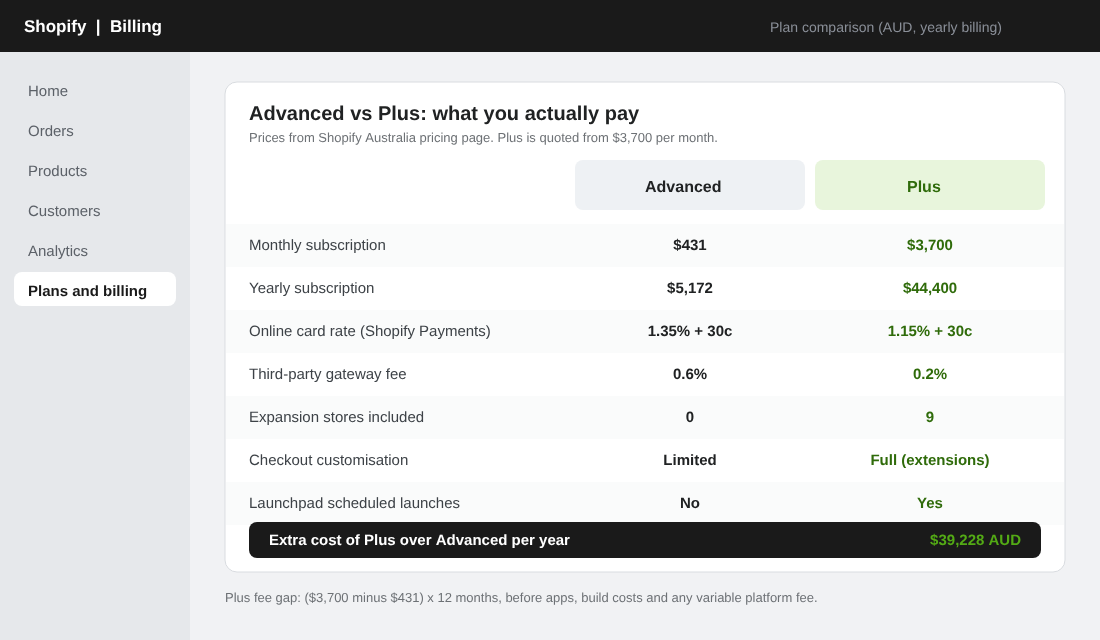
| Plan | Monthly billing | Yearly billing (per month) | Online card rate | Third-party gateway fee |
|---|---|---|---|---|
| Advanced | $575 | $431 | 1.35% + 30c | 0.6% |
| Plus | From $3,700 | Not listed | 1.15% + 30c | 0.2% |
A few things the headline price hides:
- Plus is contract pricing. On Shopify’s US page Plus is $2,500 USD a month on a one-year term or $2,300 on a three-year term, and the Australian page quotes a three-year option too. Ask about the term before you ask about the price.
- There is a variable platform fee at higher volume. Shopify says “more complex, higher volume businesses” move to a fee based on revenue and business model. Shopify does not publish the percentage, so any blog quoting an exact figure (including a few I have read) is repeating hearsay. Get it in writing in your quote.
- Card rates only drop by 0.20 percentage points. Advanced is 1.35% + 30c and Plus is 1.15% + 30c on standard online cards. That is the entire payments saving if you use Shopify Payments.
- Setup is not free in practice. Shopify lists no setup fee, but a Plus build is project work. Ringly’s 2026 breakdown (USD estimates) puts a simple migration at $5,000 to $15,000, a mid-market build at $25,000 to $80,000, and total cost of ownership at two to four times the platform fee once apps and developer time are counted.
Budget the subscription, the build and the ongoing developer retainer. If your finance person only sees the subscription line, the first quarter will be an ugly surprise.
The Break-Even Maths Nobody Shows You
Here is where I disagree with most of what ranks on Google for this topic. Plenty of articles say Plus “pays for itself” through lower transaction fees at around $1.5 million to $2 million in revenue. Run the numbers with Australian pricing and it falls apart.
The extra yearly cost of Plus over Advanced on yearly billing is ($3,700 minus $431) x 12, which is $39,228. Your card saving is 0.20% of card volume. To cover $39,228 with the card rate alone you would need roughly $19.6 million a year through Shopify Payments. If you use a third-party gateway the gap is wider (0.6% down to 0.2%, so 0.4 points) but you would still need around $9.8 million, and you probably should not be on a third-party gateway anyway.
So the fee saving is a rounding error for almost everyone. Plus has to earn its keep through revenue and efficiency, which means conversion rate, average order value, new markets, wholesale or staff time.
That gives you a cleaner test. Divide the extra cost by your gross profit and you get the revenue lift Plus must deliver to break even:
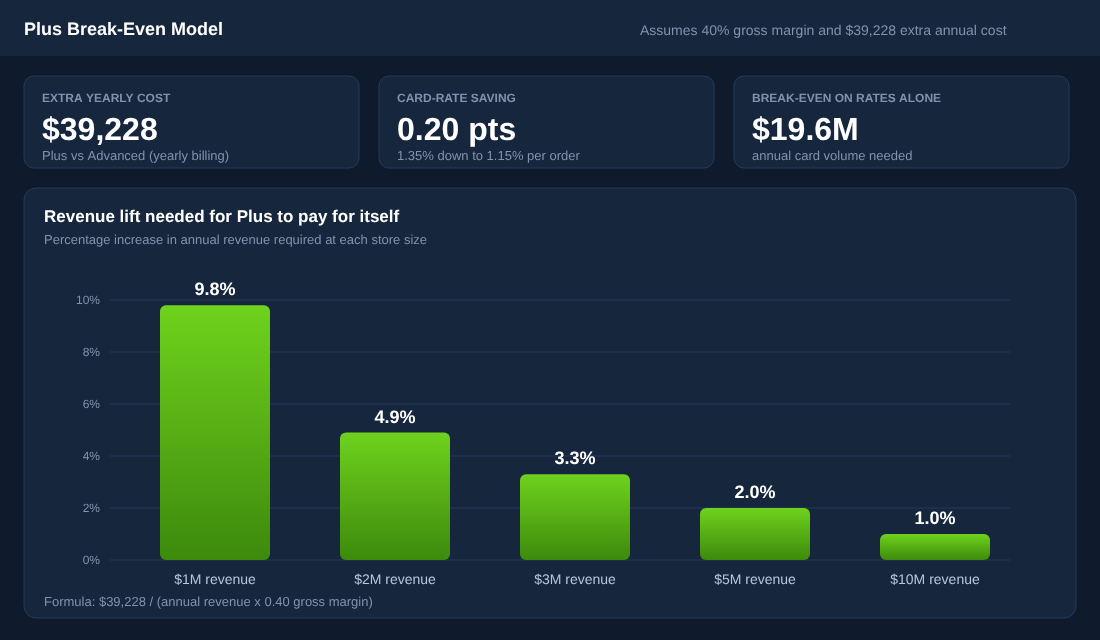
| Annual revenue | Gross profit at 40% | Revenue lift needed to cover $39,228 |
|---|---|---|
| $1M | $400,000 | 9.8% |
| $2M | $800,000 | 4.9% |
| $3M | $1,200,000 | 3.3% |
| $5M | $2,000,000 | 2.0% |
| $10M | $4,000,000 | 1.0% |
The formula is simple: $39,228 divided by (annual revenue x your gross margin). Swap in your real gross margin. If you are not sure what yours is, our guide to ecommerce gross margin in Australia shows how to calculate it properly.
Read the table like this. At $1 million, Plus has to lift your revenue by nearly 10% just to stand still. At $5 million it needs 2%. That is why the upgrade conversation only gets interesting once you are past roughly $3 million and have a specific reason to expect that lift. It also ignores the build cost, so treat these as the minimum.
The Plus Features That Actually Earn Money
Plus has a long feature list. Most of it will never matter to you. Here are the parts that change a store’s economics, with what each is worth.
1. Checkout customisation
This is the big one. Checkout on Advanced is fairly locked down. Plus lets you customise the checkout with extensions and build custom logic with Shopify Functions, for example custom fields, payment method ordering, shipping rules and B2B payment terms.
Australian health and beauty brand al.ive body is a good example. Shopify’s case study reports a 47% conversion rate increase after adding checkout customisations, three times more customer acquisitions, and more than AU$1 million in sales in four days during Black Friday, its best period since upgrading. Remember that is Shopify’s own marketing page and the brand also ran expansion stores and a B2B build, so do not assume a 47% lift lands for you. But it shows what a checkout built around your customers can do.
If your checkout is leaking, fix the basics first. Our Shopify checkout optimisation guide covers the fixes you can make on any plan before you pay for Plus.
2. Expansion stores and international selling
Plus includes nine expansion stores on top of your main store, so ten in total. Extra stores cost about $300 USD a month each or a revenue share. Aje, the Australian fashion label, reports a 135% conversion rate increase just weeks after launching its redesigned Shopify Plus build, now running three international storefronts and shipping to 75 countries.
Culture Kings tells a similar story at scale: 40% to 60% growth year on year since 2013, four global storefronts with local-currency checkouts managed from one hub, and about 60% of revenue now online. That brand moved from Adobe Commerce, which is a different starting point from a Shopify-to-Shopify upgrade.
Here is my honest take. Below three storefronts, Shopify Markets on Advanced is usually cheaper and simpler. Our Shopify Markets guide shows how to run multiple currencies and languages inside one store. Expansion stores earn their place when you need separate catalogues, separate payouts or local staff permissions per country.
3. B2B and wholesale
B2B is now available on Basic, Grow and Advanced, but capped at three active catalogues. Plus removes the cap and adds customer-level pricing, deposits and partial payments. If you run four or more price lists, or wholesale accounts that need payment terms and purchase orders, this alone can justify the jump. We cover the model in our Shopify wholesale guide.
4. Launchpad for timed launches
Launchpad lets you schedule product drops, price changes and sales events so they go live at an exact minute without someone logging in at 5am. At six or more timed events a year (Black Friday, Boxing Day, EOFY, product drops) it is worth real hours. Under that, a calendar reminder and a VA will do the job.
5. Higher API limits and automation
Shopify’s GraphQL Admin API allows 100 points a second on standard plans and 1,000 on Plus, according to First Pier’s pricing breakdown. If you run a headless storefront, heavy ERP syncing or a 3PL integration moving thousands of orders a day, this matters. If you run six apps and a few Klaviyo flows, it does not.
6. Support and the Merchant Success team
Plus includes 24/7 priority phone and chat support. It is useful when checkout breaks at 8pm on Black Friday. It is a poor reason to upgrade on its own.
What Plus Does Not Give You
A few things I see people assume Plus will fix:
- A better conversion rate. Plus gives you the tools. A tired theme, weak product pages and slow load times will stay weak. Start with our conversion rate optimisation guide.
- More traffic. Plus has nothing to do with acquisition. Your ads, email and SEO decide that.
- A lower payments bill in a meaningful way. As shown above, the saving is 0.20 points.
- Free development. The Plus checkout is powerful because it is programmable. Programmable means you pay a developer at $100 to $200 an hour (Ringly’s estimate in USD) to build it.
One deadline is worth knowing about if you are already on Plus or inheriting a Plus store. Shopify Scripts stopped executing on 30 June 2026 and editing was locked from 15 April 2026. Custom discounts, shipping rules and payment logic built in Scripts have to be rebuilt as Shopify Functions. Wholesale-heavy stores felt this most. If a previous developer built your checkout logic, ask which pieces were migrated and test them with a real order.
The Six-Point Plus Upgrade Test
Here is the framework I use with members. It forces you to name the reason you are upgrading. Score one point for every statement that is true today.
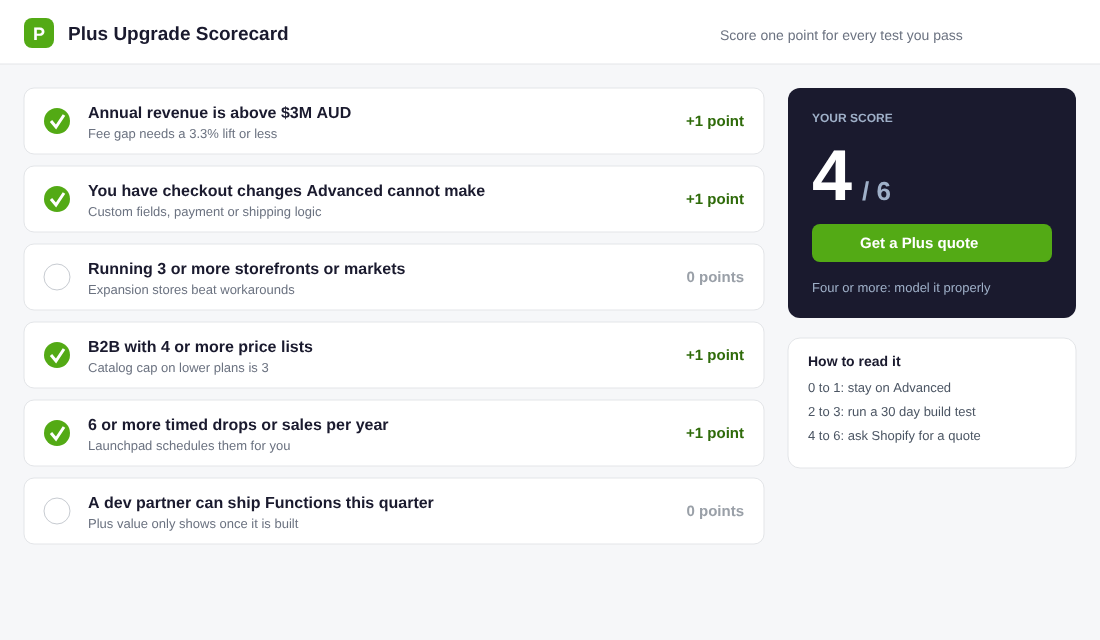
- Revenue is above $3 million AUD a year. At that size the fee gap needs a 3.3% lift or less at a 40% gross margin.
- You have checkout changes you cannot make on Advanced. Name them. “Custom delivery date field”, “hide Afterpay on subscriptions”, “wholesale payment terms”. If you cannot name one, score zero.
- You run three or more storefronts or markets. Below three, Shopify Markets is normally cheaper.
- You run B2B with four or more price lists. The catalogue cap on lower plans is three.
- You run six or more timed drops or sales a year. That is the Launchpad threshold.
- A developer partner can ship Shopify Functions this quarter. Plus value only shows once the work is built. If you cannot staff it, you are paying for shelfware.
How to read your score:
- 0 to 1: Stay on Advanced. Revisit in six months or when revenue crosses $3 million.
- 2 to 3: Run a 30-day build test. Scope the specific change, get a quote from a partner and model the lift using the table above before you commit to a contract.
- 4 to 6: Ask Shopify for a Plus quote and negotiate the term, the variable fee and the expansion store terms.
Your Plus Break-Even Worksheet (Copy This)
Open a spreadsheet and fill in these lines. It takes fifteen minutes and replaces three hours of agency calls.
- Step 1: Pull your real numbers. In Shopify admin go to Analytics, then Reports, and open the sales and payments reports. Note trailing 12-month net sales, card payment volume and total payment processing fees.
- Step 2: Calculate your extra platform cost. Plus quote per month minus your current plan per month, times 12. Our figure at list price is $39,228.
- Step 3: Add the build. Get one written developer quote for the single change you want most. Add it to your year-one cost. If it is $20,000, your year-one hurdle becomes about $59,000.
- Step 4: Add apps you will remove. If Plus lets you drop apps for upsells, payment rules or wholesale logic, subtract their annual fees. This is the one genuine saving.
- Step 5: Convert to a lift. Divide your year-one hurdle by (annual revenue x gross margin). That is the revenue lift you must deliver.
- Step 6: Decide if the lift is believable. Compare it to your own tests. If you have never lifted conversion by 2% in a year, do not budget for 5%.
While you are in the admin, use Shopify Flow. It is free on every plan and automates tasks like tagging high-value customers or flagging orders for review. Many stores buy Plus for automation they could already run on Advanced. Check what Flow does for you before paying for more.
The Compound Effect: When Plus Becomes a Growth System
The brands that get a return from Plus do not treat it as a single switch. They stack small gains. A custom checkout adds a few points of conversion. Expansion stores open a new country without rebuilding the store. B2B on the same platform gives wholesale customers self-serve ordering and frees up a staff member. Launchpad stops launch-day mistakes.
Each lift on its own might cover the $39,228 gap. Together they can cover it several times over. That is the pattern in al.ive body, Aje and Culture Kings: the platform was one part of a larger plan that included a redesign, new markets and operational work.
The reverse is also true. A brand that upgrades with no plan pays $44,400 a year for the same store it had before. Plus is an accelerator, not an engine. If your offer, ads and email are not working, a more expensive platform will not fix them.
FAQ: Shopify Plus Questions Aussie Founders Ask
How much does Shopify Plus cost in Australia?
Shopify lists Plus from $3,700 AUD a month on its Australian pricing page. A variable platform fee applies for higher-volume merchants, and development work is on top.
Can I stay on Advanced instead?
Yes, and most stores under $3 million should. Advanced is $431 AUD a month on yearly billing, with B2B catalogues, Shopify Flow and Shopify Markets.
Is the third-party gateway fee lower on Plus?
Yes. Shopify lists 0.2% on Plus compared with 0.6% on Advanced if you use a third-party gateway. Using Shopify Payments avoids that fee altogether.
Do I need Plus for Black Friday?
No. Plus helps with timed launches and checkout customisation, but you can run a strong Black Friday on Advanced with Flow, discounts and a tested checkout. Our Black Friday checklist for Shopify covers the basics.
What happens to my store when I upgrade?
You keep your store, apps and data. The work is rebuilding checkout customisations, which means Scripts, old checkout.liquid edits and any third-party checkout apps need replacing with extensions and Functions.
Where to From Here
Decide in this order. First, score yourself on the six-point test. Second, run the break-even worksheet with a real developer quote. Third, ask Shopify for a Plus quote and negotiate the term. If you are not at a four, put the $39,228 into ads, email or conversion testing instead and revisit when the numbers say yes.
Inside eCommerce Circle, platform choices like this one sit in the Platform pillar of the 10 P’s, and we work through them with every member. If you want to see exactly where your store is being capped, take the free More Orders Scorecard. It takes two minutes and shows you which of the 10 P’s to fix first.
Sources: Shopify Australia pricing, First Pier on Shopify Plus pricing, Ringly, Plus vs Advanced, Shopify case study: al.ive body, Aje case study, Shopify Plus: Culture Kings, Black Belt Commerce on the Scripts sunset. Prices checked 10 November 2026; confirm current figures with Shopify.