Most Shopify product pages are running on empty. The product photos are sharp, the copy is tight, the price is reasonable. Then a buyer scrolls to the bit that actually decides the purchase, the reviews section, and finds 4 reviews left in 2023 by people called “Customer A” and “Anonymous”. Add to cart? Probably not.
What’s in This Article
The data is brutal on this. 99.9% of consumers read product reviews before they buy online. Products with at least 5 reviews are 270% more likely to be purchased than products with zero. For higher-priced products the effect is bigger again: reviews can lift conversion on big-ticket items by up to 380%. Your reviews block is not decoration. It is the single piece of social proof that converts every visitor your ad spend just bought.
And yet most Aussie Shopify brands treat reviews as a passive feature. Install Judge.me, leave the default email on, hope for the best. What the brands hitting 4 to 6% conversion rates do is completely different. They run a Reviews Engine: a 5-stage system that captures volume, captures photos and video, and feeds reviews back out into ads, email and onsite copy. Done properly, the Reviews Engine lifts PDP conversion 20 to 35% and gives you a UGC library that fuels every ad campaign for the next 12 months. Here is how to build it.
Why most Shopify stores under-collect reviews by 5 to 10x
Before we get into the system, let’s name the problem. A healthy Shopify store should be collecting reviews from 15 to 30% of orders. The brands we work with inside eCommerce Circle who run a proper engine push this to 35 to 45% on hero SKUs. Most stores we audit sit at 2 to 5%. That is a 5 to 10x gap on the most valuable conversion asset on the site.
The reason is almost always the same three failures:
- The ask goes out too early or too late. Reviews are requested 3 days after order (before the customer has used the product) or 30 days after (when the buying memory has faded). Both kill response rate.
- The ask is one email, sent once. No reminder. No second nudge. No photo prompt. No SMS backup. A single email reaches roughly 35 to 50% of inboxes and converts at maybe 1 to 3%.
- Photo and video are an afterthought. The form asks for stars and text. The customer types two lines and moves on. The brand misses the most valuable asset of the entire interaction: visual UGC.
The Reviews Engine fixes all three. Five stages, each one engineered to lift the next, with measurable benchmarks at every step.
Stage 1: The Trigger Window (timing the ask)
The single biggest lever in a review collection system is when you ask. Get the trigger window right and your response rate doubles before you change a single word of copy.
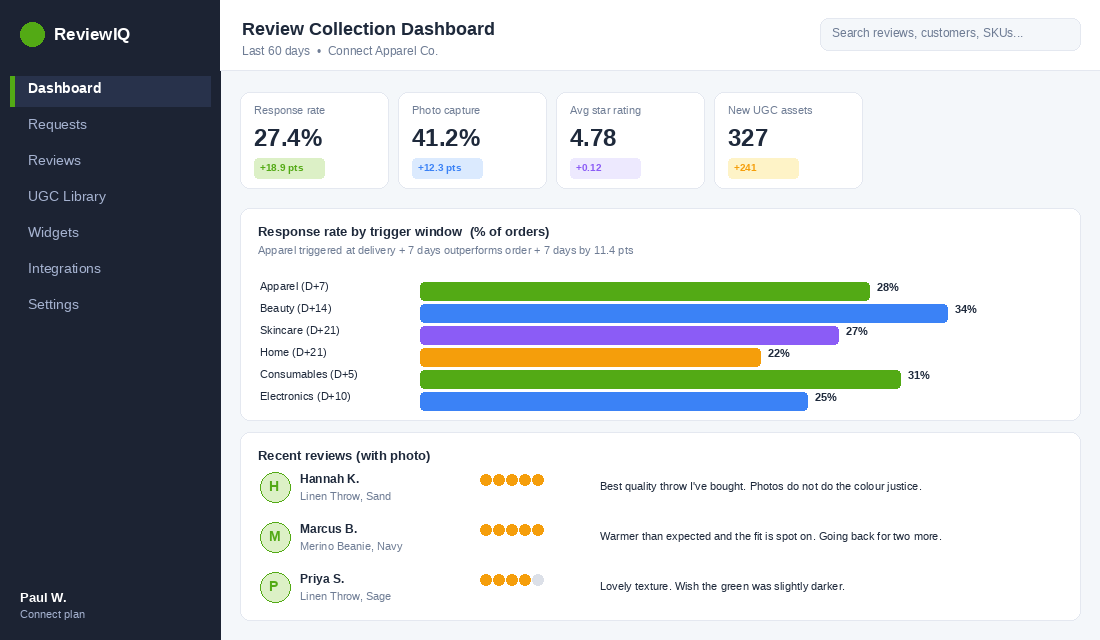
The trigger window is the number of days after delivery (not after order) when the buyer has used the product enough to form an opinion but not so long that they have forgotten the experience. It varies by category:
- Apparel, accessories, footwear: 7 to 10 days after delivery. They have worn it twice and washed it once.
- Beauty, skincare, supplements: 14 to 21 days. Long enough to see results. Short enough to remember.
- Home, furniture, decor: 14 to 28 days. Long enough to live with the piece.
- Food, beverage, consumables: 5 to 7 days. The product is gone by week two.
- Electronics, gadgets, tools: 10 to 14 days. Time to set up and use repeatedly.
The mistake almost every Shopify store makes here is anchoring the trigger to the order date, not the delivery date. If the carrier takes 6 days to deliver and your review request fires 7 days after order, the customer has had the product for 24 hours. They have not even opened the box on the kettle.
Most modern review apps (Judge.me, Loox, Okendo) now pull tracking data from Shopify Shipping or AfterShip and trigger off the actual delivery event. Turn that on. If your app does not support it, your trigger window is broken before you start.
Stage 2: The Ask (multi-touch sequence, not a single email)
A single email asking for a review is the difference between a 2% response rate and a 25% response rate. The brands collecting 30% plus of orders run a sequence of 3 to 5 touches across email and SMS, designed to compound rather than annoy.
Here is the multi-touch sequence we recommend inside Connect for stores doing 200 plus orders a month:
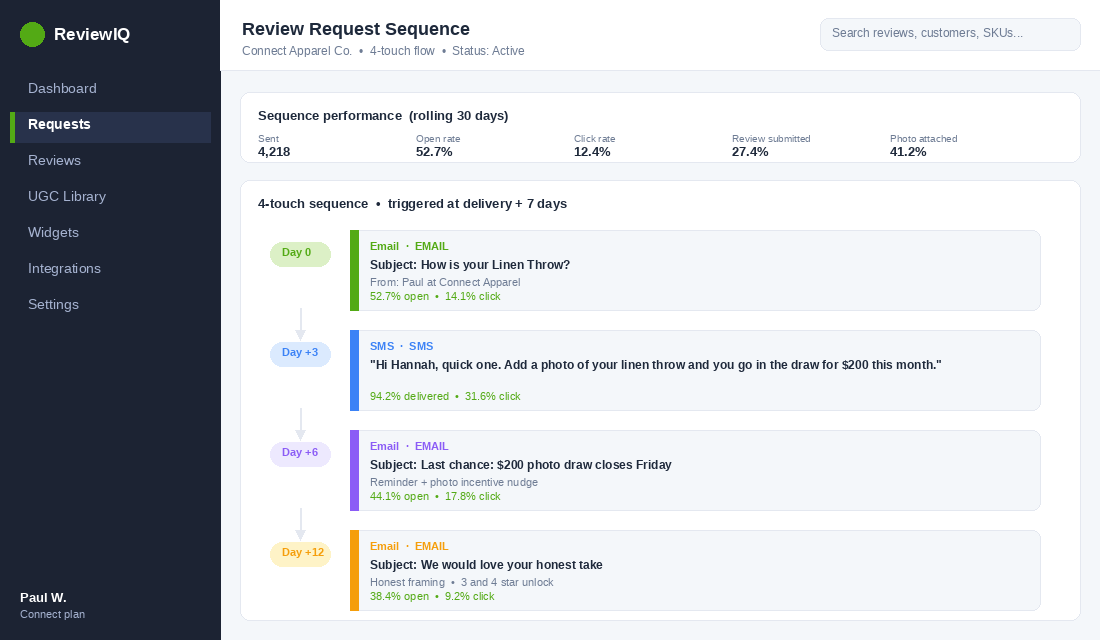
- Touch 1 (Day 0 of trigger window): Email from your review app. Plain text style, sender name matches a real person (founder name works best for stores under $5m a year). Subject line names the product, not “leave a review”.
- Touch 2 (Day +3): SMS reminder via Klaviyo or Postscript. Short, friendly, links direct to the review form. SMS open rates on this run 90% plus.
- Touch 3 (Day +6): Email reminder. Add a soft incentive here, not the first email. “Add a photo for an extra entry in our monthly $200 gift card draw.”
- Touch 4 (Day +12, optional): Final email. Frame as “we’d love to know what you really thought, even if it didn’t work for you.” This invites honest 3 and 4 star reviews that actually build trust.
The honest review framing on the final touch is non-obvious and worth a deeper look. Stores that only collect 5 star reviews have an authenticity problem: around 30% of shoppers actively distrust a product with only 5 star reviews. The ideal blend across your hero products is roughly 80% 5 star, 15% 4 star, 5% 1 to 3 star. That mix outperforms a clean 5 star average on real PDP conversion.
Across these four touches we typically see a cumulative response rate of 22 to 30% of orders, with hero SKUs pushing past 40%. Compare that with the 2 to 4% you get from a default single email.
Stage 3: The Capture (form design and the photo incentive)
Once a customer clicks through, you have about 60 seconds before they bounce. The form is where the actual capture happens, and the form decides three things: how many stars you get, whether you get a written review, and whether you get a photo or video.
Here is the form design we use across our Connect members. Same architecture, easy to replicate in Judge.me, Loox, Okendo or Stamped.
- Step 1: Star rating only. Single screen. One question. No friction. This step alone converts at 60 to 75% of clicks.
- Step 2: Branched written prompt. If 4 to 5 stars, ask “what did you love most?”. If 1 to 3 stars, ask “what would have made this better?”. Branching language by sentiment massively increases the quality of feedback.
- Step 3: Photo or video upload with a clear incentive. “Add a photo for an extra entry in our $200 monthly draw” or “share a photo and get a 15% off code on your next order.” This is the moment you build your UGC library.
- Step 4: Optional attributes. Skin type, height and size, room dimensions, anything that adds context for the next buyer. Okendo built their reputation on this. Other apps can do it with custom fields.
The photo incentive is the highest-ROI lever in the entire form. A 15% off code costs you nothing on a customer who is already a 5 star fan and very likely to buy again. In return you get a photo that will sit on your PDP for 12 months and earn a 103.9% conversion lift for every visitor who interacts with it. Visitors who engage with photo and video reviews convert at 5.9% versus 2.8% for text-only reviews. For apparel brands the lift hits 207%.
Stage 4: The Display (PDP review architecture)
You can have 1,000 reviews and still not move the needle if your PDP shows them badly. The display stage is where most of the conversion lift actually shows up, and most Shopify themes do it poorly out of the box.
Six things must be true about the way reviews appear on your product page. Walk through your hero PDP right now and check each one.
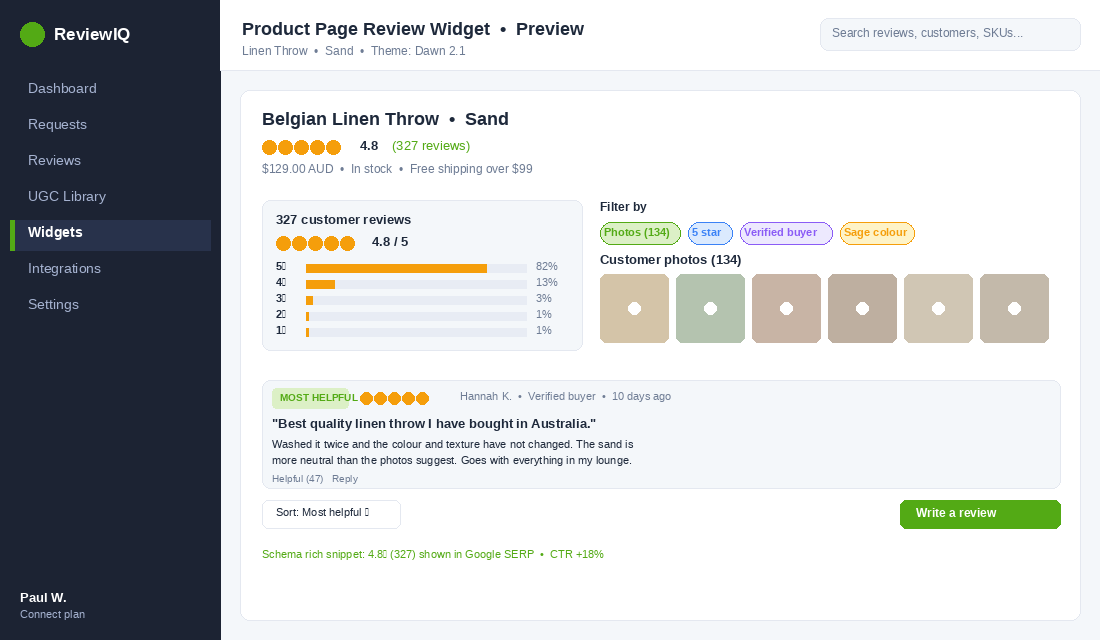
- Star rating above the fold, beside the title. Not buried below the add to cart. Buyers anchor on the star count in the first 3 seconds. If they have to scroll to find it, you have already lost half the trust signal.
- Review count linked to the section. “4.8 out of 5 (327 reviews)” with the number clickable to jump to the review section. Tiny detail, measurable lift.
- Photo gallery as the first review element, not a sidebar. Photos sell. Most themes hide them in a tab. Move them out. A grid of customer photos sitting above the written reviews is one of the highest-impact PDP changes you can make.
- Filter and sort controls. By star, by photo, by attribute. The buyer wants to filter to people like them. Letting them do that is a conversion lever, not a feature request.
- Most helpful review pinned at the top. Either by helpful-vote count or a manual pin. The first review the buyer reads should be the longest, most useful one, not whatever was left last.
- Schema markup so Google shows stars in search results. If Judge.me, Loox or your other app supports rich snippets, turn it on. Star ratings in the SERP lift CTR by 15 to 35%.
If you want a deeper breakdown of the full PDP architecture (the bit reviews sits inside), our 7-layer product page anatomy walks through every element from hero image to FAQ.
Stage 5: The Recycle (turn reviews into ads, email and onsite copy)
This is the stage 95% of Shopify brands skip entirely. You have a UGC library piling up inside your review app. It is the most underused content asset on the entire business. The brands hitting top-of-class CAC and ROAS recycle reviews into three different channels.
- Reviews as ad creative. Take a 5 star review, put the customer’s quote in big white text over their photo, and run it as a Meta or TikTok ad. We see 20 to 40% lower CPMs and 1.5 to 2x higher CTRs on review-style ads versus polished studio creative. This is the single fastest way to refresh your ad account when creative fatigue sets in.
- Reviews in email. Pull the top 3 reviews into every promotional email. “Why customers love this product” with a quote, name, and photo. Email click-through rates lift roughly 15 to 25% when you include UGC over generic product imagery.
- Reviews in onsite copy. Pull the most repeated phrase across your reviews and use it as a PDP headline. If 40 reviews say “smells incredible”, that goes in the hero or product description. Buyers wrote your best copy. Use it.
For a deeper play on review-style ad creative specifically, our UGC ads playbook for Aussie Shopify brands covers the full production workflow.
The tool stack: Judge.me vs Loox vs Yotpo vs Okendo vs Stamped
The Reviews Engine is more important than the tool, but the tool decides how easily you can run the engine. Here is the practical breakdown we give Connect members based on store size.
- Judge.me ($0 to $15 a month). Best for stores under $40k a month. Free forever plan includes unlimited reviews, photos, video, and SEO rich snippets. The $15 paid tier adds branding, Q and A, and more advanced flows. Hard to beat on price-to-feature ratio.
- Loox ($12.99 to $299 a month). Built around photo and video reviews. Best for fashion, beauty, lifestyle, and any brand where visual proof drives the sale. The order-based pricing hits hard above 500 orders a month, so model it before you commit.
- Okendo ($19 to $499 plus a month). The leader on attribute-rich reviews. If you sell skincare, supplements, sportswear, or anything where the buyer needs context (skin type, height, fitness level), Okendo earns its price. Strong Klaviyo integration.
- Stamped ($19 to $499 plus a month). Sits in the same band as Okendo with deeper loyalty and referral features. Worth comparing head-to-head if you want reviews plus a loyalty program in one stack.
- Yotpo ($828 plus a month for full suite). Enterprise option. Only makes sense if you want reviews, SMS, loyalty, and referrals on one platform and you are doing more than $200k a month. The pricing wall is real.
Our default recommendation for an Aussie store under $100k a month: Judge.me on the paid tier with photo and video turned on, plus Klaviyo handling the actual review request emails (not Judge.me’s default templates). This gives you the most flexibility on the multi-touch sequence at the lowest cost. Above $100k a month, evaluate Loox or Okendo seriously depending on whether photos or attributes matter more in your category.
The compound effect: why this is the highest-ROI 60-day project on your store
Look at what happens when all five stages run together for 60 days on a store doing 500 orders a month.
- Volume: Response rate moves from 3% to 25% of orders. On 1,000 orders over 60 days, that is 250 new reviews instead of 30. About 40% include a photo, so you also gain 100 pieces of new UGC.
- PDP conversion: Reviews above the fold, photo gallery, filter controls and schema markup add a measured 20 to 35% lift on hero PDP conversion rate. On a 2.5% PDP that is now 3.0 to 3.4%.
- Ad creative: 100 new pieces of UGC means 30 to 50 new ad concepts. CPMs drop 20 to 40%, CTRs lift 1.5 to 2x. Blended ROAS lifts 10 to 20%.
- Email revenue: Adding review quotes to promotional sends lifts CTR 15 to 25%. On a list doing $30k a month in email revenue, that is $4.5k to $7.5k a month of incremental top-line.
- SEO: Rich snippets lift organic CTR 15 to 35%. Compounds over months. Not measurable inside one campaign, very measurable over a quarter.
Stack those gains and you have a store with materially better PDP conversion, materially cheaper ads, materially better email revenue, and a UGC library that fuels every channel for the next 12 months. There is no other single project on a Shopify store that touches four channels at once and pays for itself inside 30 days.
The reason most founders never run this project is that it sits on the boundary between Product, Promotion, and Patrons. Nobody owns it. The brands that win are the ones who treat the Reviews Engine as a single Product asset and assign one person to run it monthly, end to end.
Your 7-day rollout checklist
Pin this. Work through it in order. Most stores can complete the rollout in a week, and the first lift shows up in the second week as new reviews start to flow.
- Day 1. Pick the tool. Judge.me paid tier if under $100k a month. Loox or Okendo if you are above and photos or attributes matter. Install it, connect Shopify, import existing reviews.
- Day 2. Set the trigger window. Match it to your category from the list in Stage 1. Confirm it fires off delivery, not order date.
- Day 3. Build the multi-touch sequence in Klaviyo. Four touches: email, SMS, email with photo incentive, honest framing email. Pull the customer’s name and product into every touch.
- Day 4. Redesign the review form. Star first, branched written prompt, photo upload with incentive, optional attributes.
- Day 5. Fix the PDP display. Star rating above the fold, photo gallery first, filter and sort controls, most helpful pinned, schema markup on.
- Day 6. Build the recycle workflow. One Asana or Trello board with three columns: reviews to ads, reviews to email, reviews to onsite copy. Assign it to one person on the team monthly.
- Day 7. Set the dashboard. Track response rate, photo capture rate, average star, and PDP CR for hero SKUs. Review weekly for the first 60 days.
If you have already turned on the post-purchase email sequence we covered earlier this week, the review request slots in as the second or third touch in that sequence rather than its own flow. One unified post-purchase journey, multiple revenue levers.
The negative-review playbook: why 4.7 beats a perfect 5.0
Founders panic about bad reviews. They should not. Purchase likelihood actually peaks between 4.2 and 4.7 stars, not at a spotless 5.0 — a perfect score reads as filtered or fake, and shoppers know it. The negative reviews are doing quiet work: roughly 95% of shoppers read reviews before buying, and a large share deliberately hunt for the one- and two-star ones to see how you handle problems.
- Respond to every 1-3 star review within 48 hours. Around 45% of consumers say they are more likely to buy from a business that replies to negative feedback. Your calm, specific fix is read by the next hundred browsers, not just the reviewer.
- Never delete a negative review — answer it. A store with zero criticism looks curated; a store that resolves problems in public looks trustworthy.
- Watch for pattern reviews. Three people flagging the same sizing or shipping issue is not a review problem — it is a product or ops problem your reviews just surfaced for free.
Turn your reviews into SEO and Google Shopping ratings
Reviews are not just PDP conversion fuel — they are free, compounding SEO. Every review adds fresh, keyword-rich content to a product page that would otherwise never update, and marking them up with AggregateRating schema earns you the yellow star snippet in Google. Those stars can lift organic click-through by 10-35% without a single new backlink. Most review apps output this schema automatically; confirm yours is firing, because it pairs directly with the on-page work in your product description system.
The same review data can flow into paid too. Once a product has enough verified reviews, your ratings can surface as seller and product ratings inside Google Shopping — so tighten your Google Merchant Center setup so the stars you worked to collect show up next to your ads and your competitors’ plain listings. Imagine two identical $69 products in the Shopping carousel — yours carrying a 4.6-star badge, theirs blank. That badge is the click, and the reviews engine you just built is what earns it.
One last reframe
The Reviews Engine is not a marketing project. It is a Product project. Every review that lands is a piece of new product copy, a piece of new ad creative, a piece of new onsite social proof, and a piece of new email content, written for free by a buyer who already gave you money. The brands compounding on top of that asset are the ones who treat reviews as a system, not a feature.
Inside eCommerce Circle, the Reviews Engine is one of the core Product pillars we work on with every member. If you want a second opinion on yours, or want help mapping it into your post-purchase flow, let’s talk.