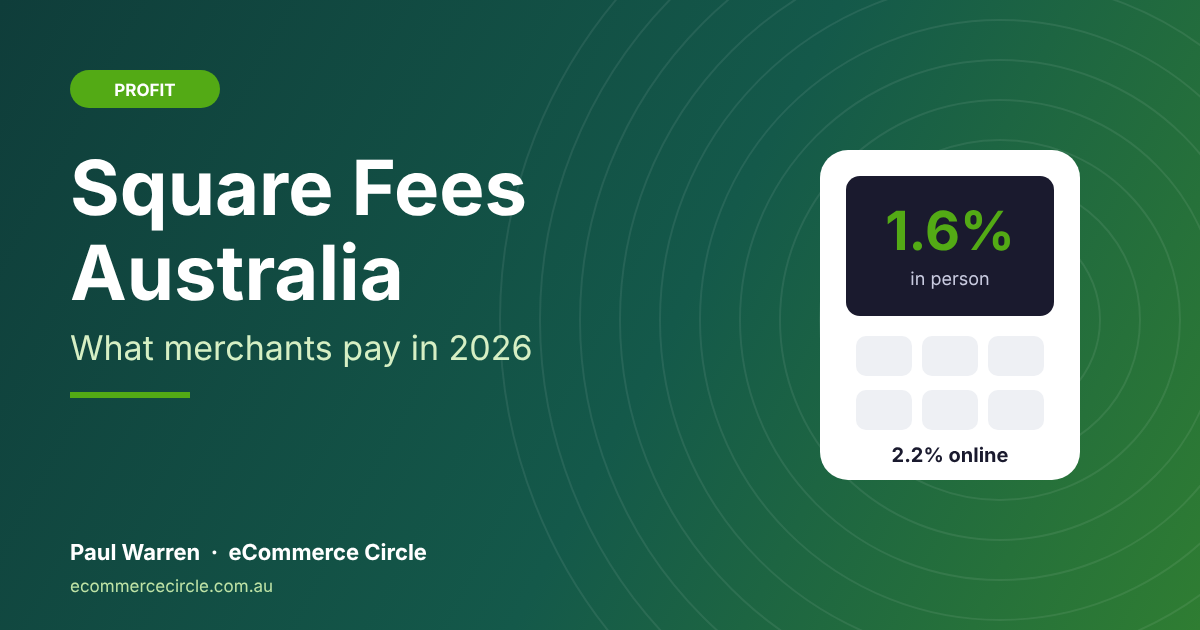
Square charges Australian sellers 1.6% per tap, insert or swipe and 2.2% per online or keyed-in payment, with no fixed cents per sale and no monthly fee on its free plans. Sellers who joined before 30 May 2024 still pay 1.9% on Square Reader, Square Stand and Tap to Pay unless they move to a paid software plan, according to Square’s own fee schedule (checked 22 November 2026).
That is the short answer. The longer answer is where most store owners lose money, because the headline rate is only one line on the bill. Afterpay through Square costs 6% plus 30 cents. Instant payouts cost 1.95%. And since 1 October 2026 you can no longer pass any of it on to customers as a card surcharge.
I see the same pattern over and over with founders who sell at markets and online. They pick a payment provider in a rush before their first pop-up, never look at it again, and two years later they are paying a few hundred dollars a year more than they need to. This guide breaks down every Square fee in Australian dollars, shows you exactly when Square is cheaper than Shopify Payments and Stripe, and gives you a seven-step checklist to cut what you pay.
Square Fees at a Glance
Here is every fee an Australian Square seller is likely to see, pulled from Square’s help centre fee schedule, pricing page and online store page. All amounts are in AUD.
| Fee | Rate | When it applies |
|---|---|---|
| In-person card payment | 1.6% | Tap, insert or swipe on any Square hardware or Tap to Pay (sign-ups from 30 May 2024) |
| Legacy in-person rate | 1.9% | Reader, Stand or Tap to Pay for sellers who joined before 30 May 2024 on a free plan |
| Online payment | 2.2% | Square Online, Payment Links, eCommerce API, subscriptions |
| Keyed-in or card on file | 2.2% | Manually entered cards, Virtual Terminal, invoices on file |
| Afterpay | 6% + 30c (excl. GST) | Every Afterpay order, in person or online |
| Instant transfer | 1.95% | Moving money to your bank before the next-day payout |
| Gift card load | 2.5% + processing | When a customer buys a Square Gift Card |
| Square Online Plus | $36 a month | Optional paid online store plan |
| Square Online Premium | $99 a month | Optional paid online store plan |
| Chargebacks | No dispute fee | Square does not charge to handle a dispute |
Two things stand out. First, Square uses one rate for every card brand, so an Amex tap costs the same 1.6% as an eftpos tap. Second, there are no fixed cents. That second point matters more than most people realise, and we will come back to it in the worked example.
In-Person Fees: 1.6% Now, 1.9% for Older Accounts
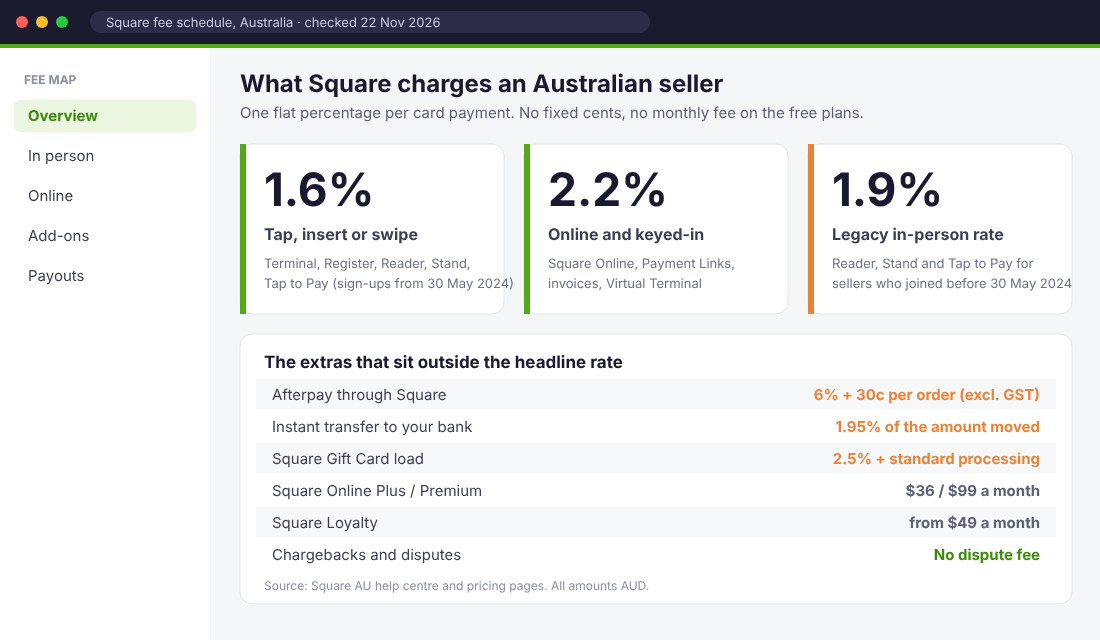
If you set up your Square account on or after 30 May 2024, you pay 1.6% on every in-person card payment, whatever hardware you use. That includes the Square Reader, Square Stand, Square Terminal, Square Register and Tap to Pay on iPhone or Android.
If you set up before that date, you are on a split rate. Terminal and Register still get 1.6%, but the Reader, Stand and Tap to Pay sit at 1.9%. Square says the 1.6% rate also applies to older sellers who subscribe to a paid software plan that includes it.
What the 0.3% gap costs you. On A$12,000 a month of market and pop-up sales, the legacy rate costs an extra A$36 a month, or A$432 a year. That is real money for a weekend stall. If you joined Square before mid-2024 and still use a Reader, open your Square Dashboard, go to Account & Settings, then Tax invoices, and check which rate you are being charged.
Hardware prices
Square’s software is free to start, but you still need something to tap on. Square’s hardware comparison page lists the Square Terminal at A$329, the Square Handheld at A$349 and the Square Register at A$1,099, with interest-free instalments on each. The Square Stand is A$149. The Square Reader was listed at A$65 on the pricing page and A$49 on the comparison page when we checked, so treat it as a promotional price that moves.
For most product brands doing markets, a Reader plus your phone is enough to start. Move to the Terminal once you are doing more than one or two events a month, because it prints receipts and does not drain your phone battery mid-rush.
Online Fees: Square Online Plans and the 2.2% Rate
Every online payment through Square costs 2.2%, whether it comes through a Square Online store, a Payment Link you send by text, or a developer integration. The plan you pay for does not change the rate. Square Online has three tiers, and the extra features in the paid tiers do not lower the rate. Per its online store page:
- Free: A$0 a month, 2.2% per transaction.
- Plus: A$36 a month, 2.2% per transaction.
- Premium: A$99 a month, 2.2% per transaction.
Compare that to Shopify’s Australian pricing: 1.7% + 30c on Basic, 1.55% + 30c on Grow and 1.35% + 30c on Advanced. Stripe charges 1.65% + A$0.30 for standard domestic cards. Square’s rate looks higher on paper, but it has no 30-cent fixed fee, so the real cost depends entirely on your order size.
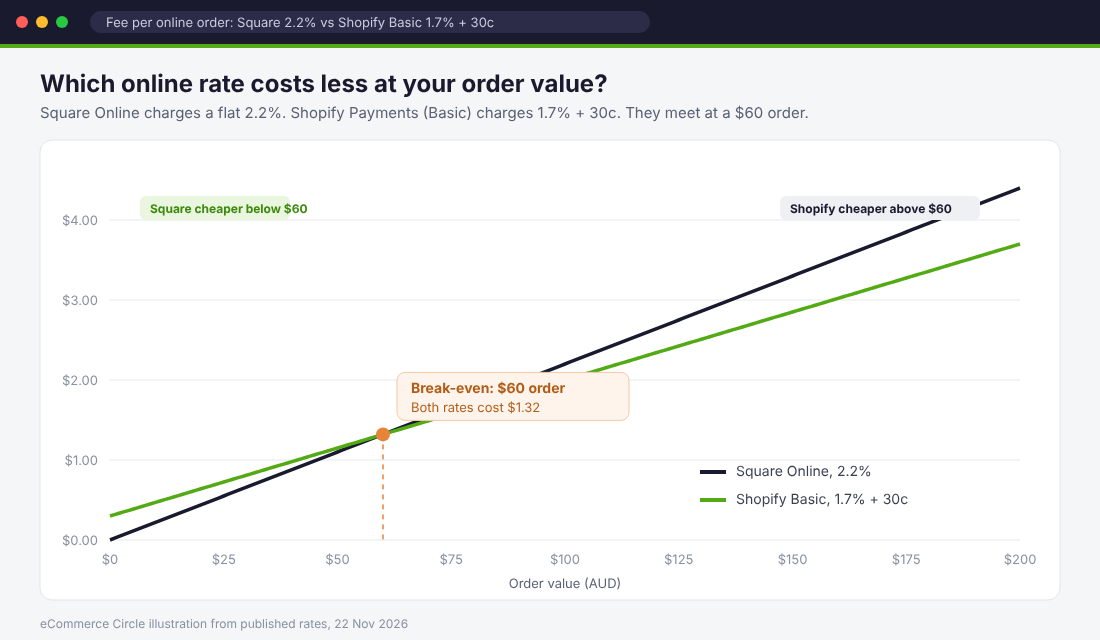
The break-even is a $60 order. At $60, Square charges $1.32 and Shopify Basic charges $1.32. Below that, Square is cheaper. Above it, Shopify is cheaper, and the gap widens as orders grow. On a $120 order, Square takes $2.64 and Shopify Basic takes $2.34.
So if you sell candles, stickers or snacks with a $30 average order, Square’s online rate works in your favour. If you sell furniture, skincare bundles or anything with a $100-plus average order, it works against you.
The Fees Hiding Outside the Headline Rate
This is where I see store owners get caught. The 1.6% and 2.2% rates are clear. The add-ons are easy to switch on without thinking about the maths.
Afterpay through Square: 6% + 30c
Square sellers can offer Afterpay in person and online, and Square pays you the full amount up front. The price is 6% + 30c per order, excluding GST, per Square’s fee page. Add GST and that is 6.6% + 33c. On an $85 order, that is about $5.94 in fees, compared with $1.87 on a normal online card payment.
Afterpay can lift conversion and order value, but it has to earn that extra $4 or so per order. I walk through how to test whether it does in our guide to whether the Afterpay merchant fee is worth it.
Instant transfers: 1.95%
Square pays out the next business day for free. Instant transfers cost 1.95% of the amount you move. Pull A$3,000 after a big market weekend and you pay A$58.50 for the privilege of having it a day early. Unless you have a supplier bill due that afternoon, wait.
Software add-ons
Square’s pricing page lists Square Loyalty from A$49 a month, Email Marketing from A$20 a month, a Kitchen Display System from A$25 a month per device and Kiosk Lite at A$45 a month per active device after a free trial. None of these are required. Each one is worth paying for only if you can point to the sales it creates.
What Square does not charge
To be fair to Square, a few things are genuinely free: no chargeback or dispute fees (Square notes these are generally $15 to $25 elsewhere), no activation fee, no early termination fee, no inactivity fee and free next-day payouts. If you run a seasonal business that goes quiet for months, those no-fee lines are worth something.
What the October Surcharge Ban Changed for Square Sellers
On 31 March 2026 the Reserve Bank of Australia published its final decision on card payment costs. From 1 October 2026, businesses can no longer add a surcharge to debit, prepaid or credit card payments on the eftpos, Mastercard and Visa networks. Square has confirmed American Express made the same choice.
For a lot of market stallholders, that ended a habit. If you were adding 1.6% at the card reader, you now absorb it or build it into your prices. There is no third option.
The RBA also cut the wholesale fees banks charge on card payments. According to the conclusions paper, the consumer credit interchange cap fell from 0.8% to 0.3% and the debit cap from 10 cents to 8 cents from 1 October 2026. A 1.0% cap on foreign-issued cards follows on 1 April 2027. The RBA found that foreign cards make up 20% of interchange paid in Australia despite being only 3% of card transactions.
Here is the catch for Square sellers. Square charges a flat rate that bundles interchange in. When we checked on 22 November 2026, Square’s fee page still listed 1.6% and 2.2%. Lower wholesale costs do not automatically show up as a lower Square rate. If your annual card sales are above A$250,000 and your average sale is over A$15, Square says its sales team can offer custom rates. That is the moment to ask, with your own numbers in hand.
One more data point to keep in your back pocket. In the RBA’s 2025 Consumer Payments Survey, about 15% of all payments and 19% of in-person payments were made in cash, and around 20% of people who wanted to use cash said they did so to avoid card surcharges. At markets, keeping a float for cash buyers still matters, and cash carries no processing fee at all.
Square vs Shopify Payments vs Stripe: A Worked Example
Rates on their own do not tell you much. Here is what the same sale costs across the three providers, using the published Australian rates.
| Sale value | Square in person (1.6%) | Shopify POS, Basic (1.85%) | Square online (2.2%) | Shopify online, Basic (1.7% + 30c) | Stripe (1.65% + 30c) |
|---|---|---|---|---|---|
| $15 | $0.24 | $0.28 | $0.33 | $0.55 | $0.55 |
| $35 | $0.56 | $0.65 | $0.77 | $0.90 | $0.88 |
| $60 | $0.96 | $1.11 | $1.32 | $1.32 | $1.29 |
| $85 | $1.36 | $1.57 | $1.87 | $1.75 | $1.70 |
| $120 | $1.92 | $2.22 | $2.64 | $2.34 | $2.28 |
| $250 | $4.00 | $4.63 | $5.50 | $4.55 | $4.43 |
In person, Square’s 1.6% is cheaper than Shopify POS on the Basic, Grow and Advanced plans at every sale size. Online, Square wins only on small orders. For the full Shopify picture, including third-party gateway fees, see our breakdown of Shopify Payments fees in Australia, and for Stripe’s extras see Stripe fees in Australia.
A real-shaped store
Let’s run a typical eCommerce Circle member profile. This is an illustration built from the published rates, not a client’s actual numbers. The store does A$30,000 a month: A$12,000 at weekend markets with a $45 average sale, and A$18,000 online with an $85 average order (about 212 orders).
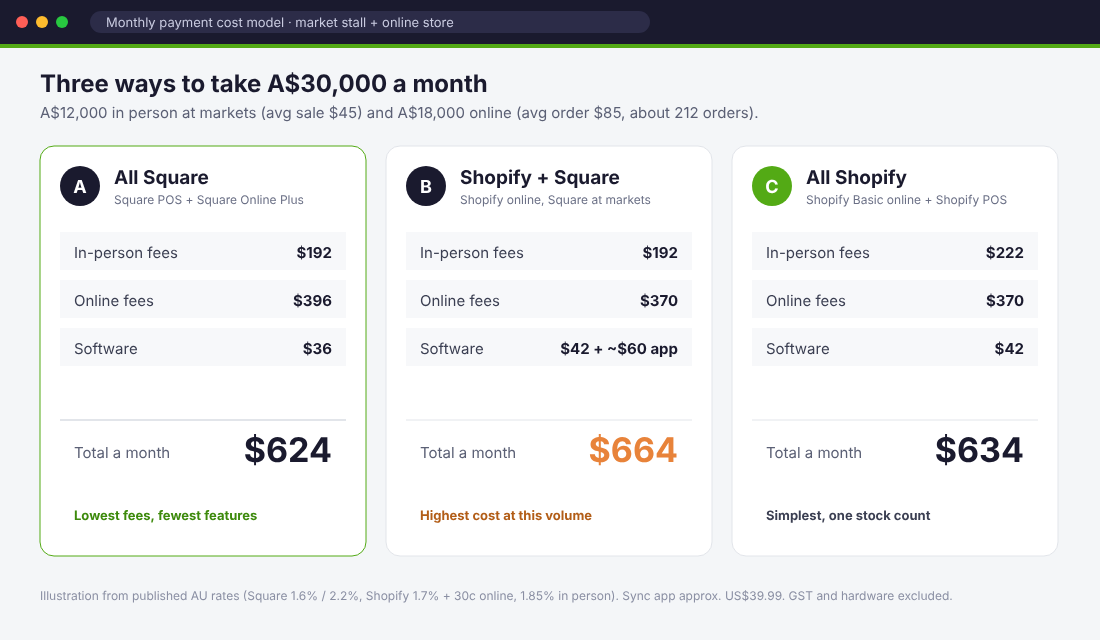
- A. All Square (Square POS plus Square Online Plus): A$192 in-person fees, A$396 online fees, A$36 software. About A$624 a month.
- B. Shopify online, Square at markets (with a sync app): A$192 in-person, A$370 online, A$42 Shopify Basic on annual billing plus about A$60 for the sync app. About A$664 a month.
- C. All Shopify (Shopify Basic online plus Shopify POS): A$222 in-person, A$370 online, A$42 software. About A$634 a month.
The lesson surprises people. The difference between the cheapest and most expensive set-up is about A$40 a month. Square’s cheaper in-person rate saves A$30 a month on A$12,000 of market sales, but a sync app that costs about A$60 a month wipes that out. Running both systems only pays on fees once your in-person sales pass roughly A$24,000 a month on Shopify Basic.
So do not choose your platform on payment fees alone. Choose it on what runs your business best, then make the fees as small as possible inside that choice.
When Square Makes Sense for a Shopify Brand
Square is a strong choice in three situations:
- You are retail-first. A shop or café with a small online store on the side. Square’s POS, rostering and inventory tools are built for that, and the online store is free to start.
- Your average sale is small. Under about $60 online, the no-fixed-fee model saves money on every order.
- You already run Square in a physical shop and are adding Shopify for online growth. Keeping staff on a system they know has a value that does not show up in a fee table.
If you are online-first and do the odd market, Shopify POS is usually simpler: one product catalogue, one stock count, one customer list. We cover the hardware and plan costs in our Shopify POS Australia guide and the wider set-up in our Shopify omnichannel guide.
How to connect Square to Shopify
If you do run both, do not count stock by hand. A sync app such as DPL Square Integration (from US$39.99 a month on the Shopify App Store, rated 4.9 from 256 reviews when we checked) links products and inventory through shared SKUs. Set-up takes about an hour:
- Give every product and variant a unique SKU in Shopify first. The sync matches on SKU, so duplicates cause chaos.
- Install the app from the Shopify App Store and connect your Square account when prompted.
- Choose a direction for the first import. If Shopify is your master catalogue, export from Shopify to Square.
- Map each Shopify location to the matching Square location so market stock and warehouse stock stay separate.
- Run a test sale on Square for a cheap item and confirm the stock drops in Shopify within a few minutes.
- Turn on failure alerts so a missed sync emails you instead of overselling quietly.
Real Australian Stores Using Square
Maker Port Douglas. Raine Ward opened this ethical homewares store in Far North Queensland at 18. According to Square’s case study, she started with a Square Reader, moved to a Square Register, and launched a Square Online store in 2021 with inventory synced to the shop. When cyclones closed road access to Port Douglas in 2023 and tourists were turned away, the online store kept sales coming in. She later moved to Square for Retail Plus to manage her makers and watch margins more closely.
Bottle & Hoop. Louisa Mudge’s cheese shop and deli in Brunswick Heads, near Byron Bay, used Square POS from day one. In Square’s 2020 interview, she explains how her product data was already in Square, so the online store was pre-populated when she needed to pivot to delivery and interstate shipping during lockdowns. That story is now six years old, but the lesson holds: when your catalogue already lives in one system, adding a channel is quick.
Both stores are retail-first, small-ticket businesses. That is exactly where Square’s pricing model fits best.
How to Cut Your Square Fees: A 7-Step Checklist
Run through this once a quarter. It takes about 30 minutes.
- Check your in-person rate. Download last month’s tax invoice from your Square Dashboard. If you see 1.9% on Reader or Tap to Pay payments, compare the cost of a paid plan that includes 1.6% against what you are overpaying.
- Stop instant transfers. Filter your transfers for the 1.95% fee. Most sellers can wait one business day.
- Price Afterpay properly. Work out your Afterpay share of orders and the extra 4% or so it costs. If it is not lifting order value, set a minimum order or switch it off for low-margin products.
- Cut keyed-in payments. Manually entered cards cost 2.2% instead of 1.6%. Send a Payment Link or use Tap to Pay instead.
- Match the channel to the order size. If your online average order is well above $60, Square Online is costing you more than Shopify or Stripe would.
- Review paid add-ons. Loyalty at A$49 a month needs to drive at least that much margin, not revenue. Cancel anything you cannot tie to sales.
- Ask for a custom rate at A$250,000. Once your card sales pass that line with an average sale above A$15, contact Square’s sales team with 12 months of volume.
Take-away template: copy these headings into a spreadsheet and fill one row per month: total card sales, in-person sales, online sales, Afterpay sales, total Square fees, fees as a percentage of sales, instant transfer fees, add-on subscriptions. If fees as a percentage of sales creeps above about 2% while your mix has not changed, something on this checklist has slipped.
How the Pieces Add Up
Payment fees feel small because they come out one sale at a time. Add them up and they are often the third or fourth biggest cost after stock, ads and shipping.
Look at how the levers stack for our A$30,000 a month store. Fixing a legacy 1.9% rate saves A$36 a month. Dropping one A$3,000 instant transfer a week saves about A$250 a month. Moving a handful of keyed-in sales to tap saves a few dollars more. Together that is close to A$3,500 a year back in the business without selling a single extra unit.
That money goes straight to profit, which means it lifts your contribution margin and lowers your break-even ROAS. Every dollar of fees you remove is a dollar you no longer need your ads to win back.
Square Fees Australia: Common Questions
Does Square charge a monthly fee in Australia?
No. Square Point of Sale and Square Online both start at A$0 a month. You pay only the processing fee per sale, unless you choose a paid plan such as Square Online Plus (A$36) or Premium (A$99), or add-ons such as Loyalty.
Can I still pass Square fees on to customers?
Not as a card surcharge. From 1 October 2026, surcharges on eftpos, Mastercard, Visa and Amex payments are banned. You can still adjust your prices, and weekend or public holiday surcharges are not affected by the card rules.
Is Square cheaper than Shopify Payments?
In person, yes, against Shopify’s Basic, Grow and Advanced plans. Online, only on orders under about $60. Above that, Shopify Basic’s 1.7% + 30c costs less than Square’s 2.2%.
Does Square charge for refunds or chargebacks?
Square does not charge a dispute or chargeback fee. Check your Dashboard for how processing fees are handled on refunds, because policies can change.
Get the Fees Off Your Plate
Payment fees are one of the quiet leaks we check first inside eCommerce Circle, alongside shipping and app spend. Most founders find at least one line on this checklist they have been paying for without knowing.
If you want to see exactly where your store is being capped, take the free More Orders Scorecard. It takes two minutes and shows you which of the 10 P’s to fix first.