Shopify Payments costs an Australian store 1.7% plus 30 cents per standard online card sale on the Basic plan, and 1.35% plus 30 cents on Advanced. That is the headline. The number that hits your bank account is different, because the fixed 30 cents, premium cards, currency conversion, PayPal and the plan fee all stack on top.
Most founders I talk to can tell me their ad spend to the dollar and have no idea what their payments cost. It is usually the second or third biggest line in the profit and loss, and it is the one nobody negotiates, audits or even looks at. A store turning over $40,000 a month pays somewhere between $670 and $2,100 a month in payment costs depending on setup. That gap is $17,000 a year of pure margin, and it comes from decisions you made once, years ago, and never revisited.
This guide breaks down what Shopify Payments really costs in Australia, how to work out your own effective rate in about 30 minutes, when a higher plan pays for itself, and where the hidden costs sit. Every rate below is from Shopify’s Australian pricing page or the provider’s own site, checked in November 2026. Rates change, so confirm yours in Settings, then Payments, before you make decisions.
Shopify Payments rates in Australia, plan by plan
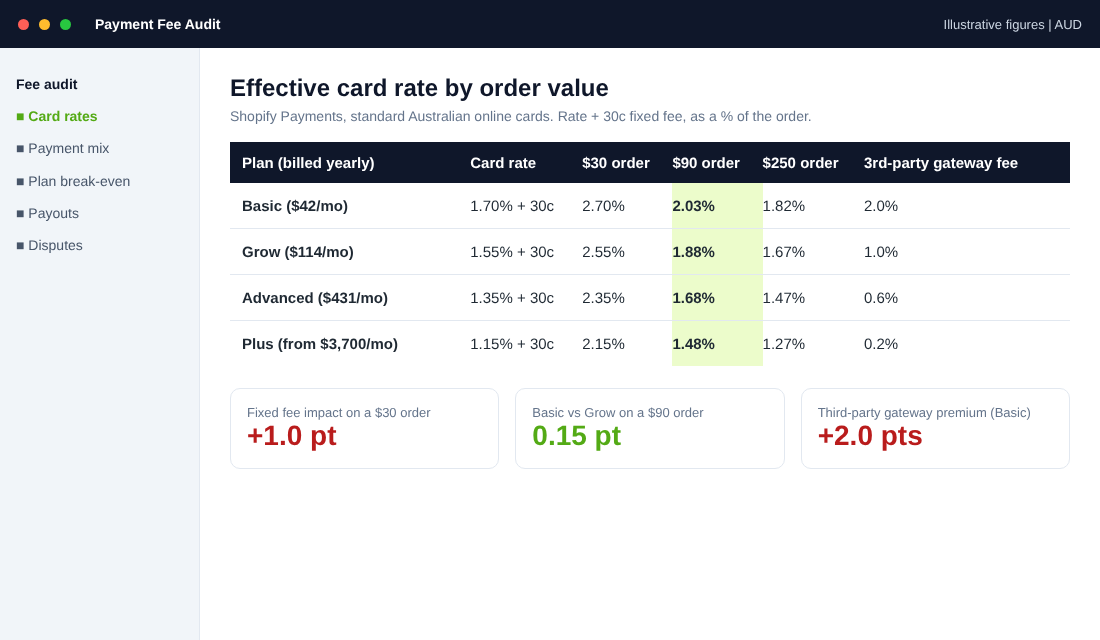
Shopify Payments is Shopify’s built-in processor, and in Australia it is the default way to take cards. You do not pay a separate merchant account fee or monthly gateway fee. You pay a percentage plus a flat 30 cents on each online card transaction, and the percentage drops as you move up plans.
| Plan | Monthly price (billed yearly) | Online card rate | Fee if you use a third-party gateway |
|---|---|---|---|
| Basic | $42 | 1.7% + 30c | 2% |
| Grow | $114 | 1.55% + 30c | 1% |
| Advanced | $431 | 1.35% + 30c | 0.6% |
| Plus | From $3,700 | 1.15% + 30c | 0.2% |
Two things in that table trip people up. First, the fee in the last column is charged by Shopify on top of whatever your external provider charges. Use PayPal as your main processor on Basic and you pay PayPal’s rate and Shopify’s 2%. Second, the rates are for standard Australian cards. Shopify charges more for American Express and for cards issued overseas, and one Australian fee roundup puts that premium at roughly 1.2 to 1.8 percentage points above the standard rate. Your admin shows your exact premium rates.
Also watch GST. One Australian roundup notes that 10% GST applies on top of Shopify Payments processing fees. If you are registered for GST, that is normally claimable as an input tax credit, but confirm with your accountant. It is the reason your bank reconciliation never quite matches the rate you saw on the pricing page.
Why your real rate is higher than the rate on the pricing page
The pricing page quotes the percentage. Your effective rate is the total fee divided by the total sale, and the 30 cent fixed fee is what moves it. On a $30 order, 1.7% plus 30 cents is $0.81, which is an effective 2.7%. On a $90 order it is 2.03%. On a $250 order it falls to 1.82%.
That matters because many Aussie stores sell a lot of low-ticket items. If your average order is $45 and your best-selling product is a $25 add-on, your blended effective rate is well above the number you have in your head. The fix is rarely negotiating a processor. It is lifting order value, which is why the free shipping threshold and bundles do double duty: they raise margin per order and dilute the fixed fee at the same time.
The five things that push your effective rate up
- Small orders. The 30 cent fixed fee is 1 percentage point on a $30 order and 0.33 points on a $90 order.
- Amex and overseas cards. Both sit well above the standard rate. If 15% of your sales are international, your blended cost is noticeably higher.
- Currency conversion. According to one Australian fee roundup, Shopify charges 2% when it converts a customer payment into your payout currency. From 6 April 2026, that fee is calculated on the gross order amount rather than after fees are taken out. The rate did not change, but the dollar cost did.
- Third-party gateways. Using anything other than Shopify Payments as your main processor adds Shopify’s 2%, 1%, 0.6% or 0.2% on top.
- Refunds and disputes. Refunding an order does not hand back every fee you paid on it, and a lost dispute costs you the order value plus handling. Check the current dispute fee in your admin, because Shopify’s help pages point to a separate fee schedule.
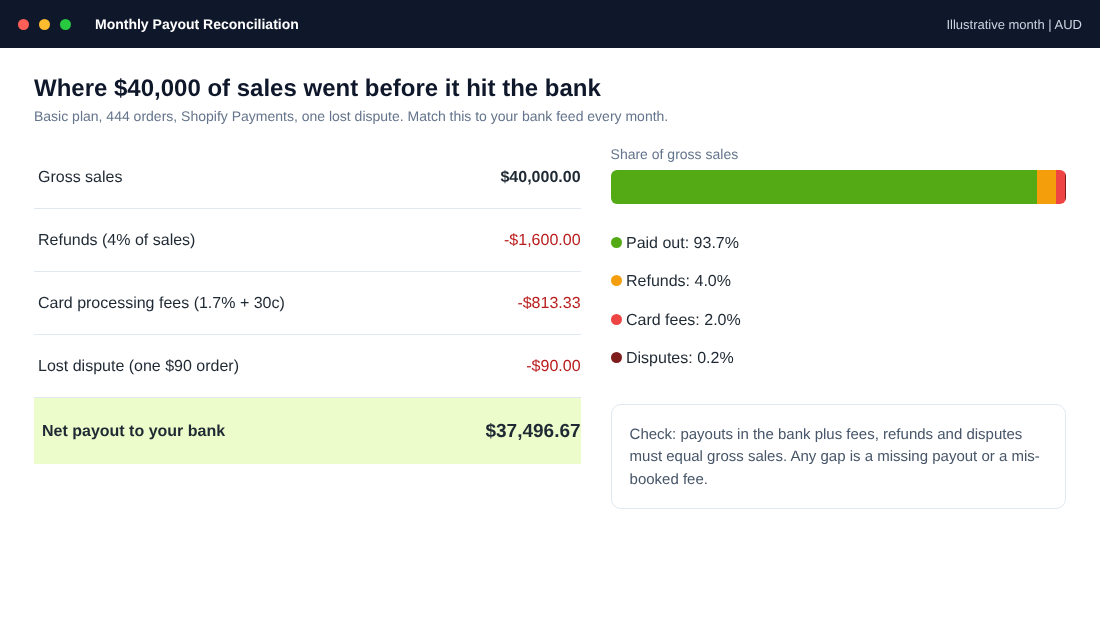
Here is the maths on a real-looking month so you can see how it flows. Take a Basic plan store doing $40,000 a month across 444 orders at a $90 average order value, all standard Australian cards on Shopify Payments.
| Setup (all sales on one method) | Fees on $40,000 | Plan fee | Effective rate (with plan fee) |
|---|---|---|---|
| Shopify Payments, Basic | $813 | $42 | 2.03% (2.14%) |
| Shopify Payments, Grow | $753 | $114 | 1.88% (2.17%) |
| Shopify Payments, Advanced | $673 | $431 | 1.68% (2.76%) |
| PayPal only, Basic (PayPal 2.9% + 30c, plus Shopify 2%) | $2,093 | $42 | 5.23% (5.34%) |
| PayPal only, Advanced (PayPal 2.9% + 30c, plus Shopify 0.6%) | $1,533 | $431 | 3.83% (4.91%) |
Read the last two rows twice. They assume every sale runs through PayPal, which is the extreme case, but a store that does so on Basic pays more than double the cost of Shopify Payments on the same sales. That is about $1,280 a month, or roughly $15,400 a year, to avoid switching a processor. This setup is common in stores that opened years ago on PayPal, grew, and never moved.
Does upgrading your Shopify plan pay for itself in card fees?
This is the question every founder asks around $30,000 to $50,000 a month. Moving from Basic to Grow lowers your card rate by 0.15 of a percentage point and costs an extra $72 a month on yearly billing. To make that back in card fee savings alone, you need about $48,000 a month in sales. On monthly billing, the Grow upgrade costs an extra $93 and the break-even is roughly $62,000.
Grow to Advanced is a bigger jump. The extra plan fee is $317 a month on yearly billing, and the card rate falls another 0.2 of a point, so you need around $158,500 a month in online sales before the fee savings alone cover the upgrade. Advanced versus Basic breaks even at about $111,000.
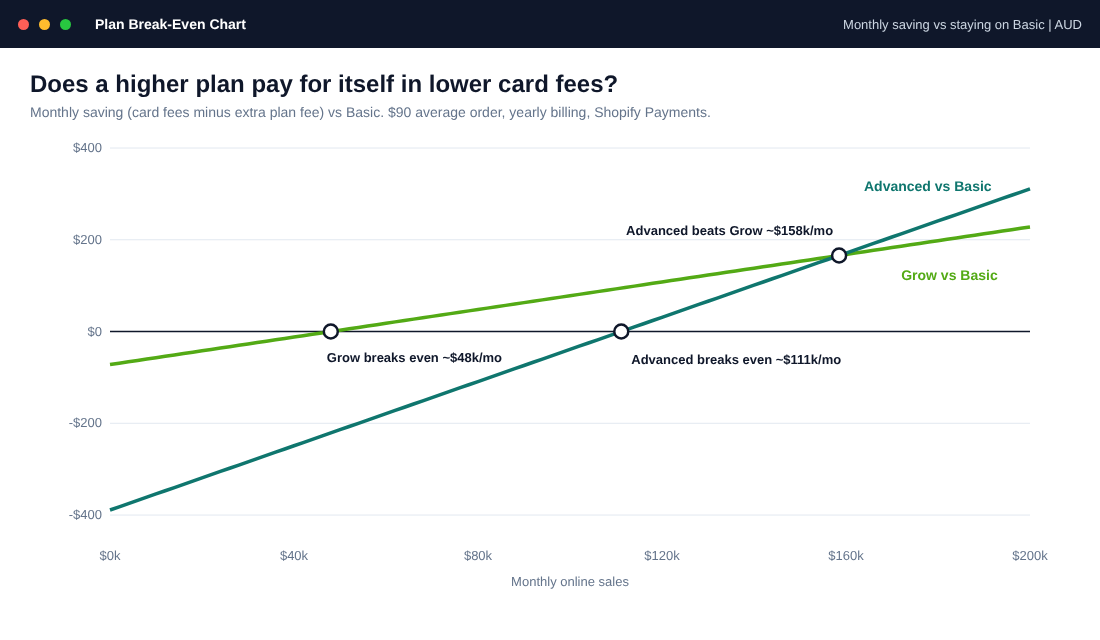
Two caveats. This is card fees only. Higher plans add staff accounts, better reporting and other features you might genuinely need, and our Shopify plan break-even guide covers the full decision. And if you use a third-party gateway, the numbers change dramatically: the 2% versus 1% fee gap means Grow pays for itself over Basic at about $7,200 a month, which is a no-brainer.
PayPal, Afterpay and the other costs that never show up on the pricing page
PayPal is worth offering. Plenty of buyers prefer it, and our Afterpay fee breakdown covers the buy now pay later side in depth. But offer it as an extra option, not as your main processor. PayPal’s own Australian page, last updated 13 October 2026, lists commercial rates of 2.9% plus 30 cents for domestic payments and 3.9% plus 30 cents for international ones. That is roughly 1.2 points above Shopify Payments on a Basic plan for a domestic sale.
PayPal also charges a currency conversion fee, listed at 3% to 4% above the base exchange rate, and a AUD $15 fee on card chargebacks unless the transaction is eligible for Seller Protection. If you sell in USD or GBP to overseas buyers through PayPal, that conversion margin can cost more than the processing fee itself.
Then there is the question of how many buyers actually use each method. The RBA’s 2025 Consumer Payments Survey found that cards made up 73% of consumer payments in Australia, with debit cards at 49% and credit and charge cards at 23%. Online payments were 20% of all consumer payments, up from 18% in 2022, and 43% of consumers used a mobile wallet for a contactless payment during the survey week. Cards and wallets dominate. Your checkout should be built around them, not around a gateway that suits a small share of buyers.
The Australian store base tells the same story. A May 2026 analysis of Storeleads data found Apple Pay on 67.3% of Australian Shopify stores, Shop Pay on 66.6%, Google Pay on 65.7% and PayPal Express on 57.2%. Afterpay sits on 26.3%, which the same analysis says is the highest share of any country market. If a competitor of yours offers Apple Pay and Shop Pay and you do not, you are the odd one out.
Why Shop Pay and wallets earn back their fees
Fees are only half the story. The other half is how many sales you complete. Shopify claims Shop Pay can lift conversion by as much as 50% compared to guest checkout, based on an external study it described in a May 2023 partner post. Treat that as Shopify’s number, since it did not name the consultancy or publish the method. The real-world case studies are more modest, and more useful.
Baby Mori, a children’s sleepwear brand, looked at switching away from Shopify Payments to Checkout.com for lower fees. Shopify’s case study says they stayed because switching would remove Shop Pay, which about 55% of their customers use. Shop Pay users converted 8.5% better and spent 13% more, and an internal analysis showed the lost revenue would outweigh any fee savings. The lesson: a processor that is a little cheaper is not cheaper if it takes away the checkout your best customers use.
Gold Coast fashion brand Princess Polly ran an A/B test on Shop Pay’s authenticated checkout, which recognises returning customers and fills their details in. Shopify’s case study reports a 4.1% conversion lift for buyers with an existing Shop Pay session, a 1% increase in store orders in Australia, and a 7.6% faster median checkout. One percent more orders sounds small until you apply it to a store doing $100,000 a month. It is $1,000 a month in sales for a setting you switch on once.
Run the same test on your own numbers. If Shopify Payments costs you $813 a month and Shop Pay, Apple Pay and Google Pay together lift your conversion by even 3%, the extra sales on $40,000 are $1,200 a month. The fees pay for themselves.
Payouts, Black Friday and the cash flow gap
Shopify Payments pays out to your bank on a schedule you choose: daily, weekly or monthly, and Shopify does not charge to switch between them. Shopify announced in 2019 that Australian merchants would be paid out in two business days instead of three, and banks then typically take one to three business days to process the deposit. Check your own payout schedule in Settings, then Payments, because the actual timing depends on your account.
Why this matters in November: Black Friday is on 27 November 2026, so your biggest sales days land on a Friday and a weekend. Weekend sales do not count as business days. Sales on Friday and Saturday may not reach your bank until the middle of the following week, while your ad accounts, your supplier deposit and your freight invoices are due now. Stores that scale ad spend aggressively on Black Friday and then wait for the payout often run out of cash in the middle of the best week of the year.
The fix is a payout schedule that suits your cash cycle and a rolling forecast. Switch to daily payouts for the BFCM period if you can, and pair it with the 8-week rolling cash flow forecast so you know how much you can spend on ads before the payout lands.
Chargebacks and surcharging: the protection side of payments
Disputes are the other cost nobody budgets for. When a customer disputes a card payment, you lose the sale, you usually pay a dispute fee, and your chargeback rate becomes a risk signal for your processor. Shopify’s help documentation says it might refund the chargeback fee depending on your country or region, so check your admin for the current Australian fee and the evidence rules. Our chargeback prevention guide covers the full prevention system. Three habits help prevent many disputes: a clear billing descriptor, a fast tracking email and a returns policy that is easy to find.
Surcharging is changing too. The RBA published an issues paper in June 2026 as part of its review of payments system regulation, and says it does not intend to revisit its earlier review of card payment surcharging unless something significant changes. It also notes that new payment options may make it harder for small merchants to understand and manage payment costs. In plain English: expect more scrutiny of fees, and do not build a business case around passing card costs on to customers. Our surcharge ban guide covers what Aussie stores can and cannot do.
The 30-minute payment fee audit
You do not need a finance team to fix this. You need one session with your last three months of data. Here is the audit we walk members through in eCommerce Circle.
- Export 90 days of payments. In your Shopify admin open the finance reports (Analytics, then Reports, then Finances) and download payments data for the last three full months, plus the payout list from Settings, Payments.
- List every payment method and its sales. Shopify Payments, PayPal, Afterpay, Shop Pay Installments, gift cards, manual payments. Put sales by method in a sheet.
- Pull the real fee for each method. Use the fee column in the payments report for Shopify Payments, PayPal’s statement for PayPal, and your BNPL provider’s settlement reports.
- Calculate your effective rate per method. Total fees divided by total sales. Do it for the blended total too.
- Check for the three leaks. Is any volume going through a third-party gateway at Shopify’s extra 2% or 1%? Is conversion fee being charged on foreign currency sales? Is your average order below $60?
- Reconcile payouts to your bank. Gross sales, minus refunds, minus fees, minus disputes should equal payouts. Any gap is something you have not booked.
- Decide one change. Move PayPal from main processor to extra option, switch on Shop Pay, raise the free shipping threshold, or change plan. Change one thing, then re-measure in 30 days.
Total payment fees (all methods, including Shopify third-party fees and conversion fees) ÷ gross sales = effective rate.
A useful yardstick for an Aussie store on Shopify Payments is about 2% blended on card sales, before BNPL. If you are well above 3%, go hunting for a leak.
A tool that makes the reconciliation easy
If you use Xero, a settlement tool like A2X or Link My Books will do the reconciliation in step 6 for you. The setup is similar in both: connect your Shopify store, connect Xero, map Shopify sales, fees, refunds and payouts to the right accounts, then post each settlement as a single summary entry that matches the bank deposit. It takes about an hour once and saves a monthly reconciliation headache. Your bookkeeper can set it up in one session, and the month-end close gets faster from there.
The compound effect: payments are a margin system, not a setting
Each of these levers looks small on its own. A few tenths of a percentage point here, a PayPal change there. Stacked together, they are the difference between a 2% payment cost and a 4% one. On $480,000 of annual sales, that is nearly $10,000 a year.
Better still, they feed each other. A higher order value lowers your effective rate because the 30 cents is spread wider. A wallet-friendly checkout lifts conversion, which means the same ad spend produces more orders. Daily payouts through Black Friday mean you can keep spending on ads that are working. And clean reconciliation means you spot a missing payout in week one instead of at tax time.
This is why payments sit under Profit in the 10 P’s. It is not a technical setting. It is a margin lever that touches conversion, cash flow and risk at the same time.
Inside eCommerce Circle, payments and margin are core pillars we work on with every member, because a store that does not know its true costs cannot scale safely. If you want to see exactly where your store is being capped, take the free More Orders Scorecard. It takes two minutes and shows you which of the 10 P’s to fix first.