Open your Shopify admin, head to Analytics, and look at how many people used your search bar last month. Then look at how much revenue came from them. For most stores the first number looks small and the second number is enormous. That gap is the most underpriced opportunity you own.
What’s in This Article
Here is the mistake almost every founder makes. You pour weeks into your homepage, your collection pages and your product photography, then leave the search bar on whatever your theme shipped with. You assume people browse. Most of your visitors do. But your highest-intent shoppers do not browse. They type exactly what they want, hit enter, and decide in about two seconds whether you are worth their money.
The numbers are blunt. Only around 15% of visitors use site search, yet those searchers drive close to 45% of revenue and convert 2 to 3 times higher than everyone else. Your search bar is the highest-intent surface on your store, and it is almost certainly running on factory settings. This is the 5-layer system we use with hundreds of Aussie Shopify founders to fix that.
Why the search bar is your highest-intent real estate
Think about the difference in mindset. A shopper clicking through your menu is window shopping. A shopper typing “merino crew” into your search box is walking up to the counter with their wallet out. They have a specific product in mind and they are trying to give you money. Your only job is to not get in the way.
The data backs this up at every scale. Amazon converts general browsers at roughly 2%, but that figure jumps to around 12% when a visitor uses search. That is a 6x lift from the same traffic, just because the shopper told the site what they wanted. Search-driven orders also tend to carry a 5 to 20% higher average order value, and searchers often buy 10 to 25% more items per order, because they arrive closer to a decision.
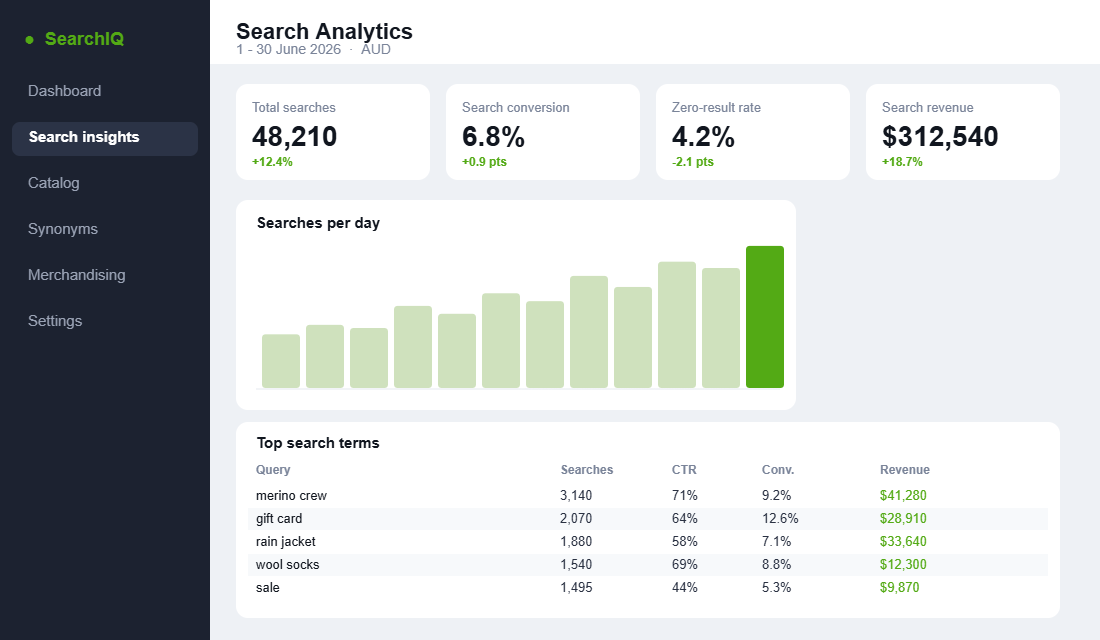
So when your search underperforms, you are not losing low-value tyre-kickers. You are losing the exact people most likely to buy. Below is what your search analytics should look like once you start treating search as a channel rather than a checkbox.
Layer 1: Make the search bar impossible to miss
You cannot capture intent you hide. On a lot of Aussie stores the search function is a tiny magnifying glass icon tucked in the top corner, and on mobile it is buried inside the hamburger menu. Mobile is where 60 to 70% of your traffic lives, so hiding search there is quietly costing you your best shoppers.
Layer one is pure visibility. Get these basics right before you touch anything clever:
- Use an open input field, not just an icon. A visible box with a cursor invites typing. An icon asks the shopper to do extra work first.
- Keep it in the header on every page. Search should follow the shopper around the store, including a sticky header on scroll. Intent strikes anywhere, not just the homepage.
- Write a placeholder that prompts action. “Search the store” is dead text. “Try \’rain jacket\’ or \’merino crew\'” teaches shoppers that detailed queries work and nudges them toward your best categories.
- Make the mobile box full-width. Thumbs are clumsy. A wide tap target and a large input field remove friction at the exact moment of highest intent.
None of this is glamorous. It is also the cheapest conversion work you will do this quarter, because you are simply letting your most motivated shoppers tell you what they want.
Layer 2: Turn on predictive search
Predictive search (also called instant search or autocomplete) shows results as the shopper types, usually after the third keystroke. Done well it is the single biggest lever in this playbook. Autocomplete can lift search conversion by 5 to 15%, and as much as 24% when it is properly wired to your product data. Shoppers who engage with a good autocomplete are roughly 6 times more likely to convert.
The reason is speed and confidence. Instead of typing, hitting enter, waiting for a page load and scanning a grid, the shopper sees the product they wanted appear instantly under their fingertips. Around 25% of search users click straight on a product in the autocomplete dropdown, skipping the results page entirely.
Your predictive dropdown should include product thumbnails, the product name, the price in AUD, and a short list of suggested queries. Images matter more than founders expect. A shopper recognises the right jacket by sight far faster than by reading a title.
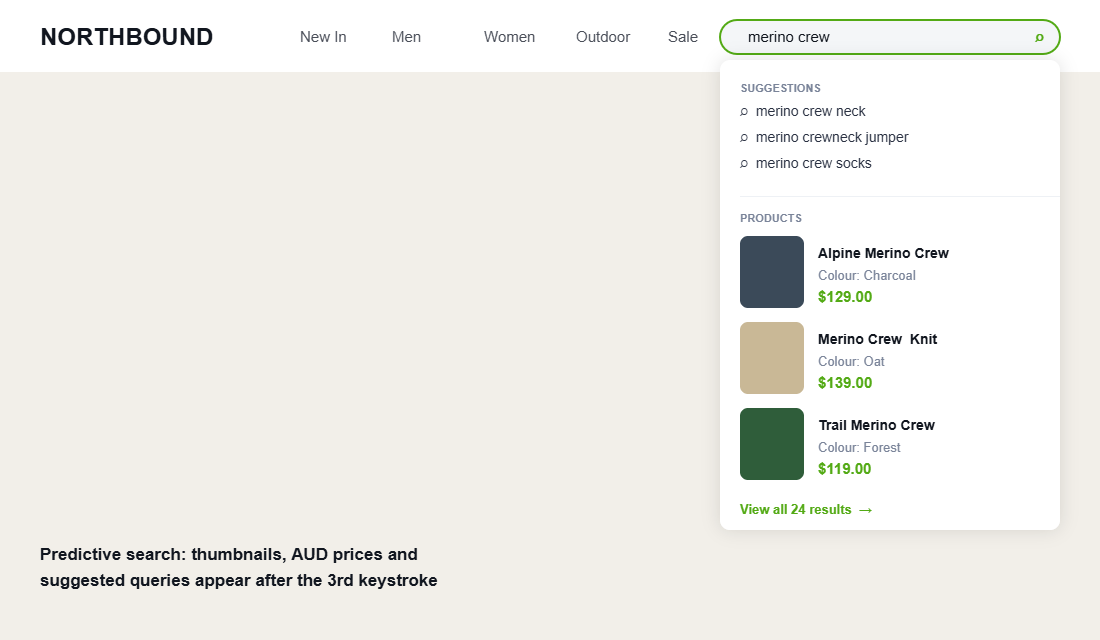
One caveat: predictive search lives or dies on speed. If your store is slow, every keystroke lags and the experience feels broken. If your Core Web Vitals need work, fix the foundations first using our Shopify site speed playbook before you layer search on top of a sluggish theme.
Layer 3: Kill zero-result searches with synonyms and typo tolerance
This is where most stores bleed the most money, and almost nobody is watching. The industry average zero-result rate sits between 10% and 18%. That means as many as one in six of your highest-intent shoppers types a query, sees “no results found”, and leaves. Best-in-class stores keep that rate under 5%, and the top performers push it below 2%.
The cruel part is that the products usually exist. The shopper just used a different word than your product titles do. Aussie English makes this worse, because your customers and your supplier-written titles rarely match. Fix it with two settings most search tools support out of the box:
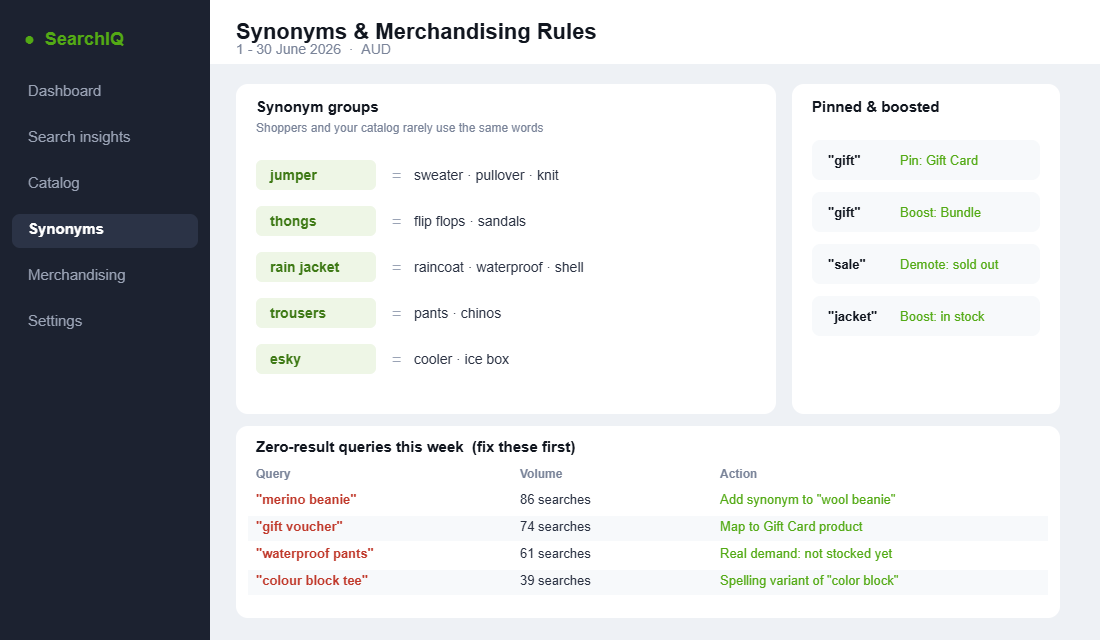
- Synonyms. Map the words shoppers actually use to your catalog. Jumper, sweater, pullover and knit should all return the same products. So should thongs and sandals, esky and cooler, trousers and pants, raincoat and rain jacket.
- Typo tolerance. “Mernio”, “jaket” and “snekers” should still find merino, jacket and sneakers. People type fast on phones and they will not retype a query for you.
- Singular and plural handling. “Sock” and “socks” are the same intent. So are “candle” and “candles”. Treat them as one.
- Spelling variants. Map “color” to “colour” and “organize” to “organise” so American spellings still land on your Australian catalog.
Adding solid synonym coverage and typo tolerance typically cuts zero-result rates by 10 to 30%. Every one of those recovered searches is a shopper who already told you they wanted to buy.
Layer 4: Merchandise the results page like a collection you control
Once a shopper sees results, the order those products appear in is a decision, not an accident. Treat your search results page exactly like a curated collection page. You would not let a collection sort itself randomly, so do not let search do it either.
- Boost in-stock products. Pushing available stock to the top often improves add-to-cart rates by 5 to 15%, and it stops shoppers falling in love with something they cannot buy.
- Pin hero products for key queries. When someone searches “gift”, pin your gift card and your bestselling bundle to the top. You know what converts for that intent, so stop leaving it to chance.
- Demote or hide sold-out and end-of-life lines. A results page full of unavailable products reads as “this store never has anything”.
- Add faceted filters to results. Size, colour, price and material filters let high-intent searchers narrow in seconds. This pairs directly with the work in our Shopify collection filtering playbook.
And remember where search results lead: the product page. If your search is sending motivated buyers to a weak PDP, you are filling a leaky bucket. Make sure the destination is built to convert using the 9-block above-the-fold framework.
Layer 5: Mine your search data every week
Your search log is the most honest market research you will ever get, and it is free. Every query is a customer telling you, in their own words and at the moment of intent, exactly what they want. That is first-party demand data money cannot buy, in the same spirit as our zero-party data playbook.
Block 20 minutes every week and work three lists:
- Top queries. Make sure your most-searched terms return great results and convert well. If “rain jacket” is your number one query, that page deserves your best merchandising.
- Zero-result queries. This is your weekly gold. Each one is either a missing synonym to add, a product to relabel, or genuine demand for something you do not stock yet. “Waterproof pants” returning nothing 61 times is a product brief.
- High-exit queries. Searches that return results but lose shoppers anyway. Usually the results are loosely relevant or the products are priced or presented poorly. Dig in.
This loop compounds. The more you feed real shopper language back into your synonyms, merchandising and even your range planning, the sharper your search gets and the more revenue it returns. Tools like Searchanise (which powers search for 14,800-plus stores including Fossil and Sennheiser) and Klevu report search conversion rates as high as 16%, well above typical store-wide figures.
What good search looks like: the benchmarks to aim for
Targets keep this honest. Without numbers to aim at, “improve search” stays a vague to-do that never gets done. Here is what a healthy Shopify search operation looks like, and where most stores actually sit today.
- Search usage: 10 to 20% of sessions. If almost nobody is searching, your bar is hidden or your shoppers do not trust it to work. Fix visibility first.
- Zero-result rate: under 5%. Most stores sit at 10 to 18%. This is usually the fastest, cheapest win available, because the products already exist.
- Search conversion: 2 to 3 times your site-wide rate. If your store converts at 2.5% and searchers convert at 3%, your search is broken. Searchers should be your best segment by a wide margin.
- Autocomplete engagement: a quarter of searchers clicking a suggestion. Roughly 25% of search users should click straight from the dropdown if your predictive results are doing their job.
Write your own current numbers next to each of these. The biggest gap is your priority. For most Aussie founders we work with, the zero-result rate is the embarrassing one, and it is also the quickest to halve.
A worked example: how one query change pays for itself
Picture a mid-sized Aussie apparel store doing $180,000 a month. Their search analytics show “jumper” gets searched 900 times a month and returns almost nothing, because every product title uses the word “knit”. Nine hundred high-intent shoppers a month hit a dead end and bounce.
The fix takes about two minutes: add a synonym group mapping jumper, sweater and pullover to knit. Now those 900 searches return the full knitwear range. If even 6% of them convert at an average order value of $120, that single synonym recovers roughly $6,480 a month, or close to $78,000 a year. From one line in a settings panel.
That is the shape of this whole playbook. The work is small and unglamorous, the shoppers are already motivated, and the returns are wildly out of proportion to the effort. You are not creating demand. You are stopping yourself from blocking demand you already paid to attract.
Mobile search: where most of your queries actually happen
Roughly 75 to 80% of Aussie DTC traffic is on a phone, and search usage on mobile is higher than on desktop because scrolling a 40-product collection with a thumb is slow. Yet most themes ship a mobile search experience that was clearly designed second: a magnifying glass icon hidden in a hamburger menu, a results page that pushes the first product below the fold, and filters that need three taps to open. Fix the five layers on mobile first, because that is where the money is.
- Give the search bar its own row on mobile. A visible input under the header, not an icon, lifts mobile search usage from a typical 6 to 8% of sessions to 12 to 15%. Sticky it to the top on scroll so it is one tap from anywhere. If your header is already crowded, a search-first mobile header with the menu moved to a bottom bar is the pattern that tests best.
- Open the right keyboard and skip the extra tap. Set
type="search"andenterkeyhint="search"on the input so iOS and Android show a Search key, and disable autocorrect and autocapitalise so “serum” does not become “Serum” or “serum.” Small change, measurable drop in zero-result queries. - Predictive results as full-width tappable rows. Product suggestions need a 60px-tall row with image, name and price, not a text list. Thumb-sized targets cut mis-taps and lift suggestion click-through to 30 to 40% of searches on mobile.
- Filters as a bottom sheet, sort as a single tap. On the results page, one “Filter” button that opens a bottom sheet with size, colour and price beats a sidebar every time. Show the active filter count on the button so people know they are looking at a narrowed set. This is the same pattern the collection filtering playbook recommends for category pages, and the two should feel identical.
- Watch the speed budget. Predictive search on a 4G connection needs results inside 300ms or it feels broken. Search apps that call an external index (Boost, Searchanise, Klevu) usually hit this; a slow theme that loads 2MB of JavaScript before the search box works will not. Run the site speed checks on the search results URL specifically, not just the homepage.
Then look at the mobile-only search report. Filter your zero-result and low-click queries by device in Shopify Analytics or your search app, and you will usually find that mobile users type shorter, messier queries: “blk tee”, “moisturiser spf”, “gift under 50”. Those become your first synonym and typo-tolerance additions in Layer 3. If you want the wider picture on mobile conversion beyond search, the mobile UX playbook covers the gap most stores have between their mobile and desktop conversion rates and how to close it.
The compound effect: how the five layers multiply
Each layer is useful on its own. Together they stack into something far bigger. A visible search bar (Layer 1) pulls more shoppers into search, where they convert 2 to 3 times higher. Predictive results (Layer 2) speed them to the right product. Synonyms and typo tolerance (Layer 3) keep them in results instead of dumping them on a dead end. Merchandising (Layer 4) surfaces the product most likely to convert. And the data loop (Layer 5) tells you precisely what to fix next week.
Run the maths on your own store. If search is 15% of your traffic and you lift its conversion by even a third through these layers, on a store doing $200,000 a month you are looking at a five-figure monthly gain from work that touches one feature. AI-powered search investments have delivered an average 43% conversion increase across retailers studied. This is not a rounding error. It is one of the highest-return projects on your store.
How to set this up on Shopify this week
You do not need an enterprise budget to start. Shopify ships a free first-party app that covers most of this playbook. Here is the order to do it in:
- Install Shopify Search & Discovery. It is free in the Shopify App Store and built by Shopify, so it will not slow your theme.
- Enable predictive search in your theme. In the theme editor, turn on search suggestions and product results with images so the dropdown shows thumbnails and AUD prices.
- Add your first 20 synonyms. Open Search & Discovery, go to Synonyms, and map the obvious ones for your range. Pull the list straight from your zero-result report.
- Set filters on search and collection results. Add the facets that matter for your products, typically size, colour, price and product type.
- Add product boosts. Use the Merchandising section to pin and boost the right products for your top five queries.
- Review Search analytics weekly. Watch top terms, conversion and zero-result rate, then feed what you learn back into synonyms and merchandising.
When you outgrow the native app, usually when you want semantic search that understands intent, advanced merchandising or AI recommendations, that is the moment to look at Searchanise, Boost AI Search & Filter, or Klevu. Earn the upgrade with traffic and data first. Most stores have months of easy wins available before they need to pay for search.
Your 5-layer site search checklist
Print this, run it against your store today, and fix the first thing that fails:
- Layer 1 – Visibility. Open input box in the header on every page, full-width on mobile, with an action-prompting placeholder.
- Layer 2 – Predictive. Instant results with thumbnails, AUD prices and suggested queries from the third keystroke.
- Layer 3 – Zero results. Synonyms, typo tolerance and spelling variants live, with a zero-result rate under 5%.
- Layer 4 – Merchandising. In-stock boosted, hero products pinned for key queries, sold-out demoted, filters on results.
- Layer 5 – Data loop. A weekly 20-minute review of top, zero-result and high-exit queries that feeds back into the system.
Most founders will find at least two of these failing right now. Each fix targets the shoppers already raising their hands to buy.
Inside eCommerce Circle, search and on-site discovery is one of the core pillars we work on with every member, because it converts traffic you already paid for. If you want a second opinion on yours, let’s talk.