Open your helpdesk and read the last twenty tickets. Not the hard ones. The ordinary ones. Count how many of them are a customer asking where their parcel is, when it will arrive, or whether it has been sent yet.
What’s in This Article
For most Aussie Shopify stores that count sits somewhere between eight and twelve out of twenty. Research across ecommerce helpdesks in 2026 puts “where is my order” at 30 to 50% of total ticket volume, and past 50% during peak. Your support team is not answering questions about your product. They are reading tracking numbers out loud.
The instinct at this point is to hire. Another part-time support person for October through January, maybe a VA in the Philippines on the early shift. That is the expensive answer, and it locks in the cost forever. The brands that hold support headcount flat through a bigger peak do something different: they remove the reason the ticket gets created. Deflection is not about being harder to contact. It is about answering the question before the customer has to ask it.
This playbook is the five-layer system we run with eCommerce Circle members ahead of peak. Australia Post delivered almost 111 million parcels across November and December last peak, up 7.6% year on year, with more than three million parcels on its single busiest day. Your ticket volume will scale with that. Your team should not have to.
Start With a Tag Audit, Not a Tool
Almost every founder who tries to fix support starts by buying something. A chatbot, a new helpdesk, an AI add-on. Then three months later the ticket count is the same and there is another subscription on the card.
The reason is simple. You cannot automate a queue you have not measured. Before you touch a tool, run a 30-day tag audit. Every ticket gets exactly one primary tag describing why the customer made contact. Not the channel. Not the sentiment. The reason.
Keep the tag list short and force a decision. Ten to fifteen tags is plenty for a store under $500k a month. If your team is choosing between twenty-eight overlapping labels, the data will be useless.
- Where is my order. Any status, tracking or “has it shipped” question.
- Delivery delayed or lost. Parcel is late, stuck in transit, or marked delivered and missing.
- Change order. Address change, item swap, cancel before dispatch.
- Returns and exchanges. How to start one, where is my refund, can I swap a size.
- Size, fit and product fit. Pre-purchase questions about whether the thing will suit them.
- Damaged or faulty on arrival. Quality issues that need a human and a photo.
- Promo and payment. Discount code not applying, payment declined, gift card balance.
- Everything else. If this tag goes above 10%, your tag list is wrong.
At the end of the 30 days you want three numbers per tag: volume, share of total, and a human judgement call on whether that intent is deflectable, human but simple, or human and complex. That third column is where the strategy lives.
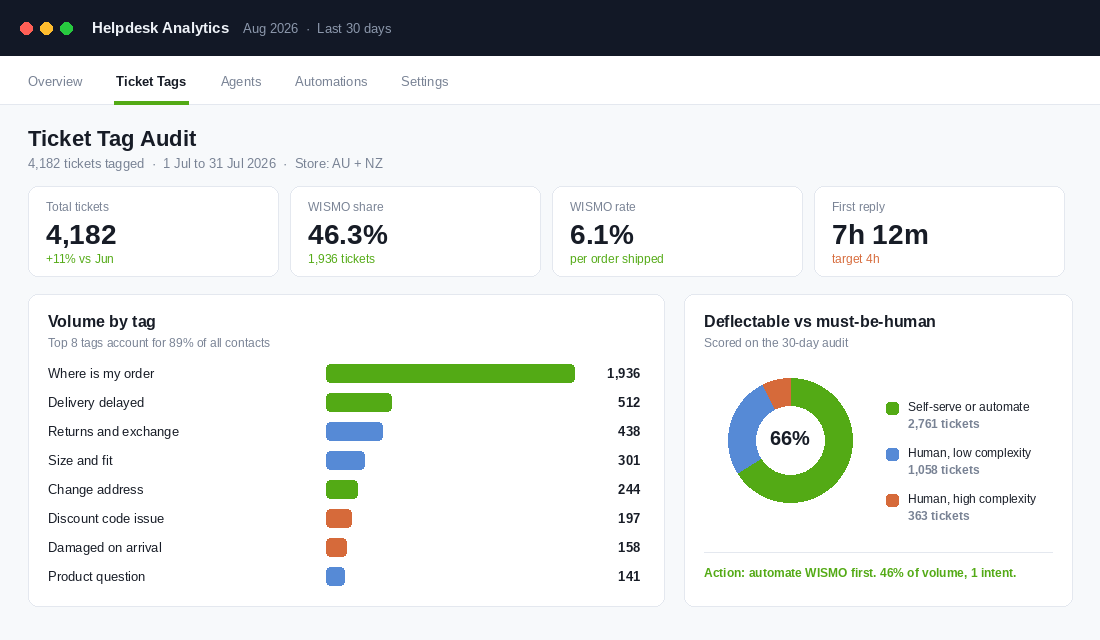
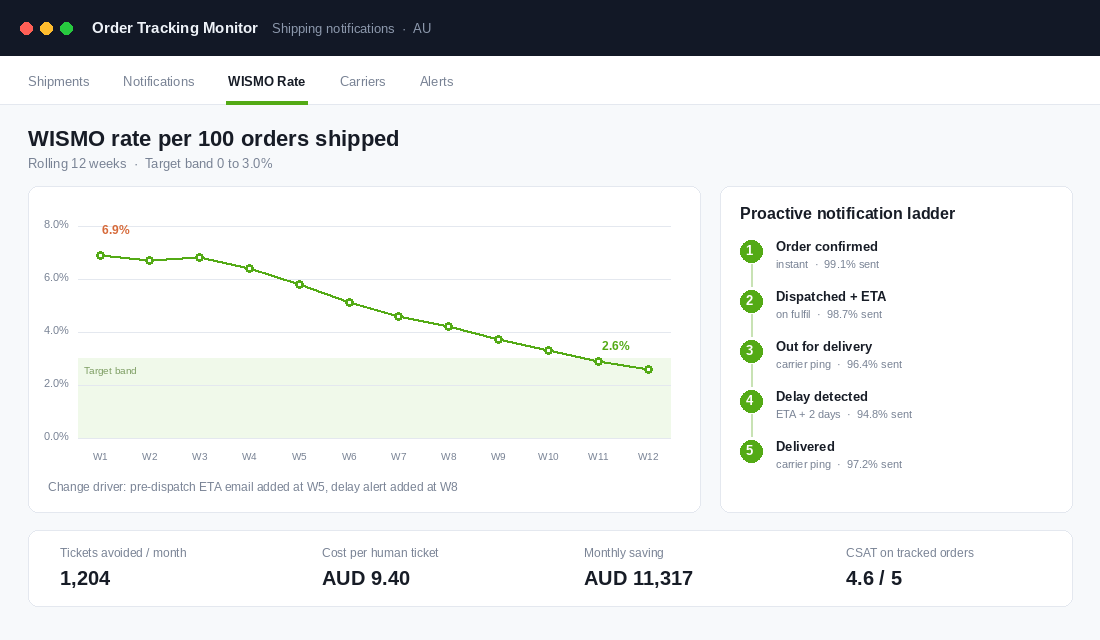
The second number you need is your WISMO rate, which is order status contacts divided by orders shipped in the same window. Industry work in 2026 puts best-in-class under 3% and calls anything from 3 to 8% normal but expensive. Most Aussie stores we audit land between 5 and 8%. Every point you remove is roughly one ticket per hundred orders that never gets created.
Do the arithmetic in dollars before you go further. Ecommerce support benchmarks put the fully loaded cost of a human-handled ticket between $8 and $25 depending on channel and complexity, against roughly $0.10 to $0.25 for a genuinely self-served interaction. At 4,000 orders a month, dropping WISMO rate from 7% to 3% removes 160 tickets. At a conservative AUD 9.40 each that is a bit over AUD 1,500 a month, before you count what it does to first reply time on everything else in the queue.
Layer 1: Kill WISMO Before It Becomes a Ticket
WISMO is the highest volume, lowest complexity intent in ecommerce, which makes it the single best place to start. It is also the one intent where the customer is never actually asking a question. They are expressing anxiety. The fix is information timing, not a better reply template.
There are three causes and they need three different fixes.
Cause one: the delivery promise was vague
“Ships in 1 to 3 business days” tells a customer nothing about when the box arrives. It also starts the clock in their head from the moment they paid. A precise, postcode-aware estimated delivery date on the product page and at checkout is the single biggest fix most stores can make here. We have covered the mechanics of this in the delivery promise playbook, and it is worth reading before you build anything else in this layer.
Cause two: the notification ladder has gaps
Most stores send an order confirmation and a dispatch email, then go quiet for four days. That silence is where the ticket is born. Build the full ladder and instrument it so you can see delivery rates per step, not just per campaign.
- Order confirmed, sent instantly, with the estimated delivery window restated in plain language.
- Dispatched, sent on fulfilment, with carrier, tracking link and the same estimated date.
- Out for delivery, triggered from the carrier webhook, on the morning of.
- Delay detected, triggered automatically when a parcel passes its estimated date by two days, sent before the customer notices.
- Delivered, with a one-line note on what to do if the parcel is not where the carrier says it is.
Step four is the one almost nobody builds and the one that removes the angriest tickets. A customer who receives an unprompted “your parcel is running behind, here is what we are doing” message contacts support far less often than one who works it out themselves from a stale tracking page.
Cause three: tracking lives on someone else’s website
Sending customers to the Australia Post tracking page hands the experience to a third party at exactly the moment they are most anxious. A branded tracking page on your own domain keeps them in your world, lets you answer the follow-up questions on the same screen, and gives you a merchandising surface. The full build is in the order tracking page playbook.
For Australian stores the practical stack here is Starshipit or Shippit for carrier data and tracking pages, or AfterShip if you are already multi-carrier and international. Wire the delay webhook into Klaviyo so the notification ladder sits with the rest of your lifecycle messaging rather than in a separate silo you forget to check.
Layer 2: Build a Help Centre That Answers the Top 15 Questions
Customers want to solve their own problem. Harvard Business Review research puts 81% of customers attempting to resolve an issue themselves before contacting a human, and Accenture found 67% prefer self-service over speaking to a representative for simple inquiries. The failure is almost never willingness. It is that the answer is not findable.
Look at what serious Australian brands do here. Who Gives A Crap runs a dedicated Zendesk help centre on its own subdomain with an Australian locale, separate from the store. HiSmile runs a Help Centre as a first-class page rather than a buried FAQ accordion. Bondi Sands keeps a structured FAQs page linked from the global footer. None of these are decoration. They are load-bearing.
Your help centre should be built backwards from the tag audit, not from a template. Take your top 15 tags by volume and write one article per intent. That is it. Fifteen articles that each answer one real question beats sixty that answer none.
- Title it the way the customer asks it. “Where is my order?” not “Order status information”.
- Answer in the first two sentences. No brand preamble. The answer, then the detail.
- Include the action. Embed the tracking lookup, the returns portal link, the size chart. An article that ends with “contact us” is a ticket with extra steps.
- Put the delivery timeframes in a table by state and postcode zone. Metro Melbourne, Sydney and Brisbane behave very differently to regional WA and NT, and pretending otherwise generates tickets.
- Date-stamp it. Peak cut-off dates change every year and stale cut-offs create complaints.
Placement matters more than content quality. A help centre linked only from the footer will be found by almost nobody. It needs to sit in the main navigation, in the order confirmation email, on the tracking page, in the contact form before the message box, and in the chat widget as the first thing offered.
Layer 3: Answer the Question Where It Gets Asked
Layer 2 catches customers who go looking. Layer 3 catches the ones who do not. The principle is simple: every recurring question should be answered at the exact point on the site where it forms in the customer’s head, not one click away.
Walk your own store with the tag audit open next to you and map each intent to a location.
- Size and fit questions belong on the product page, above the add to cart button, as a fit note and a size chart that opens in a drawer rather than a new tab.
- Shipping cost and speed questions belong on the product page and in the cart drawer, with the postcode-aware estimate, not on a shipping policy page.
- Returns questions belong on the product page as a one-line summary, with the full policy linked. “30 day returns, free exchanges within Australia” answers the question in eight words.
- Stock and restock questions belong on the variant selector as a back in stock signup, not in an email to support.
- Promo code questions belong in the cart, with a clear message explaining why a code failed. “This code applies to full price items only” prevents the ticket. “Invalid code” creates it.
Two Shopify-native details are worth calling out. First, use metafields to hold per-product fit notes and care instructions so the answer travels with the product rather than living in a global block. Second, make sure your search bar returns policy and help content, not only products. A customer typing “returns” into your site search and getting zero results is a ticket you just generated.
The test for Layer 3: could a customer who has never bought from you before answer their own question without leaving the page they are standing on? If not, that question is going to arrive in your inbox at 9pm on a Sunday.
Layer 4: Scope the AI Agent Narrowly, Then Widen It
Only now does an AI agent make sense. Deployed on top of Layers 1 to 3 it handles a clean, well-documented queue. Deployed instead of them it becomes a very expensive way to tell customers you do not know where their parcel is.
The economics are genuinely strong when the scoping is right. McKinsey’s 2026 service operations analysis put AI-handled resolutions at roughly $0.62 against $7.40 for a human agent. Intercom’s Fin reports an average resolution rate of 66% across more than 6,000 customers at $0.99 per resolution, and Gorgias prices automated resolutions around $0.90 to $1.00. Otrium runs a 65% autonomous resolution rate across 120,000 tickets a year. Decathlon, running Gorgias on Shopify, cut response times by 40% and lifted CSAT by 30%.
Be sceptical of headline numbers though. Independent testing in 2026 found vendor-advertised resolution rates of 67 to 86% landing closer to a 41% median in production, with the top quartile near 59%. The gap is almost entirely explained by scoping and content quality, which is why the audit and the help centre come first.
How to scope it
- Launch on one intent. Start with order status. It is your highest volume tag, it has a clean data source in Shopify, and the correct answer is unambiguous.
- Connect real order data, not just documents. An agent that can look up an order, read the carrier status and rewrite it in plain English resolves. An agent that can only quote your shipping policy deflects nothing.
- Set hard guardrails. No discount offers, no refund approvals, no delivery promises outside the estimate the system already holds. Write these as explicit instructions and test them adversarially.
- Make escalation invisible. When the agent hands over, the human must see the full conversation. Making a customer repeat themselves is worse than never offering the bot.
- Add one intent per fortnight, and only after the previous one clears 75% resolution with CSAT above 4.0. Order status, then address changes, then returns initiation, then size and fit.
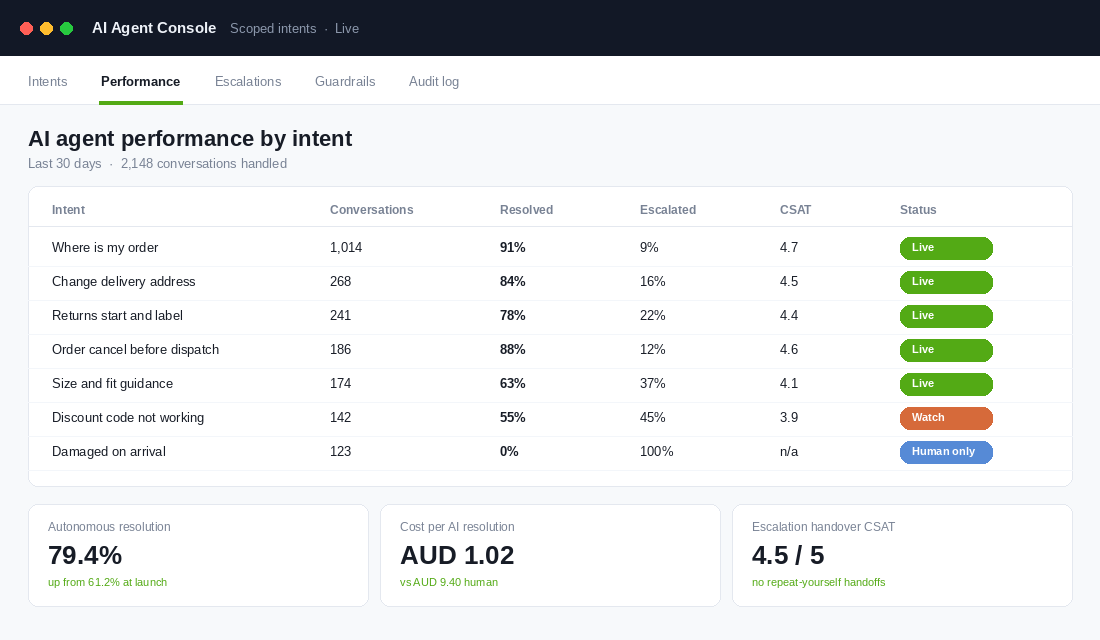
For an Australian Shopify store the shortlist is short. Gorgias is the most sensible default: it is built for ecommerce, the Shopify integration surfaces order data inside the ticket natively, and the AI Agent bills per automated resolution so the cost tracks the value. Setup runs roughly like this: install the Shopify app and connect your store, import your existing macros as the starting knowledge base, point the agent at your new help centre articles, enable it on the order status intent only, set business hours so the agent covers the overnight window that currently gets answered at 8am, and review the escalation log daily for the first fortnight. Zendesk and Re:amaze are reasonable alternatives if you are already invested in them.
One measurement warning. Track resolution, not containment. A conversation where the customer gave up and left is technically contained and commercially terrible. Failed deflection, where someone tries self-service, fails, then contacts you anyway, costs more than no deflection at all because you have added frustration to the handle time.
Layer 5: Protect the Human Queue for What Actually Needs a Human
The point of the first four layers is not a smaller support team. It is a support team working on the tickets that change revenue. Once WISMO is gone, what remains is pre-purchase questions, damaged goods, genuinely upset customers and high-value orders. All of those are worth a human and several of them are worth money.
Three moves protect that queue.
- Route by tag, not by channel. Damaged on arrival and pre-purchase product questions should skip the general queue entirely and land with your most experienced person.
- Build the macro library properly. Twenty-five well-written, on-brand replies covering your top intents will cut average handle time more than any tool. Our 25-template macro library is the fastest way to get there.
- Staff the peak against the deflected number, not last year’s ticket count. If Layers 1 to 4 are live by late September, your November volume will not scale the way it did last year. The peak season staffing playbook walks through the maths.
There is a revenue angle here that most founders miss. Pre-purchase questions convert. A customer asking “will this fit a 12 year old” is a warm lead sitting in your support inbox. When your team is drowning in tracking requests those messages get a two-line answer eight hours later. When the queue is clean they get a proper one in twenty minutes, and a meaningful share of them buy.
How the Five Layers Compound
Taken individually each layer looks incremental. A better delivery estimate. A few help articles. A bot on one intent. None of them feel like a strategy on their own.
Stacked, they multiply. A precise delivery promise cuts the number of anxious customers. The notification ladder catches most of the ones who are still anxious. The help centre catches the ones who go looking anyway. On-page answers catch the ones who never look. The AI agent absorbs what is left of the simple queue. By the time a message reaches a person, it is genuinely a message that needed a person.
The published benchmarks tell you what good looks like. Median tier-one deflection across ecommerce programmes sat at 41.2% in 2026, with the top quartile at 58.7%. Most Aussie stores we look at are under 15%, almost entirely because they skipped straight to the tool. Getting from 15% to 40% is not a technology problem. It is four weeks of unglamorous work on tags, timing and content.
The compounding shows up in three places at once. Support cost per order falls. First reply time on the remaining queue falls, which lifts CSAT on the tickets that actually influence repeat purchase. And your team stops burning out in November, which is the difference between keeping a good support person for three years and rehiring every January.
The 90-Day Peak Deflection Plan
It is early August. BFCM is roughly sixteen weeks away. That is enough time to do this properly if you start now, and not enough if you start in October. Here is the sequence.
Weeks 1 to 4: measure
- Cut your tag list to ten to fifteen intents and retag every incoming ticket.
- Calculate your baseline WISMO rate: order status contacts divided by orders shipped.
- Score each tag as deflectable, human but simple, or human and complex.
- Work out your true cost per human ticket, including the founder hours nobody counts.
- Pull last peak’s ticket volume by week so you have a forecast to beat.
Weeks 5 to 8: remove the cause
- Add a postcode-aware estimated delivery date to the product page and checkout.
- Build all five steps of the notification ladder, including the delay alert nobody builds.
- Launch a branded tracking page on your own domain.
- Publish your top 15 help articles, one per tag, each ending in an action rather than a contact link.
- Link the help centre from navigation, order confirmation, tracking page and contact form.
Weeks 9 to 12: answer in place
- Map every recurring intent to an on-page answer and ship them.
- Add fit notes and care detail to product metafields on your top 30 SKUs.
- Make site search return help and policy content, not only products.
- Fix your cart error messaging so failed promo codes explain themselves.
- Publish this year’s peak cut-off dates by state and date-stamp them.
Weeks 13 to 16: automate and staff
- Launch the AI agent on order status only, with order data connected and guardrails written.
- Review the escalation log daily for the first two weeks and fix the gaps in your help content.
- Add one intent per fortnight once resolution clears 75% and CSAT clears 4.0.
- Rebuild your macro library for the intents that stay human.
- Set peak staffing against your new deflected forecast, not last year’s raw ticket count.
If you only do three things before peak: publish a postcode-aware delivery estimate, build the delay-detected notification, and write fifteen help articles straight off your tag audit. That is two weeks of work and it will take more load off your team than any tool you can buy.
Support deflection is one of the least glamorous projects in ecommerce and one of the most reliable. It does not need new traffic, new creative or new product. It takes work you are already paying for and stops paying for it twice.
Inside eCommerce Circle, the support queue is part of the Patrons work we do with every member, because the cost of a ticket and the quality of a repeat customer are the same conversation. If you want a second opinion on where your store is leaking support hours, let us talk.