Open your best collection page on your phone and scroll. Count the badges. If you’re like most Aussie Shopify stores, you’ll find one of two things: no badges at all except a grey “Sale” pill, or a grid where half the products are shouting “HOT”, “NEW” and “SELLING FAST” at the same time.
What’s in This Article
Both cost you orders. The first wastes the most valuable real estate on the page. The second trains shoppers to ignore every label you show, and if any of those “selling fast” claims aren’t true, it puts you on the wrong side of the ACCC right before Black Friday.
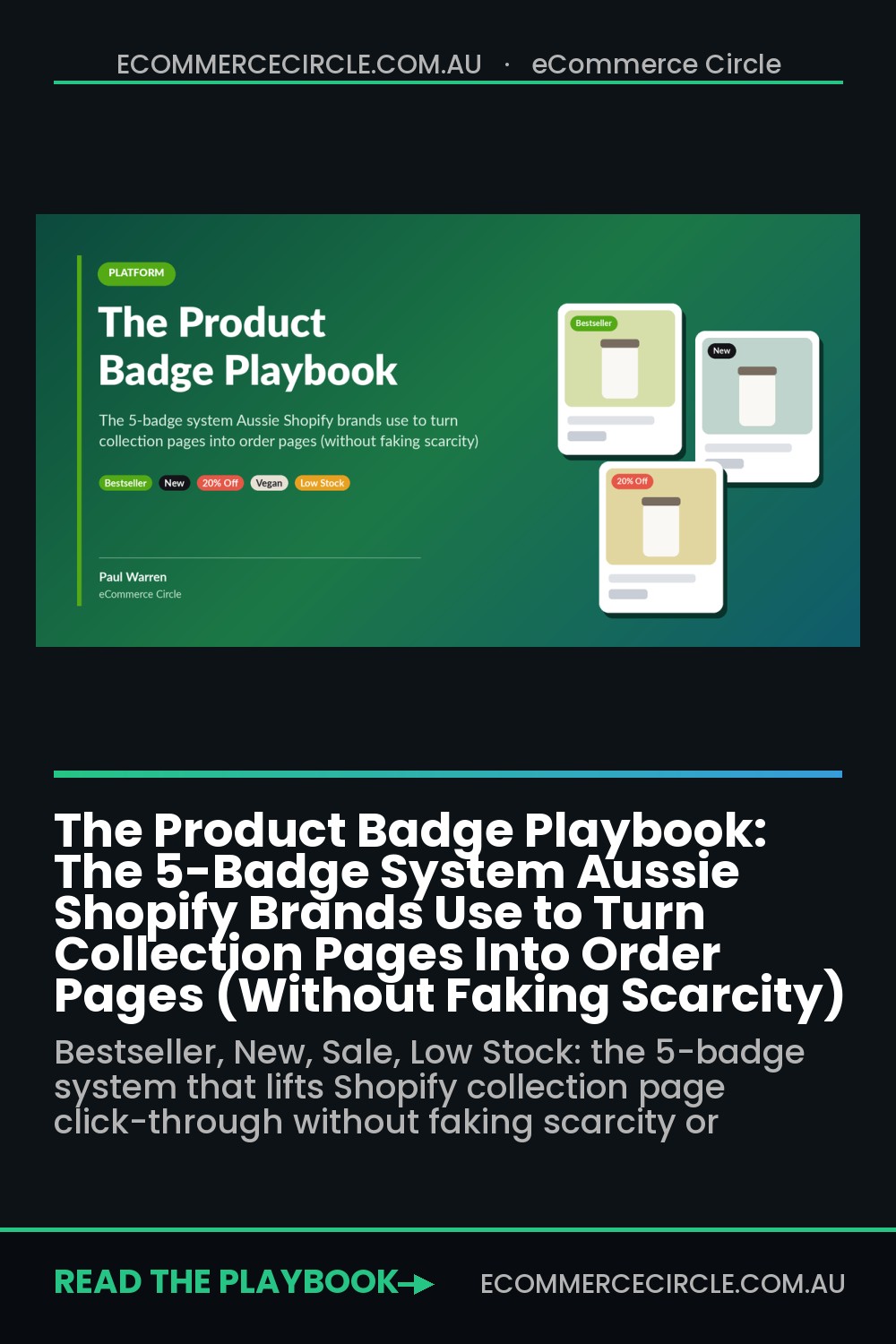
The brands that get this right treat badges as a system with rules, not stickers someone adds when they feel like it. Every badge is earned from real data, expires on a schedule, and fights for one small slot on the product card. When Profitero studied Amazon’s version of this, the Best Seller badge lifted product traffic by an average of 45% and conversion by around 3%. That’s the power of one honest, data-backed label.
This playbook gives you the five badge types that actually move orders, the rules for when each one shows, how to automate them on Shopify so they never go stale, and a BFCM badge calendar you can set up this month.
Why Badges Are a Platform Problem, Not a Design Problem
Most founders hand badges to whoever is doing the design. That’s the first mistake. A badge is a data claim sitting on a product card. “Bestseller” claims sales rank. “Only 3 left” claims stock level. “20% off” claims a price history. If the data behind it is wrong or stale, the badge is wrong too.
Here’s what the research says about getting it wrong:
- Too many badges stop working. Baymard’s product list research found that when most items in a list carry a badge, they lose their effect and just add visual clutter.
- Scarcity badges can cut sales. Researchers from Arizona State and UCLA studied 199 products at US retailer Bon-Ton. After “five or less left” messages appeared, purchases happened sooner (the gap between sales fell 14.8%), but daily purchase quantities dropped 17.6% and overall daily sales fell. Shoppers bought fewer units because they thought stock was limited.
- Australians notice the tricks. The Consumer Policy Research Centre’s Duped by Design research found 83% of Australians had experienced negative consequences from manipulative online design, and 30% had stopped using a website or app because of it.
- The regulator is watching. The ACCC’s September 2022 Digital Platform Services Inquiry interim report named false scarcity reminders, low stock warnings and countdown timers as dark patterns.
So the goal isn’t more badges. It’s fewer, truer, automated badges that help a shopper decide which product to tap in the two seconds they spend scanning your grid.
The 5-Badge System at a Glance
Every badge on your store should fit into one of five jobs. If it doesn’t, delete it.
- Proof: “Bestseller”, “Most Reviewed”, “Customer Favourite”. Tells the shopper other people chose this.
- Newness: “New”, “Just Landed”, “Back in Stock”. Gives returning customers a reason to look again.
- Offer: “20% Off”, “Bundle and Save”, “Gift With Purchase”. Makes the deal visible without opening the product.
- Benefit: “Waterproof”, “Vegan”, “Australian Made”, “Fits 15-inch Laptops”. Answers the shopper’s filter question on the card itself.
- Urgency: “Low Stock”, “Limited Edition”, “Arrives Before Christmas”. Only ever shown when live data proves it.
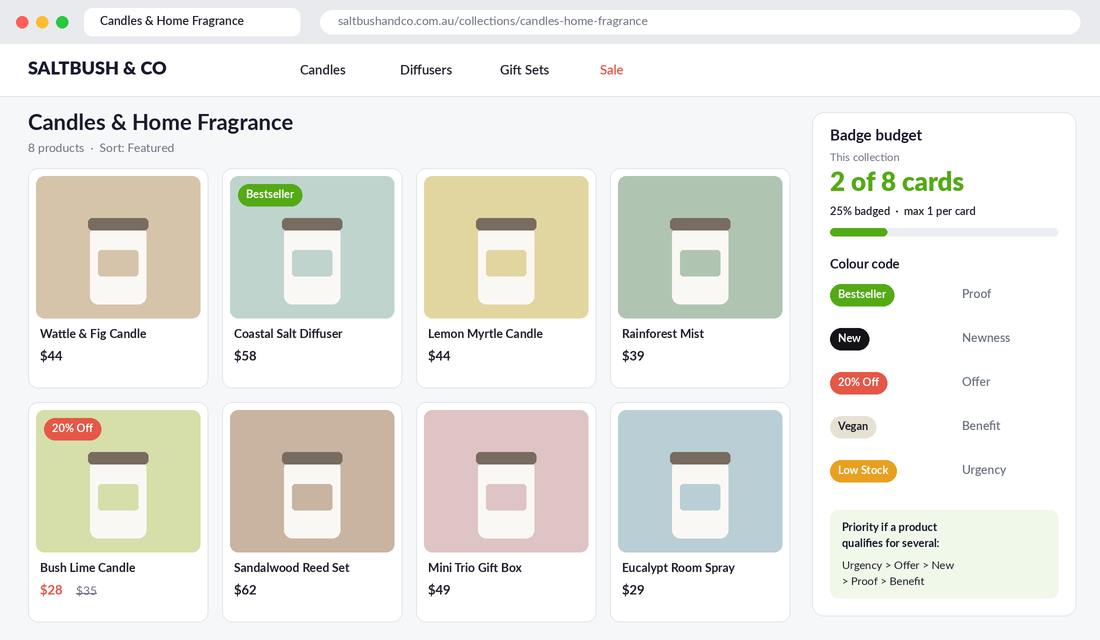
Then apply the badge budget: one badge per product card on collection pages, a maximum of two on the product page, and no more than roughly one in four products on any collection carrying a badge at once. If everything is special, nothing is.
Badge 1: Proof Badges (Earned From Sales, Not Assigned by Opinion)
“Bestseller” is the most powerful badge you have, and the most abused. Plenty of stores tag their newest product as a bestseller because they want it to sell. Shoppers can’t check, but your returns, reviews and repeat rate will tell on you.
Set a rule and stick to it:
- Bestseller = top 10% of active products by units sold in the last 30 days, within that collection. A bestseller in “Candles” doesn’t need to beat your gift sets.
- Most Reviewed = at least 50 reviews and an average of 4.5 stars or higher.
- Customer Favourite = repeat purchase rate above your store average (useful for consumables and refills).
To find your bestsellers, go to Analytics > Reports > Total sales by product in Shopify, set the date range to the last 30 days, and sort by net items sold. Export it on the first Monday of every month, tag the top 10% with badge:bestseller, and remove the tag from anything that dropped out.
Here’s why the refresh matters. A bestseller badge that never moves becomes furniture. A badge that changes monthly tells your regulars something real is happening in the range, and it gives your second-tier products a path to earn the spotlight.
Badge 2: Newness Badges (With an Expiry Date Built In)
Your returning customers make up a big chunk of your BFCM revenue, and they’ve already seen most of your range. A “New” badge is the fastest way to show them what’s changed since their last visit.
Gymshark does this well. On its all products page, product cards carry a small “New” tag on fresh drops, while other cards use the same slot for a benefit tag instead. One slot, one message, never both.
The rules that keep newness honest:
- “New” expires after 30 days. Automatically. A product that’s been “new” since March isn’t new, and your regulars know it.
- “Back in Stock” lasts 14 days. Pair it with your back-in-stock email so the badge confirms what the email promised.
- “New Colour” beats “New” when only a variant is new. It tells existing fans exactly why to look.
If your store launches fewer than one product a month, skip “New” on collection pages entirely and use the slot for proof or benefit badges. A tired “New” badge on the same three products does more harm than an empty slot.
Badge 3: Offer Badges (Show the Real Number, Keep the Paper Trail)
Most Shopify themes, including Dawn, show a generic “Sale” badge whenever a product has a compare-at price. That’s a missed opportunity. “Sale” tells the shopper nothing. “20% Off” or “Save $40” tells them whether it’s worth tapping.
Koala is a good local example. The product tiles in its navigation carry coloured tags like “20% off” and “Limited Edition”, so the offer is visible before you ever reach a product page.
Three rules for offer badges:
- Show the actual discount. Percentage for items under about $100, dollar savings above that (a “$60 off” headline reads bigger than “15% off” on a $400 item).
- Only badge real prices. Your compare-at price must be a price you genuinely charged for a reasonable period. Our Sale Price Compliance Playbook walks through the price trail you need before every sale.
- Badge the mechanic, not just the markdown. “Bundle and Save” or “Free Gift Over $100” often protects more margin than a straight percentage, and the badge is what makes shoppers notice it on the grid.
Badge 4: Benefit Badges (Answer the Filter Question on the Card)
This is the badge type almost nobody uses, and it’s often the one that lifts click-through the most. A benefit badge answers the question the shopper is already asking: “Will this work for me?”
Gymshark uses this slot for short promotional benefit tags like “all day comfort” and “new & improved”. For your store, think about what your customers filter on or ask your support team:
- Skincare: “Fragrance Free”, “Sensitive Skin”, “Vegan”
- Apparel: “Squat Proof”, “Pockets”, “Runs Small”
- Homewares: “Dishwasher Safe”, “Pet Friendly”, “Ships Flat”
- Gifts: “Gift Ready”, “Personalise It”, “Under $50”
To pick yours, export your last 200 support tickets and your top site search terms, then count the attributes people ask about. The top three become your benefit badges.
Australian Made sits in this category too, with one big caveat. The green and gold kangaroo logo can’t be used without a licence from Australian Made Campaign Limited. It’s used by more than 4,500 businesses, and the minimum licence fee is $330 a year including GST. If you qualify, it’s one of the strongest benefit badges an Aussie brand can show. Our Australian Made Playbook covers the claim rules in detail.
Badge 5: Urgency Badges (Live Data or Nothing)
Urgency badges are the most effective and the most dangerous. Done right, they help a shopper who was going to buy anyway buy now. Done wrong, they’re exactly what the ACCC calls a dark pattern.
Remember the Bon-Ton research: low-stock messages made people buy sooner, but they bought fewer units. That tells you where urgency belongs and where it doesn’t:
- Use “Low Stock” on slower-moving, one-per-order items like a jacket, a lamp or a limited print. It nudges the fence-sitter.
- Skip “Low Stock” on consumables and multi-buy items like socks, candles or supplements. It can shrink the basket.
- “Limited Edition” only if the run is genuinely capped and you won’t restock it. Write the cap in the product description.
- “Arrives Before Christmas” is the safest urgency badge of all, because it’s tied to your carrier’s published cut-off. Switch it off automatically the day after your cut-off.
Every urgency badge must read from live inventory or a hard date. Never a static tag someone forgets to remove. Our Urgency and Scarcity Playbook shows how to set real stock thresholds in your theme so the count can’t freeze on “Only 1 left”.
The Badge Hierarchy: What Wins When a Product Qualifies for Three
Your hero product might be a bestseller, on sale and low in stock all at once. With a one-badge budget, you need a tiebreaker that’s decided in advance, not by whoever edits the product last.
Here’s the default priority order we recommend:
- Urgency (only during the final days of a sale or before a delivery cut-off)
- Offer (during an active promotion)
- Newness (first 30 days)
- Proof (all other times)
- Benefit (the default when nothing else applies)
Give each badge type its own colour and keep it consistent across the store. A common setup: brand colour for proof, black for newness, red or coral for offers, a soft neutral for benefits, and amber for urgency. Shoppers learn the colour code within a visit or two, and it speeds up scanning.
How to Automate Badges on Shopify (So They Never Go Stale)
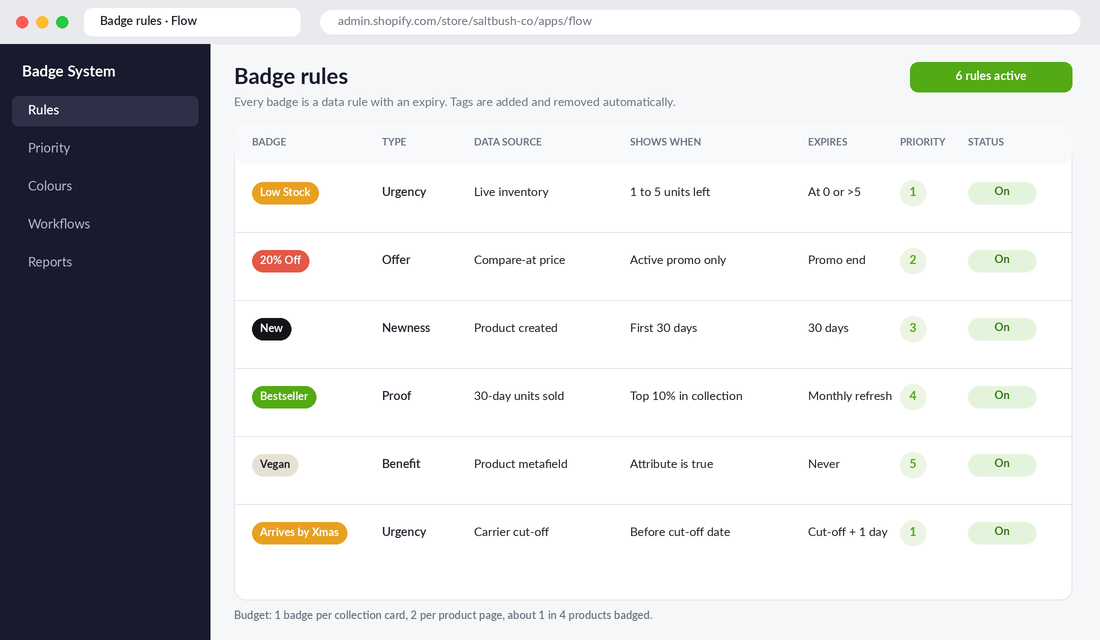
Stale badges are the number one reason badge systems fail. The fix is to drive every badge from a product tag, and let automation add and remove the tags. You have two ways to do it.
Option A: Shopify Flow plus Your Theme (Free, More Control)
Shopify Flow is a free Shopify app, available on the Basic plan and above. Here’s how to build the low-stock badge rule, which takes about 15 minutes:
- In your Shopify admin, open Apps > Flow and click Create workflow.
- Choose the trigger Product variant inventory quantity changed.
- Add a condition: inventory quantity is less than or equal to 5 and greater than 0.
- If true, add the action Add product tags with the tag
badge:low-stock. - Add a second branch: if quantity is greater than 5 or equal to 0, use Remove product tags to strip
badge:low-stock. - Turn the workflow on, then test it by changing a variant’s stock in the admin and checking the tag updates.
For the “New” badge, build a second workflow on a Scheduled time trigger that runs daily, finds products tagged badge:new that were created more than 30 days ago, and removes the tag. Then ask your developer to add a small Liquid snippet to your product card that reads badge: tags and shows the highest-priority one. It’s usually a one or two hour job.
Option B: A Badge App (Faster, No Code)
If you don’t have a developer on hand before BFCM, a dedicated app is the quicker path. Fordeer Product Labels & Badges, Labeler and Badgify all let you set display rules based on inventory, price, discount, tags or launch date, without editing theme code.
Whichever app you trial, check three things before you commit: that badges load without a visible flicker on mobile, that rules can expire automatically, and that you can limit the number of badges shown per card. If an app can’t enforce your badge budget, it’ll undo the whole system.
Test It Before You Trust It
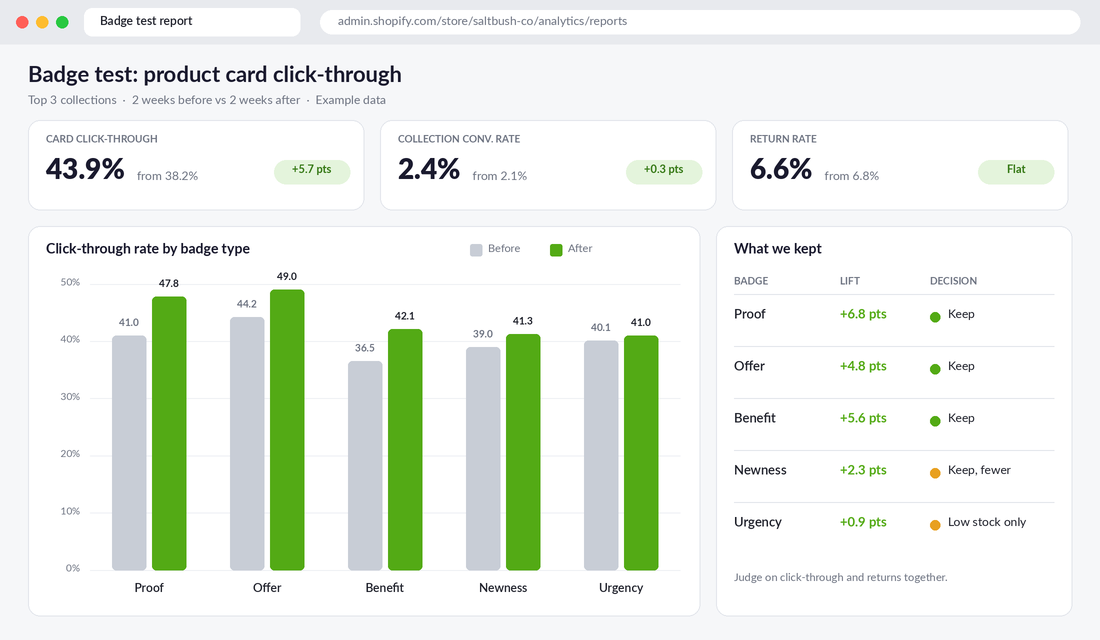
Badges feel like they should work, which is exactly why you need to measure them. The metric that matters on a collection page is product card click-through rate: the share of collection page sessions that go on to view a product.
Run it like this:
- Baseline first. Record click-through and conversion rate for your top three collections over two full weeks before changing anything.
- Change one badge type at a time. Add proof badges first, since they carry the least risk. Wait two weeks, then add benefit badges.
- Watch the badged products, not just the page. If badged products gain views but unbadged ones lose the same amount, you’ve moved attention, not grown demand. That’s still useful if the badged products have better margin.
- Check refunds and returns. A badge that lifts orders but also lifts returns (“Runs Small” missing, say) is overpromising.
If you have enough traffic for a proper split test, our A/B Testing Playbook covers sample sizes and tools. For most stores under about 20,000 monthly sessions, a clean before-and-after comparison is good enough.
Your BFCM Badge Calendar
The biggest badge mistake during peak season is leaving the same badges up for six weeks. Shoppers visit more often in November, so your badges need to change with your campaign. Black Friday falls on Friday 27 November this year, and the ARA and Roy Morgan expected Australians to spend a record $6.8 billion over last year’s four-day Black Friday weekend. That’s a lot of scanning shoppers.
- Now to early November: Proof and benefit badges only. Refresh bestsellers. Add “Gift Ready” or “Under $50” benefit badges to giftable products.
- Early access week: “Early Access” offer badge visible to logged-in or tagged customers only, if your theme or app supports it.
- Black Friday to Cyber Monday: Offer badges with the real discount take priority. Urgency badges switch on only for genuinely low-stock, one-per-order products.
- Tuesday after Cyber Monday: Remove every BFCM offer badge the same morning. Leaving “30% Off” up after the sale ends is both confusing and a compliance risk.
- December: “Arrives Before Christmas” becomes your lead badge until your carrier cut-off, then switches to “Gift Card: Instant Delivery” on your gift card product.
- Boxing Day: Offer badges return for clearance lines only.
Put every swap in your campaign calendar with a named owner and a time. A badge change that “someone will do” on Cyber Monday night usually doesn’t happen.
The 20-Minute Badge Audit Checklist
Run this on your top three collections this week, on your phone, not your desktop.
- ☐ Every badge on the page fits one of the five jobs: proof, newness, offer, benefit or urgency
- ☐ No product card shows more than one badge
- ☐ No more than about one in four products on the collection carries a badge
- ☐ Every “Bestseller” is in the top 10% of units sold in the last 30 days
- ☐ No “New” badge is older than 30 days
- ☐ Offer badges show the real % or $ saving, not just “Sale”
- ☐ Every compare-at price behind an offer badge has a documented price history
- ☐ Every urgency badge reads from live stock or a hard date, and disappears at zero
- ☐ Low-stock badges are switched off for consumables and multi-buy products
- ☐ Australian Made or other certification badges are licensed and current
- ☐ Each badge type has its own consistent colour
- ☐ Badges are readable at mobile size and don’t cover the product
- ☐ Badge tags are added and removed by Flow or an app, not by hand
- ☐ BFCM badge swaps are in the campaign calendar with an owner and time
- ☐ Product card click-through baseline is recorded before changes go live
How the Five Badges Compound
On their own, each badge does one small job. Together, they turn your collection page from a catalogue into a guided shop.
Proof badges send new visitors to the products most likely to convert them. Newness badges give your returning customers a reason to look again. Benefit badges answer questions before they become support tickets or abandoned sessions. Offer badges make your promotion visible at a glance. And honest urgency badges close the deal for the shopper who was already leaning in.
Because every badge is earned from data and expires on a rule, shoppers learn to trust them. That trust is the real asset. A store whose badges are always true can use urgency during BFCM and have people believe it. A store that’s cried wolf all year can’t.
Inside eCommerce Circle, Platform is one of the core pillars we work on with every member, because small changes to how a product card looks often move more orders than another round of ads. If you want to see exactly where your store is being capped, take the free More Orders Scorecard. It takes two minutes and shows you which of the 10 P’s to fix first.