Conversion rate optimisation is the process of getting more of your existing visitors to buy, by fixing the places your store loses them. For most Australian Shopify stores the average sits around 1.4% to 1.8%, so the practical starting point is to measure your funnel, fix speed and mobile, then work through the product page, cart and checkout before you run a single A/B test.
What’s in This Article
That order matters, and it is where most founders go wrong. They install a heatmap app, change a button colour, read a blog post about urgency timers, and add a countdown clock. Three weeks later nothing has moved and they conclude that CRO does not work for their store.
CRO works. It just works in a sequence. Brands that grow profitably treat it as a weekly habit of finding the biggest leak, fixing it, and measuring the result. This guide gives you that sequence, the benchmarks to judge yourself against, the free tool to get started this week, and a scoring template you can copy into a spreadsheet today.
What conversion rate optimisation actually means for a Shopify store
Your conversion rate is orders divided by sessions. If 10,000 people visit and 175 buy, you convert at 1.75%. CRO is the work of lifting that number without buying more traffic.
The maths is why it matters. If you spend $15,000 a month on ads and convert at 1.5%, lifting to 2.0% gives you a third more orders from the same spend. Your cost to acquire each customer drops by a quarter. That is margin you can reinvest in ads or keep.
One warning before we start. Conversion rate is an output, not a lever. You cannot “improve conversion rate” directly. You improve the things that sit underneath it: whether the page loads, whether the offer is clear, whether the buyer trusts you, and whether the checkout asks for anything unexpected. This guide is organised around those things.
What a good Shopify conversion rate looks like in Australia
You need a benchmark before you can tell whether you have a problem. Be careful with the numbers you find online, because they vary a lot depending on the dataset.
- Shopify platform average: about 1.4%. Littledata’s 2026 dataset puts the top 20% of stores at roughly 3.1% to 3.5%, and the top 10% above 4.7%.
- Australia: about 1.78%. Andava’s 2026 Australian statistics give 1.78% as an Australia-wide baseline. Dynamic Yield’s APAC all-industry figure is 1.7%, against 2.69% globally.
- Mobile converts worse than desktop. Littledata’s figures put mobile at 1.2% on average and desktop at 1.9%, and roughly 70% of Shopify traffic is mobile. That gap is the biggest single opportunity in most stores.
Listed Australian retailers give us a few real reference points. Step One reported an online conversion rate of 4.7% in the first half of FY26, and Temple & Webster reported 3.2% for H1 FY26, up from 3.0% in FY25. Both sell products people already understand, which helps. Treat them as a ceiling worth studying, not a target for a store with a new brand and a small catalogue.
Your category matters more than the average. Food and beverage can convert at four to six percent, while jewellery and furniture often sit under 1.5%. Our Shopify conversion rate benchmarks by niche post breaks this down so you compare yourself with the right peers.
Step 1: Build your funnel view before you change anything
Open your Shopify analytics and write down five numbers for the last 30 days: sessions, product page views, add-to-cart sessions, reached-checkout sessions and completed orders. Then work out the step rate between each. This takes ten minutes and tells you where to spend the next month.
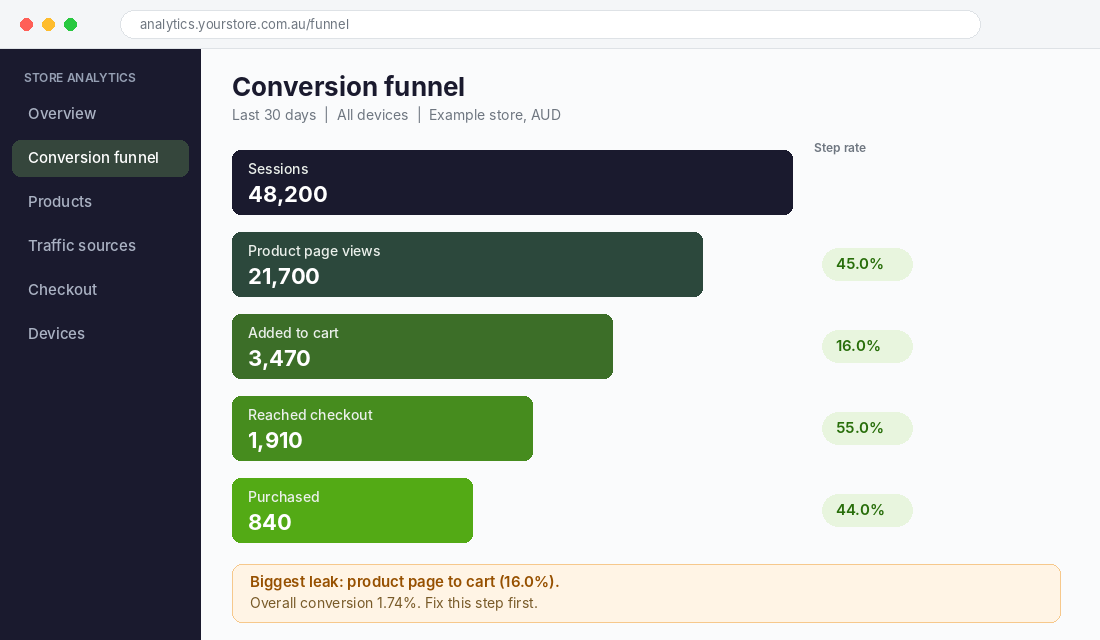
Here is how to read it. Every store has a different weak point, and the fix for each is different.
- Low product page views (under 40% of sessions). Your traffic is wrong or your homepage and collection pages are not pulling people in. Look at ad targeting, navigation and collection layout.
- Low add-to-cart rate (under 6% of product page views is a warning sign). The product page is not convincing. Photos, price, delivery information, reviews and copy are the suspects.
- Big drop from cart to checkout. Shoppers are being surprised in the cart, usually by shipping cost or a forced upsell.
- Big drop from checkout to purchase. Friction in the form, missing payment methods, or trust concerns.
Split the same funnel by device. If desktop converts at 2.5% and mobile at 0.9%, you do not have a conversion problem, you have a mobile problem, and you should start there. Our 10-point Shopify CRO audit gives you the checklist to run through once you know which step is leaking.
Step 2: Fix speed, mobile and trust first
Fast, clear, trustworthy pages are the foundation. If your store is slow or confusing on a phone, no amount of clever copy will rescue it.
Speed and mobile
Test your homepage and your best-selling product page on PageSpeed Insights, using the mobile tab. Pay attention to the Largest Contentful Paint figure. Google treats 2.5 seconds or under as good. Most slow Shopify stores have the same three culprits: oversized hero images, too many apps injecting scripts, and an autoplaying video above the fold.
- Compress hero and product images and serve them in WebP, which Shopify does by default for images uploaded through the theme.
- Audit your apps. Remove anything you have not opened in 90 days, and check that deleted apps have not left code behind in your theme.
- Replace sliders with one strong hero image and a clear headline. Sliders slow the page and almost nobody clicks past the first slide.
Then use your own phone, on mobile data, to buy something from your store. Count the thumb taps from landing page to paid. Every unnecessary tap costs you orders. Our mobile UX guide for Shopify covers the specific fixes.
Trust
Australian buyers are wary of unknown stores, and with good reason. Baymard Institute research found that 19% of US shoppers abandoned a checkout because they did not trust the site with their card details. Local cues help here more than anywhere else in the funnel.
- Show your ABN, a real Australian returns address and a phone number or contact form in the footer.
- Display payment icons for Visa, Mastercard, Apple Pay, Shop Pay and Afterpay or Zip near the price and in the cart.
- Put your returns policy in plain English on the product page, not buried in the footer.
- Show real reviews with photos, including a few three-star reviews. A page full of five stars looks edited.
Step 3: Make the product page do the selling
If your funnel shows the biggest drop between product page and cart, this is where you spend your time. A product page has one job: answer every question a nervous buyer has before they have to ask it.
Work through these in order. Most stores I audit are missing at least three.
- Price and delivery above the fold. Show the price, the Afterpay or Shop Pay instalment amount, shipping cost and an estimated delivery date to the buyer’s postcode. Baymard found that 40% of US shoppers who abandoned a purchase cited extra costs like shipping, tax and fees. Showing the cost early removes the shock.
- Photos that answer questions. Include a scale shot, a detail shot, a product in use, and a size or fit photo. Five to eight images is the sweet spot for most categories.
- A benefit-led headline and first line. Say what the product does for the buyer before you list what it is made from.
- Reviews close to the buy button. Put the star rating and review count directly under the title, linked to the full reviews lower down.
- Objection handling. A short block covering returns, warranty, sizing or fit, and “who this is for” answers the questions that stop sales.
- One clear call to action. On mobile, a sticky add-to-cart bar keeps the button in reach as the shopper scrolls.
Our 7-layer product page anatomy goes deep on each of these. Start with the first two on your top five products by traffic. Those five pages usually account for most of your revenue, so a lift there matters far more than polishing your whole catalogue.
Step 4: Remove friction from the cart and checkout
Baymard Institute, which has studied checkout usability for years, puts the average documented cart abandonment rate at 70.22%. Some of that is shoppers who were never going to buy. But Baymard also estimates that the average large ecommerce site could lift conversion by 35.26% through better checkout design, and the typical site it benchmarked had 39 areas where checkout could improve.
The reasons shoppers give for leaving, from the same Baymard research, are a useful checklist:
- 40%: extra costs were too high. Show shipping thresholds early, for example “Free shipping over $99”, and avoid surprises.
- 20%: delivery was too slow. State a delivery window and be honest about it. In Australia, tell remote-postcode buyers up front.
- 18%: the site wanted an account. Turn on guest checkout and Shop Pay so returning buyers can pay in a couple of taps.
- 17%: checkout was too long or complicated. Remove optional fields, and enable address autocomplete.
- 17%: website errors or crashes. Test your checkout on iPhone and Android after every theme or app change.
Shopify checkout is already well optimised compared with most platforms, so your wins here come from the offer around it: shipping rules, payment methods and trust. Add Afterpay or Zip if your average order value is over $80, and make sure Apple Pay and Google Pay are switched on. For the full list, see our Shopify checkout optimisation guide.
Step 5: Use Microsoft Clarity to find what is actually going wrong
Analytics tells you where people leave. It does not tell you why. For that you need to watch real sessions, and the best free tool for the job is Microsoft Clarity.
Clarity is free, with no traffic limits according to Microsoft, and it connects to Shopify through the Clarity app in the Shopify App Store. It gives you session recordings, heatmaps, scroll depth and rage click tracking, and it can track checkout and thank-you pages through the Shopify pixel. In one case study published by Microsoft, the agency B Interactive used Clarity to optimise a Shopify product page and lifted conversion from 1.13% to 1.9%, with average order value rising from $115 to $140.
How to set it up in about 15 minutes
- Create a free Clarity account at clarity.microsoft.com and add your store as a new project.
- In Shopify, open the App Store, search for Microsoft Clarity and install the official app. Connect it to your Clarity project.
- Wait 48 to 72 hours so you have a few hundred sessions, then open the Recordings tab.
- Filter recordings to mobile, then to sessions that added to cart but did not purchase. Watch 20 of them at double speed.
- Note every point where someone hesitates, scrolls back up, taps something that is not a button, or leaves. Write each one in a spreadsheet.
- Open the heatmap for your top product page. Check how far down most visitors scroll and whether anything important sits below where they stop.
Watching 20 recordings is the most valuable hour in CRO. You will see the same two or three problems repeat, and those become your first tests. For a deeper walkthrough, see our Shopify heatmap guide. One note: a third-party Clarity app on the Shopify App Store charges a monthly fee, so install Microsoft’s own app unless you want the extras that app adds.
Step 6: Prioritise ideas, then test them properly
By now you have a long list of ideas. This is where most stores stall, because everything feels important. The fix is a simple scoring system. Score each idea from 1 to 10 on three things: Impact (how much it could lift conversion), Confidence (how sure you are, based on your data), and Ease (how quickly you can ship it). Average the three, and work from the top.
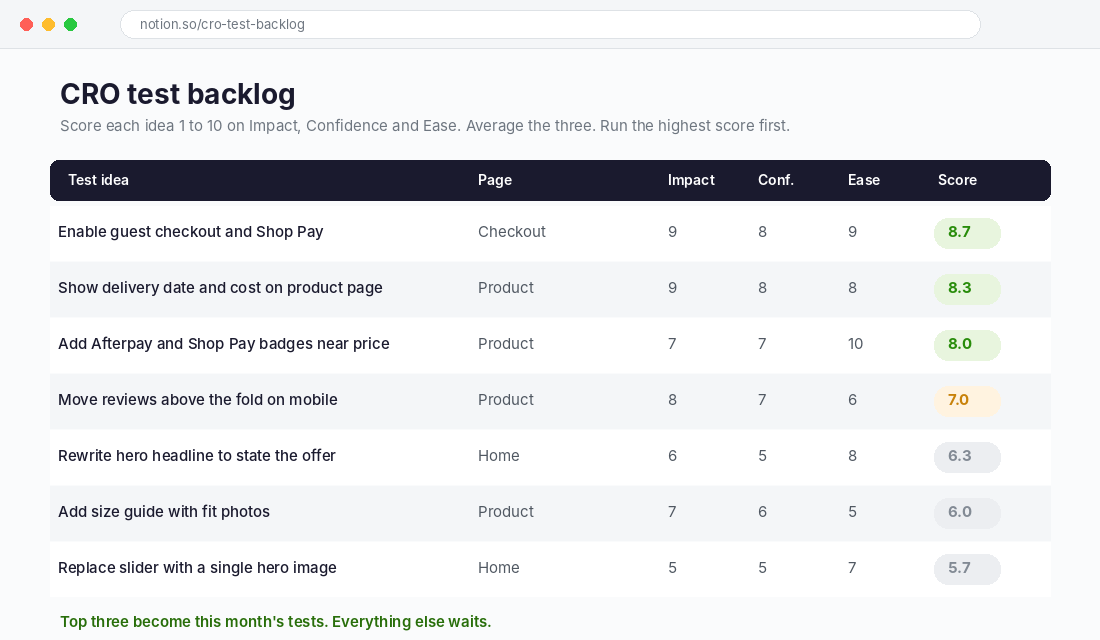
Notice what rises to the top. The wins are rarely clever. Showing a delivery date, adding Afterpay badges and enabling guest checkout are boring, and they tend to beat redesigns.
When to A/B test and when to just ship
A/B testing needs traffic. A store converting at around 1.5% needs tens of thousands of sessions to detect a modest lift with confidence. Under roughly 20,000 sessions a month, you are better off making the change your data supports and comparing before and after, while watching for seasonal noise.
When you do test, follow these rules:
- Test one change at a time, so you know what caused the result.
- Run the test for at least two full weeks, covering two weekends, even if it looks like a winner early.
- Decide your success metric before you start. Revenue per session is usually better than conversion rate alone, because a change can raise orders and cut average order value.
- Do not test during Black Friday or a big sale. Traffic quality changes and your results will not carry over.
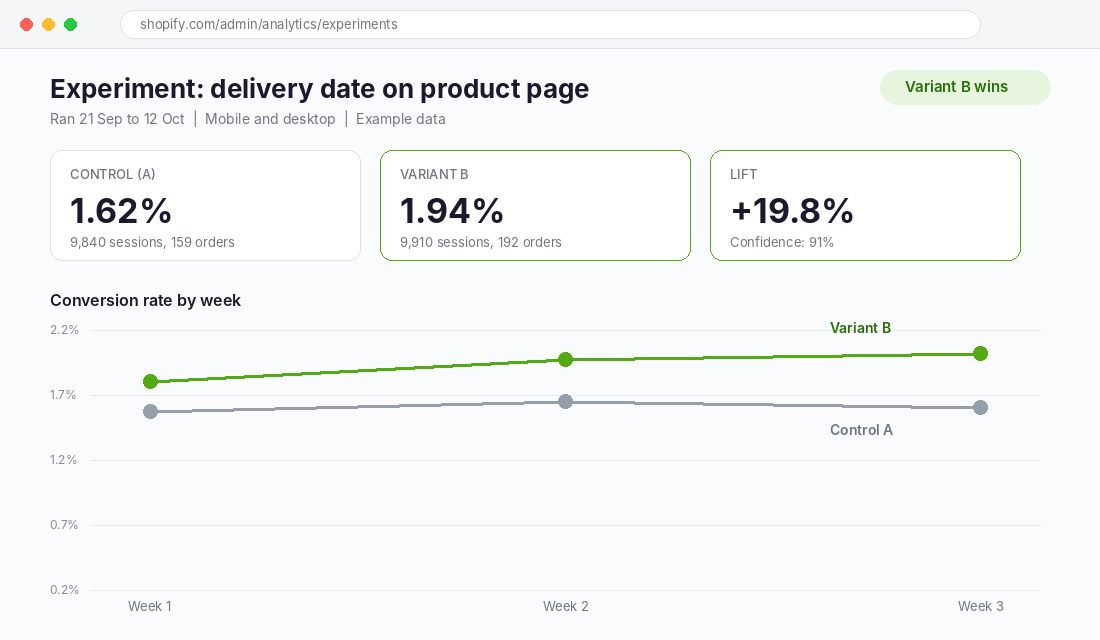
Our A/B testing guide for Shopify covers sample sizes and tools in detail.
The 5-Layer CRO Order: a template you can copy
Here is the whole system on one page. Work through the layers in order. Do not move to the next one until the current one is fixed, because each layer multiplies the one after it.
| Layer | Question to answer | Where to look | Typical first fix |
|---|---|---|---|
| 1. Measure | Which funnel step leaks most? | Shopify analytics, split by device | Write down five numbers and step rates |
| 2. Speed and trust | Does it load fast and feel safe on mobile? | PageSpeed Insights, your own phone | Compress images, remove unused apps, add trust cues |
| 3. Product page | Does it answer every buyer question? | Clarity recordings, top 5 products | Delivery date, price, instalments, reviews near title |
| 4. Cart and checkout | Is anything surprising or slow? | Funnel step cart to checkout | Show shipping early, guest checkout, Shop Pay |
| 5. Test and repeat | What is the next highest score? | Your scored backlog | Run one test, two weeks minimum |
Your first 30 days
- Week 1: Build your funnel view, split by device. Install Clarity. Run PageSpeed on your top three pages.
- Week 2: Watch 20 mobile recordings. Fix speed and trust issues. Start your scored backlog.
- Week 3: Ship the top two product page fixes on your best five products.
- Week 4: Fix cart and checkout surprises. Re-measure the funnel against week 1 and pick the next three items from your backlog.
The compound effect: why small lifts add up fast
Here is the part most founders miss. Each layer improves a different step, and the gains multiply rather than add. Lift product page views to cart by 15%, cart to checkout by 10%, and checkout to purchase by 10%, and your overall conversion rate rises by about 39%. A store converting at 1.5% moves to roughly 2.1% without a dollar of extra ad spend.
That also changes your ad economics. On a $20,000 monthly ad budget with the same cost per click, a 39% lift in conversion cuts your cost per order by about 28%. It gives you room to bid more aggressively, test new audiences and outbid competitors on the same keywords. CRO is not separate from your marketing. It is what makes your marketing profitable.
The stores that keep winning are the ones that run this loop every month: measure, find the leak, fix it, test, and repeat. There is no finish line. There is only a next-highest score on your backlog.
Where to go from here
If you only do three things this week, do these: build your funnel view split by device, install Microsoft Clarity and watch 20 mobile recordings, and write your first scored backlog of ten ideas. That alone puts you ahead of most stores, which are guessing.
Inside eCommerce Circle, conversion is one of the core areas we work on with every member, because it sits underneath every other part of the business. If you want to see exactly where your store is being capped, take the free More Orders Scorecard. It takes two minutes and shows you which of the 10 P’s to fix first.