Your Shopify store is not getting sales for one of three reasons: the wrong people are arriving, the right people are leaving before they buy, or your tracking is hiding the sales you do make. Work out which one you have in the next ten minutes, then fix the biggest leak first instead of redesigning the whole site.
What’s in This Article
Most founders do the opposite. They get to week six with a trickle of orders and change the theme, rewrite the homepage, swap the logo and add a popup. Then they spend another $1,500 on ads to see if it worked. It never does, because they never found the actual leak.
The stores that turn this around do something boring. They open the funnel report, find the single step where shoppers vanish, and fix that. This article gives you that process, the 11 causes we see most often in Australian stores, and a scoring sheet so you know what to fix first. If you want the full audit version, our Shopify CRO audit checklist covers 10 points in detail.
Step 1: Find the leak before you fix anything
Open Shopify Analytics and look at the conversion funnel for the last 30 days. You are looking at four numbers: sessions, sessions that added to cart, sessions that reached checkout, and sessions that completed checkout. The drop between each pair tells you where the problem lives.
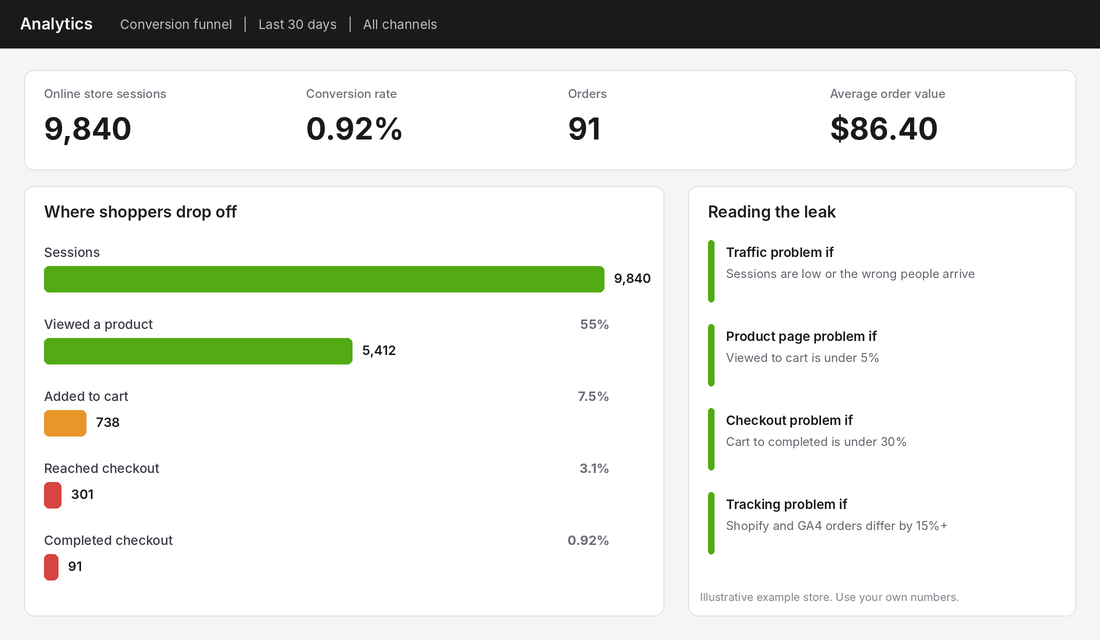
Use these rules of thumb to read it:
- Low sessions, or sessions that never view a product. You have a traffic problem. Causes 1 and 2 below.
- Plenty of product views, under 5% adding to cart. You have a product page problem. Causes 3, 4 and 5.
- Plenty of carts, fewer than 30% finishing checkout. You have a checkout problem. Causes 6, 7, 8 and 9.
- Shopify shows far more orders than GA4 or your ad platform. You have a tracking problem. Cause 10.
One caution before you read anything into the percentages. A typical Shopify store converts somewhere between 1.4% and 1.8%, with the top 20% above 3.2% and the bottom 20% below 0.5%, according to a Red Stag Fulfillment roundup of Littledata and Shopify data. That same roundup suggests you need at least 500 sessions before your conversion rate means anything. If you have 200 sessions and no orders, you do not have a conversion problem yet. You have a traffic problem. Our 2026 conversion rate benchmarks break these numbers down by niche.
Traffic causes: the wrong people, or too few of them
Cause 1: You are buying clicks from people who were never going to buy
Paid social traffic converts at roughly 0.8% to 1.2% for the average Shopify store, while organic search sits around 3.6% and email above 5% (same Red Stag source). That does not mean ads are bad. It means a cold audience needs more proof and more time than someone searching for your exact product.
The fix: split your sessions by channel in Shopify Analytics. If 90% of your traffic is cold paid social at a 0.6% conversion rate, the store is probably fine and the audience is the issue. Tighten targeting, put your best offer and proof in the ad itself, and add a retargeting layer for people who viewed a product. If you have not set up your account structure properly, start with our guide to {a(B+’meta-ads-account-structure/’,’Meta ads account structure’)}.
Cause 2: Your mobile pages are too slow
Most Australian shoppers arrive on a phone, and phones punish slow pages. Google’s research found that as mobile page load time goes from one second to seven seconds, the probability of a visitor bouncing rises by 113%. Shopify’s own mobile conversion rate runs well below desktop (about 1.2% against 1.9% in the Red Stag data), and slow pages are a big part of the reason.
The fix: run your homepage and your best-selling product page through PageSpeed Insights on mobile. Look at Largest Contentful Paint. Anything over 2.5 seconds needs work. The usual culprits are uncompressed hero images, too many apps injecting scripts, and an autoplay video above the fold. Remove any app you have not opened in 90 days, convert images to WebP at the size they display, and lazy load anything below the fold.
Product page causes: they looked, then left
Cause 3: Nobody can tell what you sell in five seconds
Open your homepage on your phone, hold it at arm’s length and count to five. Can a stranger say what you sell, who it is for and why it is better? Most stores fail this test. The headline says something like “Elevate your everyday”, the hero image shows a lifestyle shot with no product in focus, and the button says “Shop now”.
The fix: rewrite the headline as a plain statement of product plus outcome, such as “Merino tees that do not smell after three days of travel”. Put one proof point directly underneath it (a review count, a press logo, a guarantee). Make the primary button name the destination: “Shop men’s tees”. Do this test with someone who has never seen your store.
Cause 4: The product page does not answer the question that is stopping the purchase
Every product has one or two objections that decide whether someone adds to cart. For apparel it is fit. For skincare it is whether it will irritate sensitive skin. For furniture it is whether it will fit through the door. If the page does not answer that objection in the first scroll, shoppers leave to look for the answer somewhere else, and they usually do not come back.
The fix: read your last 30 customer emails and live chats and write down the questions people ask before buying. Take the top two and answer them with a line of copy, a size guide pop-up or a short video near the add to cart button. Our product page framework walks through every element that drives add to cart.
Cause 5: Nothing on the page makes a stranger trust you
A new visitor has no reason to believe you exist. Koala, one of Australia’s best-known online brands, puts “120 day trial” and “World class warranty, up to 10 years” in its announcement bar. The risk is removed before anyone scrolls. Gymshark’s Australian store runs a “Free standard shipping on orders over $100” banner and lists Afterpay and Klarna in the footer.
You may not be able to offer a 120-night trial, but you can show the basics: real review counts on the product page, a clear returns policy in one line near the price, a visible ABN and contact details in the footer, and a payment method strip. If you sell physical goods, add a photo or name of a real person who packs the orders.
The fix: add three trust signals above the fold on every product page: star rating with review count, the returns promise in one sentence, and the delivery time to a major city. Use the Product section of your Scorecard to check the rest.
Checkout causes: they wanted it, then you lost them
This is where most stores leak the most money, and it is the easiest to fix. The Baymard Institute puts the average cart abandonment rate at just over 70%, based on 49 studies. Its 2023 survey of 2,219 US adults also lists why people abandon. The US sample is not Australian, but the reasons match what we see in Australian stores.
Cause 6: The shipping cost appears too late
The number one reason for abandoning checkout, cited by 47% of shoppers, is extra costs that are too high (shipping, tax, fees). Another 17% said the total order cost was not visible upfront. Shipping that appears for the first time at checkout is the single most common leak we find in stores with plenty of carts and few orders.
The fix: show the shipping cost or the free shipping threshold on the product page and in the cart. Set the threshold roughly 25% above your average order value so it nudges baskets up. Gymshark’s $100 free shipping banner is a clean example because it sits on every page. If your average order is $80, a $100 threshold is the kind of number to test.
Cause 7: You make people create an account
Baymard found that 25% of shoppers abandoned because the site required account creation. In Shopify, go to Settings, then Customer accounts, and make sure accounts are optional. Offer account creation after the purchase on the thank you page, when the shopper already has a reason to want one.
Cause 8: The payment method they want is missing
Eleven percent of abandoners in the Baymard survey said there were not enough payment methods. In Australia the expectation is high. Australia Post’s 2026 ecommerce report says Australians spent a record $82.6 billion online, about 24% of all retail spend, across 9.8 million households (82% of Australian homes). Those shoppers have used Afterpay, PayPal and Apple Pay elsewhere and expect to see them.
The fix: switch on Shop Pay, Apple Pay, Google Pay, PayPal and at least one buy now pay later option. Check which ones your market supports in Australia, because availability differs by provider. Our buy now pay later guide explains the trade-offs of each.
Cause 9: Checkout is too long, slow or buggy
Eighteen percent of shoppers said checkout was too long or complicated, and 14% hit website errors or crashes. A single broken discount code field or a shipping rate that fails to load can cost you every sale that day. Place three test orders per week on your own phone, using a discount code, one guest checkout and one express wallet. If any of the three fails, you have found a leak in minutes.
The fix: cut optional form fields, remove the company name and second address lines, turn on address auto-complete, and make sure your delivery estimate shows before payment. Keep distractions out of checkout. No newsletter popups, no upsell carousels that push the pay button below the fold on mobile.
The hidden causes: tracking and the second chance
Cause 10: Your tracking is broken, so you cannot see the sales you are making
Plenty of “no sales” stores do have sales. Ad platforms show 2 purchases while Shopify shows 14. Or the reverse: a theme change removed the purchase event and the founder paused an ad that was working. Compare orders in Shopify against orders in GA4 and Meta Events Manager over the last 14 days. A gap of more than 15% means you are making decisions on bad data. Our GA4 setup guide and tracking pixel audit show the steps.
Cause 11: You never follow up with the 70% who leave
If seven in ten carts are abandoned and you have no abandoned cart email, you are sending those people away for good. Email converts above 5% in the Red Stag benchmarks, which is more than any other channel on the list. A three-email abandoned cart flow, plus a welcome flow for new subscribers, is the most reliable way to turn traffic you already paid for into sales.
The fix: switch on Shopify’s abandoned checkout email today as a stop-gap, then build the proper flow in Klaviyo or Omnisend. Email 1 goes out within one hour and reminds them what they left. Email 2 at 24 hours answers the top objection. Email 3 at 48 to 72 hours adds social proof or a small incentive if your margins allow.
The free tool that shows you why people leave: Microsoft Clarity
The funnel tells you where shoppers drop off. It does not tell you why. For that, install Microsoft Clarity. It is a free behaviour analytics tool from Microsoft that records sessions and builds heatmaps, and it connects to Shopify through an app in the Shopify App Store.
Setup in about five minutes:
- Open the Microsoft Clarity app page in the Shopify App Store and click Add app.
- Follow the prompts to connect it to a Clarity project. It works with the Shopify Pixel, so it also tracks checkout and thank you pages, not just landing pages.
- Open your Clarity dashboard. Product views, add to cart and checkout events are tracked automatically.
- Filter recordings by device type (mobile first) and by UTM campaign, so you can watch the traffic you paid for.
- Watch 20 recordings of sessions that added to cart but did not buy. Write down every time someone hesitates, taps the same spot repeatedly, or scrolls back up.
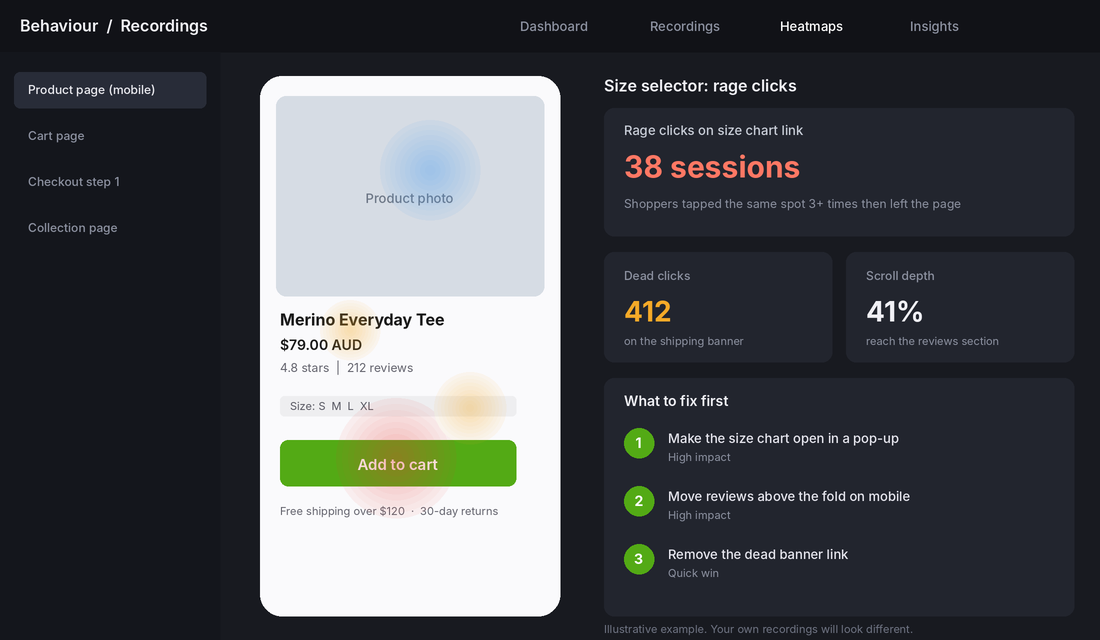
Twenty recordings will show you more than any blog post, including this one. The pattern repeats quickly: three people missing the size guide, two people tapping a banner that is not a link, five people never scrolling to the reviews. Each pattern is a fix, and each fix is cheaper than another round of ads. For more detail on reading heatmaps, see our heatmap guide.
The Sales Leak Scorecard: what to fix first
Eleven causes is too many to fix at once. Give each one a score from 0 to 3 based on the evidence in your own store. Then fix the 3s first, in the order of the funnel: traffic, product page, checkout.
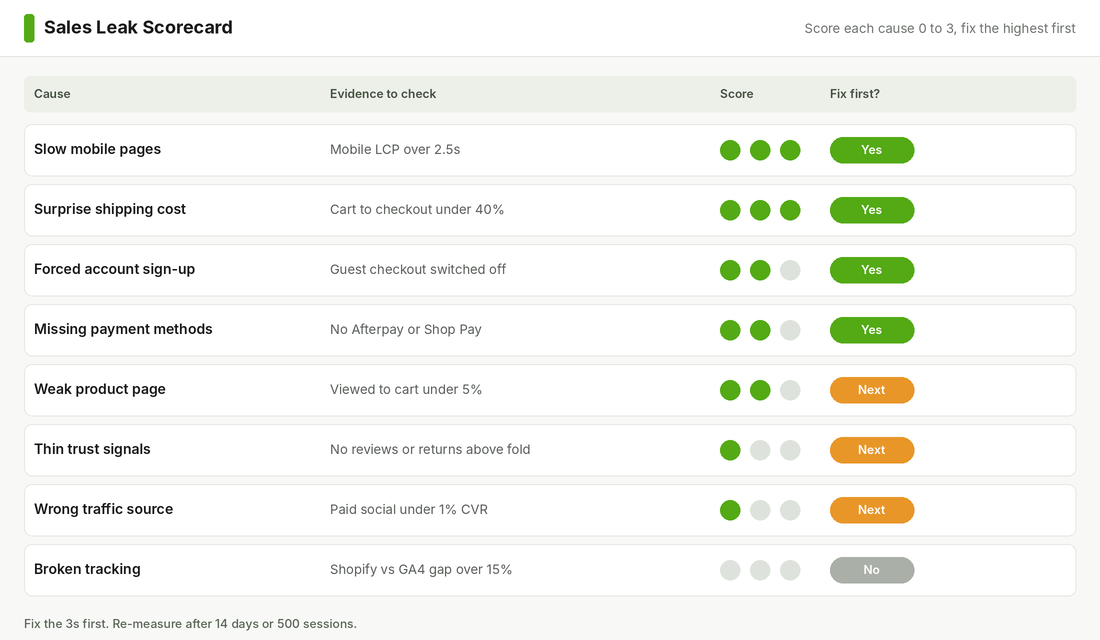
Here is how to score each one.
- 0 means no evidence of a problem. Your numbers are fine, or you have checked and it works.
- 1 means a minor issue. It could be better but is not obviously costing sales.
- 2 means a likely leak. The evidence in your funnel or your recordings points here.
- 3 means a confirmed leak. You have seen it in the data or in a recording and can name the exact page or step.
A simple 14-day plan works for most stores:
- Days 1 to 2: pull the funnel, check tracking against Shopify, install Clarity.
- Days 3 to 5: watch 20 recordings, score the 11 causes, pick the top three.
- Days 6 to 10: fix them. Shipping visibility, guest checkout and payment methods can usually be done in an afternoon.
- Days 11 to 14: leave the site alone. Wait for 500 sessions, then compare the funnel to the one you started with.
Do not change five things at once and then try to guess which one worked. Change the biggest leak, measure, and move to the next one.
The compound effect: small leaks add up to a lot of revenue
Here is why this approach beats a redesign. Take a store with 10,000 sessions a month, a 1.0% conversion rate and a $90 average order value. That is 100 orders and $9,000 a month. Lift conversion to 1.5% by fixing shipping visibility, guest checkout and mobile speed, and the same traffic produces 150 orders and $13,500. That is $4,500 more a month, or $54,000 a year, without spending another dollar on ads.
The three fixes do not each add 0.5%. They compound. A faster page keeps more shoppers on the product page. A clearer product page sends more people to the cart. A smoother checkout finishes more of those carts. An abandoned cart email catches some of the rest. Each stage hands a bigger number to the next stage, which is why fixing the funnel in order works better than fixing it at random.
It also changes your ad maths. If your conversion rate moves from 1.0% to 1.5%, your cost per order from the same ad spend falls by a third. Ads that looked unprofitable become profitable without touching the creative.
What to do if you have done all this and sales are still flat
If your funnel is healthy, your tracking is right and your conversion rate is above 1.5%, the problem is almost always the offer or the audience size. Look at your margins, your price compared with similar stores, and whether you actually have enough traffic. A store with a 3% conversion rate and 300 sessions a month will only ever make nine orders. At that point the work is demand generation, not conversion.
If you are not sure which side of the line you are on, that is a diagnosis problem rather than a work problem. It is the reason working with an ecommerce coach can save months of guessing: someone who has seen hundreds of stores spots the leak in the first session.
Inside eCommerce Circle, finding the one thing that is capping sales is the first job we do with every member. If you want to see exactly where your store is being held back, take the free More Orders Scorecard. It takes two minutes and shows you which of the 10 P’s to fix first.