Shopify POS costs nothing extra to switch on in Australia. Every paid Shopify plan includes in-person selling, and you pay a card rate of 1.65% to 1.85% per tap with no 30 cent fee. You only add a monthly cost when you upgrade a location to POS Pro (A$129 a month per location) or buy hardware, which can be as little as A$79 for a card reader.
That is the short answer. The longer answer is where most store owners go wrong. They either buy A$1,500 of counter hardware for a market stall that would have run fine on a phone, or they bolt a separate EFTPOS machine and a second POS onto their Shopify store and spend the next year reconciling two sets of stock numbers.
This guide gives you the real costs, the plan maths, three hardware kits priced from Shopify’s Australian hardware store, and a 14-day go-live checklist. It sits in the Platform part of the More Orders Operating System, because your POS is not a gadget. It is the system that decides whether your online and in-store customers end up in one database or two.
Why in-person selling still matters for online brands
It is easy to think of physical retail as the old channel. The numbers say otherwise. Australia Post’s October 2026 quarterly eCommerce update, citing CommBank iQ data, put online at 26% of total retail spending in the September quarter. Online is growing fast, up 17% year on year to A$25 billion for the quarter, but roughly three dollars in every four still change hands in person.
For a Shopify brand, in-person sales usually show up in one of four ways:
- Markets and events. Weekend markets, trade fairs and expos where you sell for a day or two at a time.
- Pop-ups. A short lease or a shared retail space for a few weeks, often around Christmas.
- A permanent store or showroom. One fixed location with staff, stock and opening hours.
- Wholesale and showroom visits. Customers or stockists who come to your warehouse to see the range.
Each of these needs a different setup. A market stall needs a reliable way to take a tap payment and nothing else. A permanent store needs stock counts, staff permissions and exchanges. The mistake is buying for the store you might open one day instead of the selling you do now.
Cash has not disappeared either. The Reserve Bank’s 2025 Consumer Payments Survey found 19% of in-person payments by number were still made in cash. If you sell at markets, plan for a float and a way to record cash sales in the same system as your cards.
What Shopify POS costs in Australia (the full price list)
Shopify used to call the free version POS Lite. It now simply includes “casual in-person selling” in every paid plan. Here is what you pay, taken from Shopify’s Australian POS pricing page in November 2026:
| Plan | Monthly price (billed monthly) | In-person card rate | Online card rate | Staff on POS |
|---|---|---|---|---|
| Basic | A$56 (A$42 billed yearly) | 1.85% + 0c | 1.7% + 30c | Limited |
| Grow | A$149 (A$114 billed yearly) | 1.75% + 0c | 1.55% + 30c | Unlimited POS logins |
| Advanced | A$575 (A$431 billed yearly) | 1.65% + 0c | 1.35% + 30c | Unlimited POS logins |
| Plus | From A$3,700 (3-year term) | Negotiated | From 1.15% + 30c | Unlimited, with roles |
Three details matter more than the headline rates.
There is no 30 cent fee on in-person sales. Online card sales carry 30 cents per order. In-person sales do not. On a A$25 market sale that is the difference between paying 46 cents (1.85%) and paying 73 cents if the same sale had gone through online checkout on the Basic plan.
POS Pro is per location. It costs A$129 a month for each location you upgrade. Two shops on POS Pro is A$258 a month on top of your plan. Plus includes 20 POS Pro locations. Shopify’s FAQ describes the A$129 as billed yearly, so check the billing term in your admin before you commit.
Shopify Payments is the processor. Tap to Pay and Shopify’s card readers all run through Shopify Payments. If you have not turned it on, read our guide to Shopify Payments fees in Australia first, because the same account handles both channels.
For context, Square charges a flat 1.6% per in-person transaction in Australia. That is cheaper than Shopify’s Basic rate by 0.25 percentage points, or A$50 a month on A$20,000 of in-person sales. What Square cannot do is share one stock count, one customer list and one gift card balance with your Shopify store without an extra integration. For most online-first brands, that A$50 buys back far more than A$50 of admin time.
Included features vs POS Pro: which do you need?
Every paid plan lets you take payments in person, capture basic customer details and process returns at the location where the item was bought. POS Pro is the upgrade for stores that trade from a fixed location. According to Shopify, it adds:
- Unlimited staff with roles and permissions, so a casual cannot issue a 50% discount or a refund without approval.
- Inventory management: stock counts, purchase orders and low stock alerts in POS.
- Rich customer profiles with lifetime value and loyalty insights at the counter.
- Returns and exchanges at any location, including items bought online.
- Omnichannel selling such as buy online, pick up in store and “endless aisle” (sell something in store and ship it from the warehouse).
- Retail reports by location and staff member.
Here is the rule we use with members. Stay on the included features while you sell at markets and pop-ups. Upgrade a location to POS Pro when you have all three of these: a fixed address, staff other than you, and more than a couple of hundred SKUs to count. If one of those is missing, A$129 a month is usually better spent elsewhere.
One hidden benefit is worth knowing. Shopify’s POS Terminal comes with a standard one-year warranty, extended to two years on a POS Pro subscription. If you run a counter, that changes the hardware maths slightly in Pro’s favour.
The plan maths: when upgrading Shopify pays for itself
Most store owners pick a plan for its features and never check the fee side. Let’s run it on a realistic store.
The worked example (an illustration, not a real store): A$40,000 a month online from 400 orders, A$20,000 a month in person from one shop on POS Pro, monthly billing.
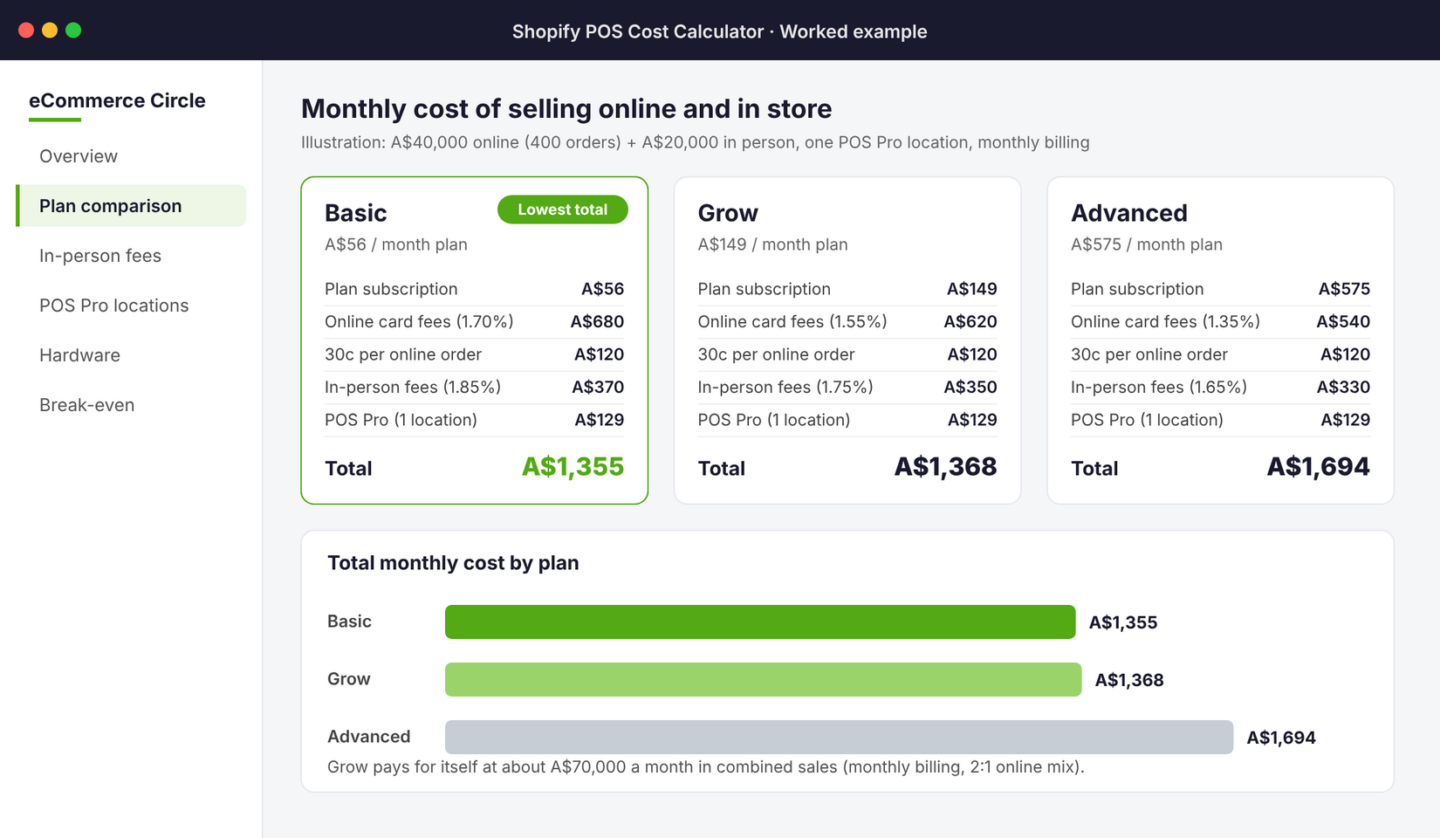
| Cost line | Basic | Grow | Advanced |
|---|---|---|---|
| Plan subscription | A$56 | A$149 | A$575 |
| Online card fees | A$680 | A$620 | A$540 |
| 30c per online order (400) | A$120 | A$120 | A$120 |
| In-person card fees | A$370 | A$350 | A$330 |
| POS Pro, one location | A$129 | A$129 | A$129 |
| Total per month | A$1,355 | A$1,368 | A$1,694 |
At this size, Basic and Grow cost almost the same. Grow saves 0.15 percentage points online and 0.10 in person, which is A$80 a month here, against a subscription that costs A$93 more. Advanced is A$339 a month dearer and does not catch up until sales are far higher.
The break-even is simple to work out for your own store:
Break-even sales = extra subscription cost ÷ blended rate saving.
With a 2:1 mix of online to in-person sales, the blended saving from Basic to Grow is about 0.133%. On monthly billing (A$93 extra) Grow pays for itself at around A$70,000 a month in combined sales. On yearly billing (A$72 extra) the break-even falls to about A$54,000.
But fees are not the only reason to move. Basic limits how many staff can log in to POS. If you have three people working the counter, Grow’s unlimited POS logins may decide it for you long before the fee maths does.
Hardware: three kits that cover almost every Aussie store
Shopify supports Tap to Pay on iPhone and Tap to Pay on Android in Australia. Both launched here on 15 October 2024. That means your first “terminal” can be the phone in your pocket, at no hardware cost. Tap to Pay takes contactless cards and digital wallets, and it is charged at your normal in-person rate.
Beyond that, these are the three kits we recommend, priced from Shopify’s Australian hardware store in November 2026:
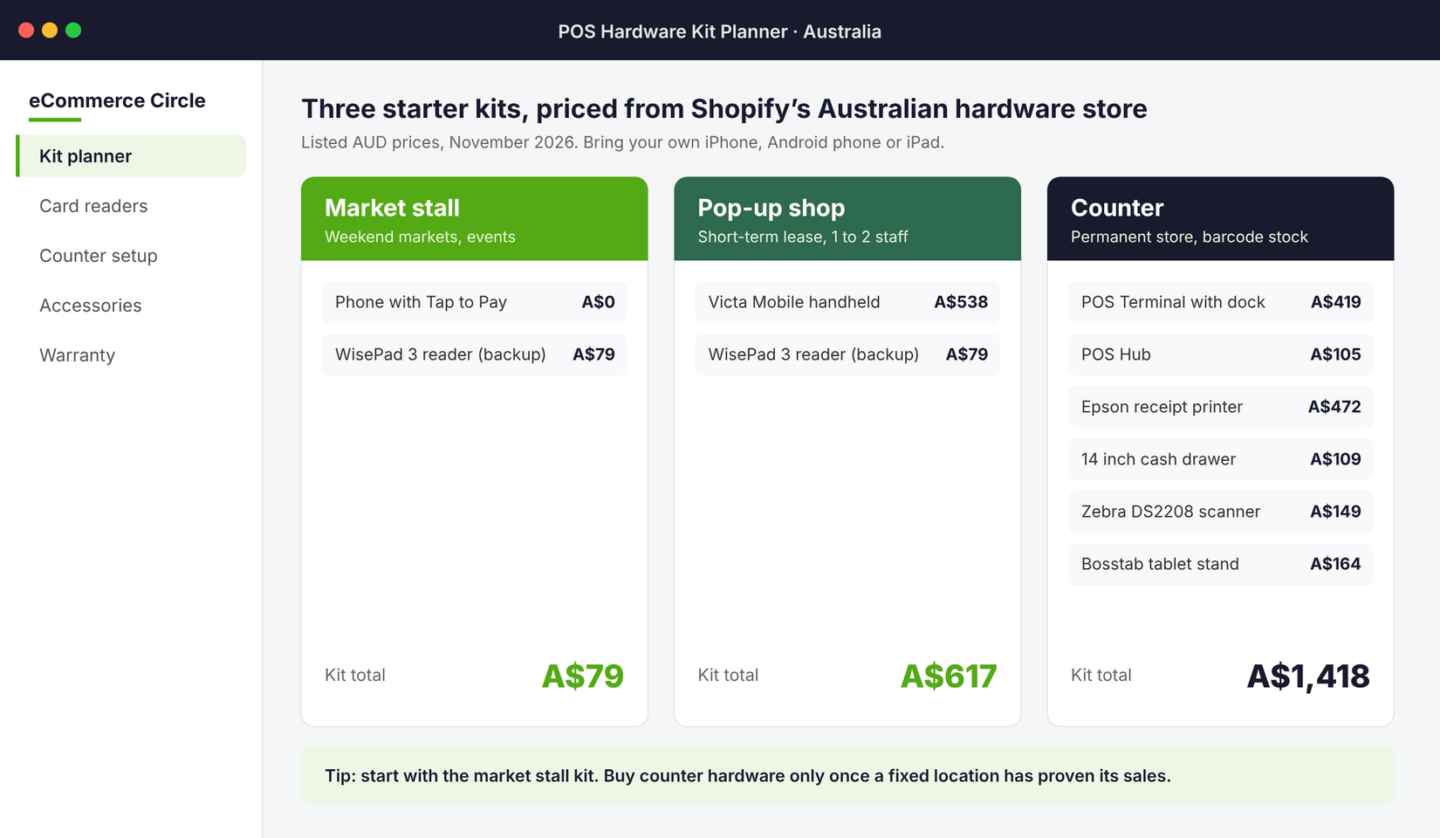
- Market stall (A$79). Your phone with Tap to Pay, plus a WisePad 3 card reader (A$79) as a backup for chip-and-PIN cards and for when your phone is flat. This is enough for most markets.
- Pop-up shop (A$617). A Verifone Victa Mobile handheld (A$538), which runs Shopify POS, takes payments and scans barcodes in one device, plus the WisePad 3 as a spare.
- Counter (A$1,418). POS Terminal with customer display (A$419), POS Hub to connect wired devices (A$105), Epson receipt printer (A$472), 14 inch cash drawer (A$109), Zebra DS2208 barcode scanner (A$149) and a Bosstab tablet stand (A$164). You supply the iPad or Android tablet.
Prices are listed in AUD and change with promotions. At the time of writing, Shopify’s POS pricing page was running an offer of free hardware with a year of POS Pro, worth up to A$3,500. If you are about to open a permanent store, check whether that offer is still live before you buy anything.
Two buying rules save money. First, buy the market stall kit first, even if you plan a shop. You will use the reader as a backup forever. Second, do not buy a counter setup for a pop-up. A four-week lease does not need a cash drawer bolted to a desk. A handheld and a float bag will do.
How Australian brands use Shopify POS
Two Australian examples show the range, from one market table to a national chain. Both come from Shopify’s own case studies, so treat them as vendor success stories rather than independent research.
Nutrition Warehouse is Australia’s largest sports supplement retailer, with more than 120 stores across Australia and New Zealand. It moved from Magento and Retail Express to Shopify and Shopify POS. According to Shopify’s case study, it onboarded more than 120 stores in six months, trained 600 staff on mobile POS in three months, earned more than A$100,000 in extra sales from mobile POS setups at events, and cut time spent consolidating online and offline data by 15%. Before the switch, online gift cards could not be redeemed in store without a call to customer service, and inventory updated in 15-minute batches.
Princess Polly started online on the Gold Coast and has since opened physical stores. Shopify reports it went from zero to seven stores in just over a year, onboarding up to 50 new team members at a time, with online orders returnable in store using a QR code. Its operations lead put the reason for choosing Shopify POS simply: using any other POS “splits the customer journey in half”.
That line is the whole argument for a unified POS. Your best customers do not think in channels. They buy online, visit your stall, and return a gift in store. If those three moments sit in three systems, you cannot see them as one customer, and you cannot market to them as one.
How to set up Shopify POS in Australia (step by step)
Here is the setup in the order that avoids rework. Allow two weeks before your first market or store opening.
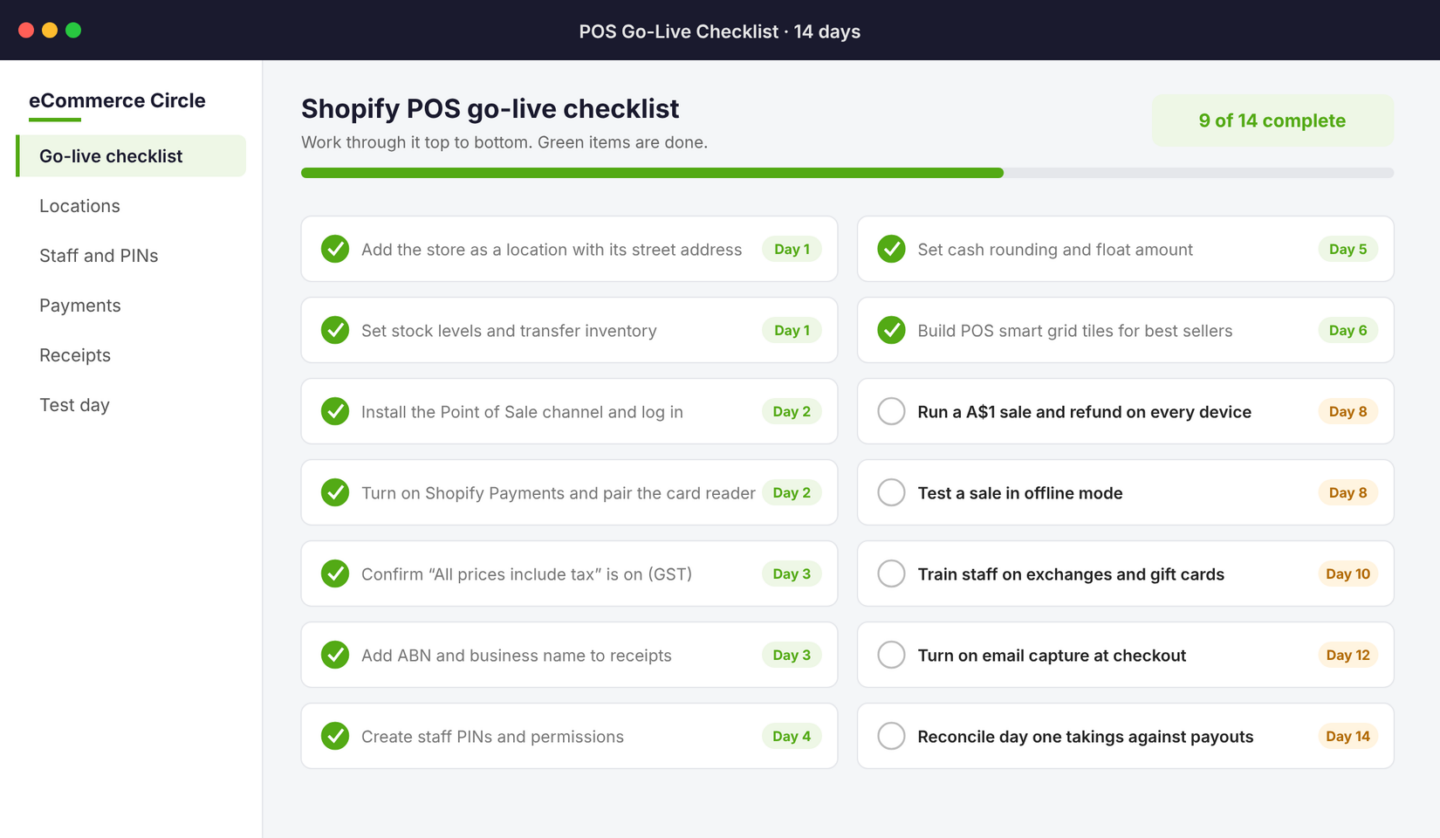
- Add a location. In your Shopify admin, go to Settings, then Locations, and add your store or a “Markets” location. Use a real street address, because it appears on receipts and in tax reports.
- Assign stock to it. Move the units you will sell in person into that location, so online customers cannot buy the last one off the shelf while it sits in your market tub.
- Install the Point of Sale channel. Add it from the Shopify App Store, then download the Shopify POS app on your phone or tablet and log in.
- Turn on Shopify Payments and pair your reader. Pair the WisePad 3 or POS Terminal in the POS app’s hardware settings, or enable Tap to Pay on your phone.
- Check GST settings. Australian retail prices include GST, so confirm “All prices include tax” is ticked in your tax settings.
- Put your ABN on receipts. Customise the POS receipt with your business name and ABN. Customers can ask for a tax invoice on sales over A$82.50 including GST, and it needs your ABN.
- Create staff PINs. Give every person their own PIN, even at a two-person stall. Shared logins make refunds and cash shortfalls impossible to trace.
- Set cash rounding and your float. Shopify POS supports cash rounding to the nearest 5 cents. Decide your opening float and record it each day.
- Build your POS home screen. Add tiles for best sellers, a market-day discount and a “custom sale” button, so a sale takes two taps.
- Test everything. Run a A$1 sale and refund on every device, then turn off Wi-Fi and run a cash sale to see how offline mode behaves.
The test step is the one people skip, and it is the one that saves your Saturday. Markets have patchy reception. Find out at home whether your setup can keep trading offline, not at 8am with a queue in front of you.
Five mistakes that cost Aussie stores money at the counter
- Running a separate EFTPOS machine. Your bank terminal does not know what you sold, so stock and customer records drift. Every sale should go through Shopify POS, even if you keep the old terminal as a backup.
- Not capturing emails at checkout. An in-person buyer with no email is a one-off sale. Turn on customer capture and offer the digital receipt. Those buyers then flow into your post-purchase emails like any online customer.
- Paying for POS Pro at a market stall. If you trade two days a month, the included features are enough. Save the A$129.
- Selling online stock you have already loaded into the van. Without a separate location, your website keeps selling units that are physically at the market. Use a location and a stock transfer every time.
- Ignoring gift cards. Shopify gift cards work online and in store from one balance. Sell them at Christmas markets, and see our guide to Shopify gift cards in Australia for the rules on expiry.
The compound effect: one customer record, every channel
Each piece above saves a little on its own. The real payoff comes when they work together.
A shopper finds you at a weekend market and taps her phone on your reader. Because you captured her email, she gets your welcome flow on Monday. Because stock and customers sit in one system, you can see she bought the candle in store and send her the matching refill a month later. When she buys a gift online and the recipient wants a different scent, they exchange it at your pop-up without a phone call. At Christmas, she buys a gift card at your stall and her sister redeems it online.
None of that is possible with a separate EFTPOS machine and a spreadsheet. With Shopify POS, it is the default. That is why we treat the POS decision as a Platform decision, not a payments one. The card rate matters, but the customer record matters more.
If you want to plan the in-person side in more depth, our guides to running a profitable pop-up and adding a retail channel cover the event maths and the store rollout.
Your Shopify POS decision checklist
Use this before you spend a dollar on hardware or subscriptions:
- Where do I sell in person? Markets only, pop-ups, or a fixed store? Buy the kit for that, not the one after it.
- What are my monthly in-person sales? Multiply by your plan’s in-person rate to get your card cost.
- Does a plan upgrade pay? Divide the extra subscription by the rate saving. Below the break-even, stay put unless you need more staff logins.
- Do I meet all three POS Pro tests? Fixed address, staff other than me, and stock to count. If not, skip Pro.
- Have I set up a separate location? Every in-person channel needs its own stock pool.
- Will I capture customer emails at the counter? If not, in-person sales will never compound.
- Have I tested offline mode and a refund? Do it at home, not at the event.
Shopify POS Australia: quick answers
Is Shopify POS free in Australia?
The software is included in every paid Shopify plan from A$56 a month (A$42 billed yearly). You pay a card rate on each in-person sale of 1.65% to 1.85% depending on your plan. POS Pro is an optional upgrade at A$129 a month per location.
Can I use Tap to Pay with Shopify POS in Australia?
Yes. Tap to Pay on iPhone and on Android have both been available for Shopify POS in Australia since October 2024. You need a compatible phone, and payments are charged at your plan’s normal in-person rate.
Does Shopify POS work with my existing EFTPOS terminal?
Not as an integrated payment device. You can record an external card payment manually, but the sale and the payment will not reconcile automatically. Shopify’s own readers or Tap to Pay keep everything in one place.
Is Shopify POS cheaper than Square in Australia?
On the card rate alone, no. Square charges 1.6% in person and Shopify charges 1.65% to 1.85%. If your online store is on Shopify, the shared stock, customers and gift cards usually outweigh the difference.
Do I need POS Pro for a market stall?
No. The included in-person features handle payments, simple customer profiles and returns at the stall. POS Pro is built for fixed locations with staff and stock counts.
Your next step
Inside eCommerce Circle, getting the platform right, including how online and in-person sales feed one customer record, is one of the core pillars we work on with every member. If you want to see exactly where your store is being capped, take the free More Orders Scorecard. It takes two minutes and shows you which of the 10 P’s to fix first.
Sources: Shopify Australia POS pricing and plan pricing pages (November 2026); Shopify Australian hardware store (November 2026); Shopify Changelog, Tap to Pay on iPhone and on Android (15 October 2024); Australia Post Quarterly eCommerce Update, October 2026 (CommBank iQ data); Reserve Bank of Australia Bulletin, April 2026, Cash Use in Australia; Square Australia pricing (November 2026); Shopify case studies for Nutrition Warehouse and Princess Polly. The worked example and break-even figures are illustrations calculated from published rates. Prices change, so confirm in your own admin.