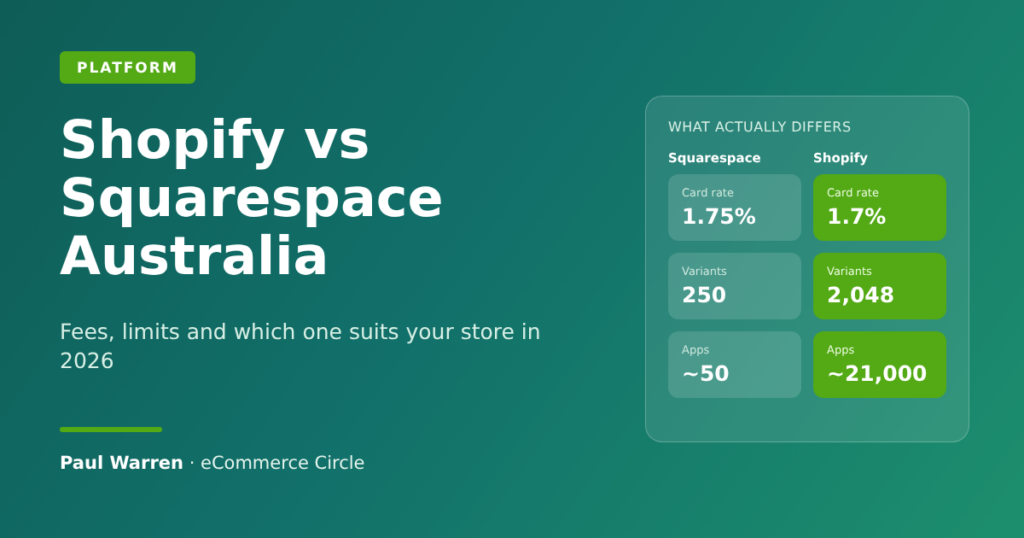
Shopify vs Squarespace, the short version: for an Australian store, the running costs are almost identical, so fees should not decide it. Pick Squarespace if the site is mostly content with a small, simple catalogue. Pick Shopify if selling products is the business and you plan to grow it.
Most founders get this comparison wrong because they compare the monthly plan price. Squarespace starts at A$17 a month and Shopify at A$42, so Squarespace looks like the obvious saving.
It is not. Once you add card fees, a store turning over A$10,000 a month pays about A$236 a month on Squarespace Core and A$245 on Shopify Basic. That is a A$9 gap. The real differences sit in what each platform will and will not let you do once orders start coming in.
Every price and limit below was checked on 19 November 2026 against each vendor’s own pages, and I have said where a figure comes from someone else.
The Short Answer for Australian Stores
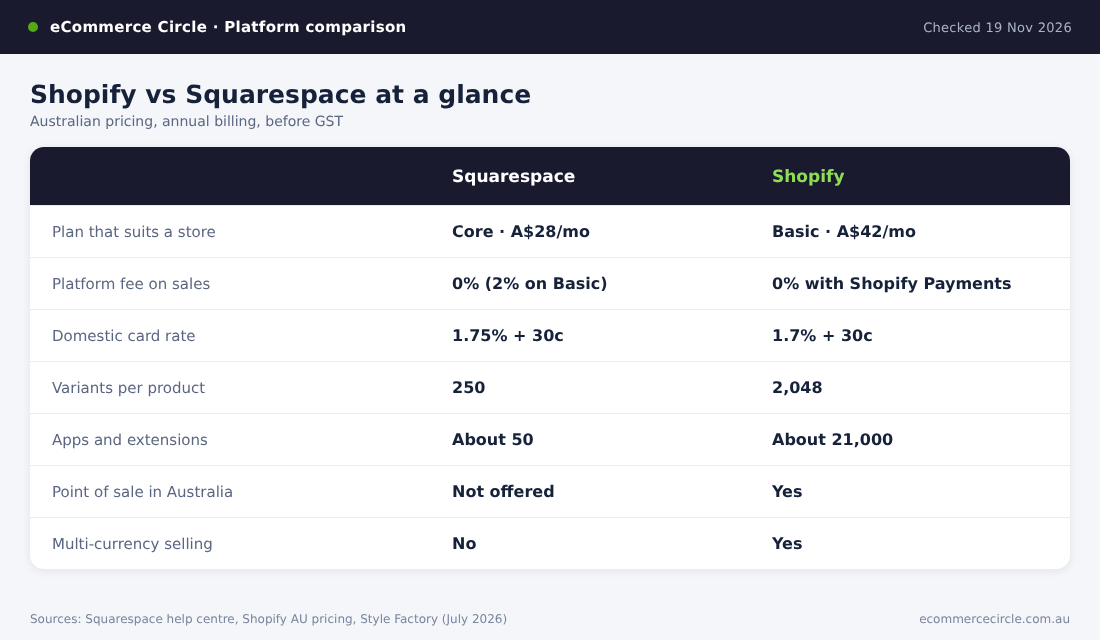
Here is the whole comparison in one table. The sections after it explain each row and show the maths.
| Squarespace | Shopify | |
|---|---|---|
| Entry plan that suits a store | Core, A$28 a month billed annually | Basic, A$42 a month billed annually |
| Platform fee on sales | 2% on Basic, 0% on Core and above | 0% with Shopify Payments |
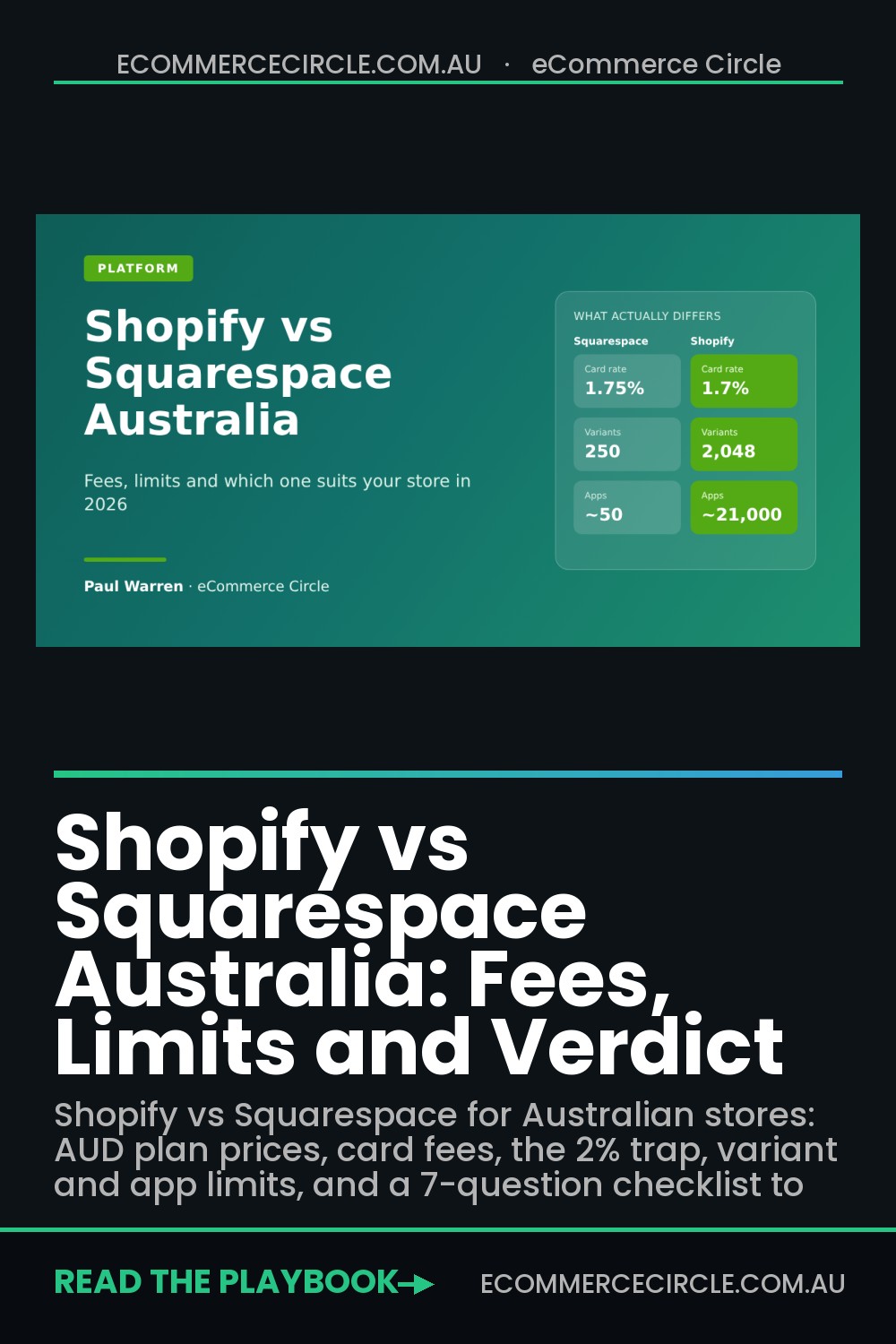
| Domestic card rate | 1.75% + 30c, down to 1.35% + 30c | 1.7% + 30c, down to 1.35% + 30c |
| Variants per product | 250 | 2,048 |
| Apps and extensions | About 50 | About 21,000 |
| Point of sale in Australia | Not offered | Yes, from 1.85% in person |
| Multi-currency selling | No | Yes, through Shopify Markets |
| Best for | Content-led sites with a small range | Product-led stores that plan to scale |
Both are popular here. BuiltWith’s Australian data (updated 15 November 2026) detects Shopify on 175,468 Australian websites and Squarespace’s add-to-cart technology on 125,096. Shopify Plus alone accounts for another 6,950.
So you are not choosing between a serious platform and a toy. You are choosing between a website builder that can sell and a selling platform that can publish.
What Each Platform Costs in Australian Dollars
Squarespace rebuilt its plans in 2025. The old Personal, Business and Commerce plans are now legacy plans, and new sites choose from Basic, Core, Plus and Advanced. All four can sell products.
| Plan | Billed annually (per month) | Billed monthly |
|---|---|---|
| Squarespace Basic | A$17 | A$24 |
| Squarespace Core | A$28 | A$39 |
| Squarespace Plus | A$49 | A$69 |
| Squarespace Advanced | A$109 | A$149 |
| Shopify Basic | A$42 | A$56 |
| Shopify Grow | A$114 | A$149 |
| Shopify Advanced | A$431 | A$575 |
The Shopify prices are from Shopify’s Australian pricing page. Squarespace shows US dollars to anyone browsing from outside Australia, so the Australian dollar figures above come from bdog’s plan-by-plan guide, which read them from Squarespace’s Australian pages on 12 October 2026. A Melbourne studio, Onrai, recorded the same annual prices in August. Confirm the number at checkout before you commit.
Three things to know before you compare the columns:
- GST goes on top. Squarespace states that its listed prices do not include GST. Budget an extra 10% unless you have given the platform a GST-registered ABN.
- Annual billing is a commitment. You pay 12 months upfront to get the lower rate. If you are still testing the idea, pay monthly for the first quarter.
- Shopify’s trial is cheaper to extend. Shopify currently offers 3 days free, then A$1 a month for 3 months. Squarespace gives you 14 days free with no card. Squarespace was also running 30% off new plans when I checked.
If you want to know when a bigger Shopify plan pays for itself, the maths is in our Shopify plan break-even guide.
The Fees on Every Sale and the 2% Trap
The plan price is the small number. The fee on every order is the big one, and this is where Squarespace Basic catches people.
Squarespace Basic charges a 2% transaction fee on every physical product, download or service you sell. That is on top of card processing. Core, Plus and Advanced charge 0%, according to Squarespace’s fee schedule (last updated 10 November 2026).
Run the break-even. Core costs A$11 a month more than Basic on annual billing. A 2% fee equals A$11 at A$550 in monthly sales. If your store sells more than about A$550 a month, Core is cheaper than Basic. On monthly billing the line is A$750.
In other words, Basic is a plan for a site that sells a few things on the side. If you intend to run a store, ignore it.
Card processing rates in Australia
Squarespace Payments, its built-in processor, is available to Australian businesses, and its domestic rates sit within a whisker of Shopify Payments.
| Card type | Squarespace Payments | Shopify Payments |
|---|---|---|
| Domestic personal cards, entry plans | 1.75% + 30c (Basic and Core) | 1.7% + 30c (Basic) |
| Domestic personal cards, mid plan | 1.55% + 30c (Plus) | 1.55% + 30c (Grow) |
| Domestic personal cards, top plan | 1.35% + 30c (Advanced) | 1.35% + 30c (Advanced) |
| American Express | 2.9% + 30c | 2.9% down to 2.7% + 30c |
| International cards | 2.9% + 30c | 3.5% down to 3.3% + 30c |
| Domestic business or corporate cards | 2.9% + 30c | Not listed separately |
Two details in that table are worth a second look.
- Squarespace is cheaper on overseas cards. It charges 2.9% + 30c where Shopify Basic charges 3.5% + 30c. If a third of your buyers are overseas, that adds up.
- Squarespace charges more for business cards. A domestic business or corporate card costs 2.9% + 30c on every Squarespace plan. If you sell to tradies, offices or other businesses, a real share of your orders will land on that rate.
Both platforms let you use another processor. On Squarespace you can connect Stripe (1.65% + 30c for domestic cards on Stripe’s Australian pricing) or PayPal with no penalty on Core and above. On Shopify, skipping Shopify Payments adds a third-party fee of 2% on Basic, 1% on Grow and 0.6% on Advanced. We break that down in Shopify Payments fees in Australia.
A Worked Example at Two Store Sizes
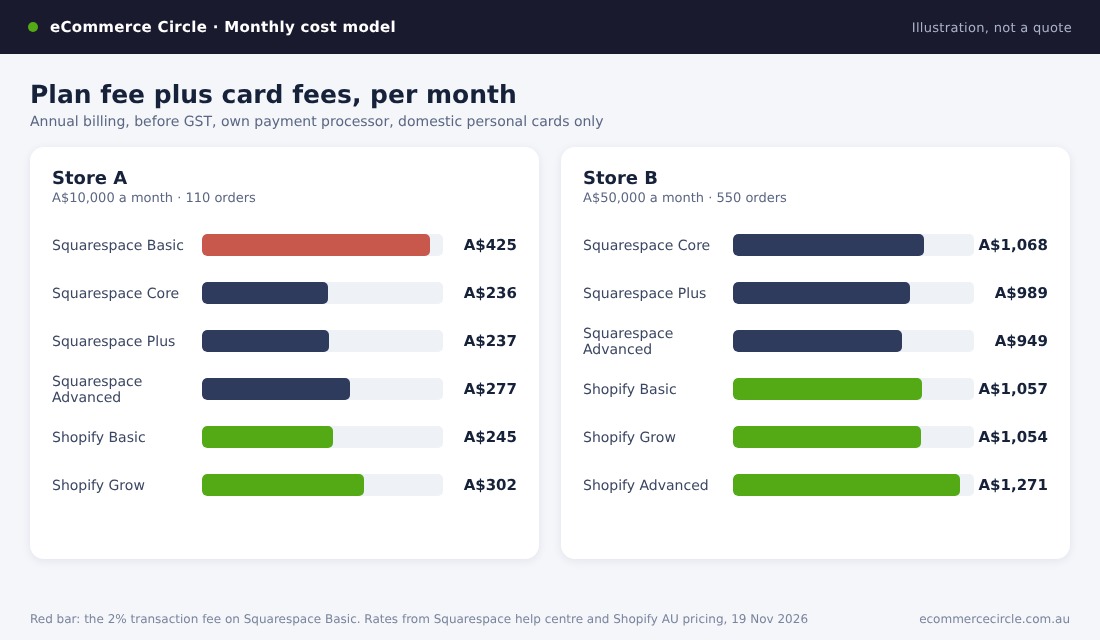
This is an illustration, not a quote. I have assumed annual billing, prices before GST, the platform’s own payment processor, and every order paid on a domestic personal card.
Store A turns over A$10,000 a month from 110 orders. Store B turns over A$50,000 a month from 550 orders.
| Plan | Store A monthly cost | Store B monthly cost |
|---|---|---|
| Squarespace Basic | A$425 | Not sensible |
| Squarespace Core | A$236 | A$1,068 |
| Squarespace Plus | A$237 | A$989 |
| Squarespace Advanced | A$277 | A$949 |
| Shopify Basic | A$245 | A$1,057 |
| Shopify Grow | A$302 | A$1,054 |
| Shopify Advanced | A$599 | A$1,271 |
Read across Store A. Squarespace Basic costs A$189 a month more than Core because of the 2% fee. Core and Shopify Basic are A$9 apart.
Now Store B. The cheapest Squarespace option (Advanced, A$949) beats the cheapest Shopify option (Grow, A$1,054) by A$105 a month. That is A$1,260 a year on A$600,000 of sales, or about 0.2% of revenue.
That is my whole argument about fees. Squarespace is slightly cheaper, and the saving is too small to matter. A single feature that lifts conversion by a tenth of a percentage point is worth more than the entire fee gap. So choose on capability.
Catalogue, Variant and App Limits
This is where the two platforms pull apart.
- Variants. Squarespace allows 250 variants per product, per its product help page. Shopify raised its limit from 100 to 2,048 variants per product. A tee in 8 colours, 7 sizes and 3 fits needs 168 variants, so it fits both. Make it 10 colours, 8 sizes and 4 fits and you need 320, which only Shopify can hold. Squarespace does allow more option types per product (6 against Shopify’s 3, by Style Factory’s count), which helps if you sell made-to-order items with lots of choices.
- Catalogue size. Squarespace caps a store page at 10,000 products on version 7.1 and hidden products count. Shopify has no product cap.
- Apps. Style Factory’s July 2026 review counted about 21,000 apps in Shopify’s app store against roughly 50 Squarespace extensions. Reviews, loyalty, bundles, subscriptions, returns portals and upsells all exist on Shopify as a choice of several apps. On Squarespace you use what is built in or you go without.
- Currencies. Squarespace sells in one currency. Shopify Markets lets you show local prices on every plan, provided you use Shopify Payments.
- Reporting. Style Factory counts more than 200 report types in Shopify. Squarespace’s analytics are simpler and cover fewer questions.
Squarespace is not bare. Abandoned cart emails, gift cards, customer accounts and subscription products are included on all four plans. Low stock alerts start on Plus, and the commerce APIs start on Core.
The question is whether the built-in version is enough for you. For a ceramicist with 40 products it usually is. For a supplement brand running bundles, subscriptions and a loyalty program, it is not.
Shipping, Afterpay and Selling in Person
Reviews written for American readers get this section wrong for Australia, so I checked each point on the vendors’ own help pages.
Shipping
Squarespace offers live carrier rates at checkout in Australia on Core, Plus and Advanced. Its carrier-calculated shipping page lists Allied Express, CouriersPlease, Hubbed, TNT and UPS as the default carriers for Australia. Australia Post (eParcel, On Demand and MyPost Business), StarTrack, DHL and FedEx are there too, but only if you connect your own carrier account, and that needs the Advanced plan. Live rates only work for domestic orders, and carts are capped at 150 items when they are switched on.
What Squarespace does not do outside the US is sell you the label. You buy labels from the carrier or through an extension such as Easyship.
Shopify lets you buy and print labels inside the admin on every plan, and its Australian pricing page advertises shipping discounts of up to 44.2%. Third-party calculated rates at checkout are the catch: not available on Basic, a paid add-on on Grow, included on Advanced.
Afterpay and buy now, pay later
Squarespace Payments in Australia accepts cards, Apple Pay, Google Pay and Klarna (5.99% + 30c), per its availability page. Afterpay is not on that list for Australia. To offer it, you connect Stripe instead and switch Afterpay on in the Stripe settings, as Afterpay’s Squarespace page explains.
On Shopify, Afterpay runs alongside Shopify Payments as its own integration. Our Afterpay fees guide covers what it costs.
Point of sale
If you sell at markets, pop-ups or a shopfront, this one is simple. Squarespace’s in-person selling is available in the United States and the United Kingdom only. Shopify POS works in Australia, with in-person card rates of 1.85% on Basic, 1.75% on Grow and 1.65% on Advanced, and stock that syncs with your online store.
When Squarespace Is the Right Call
I coach Shopify brands, so take this as coming from someone with a bias. Squarespace is still the better choice in a few situations.
- Your site is content first. Photographers, designers, studios, authors, consultants and venues need pages that look good and a way to sell a handful of things. Squarespace does that with less setup.
- You sell services, bookings or memberships. Scheduling (through Acuity), courses and member areas are Squarespace’s own products, though some are separate subscriptions. On Shopify each one is a third-party app.
- Your range is small and simple. Under about 50 products, few variants, one currency, Australian customers.
- Nobody on the team wants to manage apps. Fewer moving parts is a real benefit when you are the designer, the packer and the bookkeeper.
If that is you, take Core on annual billing, connect Squarespace Payments, and spend your energy on the product.
When to Move to Shopify
The stores that switch usually hit the same wall. Sales grow, the catalogue grows, and the founder starts asking for things Squarespace cannot do.
Talli, a baby-monitoring brand, moved from Squarespace to Shopify with the agency Prismfly over four months. Prismfly’s case study reports purchases up 48.78%, revenue per user up 6.52% and bounce rate down 5.24% after the move. The project included a rebrand, so the platform does not get all the credit.
Roarsome, a children’s outdoor-wear brand, wanted a “shop by character” navigation it could not build cleanly on Squarespace. After migrating with Cake Agency, the agency reports a 31% lift in conversion rate and an 11% drop in bounce rate.
Both are agency case studies, and agencies publish their wins. Read them as examples of why brands move, not as a promise of what you will get.
The triggers I see most often with members:
- You need an app that does not exist on Squarespace. Bundles, loyalty, a returns portal, post-purchase upsells, a proper reviews platform.
- You want to sell in person. There is no Squarespace point of sale in Australia.
- You are selling overseas. One currency and domestic-only live shipping rates will hold you back.
- Your ads need better data. In my experience Shopify’s integrations with Meta and Google go deeper, and there is far more help available when tracking breaks.
- You are hiring. Far more Australian freelancers, agencies and ecommerce managers know Shopify than know Squarespace commerce.
If you are weighing other platforms too, we have run the same comparison for Shopify vs Wix and Shopify vs WooCommerce.
How to Switch With Shopify’s Store Migration App
Shopify’s migration guide lists its own Store Migration app first, with CSV import as the fallback. Here is the order that avoids the usual mistakes.
- Start the Shopify trial and leave Squarespace live. Do not touch your domain yet. You build the new store in the background.
- Export from Squarespace. Export your products to a .csv from the Products panel, then export your orders and your customer list. Style Factory notes that only physical and service products export, so list your digital products and rebuild those by hand.
- Import in the right order. Install the Store Migration app from the Shopify App Store and bring in products first, then customers, then historical orders. Shopify warns that the order matters, because orders need to attach to products and customers that already exist.
- Check every product. Products with a missing variant option fail to import. Open ten products at random and compare price, variants, images and stock against the old site.
- Set up shipping, tax, payments and a test order. Turn on Shopify Payments, add your shipping rates, then place a real order and refund it.
- Map your redirects before you move the domain. Squarespace and Shopify use different URL patterns. Export your top 50 pages by traffic from Search Console and create a 301 redirect for each one in Shopify. This step is the one that protects your Google rankings.
- Disconnect the domain from Squarespace, then connect it to Shopify. Doing it in that order avoids SSL certificate errors. Keep the Squarespace subscription for a month in case you missed something.
As a rule of thumb, a store with under 100 products can do this in a weekend. Allow two to three weeks if you want a designed theme and time to test it.
The 7-Question Platform Checklist
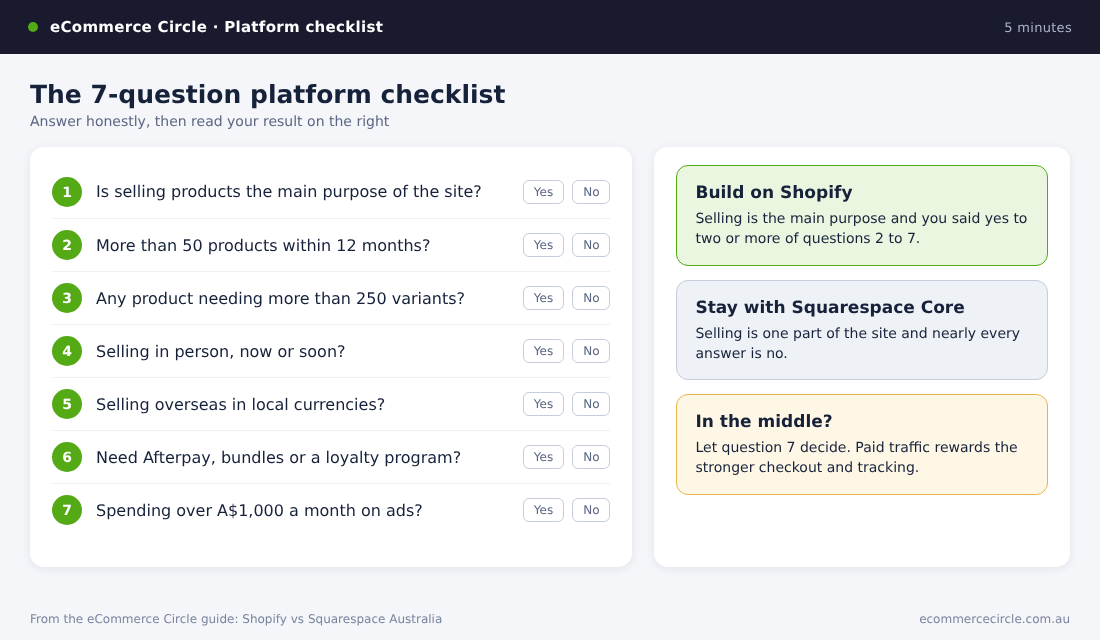
Copy this into a note and answer it honestly. It takes five minutes.
- Is selling products the main purpose of the website, or one part of it?
- Will you have more than 50 products within 12 months?
- Does any product need more than 250 variants?
- Do you sell in person, or plan to?
- Do you want to sell to customers outside Australia in their own currency?
- Do you need Afterpay, bundles, subscriptions with a customer portal, or a loyalty program?
- Will you spend more than A$1,000 a month on Meta or Google ads this year?
How to score it: if you answered “the main purpose” to question 1 and yes to two or more of the others, build on Shopify. If selling is one part of the site and you answered no to nearly everything, Squarespace Core will serve you well and cost you less effort.
If you landed in the middle, look at question 7. Paid traffic is expensive, and the platform with the better checkout and tracking earns its keep quickly.
How the Pieces Fit Together
Line the sections up and the picture is clear.
Fees are a draw. Squarespace wins by about 0.2% of revenue at A$50,000 a month, and loses badly if you stay on Basic past A$550 a month in sales.
Limits are not a draw. Variants, apps, currencies, point of sale and reporting all favour Shopify, and each of them becomes a problem at the exact moment your store starts to work.
That is why the cheap decision and the right decision differ. Moving platforms is a weekend job with 40 products and a much bigger project with 400. If you already know you are building a product business, start where you intend to finish.
And if you are on Squarespace now and it is not holding you back, stay. A platform change will not fix a weak offer or thin traffic. Fix those first.
Shopify vs Squarespace FAQ
Is Squarespace cheaper than Shopify in Australia?
On plan price, yes: A$28 a month for Core against A$42 for Shopify Basic, billed annually. Once card fees are included the gap shrinks to about A$9 a month for a store turning over A$10,000 a month.
Does Squarespace charge transaction fees?
Only on the Basic plan, which charges 2% on product sales. Core, Plus and Advanced charge 0%. Digital products and memberships have a separate fee of 7%, 5%, 1% and 0% as you move up the plans. Card processing applies on every plan.
Can I use Afterpay on Squarespace in Australia?
Yes, through Stripe. Connect Stripe as your processor and switch Afterpay on in the Stripe settings. Squarespace Payments in Australia offers Klarna, not Afterpay.
Can I move from Squarespace to Shopify without losing my Google rankings?
Yes, if you set up 301 redirects from every old URL to its new one before you switch the domain, keep your page titles and content, and resubmit your sitemap in Search Console. Expect a few weeks of movement either way.
Inside eCommerce Circle, Platform is one of the 10 P’s we work through with every member, because the right setup makes every other part of the store easier to grow. If you want to see exactly where your store is being capped, take the free More Orders Scorecard. It takes two minutes and shows you which of the 10 P’s to fix first.