Your Meta ads are spending $200 a day, the clicks are rolling in, and the orders are not. Most store owners respond the same way: they swap the audience, duplicate the ad set, bump the budget, and hope the algorithm sorts it out. Two weeks later they are $2,800 poorer and no wiser.
What’s in This Article
Here is the problem with that approach. “Not converting” is a symptom, not a diagnosis. The sale can leak at six different points between the impression and the order confirmation, and each leak has a different fix. Brands that scale on Meta do not guess. They run a short triage, find the broken stage, and fix that one thing.
This guide gives you that triage. There are nine fixes, in the order we check them with coaching members, plus a one-page checklist at the end. If you want the structural side first, start with our guide to Meta ads account structure and come back.
First, Confirm You Actually Have a Conversion Problem
Before you touch a single ad, make sure the numbers you are looking at are fair. A surprising number of “failing” accounts are really short windows, tiny samples, or broken tracking.
Run three quick checks:
- Sample size. If an ad has fewer than a few hundred link clicks, you cannot read its conversion rate. Joshua Uebergang, director at Digital Darts, told eCommerceNews Australia that brands often call a winner after only US$50 to US$100 of spend, which he says does not predict results at higher spend.
- Attribution window. Compare Meta’s numbers against your Shopify orders for the same dates. If Shopify shows 40 orders and Meta claims 25, you have a tracking gap, not an ad problem.
- Store-level conversion. Shogun’s January to June 2026 data across 745 Shopify stores puts the mean conversion rate at 2.61% and the median at 1.74% (via Blend Commerce). Notice the gap. Half of Shopify stores convert below 1.74%, so cold paid traffic converting at 1% is normal, not broken.
If you are inside those ranges and still losing money, keep reading. The issue is probably somewhere specific.
Fix 1: Repair Your Tracking Before Anything Else
If Meta cannot see your purchases, it cannot find more buyers. It optimises toward whatever signal you feed it, so weak data produces weak targeting. This is the most common hidden cause of “my ads stopped working”, and the cheapest to fix.
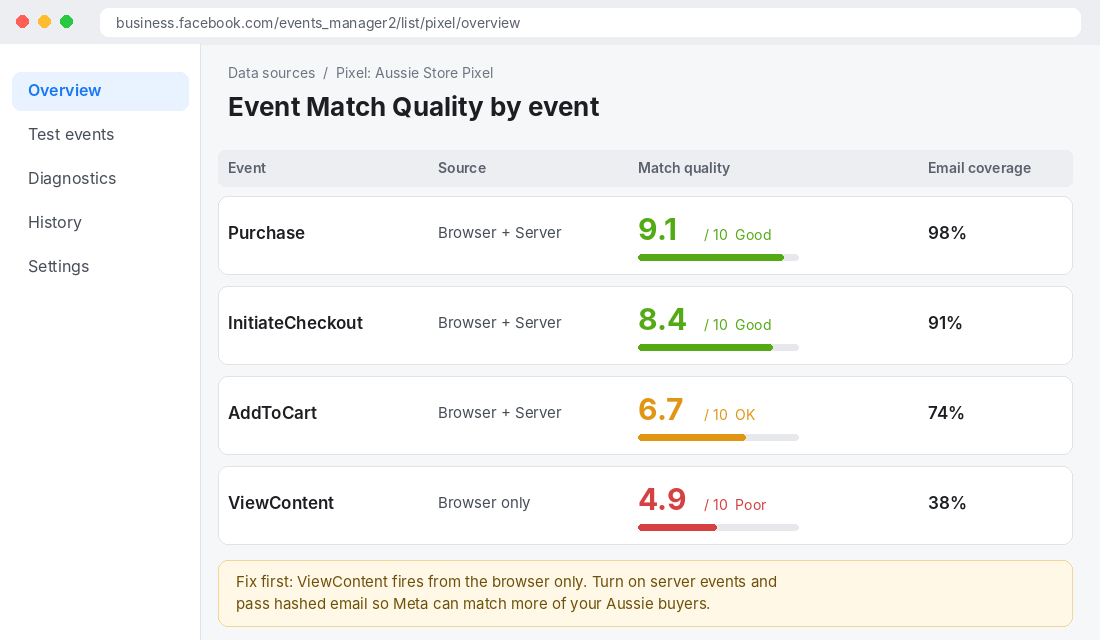
The metric to watch is Event Match Quality (EMQ), a 0 to 10 score Meta shows for each event in Events Manager. WeltPixel’s guide treats 6 as a floor and 8 or higher as the working target for Purchase events, and notes that a Purchase score below 6 usually means email is missing from the server-side event.
How to check and fix it in 20 minutes
- Open Meta Events Manager, select your pixel, and look at the Overview tab. Note the EMQ for Purchase, InitiateCheckout and AddToCart.
- In Shopify, open the Facebook & Instagram sales channel and confirm data sharing is set to the maximum level, so server-side events (Conversions API) fire alongside the browser pixel.
- Go to the Test events tab, place a test order on your own store, and confirm both the browser and server version of Purchase appear with a matching event ID. That is how Meta deduplicates them.
- Check the Diagnostics tab for warnings. Come back 24 hours later and re-check the EMQ for Purchase.
- If Purchase is still under 8, look at email coverage first. Hashed email carries the most weight.
One caution. Expect tracking fixes to improve what Meta sees, not to create sales. Fix this first because every other decision depends on it.
Fix 2: Find the Leak With a Six-Stage Funnel Read
Now you can trust the numbers, so diagnose properly. Pull your prospecting campaign for the last 14 days and write down six figures: impressions, link clicks, landing page views, add to carts, checkouts initiated, purchases. Then work out the rate between each stage.
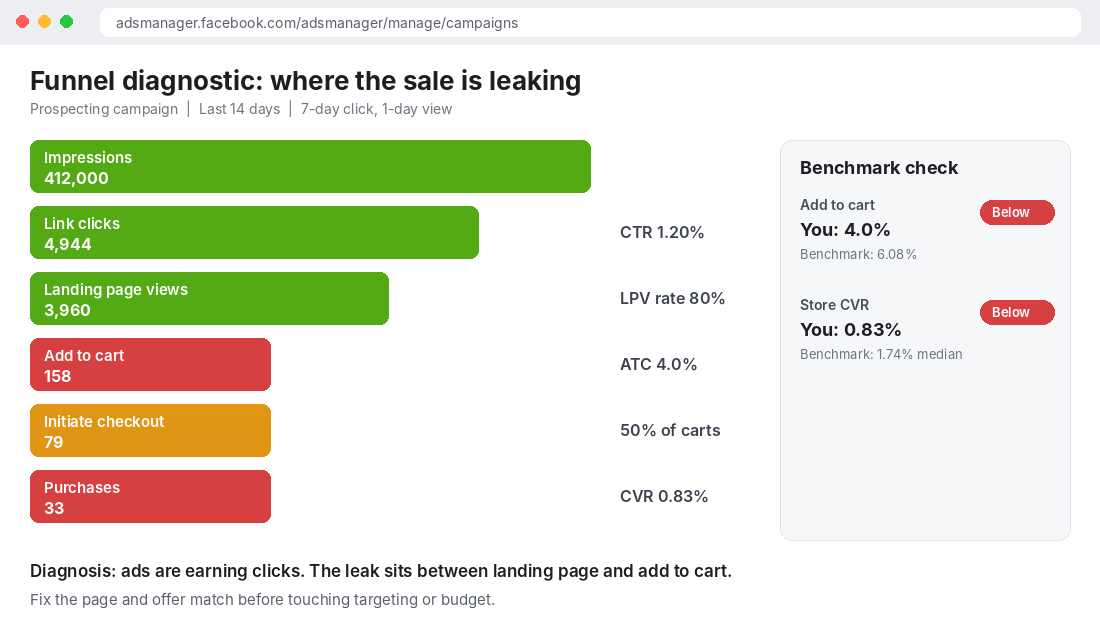
Each stage points at a different owner:
| Where it leaks | What it means | Fix it with |
|---|---|---|
| Impressions to clicks (CTR low) | Creative or hook is not earning attention | Fix 7 and Fix 8 |
| Clicks to landing page views (under ~75%) | Slow page, broken link or bad redirect | Page speed, link check |
| Landing page to add to cart | Offer and page do not match the ad | Fix 4 |
| Add to cart to checkout | Price shock: shipping, fees, surprise totals | Shipping threshold, price clarity |
| Checkout to purchase | Payment friction or trust gap | Checkout audit, express wallets, BNPL |
| Everything looks fine but ROAS is low | Margin or AOV problem | Fix 9 |
Benchmarks help here. Dynamic Yield’s rolling 12-month data (via Blend Commerce) puts the global product-page add-to-cart rate at 6.08% and shows 77.55% of created carts never become a purchase. If your add-to-cart rate from paid traffic sits near 4%, as in the screenshot above, you have found your leak and it is not the ad.
For the full page-side fix list, run the Shopify CRO audit alongside this triage.
Fix 3: Stop Resetting the Learning Phase
Meta’s delivery system needs data to optimise. GoMarble’s explainer notes the learning phase generally ends once an ad set hits roughly 50 optimisation events, and that most ad sets exit in 3 to 5 days if they get there in that window. New ads, new ad sets, and significant edits to targeting, creative, budget or bid strategy can all restart it.
That is why “I tweaked it every day” is such a reliable path to a dead account. Each change throws the system back to guessing.
- Batch your edits. Change one thing, then leave it alone for at least three to five days or until the ad set clears about 50 events.
- Never edit a winning ad. Uebergang’s advice is to duplicate it or add new ads beside it, because editing makes Meta treat it as new.
- Check for “Learning Limited”. It means the ad set cannot generate enough events. The usual causes are too little budget, too narrow an audience, or optimising for a rare event.
Fix 4: Match the Landing Page to the Ad
This is the fix that moves the most revenue for stores whose funnel read shows a leak after the click. A shopper taps an ad promising a specific thing, lands on your generic homepage, and has to hunt for it. Most will not.
Run the message-match test. Put the ad and the landing page side by side on your phone and ask:
- Does the headline above the fold repeat the promise in the ad, almost word for word?
- Is the product or offer from the ad visible without scrolling?
- Is the price, shipping cost and delivery time visible before they commit?
- Does social proof (reviews, a star rating, a recognisable stockist) appear in the first screen?
If you answer no to two or more, build a dedicated landing page or collection for that ad. Our guide on landing page architecture for Meta ads covers the layout. Remember too that conversion rate falls as order value rises. Lebesgue’s 2026 median benchmarks show fashion converting at 2.18% for orders under $50 but 1.06% above $200, so a $250 hero product needs far more reassurance than a $30 one.
Fix 5: Get the Budget High Enough to Learn
Under-spending is the quiet killer. If your cost per purchase is $40 and you want 50 purchases in a week for stable delivery, you need roughly $2,000 a week, or about $285 a day, on that ad set. That is my arithmetic from Meta’s 50-event guidance, not a Meta rule, but it explains why a $30 a day ad set limps along in Learning Limited for months.
You have two honest options when the budget does not stretch:
- Consolidate. Run one prospecting campaign instead of four, so the same dollars produce one stable data set.
- Optimise higher up the funnel. Temporarily optimise for add to cart so the ad set clears learning, then move back to purchase once volume builds.
We break down how to set the number in our guide to Meta ads budget for Shopify stores.
Fix 6: Simplify Your Testing Structure
The classic mistake is launching ten ad sets with ten creatives and a small budget each. Uebergang claims that structure can waste 80 to 90% of a test budget on creatives that flop. Whatever the exact figure, the logic is sound: you spread thin spend across unproven ads and starve the winners.
A cleaner setup:
- One broad prospecting campaign.
- One “winners” ad set holding your proven ads.
- Two or three test ad sets, each with one flexible creative containing three to five variations.
- Judge tests on four numbers: CPM, total spend, cost per acquisition and frequency. Not ROAS alone.
For the Aussie brands we coach, this single change often does more than any audience tweak, because it lets Meta concentrate spend instead of fragmenting it.
Fix 7: Make Creative Do the Targeting
Meta’s systems now lean heavily on creative to decide who sees your ad. Our piece on Meta Andromeda covers why. The practical takeaway: a generic ad gets generic delivery, and a specific ad finds a specific buyer.
The fix is problem-led creative. Uebergang points to the maternal wellness brand Hydramama, which shifted its messaging from athletes to pregnant and postpartum women. Same product, a sharper problem, a different buyer. Write one ad per pain point your customer actually has, using their words from reviews and support emails.
Three formats to test first:
- Problem and proof. Open on the problem in the customer’s own words, then show the product solving it.
- Founder or customer talking to camera. A 20 to 30 second selfie-style clip with the key claim in the first three seconds.
- Comparison. You versus the usual alternative, honestly done.
Also watch for fatigue. In a case study from Boolean Maths, shoppers saw an average of 6.1 ads but only 1.2 unique ads. That is a tiny creative library doing a lot of repeat work. If your frequency is climbing, you need more distinct concepts, not more variations of one.
Fix 8: Meet the Customer Where They Are
Cold traffic does not buy like warm traffic. If your only offer is “buy now” to people who have never heard of you, expect weak conversion. Our customer awareness stages audit shows how to map ads to what the buyer already knows.
A simple split works for most stores:
- Prospecting sells the problem and the story, with a soft first step like a quiz, guide, or low-risk first product.
- Retargeting sells the purchase: reviews, offer, delivery promise, a reason to act now.
- Catalogue ads in retargeting remind people of the exact product they viewed.
Agency AIA’s case study of Aussie Candle Supplies describes this structure: separate prospecting and retargeting campaigns with catalogue ads in retargeting, which drove the largest share of purchases. The agency reports 1,530+ purchases in a month at a $2.87 cost per result. Treat those as agency-reported figures, since the page does not break out margin, but the structure is the point. Different jobs need different campaigns.
Fix 9: Check Whether the Maths Can Ever Work
Here is the one nobody wants to hear. Sometimes the ads are fine and the economics are broken.
Take AdAmigo’s 2026 projection for Australia: an average Meta CPM of US$18.50 and CPC of US$2.10. Divide the CPC by the median Shopify conversion rate of 1.74% and you get roughly US$120 to win a single customer. At the mean rate of 2.61% it is still about US$80. If your product sells for $60 with a 45% contribution margin, you make about $27 per order. You cannot buy customers at $80 to $120 and survive on the first sale.
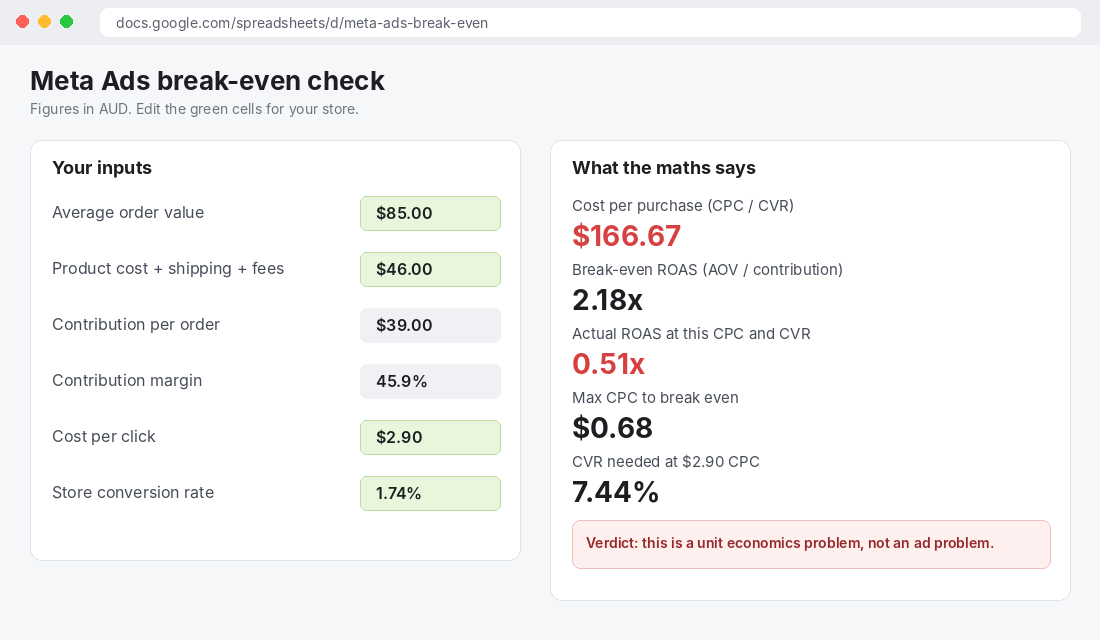
Run this calculation for your own store:
- Contribution per order = average order value minus product cost, shipping, payment fees and packaging.
- Break-even ROAS = average order value divided by contribution per order.
- Cost per purchase = cost per click divided by conversion rate.
- Max affordable CPC = contribution per order multiplied by conversion rate.
If your cost per purchase beats contribution per order, you have three levers: raise AOV (bundles, thresholds), raise conversion (Fixes 2 and 4), or raise margin. Only after that does ad optimisation matter. Our guides on marketing efficiency ratio and blended ROAS show how to judge the account at business level instead of ad set level. The Profit section of the Scorecard checks exactly this.
The 10-Minute Meta Ads Triage Checklist
Print this and run it before you change anything in your account:
- Data fair? Enough clicks, same date range, Shopify orders compared to Meta’s claim.
- Tracking healthy? Purchase EMQ at 8 or above, browser and server events deduplicated.
- Funnel read done? All six stage rates written down. Biggest drop identified.
- Learning protected? No edits to winning ads, changes batched, ad sets above about 50 events.
- Message match? Ad promise repeated above the fold on the landing page.
- Budget adequate? Roughly 50 times your cost per purchase per week on each ad set.
- Structure simple? One broad campaign, one winners ad set, a few test ad sets.
- Creative specific? One ad per customer problem, at least five distinct concepts live.
- Audience mapped? Prospecting and retargeting doing different jobs.
- Maths proven? Cost per purchase is below contribution per order.
Work down the list in order. Stop at the first item you fail, fix it, wait for data, and move on. The sequence matters because later fixes depend on earlier ones. There is no point testing creative on a broken pixel.
How the Fixes Compound
These nine fixes are not a menu. They work as a chain. Clean tracking gives Meta better signal. Better signal stabilises delivery. A stable account lets creative tests produce readable results. Winning creative sends the right buyers to a landing page that matches the promise. A matched page lifts conversion, which lowers cost per purchase, which makes the maths work at a higher budget, which feeds even more signal back to Meta.
That loop is why the same ad account can look hopeless in one month and profitable in the next, with no change in audience at all. The accounts that stay stuck are the ones that skip the diagnosis and go straight to rebuilding.
Inside eCommerce Circle, paid media is one of the core pillars we work on with every member, because it only pays off once the pages, the offer and the numbers behind it are right. If you want to see exactly where your store is being capped, take the free More Orders Scorecard. It takes two minutes and shows you which of the 10 P’s to fix first.