Ask most Aussie Shopify founders where their ad budget goes and you’ll hear the same two answers: Meta and Google. Maybe a bit of TikTok if someone on the team is keen. Snapchat barely gets a mention.
What’s in This Article
That’s a strange blind spot for an app with more than 8 million monthly active users in Australia, one that reaches 75% of Australians aged 13 to 34 and gets opened around 40 times a day. Most founders wrote it off years ago as a teen app full of dog-ear filters. Then the under-16 social media ban arrived in December 2025, and plenty decided that settled it.
Here’s the thing. The brands quietly getting results on Snapchat aren’t treating it as a teen channel. They’re treating it as a cheaper, less crowded way to reach 18 to 34 year olds on their phones, and they’re testing it properly instead of throwing $300 at a boosted post and calling it dead. Officeworks cut its cost per purchase on Snapchat by 56% in a single quarter by fixing its tracking. Comfrt, the US hoodie brand, reported a 79% new customer rate from the channel.
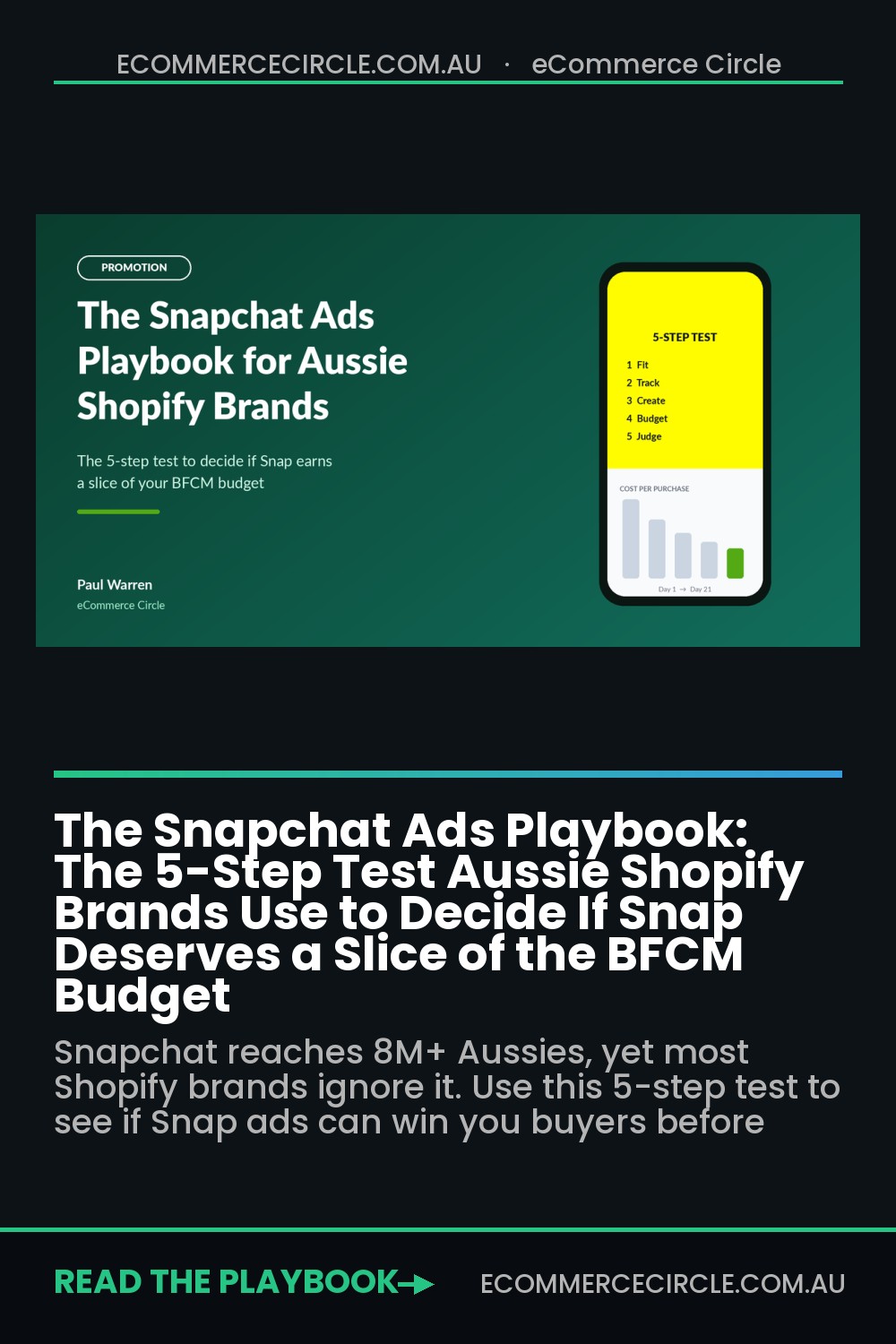
This playbook gives you a five-step test to decide whether Snapchat deserves a slice of your budget before Black Friday (27 November 2026), what to install, which ad formats to run, how much to spend, and how to judge the result honestly.
Why Snapchat Is the Most Ignored Ad Channel in Australia
Start with the audience, because it’s bigger and older than most founders assume. When Snap announced its 8 million Australian monthly users, it also said almost 45% of Australian Snapchatters are 25 or older. It reaches 80% of 13 to 24 year olds and 75% of 13 to 34 year olds nationally. Globally, the app passed 932 million monthly active users in the June 2025 quarter.
Now look at the competition for that attention. Every Aussie DTC brand is bidding against each other in Meta’s auction, and that crowding gets worst in November. Snapchat’s ad auction has far fewer small ecommerce advertisers in it, which is exactly why the efficiency numbers look interesting.
In 2025, Snap and analytics platform Triple Whale analysed $3 billion in ad spend across 20,000 Snapchat advertisers. Snapchat’s return on ad spend rose 7.5% over the period while most other platforms declined, and it posted the lowest cost per acquisition of the platforms measured. Apparel brands saw the strongest ROAS.
Treat that with healthy scepticism. It’s Snap’s own research, using last-click style data from Triple Whale’s customer base, and averages hide plenty of brands that lost money. But it tells you the channel is worth a structured test, not a dismissive shrug. If your best customers are under 35 and shop on their phones, ignoring Snapchat means leaving a cheaper auction to your competitors.
What the Under-16 Ban Changed (and Why It Might Help You)
Australia’s Social Media Minimum Age law took effect on 10 December 2025, and Snapchat is one of the designated platforms. By February 2026, Snap said it had locked or disabled more than 415,000 Australian accounts belonging to users who declared an age under 16 or who its age-detection tools flagged as under 16. Platforms that fail to take reasonable steps face penalties of up to $49.5 million.
For a Shopify brand, that’s mostly good news. Under-16s were never a great ad audience: low spending power, no credit cards, and a high chance of a parent saying no at checkout. Removing a chunk of them makes the remaining audience older on average, which is closer to who actually buys from you.
Two practical points follow:
- Set your minimum age to 18 anyway. Snap has pointed to the government’s own age assurance trial, which found estimation tools were accurate to within two to three years on average, so some younger users will still slip through. An 18+ floor keeps your spend on buyers and keeps you clear of awkward questions if you sell anything age-sensitive.
- Re-check any old audience data. If you ran Snapchat before December 2025, lookalikes and engagement audiences built from that period may include accounts that no longer exist. Rebuild them from fresh pixel data rather than reusing stale lists.
If you want the wider picture on how the ban changes your marketing mix, we covered it in our under-16 social media ban guide.
Step 1: Run the Five-Question Fit Test Before You Spend a Dollar
Snapchat isn’t for every store. Before you open an ad account, answer these five questions honestly. Give yourself one point for every “yes”.
- Are at least 40% of your customers aged 18 to 34? Check Shopify’s customer reports, your Klaviyo profiles or your Meta audience insights. If your core buyer is 50+, stop here and spend the money elsewhere.
- Does more than 70% of your traffic come from mobile? Snapchat is a phone-only environment. Comfrt said 93% of its traffic came from mobile before it scaled on Snap.
- Does your product sell visually in under five seconds? Fashion, beauty, accessories, fitness gear, homewares with a strong look and giftable items tend to work. Products that need a long explanation (supplements with complex claims, B2B tools) struggle.
- Can you produce at least six vertical videos a month? Snap rewards fresh, native-looking creative. If your only assets are polished product photos on white backgrounds, you’ll need to fix that first.
- Is your contribution margin healthy enough to fund a learning period? You need to be able to absorb two or three weeks of below-target returns while the algorithm learns. If every order is already marginal on Meta, a new channel won’t save you.
Scoring: 4 or 5 means run the test this month. 3 means test with a small budget after BFCM, once your creative library is stronger. 2 or less means park it and put that budget into the channels already working for you.
If you score well on question 1, our Gen Z Buyer Playbook is worth reading alongside this one. It covers what younger Australians expect from a brand before they’ll hand over their card details.
Step 2: Install the Snapchat Ads App, Pixel and Conversions API Properly
This is the step most brands skip, and it’s the reason most Snapchat tests fail. If Snap can’t see your purchases, it can’t find more buyers. It just finds more people who like tapping on things.
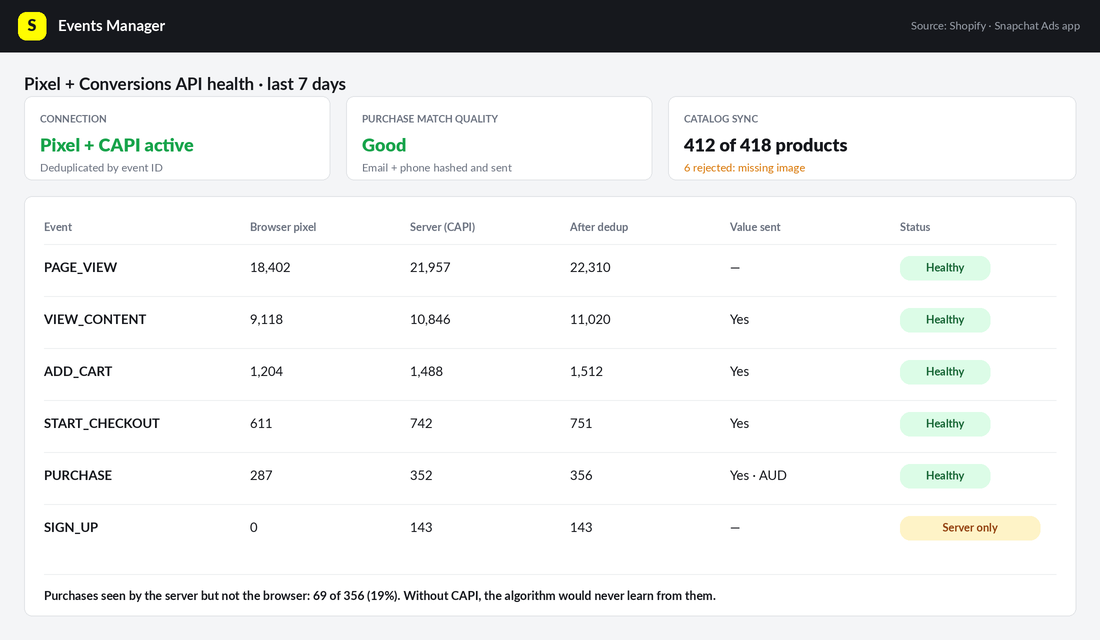
The numbers make the case. Snap says advertisers who run the Snap Pixel and Conversions API (CAPI) together see, at the median, an 18% improvement in cost per purchase, 22% more attributed purchases and a 25% increase in purchase value. Officeworks, working with its agency Kinesso and Tealium, implemented CAPI and compared its direct response campaigns month on month. The result: a 1.4x increase in add-to-cart and purchase signals, 2x ROAS and a 56% drop in cost per purchase.
You don’t need an enterprise tag manager to get the same plumbing. The free Snapchat Ads app on the Shopify App Store (rated 4.6 stars from almost 700 reviews) handles it. Here’s the setup:
- Install the app. In Shopify admin, go to Apps, search “Snapchat Ads” and install the official app published by Snap.
- Connect or create your Business account. Log in with a Snapchat account you control (not a staff member’s personal login). The app creates a Snapchat Business account and ad account if you don’t have one. Turn on two-factor authentication straight away.
- Set your currency to AUD and time zone to your state. Both are painful to change later and mismatched time zones make daily reporting useless.
- Enable the Snap Pixel and Conversions API in the app’s data sharing settings. Make sure Shopify’s customer privacy settings allow the app to receive events, or you’ll see page views and nothing else.
- Sync your product catalogue. This powers Dynamic Product Ads. Check that product IDs in the catalogue match the IDs the pixel sends, or retargeting will show the wrong items.
- Place a real test order. Buy a cheap item with a discount code, then check Events Manager in Snapchat Ads Manager. You want to see PAGE_VIEW, VIEW_CONTENT, ADD_CART, START_CHECKOUT and PURCHASE, each with a sensible value.
Then add UTM parameters to every ad (utm_source=snapchat, utm_medium=paid_social, utm_campaign=your campaign name). That’s your independent check in Shopify and GA4 later. Our UTM tracking playbook has a naming template you can copy.
Step 3: Pick the Three Ad Formats That Actually Sell for Shopify Brands
Snapchat has a long menu of ad products, from AR Lenses to full-screen takeovers. Ignore most of them. Sponsored Lenses are built for big-brand awareness budgets, not a $2 million Shopify store. For an ecommerce test, three formats do the heavy lifting.
- Single image or video Snap Ads (prospecting). Full-screen vertical ads that appear between Stories and in Spotlight. This is where your UGC-style videos go. Use them to reach new people with a clear product and a clear reason to tap.
- Collection Ads (prospecting and mid-funnel). A video or image on top with four tappable product tiles underneath. Great for brands with a range, like a swimwear label showing four best-sellers under one hero video.
- Dynamic Product Ads (retargeting). Pulled automatically from your synced catalogue to show people the exact products they viewed or added to cart. This is the format that tends to produce the best ROAS numbers, because it’s chasing warm buyers.
Creative matters more on Snap than anywhere else, because users tap past anything that looks like an ad. Follow these rules:
- Shoot 9:16 vertical, full screen. No letterboxed landscape videos and no square images with blank space.
- Hook in the first two seconds. Open with the product in hand, a face talking to camera, or a result. Logos and brand intros get skipped.
- Make it look like a Snap from a friend. Phone-shot, natural light, real voices. Comfrt leaned into UGC-style videos tied to cultural moments and kept a high volume of creative in rotation.
- Design for sound on, but caption everything. A voice explaining the product does a lot of selling, and captions catch everyone watching on mute.
- Rotate creative weekly during the test. Plan six to eight videos for a 21-day test, and pause anything that hasn’t earned a purchase after spending two to three times your target cost per purchase.
Here’s a quick Aussie example of how that looks. A Melbourne activewear brand might run three founder-to-camera videos (“Here’s why our leggings don’t go see-through on a squat”), two customer try-on clips, and one Collection Ad with its four best-selling sets. That’s six assets, built from content most brands already have sitting on their phones.
Step 4: Set a 21-Day Budget and Bidding Plan
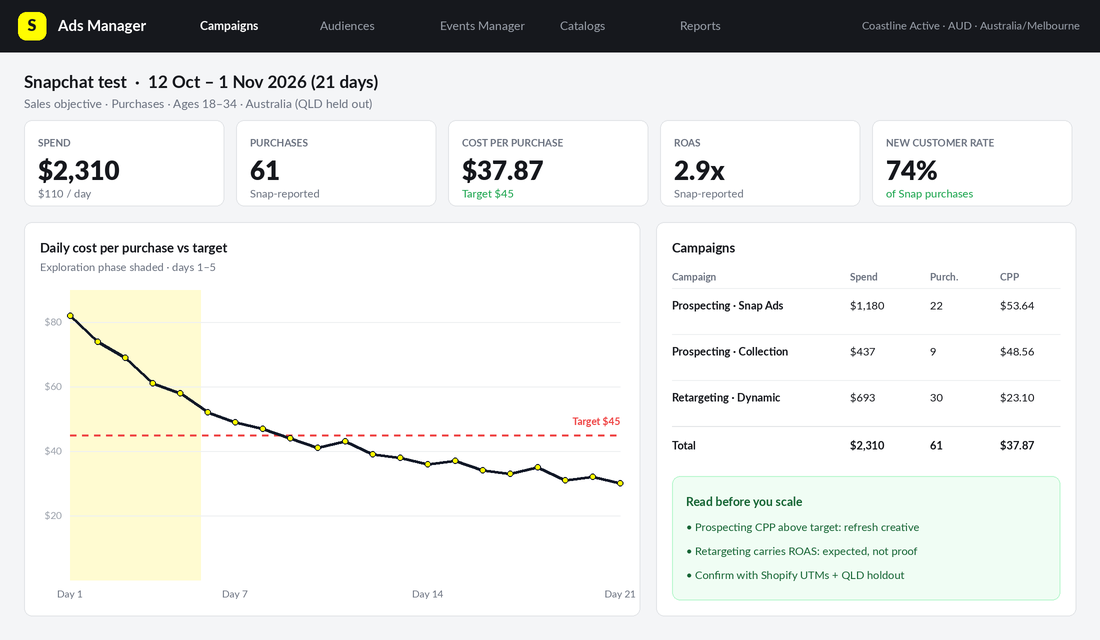
Snap’s published minimum is just $5 a day, but it recommends at least $20 to $50 a day so each ad can get through the Exploration Phase, which typically runs four days or more while the system works out who in your audience is most likely to act. Spend less than that and you’ll never know whether Snapchat failed or your budget did.
Here’s the structure we suggest for a first test:
- Total budget: $1,500 to $3,000 over 21 days. That’s roughly $70 to $140 a day across the account.
- Campaign 1, Prospecting (70% of budget): Sales objective optimised for purchases, Australia, ages 18 to 34 (or your real buyer range), broad targeting with Snap’s Smart Targeting switched on. Run four to six Snap Ads and one Collection Ad.
- Campaign 2, Retargeting (30% of budget): Dynamic Product Ads to people who viewed products or added to cart in the last 30 days, excluding recent purchasers.
- Bidding: start on Auto-Bid for the first week to collect data. Only move to a target cost once you have at least 30 to 50 purchases in the account.
- Don’t touch it for seven days. Editing budgets, audiences or bids resets learning. Make decisions at day 7, day 14 and day 21.
One interesting note from Comfrt’s case study: the brand saw better results after shifting from a Target CPA bid to Max Bid, combined with a high volume of creative. The lesson isn’t that one bid type always wins. It’s that a too-tight cost target on a new channel can starve delivery, so start loose and tighten once you have data.
Timing matters too. Running this test in October means you go into Black Friday with real data and a warmed-up pixel. Starting it on the Monday of BFCM week means paying peak auction prices to learn, which is the most expensive way to find out anything. The ARA and Roy Morgan forecast Australians would spend $6.8 billion over last year’s Black Friday to Cyber Monday period, and every channel gets more expensive when that money is up for grabs.
Step 5: Judge the Test With Three Numbers, Not One
This is where most founders get fooled, in one of two directions. Either they trust Snap’s dashboard, which (like every ad platform) counts view-through conversions generously. Or they look only at Google Analytics last-click, where Snapchat almost always looks terrible because people see the ad on their phone and buy later through a Google search.
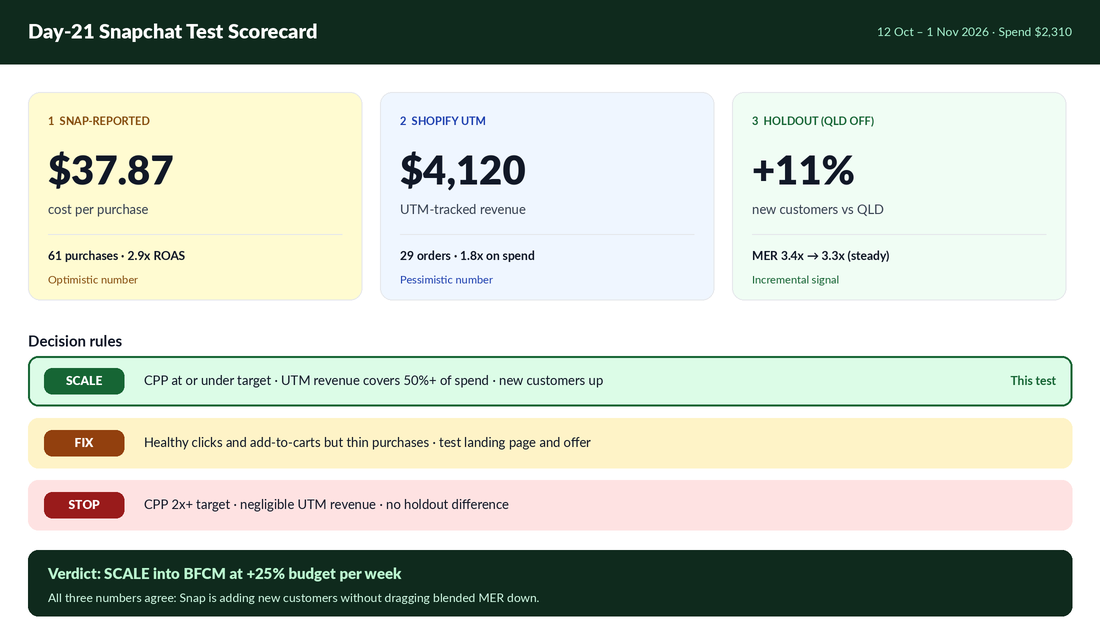
At day 21, line up three numbers:
- Snap-reported cost per purchase. Check which attribution window your columns use in Ads Manager and write it down, so you compare like with like each time. Treat this as the optimistic number.
- Shopify UTM-tracked revenue. In Shopify Analytics, filter sessions and sales by utm_source=snapchat. Treat this as the pessimistic number. The truth sits somewhere between the two.
- Change in total new customers and MER. Compare your overall new customer count and marketing efficiency ratio (total revenue divided by total ad spend) for the 21 days against the previous 21 days and the same period last year. If Snap is adding real buyers, total new customers should rise without your blended MER falling off a cliff.
For a cleaner read, run a geographic holdout. Switch Snapchat ads off in one state of similar size (for example, run in Victoria and NSW but hold out Queensland) and compare new customer growth across states. Comfrt took this further, partnering with incrementality platform WorkMagic and reporting an incremental ROAS above 3x. Even after doubling its Snap spend, the brand said its overall MER held steady. Our incrementality playbook walks through how to set up a simple holdout without paid software.
Then make one of three calls:
- Scale: Snap-reported cost per purchase is at or below your target, UTM revenue covers at least half the spend, and new customers rose. Increase budget by 20% to 30% a week into BFCM, not all at once.
- Fix: clicks and add-to-carts are healthy but purchases are thin. That usually points to your landing page or offer, not the channel. Test a dedicated landing page or a stronger first-order offer before giving up.
- Stop: cost per purchase is more than double target, UTM revenue is negligible and the holdout shows no difference. Turn it off, keep the pixel running so you keep collecting data, and revisit in six months.
The Mistakes That Kill Most Snapchat Tests
We see the same five errors over and over when founders tell us “Snapchat doesn’t work for us”:
- Running Meta creative on Snap. A polished 1:1 carousel cut down to vertical looks exactly like an ad, and gets skipped like one.
- Optimising for swipes, not purchases. The swipe-up objective will find you cheap clicks from people who were never going to buy. Optimise for purchases from day one if your pixel is healthy.
- Spending $10 a day for a week. That’s not a test. It never leaves the Exploration Phase.
- No CAPI. With browser tracking blocked on many iPhones, pixel-only setups miss a big share of purchases and the algorithm optimises on bad data.
- Judging it on GA4 last-click alone. Snapchat is a discovery channel. If you only credit the last click, you’ll cut the channel that started the journey.
How It All Fits Together
Each step on its own looks small. Together, they’re the difference between “we tried Snapchat once” and a genuine third paid channel heading into peak season.
The fit test stops you wasting money on the wrong audience. Proper tracking means Snap’s algorithm is learning from real purchases instead of random taps. Native vertical creative earns attention in a feed where people skip anything that smells like an ad. A structured 21-day budget gives the system enough data to find buyers. And the three-number scorecard means you make the scale, fix or stop call on evidence instead of gut feel.
The compounding bit is what happens after the test. Even if you only end up spending 10% of your paid budget on Snapchat, you’ve reduced your dependence on a single auction. When Meta costs spike in the last fortnight of November, you’ve got a second prospecting engine already warmed up and a library of vertical videos you can reuse on TikTok, Reels and YouTube Shorts.
Your Snapchat Test Checklist
Copy this into your project tool and work through it before the end of October:
- Score the five-question fit test and only proceed with 4 or 5 points (or 3 with a smaller post-BFCM budget).
- Install the official Snapchat Ads app from the Shopify App Store using a business-owned login with two-factor authentication.
- Set AUD currency and your local time zone on the ad account.
- Turn on the Snap Pixel and Conversions API and check Shopify’s customer privacy settings allow events through.
- Sync the product catalogue and confirm product IDs match pixel events.
- Place a test order and confirm all five key events in Events Manager with correct values.
- Add UTMs to every ad using one consistent naming convention.
- Produce six to eight vertical 9:16 videos with a two-second hook and captions.
- Build two campaigns: prospecting (70%) and Dynamic Product Ads retargeting (30%), minimum age 18.
- Commit $1,500 to $3,000 over 21 days and schedule review points at day 7, 14 and 21.
- Choose a holdout state and record its baseline new customer numbers.
- Make the scale, fix or stop call at day 21 using all three numbers.
Give Snapchat a Fair Test Before Peak Season
You don’t need to love Snapchat. You just need to know whether it can find buyers for you at a cost that works, and the only way to know is to test it properly. Three weeks, a sensible budget, clean tracking and an honest scorecard will tell you more than years of assuming it’s “just for teenagers”.
Inside eCommerce Circle, Promotion is one of the core pillars we work on with every member, and building more than one reliable acquisition channel is a big part of it. If you want to see exactly where your store is being capped, take the free More Orders Scorecard. It takes two minutes and shows you which of the 10 P’s to fix first.