Open a product page on your store, right click, and hit “View page source”. Search for application/ld+json. What you find in the next thirty seconds explains more about your organic performance than any keyword report you have ever paid for.
What’s in This Article
Most Aussie Shopify stores find one of two things. Either a thin block of code with a product name, a price and not much else. Or two competing blocks that contradict each other, because the theme wrote one and a review app wrote another. Both outcomes cost you the same thing: Google reads your product page as a guess instead of a fact.
That matters more in 2026 than it did in 2023. Rich results with visible prices, ratings and shipping costs consistently pull 20 to 30% higher click-through than plain blue links at the same position, and listings with visible star ratings sit at the top of that range. On top of that, research into AI answer engines found that 71% of pages cited by ChatGPT and 65% of pages cited by Google’s AI Mode contained structured data. The machines reading your store now outnumber the humans, and they all read the same file.
Here are the seven fixes that take a default Shopify product page from “technically valid” to “fully eligible”, in the order I would do them.
What Shopify Actually Gives You Out Of The Box
Start with the honest baseline, because most founders assume Shopify handles this. It partly does.
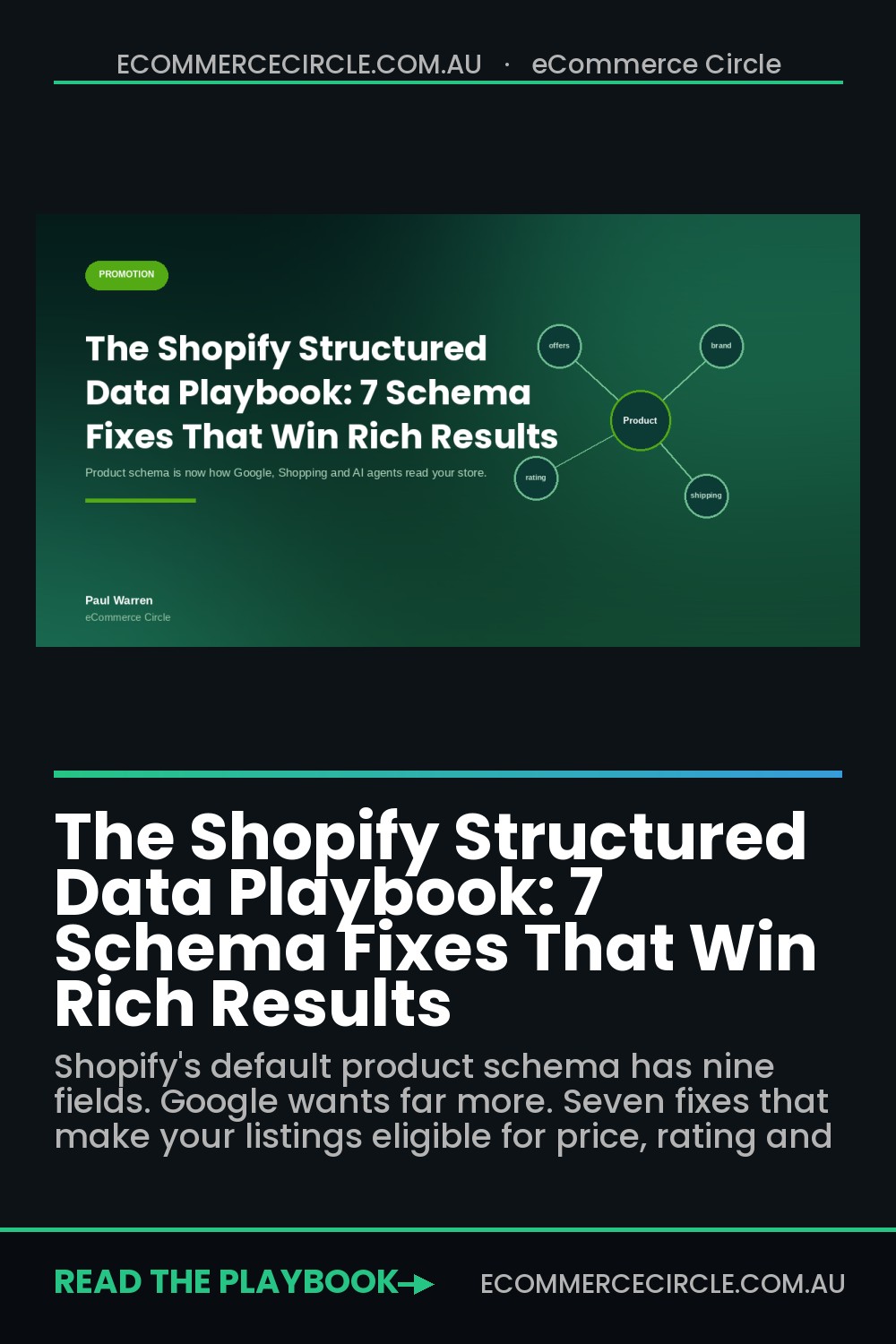
Dawn and almost every theme built on it generate product schema with a single line of Liquid: {{ product | structured_data }}. That filter is documented on shopify.dev, and the output is exactly this set of fields: @context, @id, @type, brand, category, description, image, name, url, and an offers object containing availability, price, priceCurrency and url.
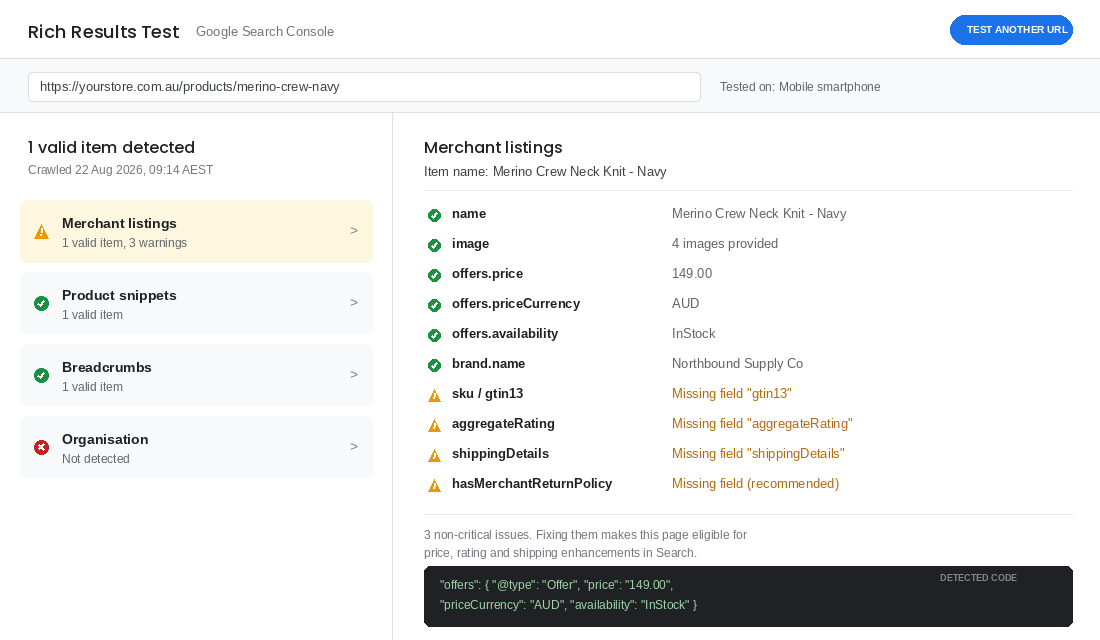
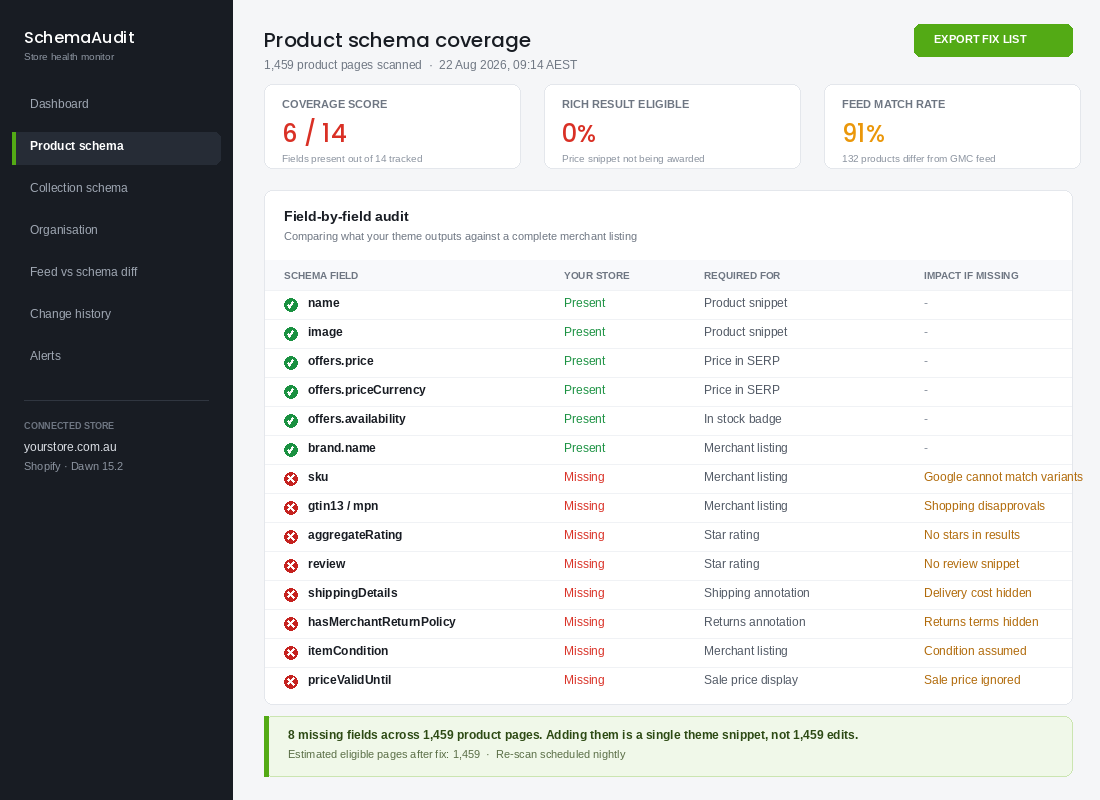
That is nine or ten fields. It is enough to be classified as a valid product snippet. It is not enough to be a complete merchant listing, which is the class of markup that turns on the price, rating, shipping and returns annotations in Search and feeds Google’s Shopping surfaces.
Missing from the default output: sku, gtin13, mpn, aggregateRating, review, shippingDetails, hasMerchantReturnPolicy, itemCondition and priceValidUntil. Nine gaps, every one of which Google either requires or rewards.
Fix 1: Delete Your Duplicate Product Blocks
This is the most common fault and the easiest to miss, because both blocks look correct on their own.
I pulled the source of a Melbourne skincare brand’s best-selling product page while writing this. Frank Body’s coffee scrub page carries two separate Product blocks. One is the theme’s output. The second comes from a reviews app and carries an aggregateRating the first one does not have. Neither block includes shipping or returns markup.
When Google finds two Product entities on one page, it has to choose. Sometimes it merges them. Sometimes it picks the wrong one and drops your star rating. Sometimes it flags the page as having a duplicate item and you lose the enhancement entirely. You do not get to control which.
How to fix it:
- Find every source. Search your page source for
ld+jsonand count the blocks. Then search your theme forstructured_dataand for hardcoded"@type": "Product"strings in snippets and sections. - Pick one owner. Usually the theme. Turn off schema output in your review app settings, which most of them expose as a single toggle labelled “rich snippets” or “SEO markup”.
- Merge, do not delete. Whatever the app was contributing, such as the rating, needs to move into the theme’s block. Losing the duplicate and the rating at once is a downgrade.
- Re-test the page. One Product item, one Offer, one rating.
If you run more than four apps that touch the product page, assume you have this problem until you have proven you do not.
Fix 2: Add The Identifiers Google Uses To Recognise Your Product
Google does not just want to know you sell a navy merino crew neck. It wants to know that your navy merino crew neck is the same physical item that three other retailers are listing, so it can build a comparison. That matching runs on identifiers.
Three fields do the work. sku is your internal code. gtin13 is the barcode, which for most Australian products is an EAN or a UPC you already hold in Shopify’s inventory fields. mpn is the manufacturer part number, which matters if you are a stockist rather than the brand owner.
Bondi Sands does this properly. Their product markup includes sku, mpn, brand, itemCondition and a named seller. That is well beyond Shopify’s default and it is why their listings behave predictably in Shopping.
The practical version for a Shopify store: your barcode already lives on the variant. Pull it into your schema snippet with {{ product.selected_or_first_available_variant.barcode }} and map it to gtin13 only when the value is 13 digits. A malformed GTIN is worse than a missing one, because it triggers a hard disapproval in Merchant Centre rather than a soft warning.
If you are a private-label brand with no barcodes at all, set mpn to your own SKU and add "identifier_exists": false to your Merchant Centre feed. Do not invent numbers.
Fix 3: Publish Ratings You Can Actually Defend
Star ratings are the single highest-return enhancement available to you. Listings that show them see click-through rates 15 to 35% above identical listings without them. On a collection of 40 products doing 12,000 organic sessions a month, that is not a rounding error.
Two rules and one warning.
- The rating must be visible on the page. Google requires that the
aggregateRatingin your markup matches a rating a human can see. Marking up a rating that only exists in the code is a manual action waiting to happen. - Include
ratingValue,reviewCountandbestRating. A rating with no count is routinely ignored. - Do not mark up ratings on products with fewer than five reviews. A single five-star review renders as a perfect score and readers discount it instantly. Worse, one bad review swings your average by a full star overnight.
If your review volume is thin, the fix is upstream, not in the code. Get your post-purchase review request timing right first, then come back and mark it up. We covered the sequencing of that in the Shopify reviews playbook.
Fix 4: Put Your Shipping Costs In The Markup
This one is uniquely valuable for Australian brands and almost nobody does it.
Shipping is the number one reason Australian shoppers abandon a cart. If a competitor’s listing shows “Free delivery” in the search result and yours shows nothing, you lose the click before your product page ever loads. The shippingDetails property fixes that by letting Google display your delivery cost and speed directly in the result.
The structure needs an OfferShippingDetails object containing a shippingRate with a value and currency, and a shippingDestination defining the region. For a typical Aussie DTC brand that means one entry for AU with your standard rate, and a second entry with a rate of 0 for orders above your free shipping threshold.
Add deliveryTime if you can stand behind it. Splitting handlingTime (how long until you dispatch) from transitTime (how long the courier takes) is how you show “3 to 5 business days” honestly. If you cannot hit that window during peak, do not publish it. Markup that contradicts reality generates the exact complaint emails you are trying to avoid.
Fix 5: Mark Up Your Returns Policy Once, At The Organisation Level
Google added support for return policy markup on merchant listings and then expanded it again in late 2025. Most stores still have not touched it.
The efficient move is to define hasMerchantReturnPolicy once, nested under your Organization markup, rather than repeating it on every product. One block in theme.liquid covers your whole catalogue. You then override it at the Offer level only for the handful of products where the policy differs, such as final-sale or personalised items.
What to include:
merchantReturnDays. Your actual window. Thirty is standard for Aussie DTC, sixty is a differentiator.returnMethod. UsuallyReturnByMailunless you have retail doors.returnFees. Be straight.FreeReturnif you pay,ReturnShippingFeesif the customer does.applicableCountry. AU, plus NZ if you ship there.
Two notes for Australian sellers. Your markup describes your voluntary change-of-mind policy. It does not and cannot limit your obligations under Australian Consumer Law for faulty goods, so make sure the policy page it points to says so. And if you are quietly offering 30 days in your markup while your policy page says 14, you have just created a written promise you will be held to.
Fix 6: Make Your Schema And Your Merchant Centre Feed Agree
Here is the failure mode that catches profitable stores rather than sloppy ones.
Google Merchant Centre now cross-references the Product schema on your landing page against the data in your feed. When they disagree on price, availability or currency, the product gets disapproved for a landing page mismatch. Your Shopping ads stop serving and the notification lands in an account most founders check monthly.
The usual culprits are boringly predictable:
- Sale price timing. Your feed syncs at 2am, your promotion starts at 6am. For four hours the feed says 149 and the page says 119.
- Currency by market. A shopper in New Zealand sees NZD on the page while the feed still declares AUD. Shopify Markets will do this to you if the schema snippet hardcodes the shop currency instead of using the presentment currency.
- Availability lag. The page says in stock because it counts incoming inventory. The feed says out of stock because it counts on-hand.
Fix the currency issue in the snippet by outputting {{ cart.currency.iso_code }} rather than a hardcoded string, and align your feed sync to run before, not after, your scheduled price changes. If Shopping is a meaningful channel for you, the mechanics of feed hygiene are worth a deeper look in the Google Shopping feed playbook.
Fix 7: Mark Up The Pages That Are Not Product Pages
Product schema gets all the attention. The other four types take an hour combined and they are what make your store legible as a business rather than a pile of URLs.
Organizationon every page. Legal name, logo, ABN-backed contact details, and your social profiles insameAs. This is what a knowledge panel is built from, and it is where your returns policy lives.BreadcrumbListon products and collections. Replaces the ugly URL string in the search result with a readable path. Cheap win, immediate visual improvement.ItemListon collection pages. Tells Google a collection page is a curated set rather than a duplicate of thirty product pages.FAQPageon your shipping, returns and sizing pages. Not on product pages, where Google has narrowed eligibility, but on genuine support content it still earns expanded results.
Do the Organization block first. It is one snippet, it applies sitewide, and it carries the returns policy from Fix 5.
The 20 Minute Audit You Can Run This Morning
You do not need a paid tool to find out where you stand. Two free ones from Google will tell you everything, and you can be through this before your second coffee.
Step 1. The single-page deep read (5 minutes). Open the Rich Results Test at search.google.com/test/rich-results. Paste the URL of your best-selling product. Switch the crawl agent to smartphone, because that is what Google indexes with. Read the left panel for detected types and the right panel for the field list. Write down every warning.
Step 2. The duplicate check (3 minutes). On that same product page, view source and count how many application/ld+json blocks contain "@type":"Product". The answer must be one. If it is two, that is your first job.
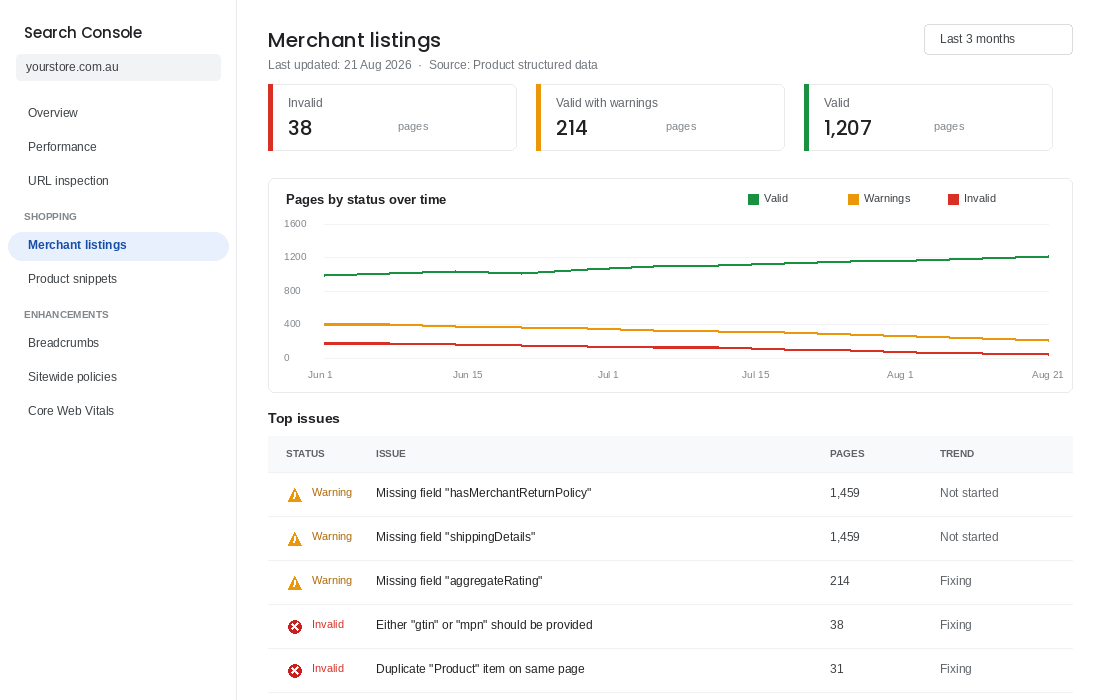
Step 3. The whole-catalogue read (7 minutes). In Search Console, open Shopping, then Merchant listings. This report covers every product URL Google has crawled, not just the one you tested. Sort the issues table by affected pages. A warning appearing on 1,400 pages is one missing field in one snippet, which is good news.
Step 4. The feed cross-check (5 minutes). In Merchant Centre, filter products to Disapproved and look for “Mismatched value (page crawl)”. Every entry there is a schema and feed disagreement from Fix 6.
Write the output into four buckets: duplicates, missing identifiers, missing enhancements, feed mismatches. Then fix them in that order, because a duplicate block will make every other fix look like it failed.
One process note. After you edit the snippet, use the URL Inspection tool to request indexing on three or four products rather than waiting. Enhancement reports typically take one to three weeks to reflect a fix across a full catalogue, so validate on a handful first and confirm the change worked before you assume it did.
Why This Compounds: One Data Layer, Four Front Doors
Here is the part that makes structured data worth a morning rather than a maybe.
You are not doing this for one channel. The same JSON-LD block feeds four separate front doors to your store, and they are increasingly the same door.
- Organic search. Prices, ratings, stock status and shipping annotations in the result. Twenty to thirty percent more clicks at the same ranking position.
- Google Shopping. Free listings and paid ads both validate against your page markup. Bad schema is a disapproval, not just a missed enhancement.
- AI answer engines. Structured data appeared on 71% of pages ChatGPT cited and 65% of pages cited in Google’s AI Mode. Being machine-readable is now the entry requirement for being recommended at all.
- Shopping agents. AI-referred traffic to retail sites grew 393% year on year in Q1 2026, and those visitors now convert 42% better than non-AI traffic. An agent comparing four navy merino crews reads price, availability, shipping cost and return window from markup. If yours is blank, you are not in the comparison.
That last shift is the one worth sitting with. For twenty years, the job was to persuade a person. The persuasion still matters at the point of decision, but qualifying for the shortlist is now a data problem. An agent will not read your brand story or notice your photography. It reads fields.
Which means the cheapest competitive advantage available to an Aussie store right now is being the one in your category with complete markup, because most of your competitors have nine fields and a duplicate block. If you want the wider picture of how this plays out, we have written about it in the agentic commerce playbook and the answer engine optimisation playbook.
Keeping It Working: The Monthly Loop That Catches Broken Schema Before Google Does
Schema is not a set-and-forget fix. Theme updates overwrite snippet files, a new review app injects its own AggregateRating block alongside yours, and a price change in Shopify does not always flow through to a hard-coded offer in a custom liquid section. Most stores that lose rich results lose them silently, and only notice when organic product clicks drift down 15 to 25% over a quarter.
The three reports to check on the first Monday of every month
- Search Console, Enhancements, Merchant listings and Product snippets. Watch the “Valid” count against your published product count. A drop of more than 5% in a month means something broke.
- Search Console, Performance, filtered by Search appearance. Compare click-through for results with rich features against plain results. On most Shopify stores rich product results earn 20 to 35% higher CTR at the same position, so this is the number that tells you whether the work is still paying.
- Google Merchant Center, Diagnostics. Mismatches between feed price and structured data price show up here first, usually as “automatic item updates” warnings, and they precede a rich-result loss by a week or two.
Re-validate after every one of these events
Run five representative URLs (a hero product, a variant-heavy product, a collection, a blog post, the homepage) through the Rich Results Test whenever you install or remove an app, update the theme, change your shipping or returns policy, or migrate a review provider. That is a ten-minute job. A quarter of unexplained rich-result losses we see trace back to a review app swap that left two rating blocks fighting each other.
Set a threshold and an owner
Decide what counts as broken. A sensible rule: more than 3% of products invalid, or a CTR gap between rich and plain results that closes to under 10%, triggers a fix within five working days. Assign it to one person. Structured data fails in the gap between “the developer thought marketing owned it” and “marketing thought the developer owned it.” The same accountability logic runs through the Shopify SEO playbook, where every technical layer has a named owner and a review cadence.
One last check worth adding to the loop: page weight. Every schema block you add is a few hundred bytes of JSON, which is nothing on its own, but stores that bolt on four apps each injecting their own markup end up with duplicated blocks and slower responses. If your product pages have crept past the 2.5 second Largest Contentful Paint target, the site speed playbook shows how to find which scripts are doing the damage, and duplicate schema is often on the list.
Your Structured Data Checklist
Print this, work down it, and tick as you go. Every line is a yes or no.
- One Product block per page. Verified in page source, not assumed.
- Identifiers present.
skualways,gtin13where a valid barcode exists,mpnif you are a stockist. brand.namematches your Merchant Centre brand exactly. Including capitalisation.aggregateRatingwithratingValue,reviewCountandbestRating. Only on products with five or more reviews, and visible on the page.shippingDetailswith an AU destination and a real rate. Plus a zero-rate entry above your free shipping threshold.hasMerchantReturnPolicyon Organization. Days, method, fees and country, matching your policy page word for word.priceCurrencyuses the presentment currency. Not a hardcoded AUD.availabilityandpricematch your feed at every hour of the day. Including during scheduled promotions.OrganizationandBreadcrumbListsitewide.ItemListon collections.- Zero errors and zero warnings in Merchant listings. Checked monthly, not annually.
Ten lines. If you can tick all ten, you are ahead of the overwhelming majority of Australian Shopify stores, including some doing eight figures.
None of this is glamorous work. It is a snippet in a theme file that no customer will ever see. But it is the difference between a search result that shows a price, a star rating, free delivery and a 60 day return window, and one that shows a title and a URL. Same product. Same position. Very different click-through.
Go and check yours. It takes twenty minutes and I would be surprised if you came back clean.
Inside eCommerce Circle, technical foundations like structured data are one of the core pillars we work through with every member, because they compound quietly while everyone else is chasing the next ad angle. If you want a second opinion on yours, let’s talk.