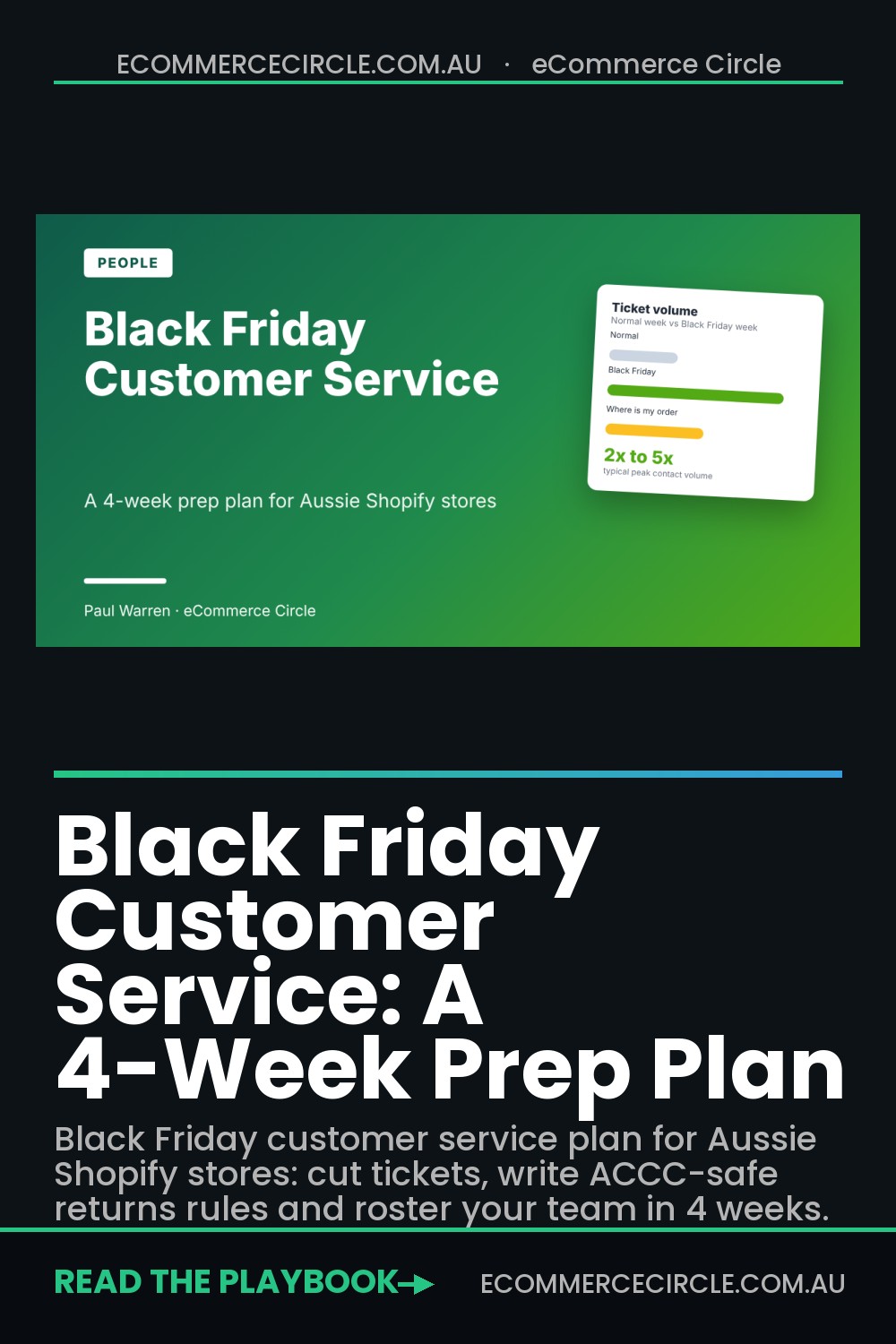
Black Friday customer service comes down to three things: answer “where is my order” before anyone asks, write your returns rules before the sale starts, and roster real humans for the 27 to 30 November peak. Do those three and most of the pain disappears. Skip them and your inbox becomes the bottleneck on your biggest revenue week of the year.
Here is the pattern I see with Aussie Shopify stores. They spend six weeks on ads, email and discount maths. Then Black Friday lands, contact volume doubles or worse, and the founder is answering tracking emails from the couch at 11pm. Every unanswered ticket is a customer who is less likely to buy from you again in January.
You have four weeks. That is plenty if you start this week. This plan covers what to measure, what to automate for free inside Shopify, how to write policies that comply with Australian Consumer Law, and how to roster a small team without burning anyone out. It sits alongside our Black Friday Australia 2026 dates and deadlines guide and the Black Friday carrier plan, because support volume is mostly a shipping and expectations problem.
Why Black Friday Support Volume Catches Stores Off Guard
Contact volume typically rises to about double normal during Black Friday and Cyber Monday, according to Concentrix figures reported by Ringly. In fashion, electronics and flash-sale retail it can reach three to five times normal. The same data shows “where is my order” contacts climbing from roughly 25% of volume in a normal period to nearly 50% at peak.
Australian shoppers are not quiet either. Australia Post reported that Aussies spent $1.5 billion online across the 2025 Black Friday and Cyber Monday weekend, with 3.1 million households shopping. That is a lot of parcels, and every parcel is a chance for a tracking question.
The part most founders miss is that a big share of peak contacts is avoidable. The Concentrix data points to delayed tracking updates, failed promo codes, payment issues and refund delays as the usual drivers. None of those need a clever reply. They need a better system upstream.
Here is what that means for you: your goal is not to answer tickets faster. Your goal is to create fewer of them.
Step 1: Pull Your Ticket Data and Find the Top Three Reasons
Before you buy a tool or hire anyone, find out what your customers actually ask. If you have been running on a shared Gmail inbox, spend an hour this week tagging the last 90 days of emails by reason. A spreadsheet is fine.
You are looking for three numbers:
- Tickets per 100 orders. Divide last month’s support emails, chats and DMs by last month’s orders, then multiply by 100. This is your forecasting number.
- Top three reasons by share of volume. In almost every store I coach, three reasons account for 70% or more of contacts. Usually it is order status, returns and discount codes.
- Average first response time. Not your best day. Your average.
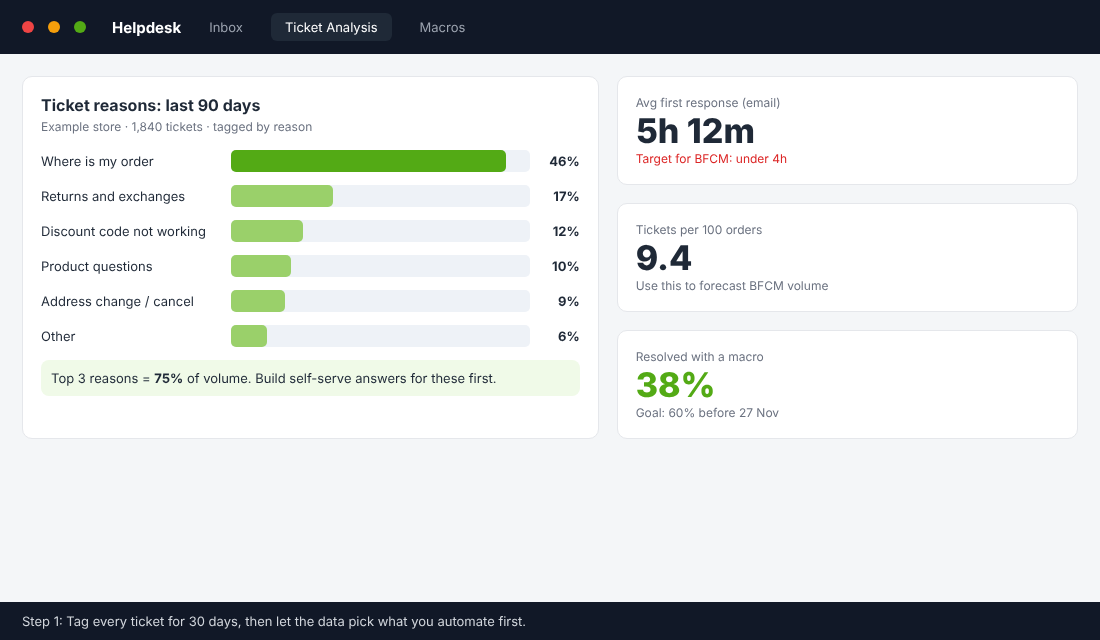
Now do the forecast. Take your tickets per 100 orders and multiply by the orders you expect across Black Friday week. Then apply a peak multiplier. I would plan for 2x as the base case and have a 3x contingency, which lines up with the Concentrix range above. If your store usually gets 9 tickets per 100 orders and you expect 1,500 orders across the week, that is 135 tickets normally. Plan for 270 and have cover for 405.
That is the number that decides whether you need a casual team member for the week, a helpdesk tool, or just a good set of saved replies.
Step 2: Kill the Number One Ticket, Where Is My Order
If order status is close to half your peak volume, fixing it is the biggest lever you have. Three moves, in this order.
Set honest delivery dates on the product page and at checkout
Tickets about late parcels often start as a mismatch between what the customer assumed and what you promised. During the sale your normal dispatch time will blow out. Update it. A line like “Black Friday orders ship within 3 business days” at checkout prevents dozens of emails. Our Shopify shipping policy template has wording you can adapt.
Turn on proactive tracking emails
Check that your shipping confirmation email contains a tracking link, not just a tracking number. Then add a delay notification. In Klaviyo or Shopify Flow, trigger a short email if an order has no carrier scan 3 days after fulfilment. The customer hears from you before they have to ask.
Give customers a self-serve tracking page
Shopify Inbox ships with a default “Track my order” instant answer that asks for an order number and email. Switch it on, and link to your order status page from your header and footer. It takes five minutes and it is free.
Know your cut-off dates and put them in writing as well. Australia Post’s 2026 Christmas last-sending dates start around 14 to 18 December for WA and the NT and run to about 21 December for most interstate standard parcels. Double check the current dates on the Australia Post site before you publish yours, because the published sources are not perfectly consistent.
Step 3: Write Your Returns Rules Before the Sale, and Make Them Legal
Returns questions are the second biggest category in most stores, and Black Friday makes them worse. The return rate reached 10.3% in 2024, up from 7.9% the year before, according to Queue-it’s Black Friday report as cited by Ringly. Treat that as a US-led benchmark, but the direction matches what Australian stores report: sale shoppers buy more speculatively.
The risk for Australian stores is not just volume. It is compliance. In February 2025 the ACCC swept more than 2,000 Australian retail websites and found businesses using terms that may breach the Australian Consumer Law. The ACCC says you should not claim, for faulty products, that:
- No refunds are allowed under any circumstances.
- No refunds apply to sale or specialised items.
- Customers only have a limited time from receipt to return an item for a refund.
- Returns are subject to a restocking or repair fee.
- Delivery fees are non-refundable, or customers must pay to send faulty items back.
Read that list against your own returns page tonight. “No refunds on sale items” is the classic Black Friday mistake. You can restrict change of mind returns on sale stock, but you cannot take away a customer’s consumer guarantee rights when a product is faulty. Say that clearly on the page. I am not a lawyer, so run your final wording past one, or check the ACCC guidance directly.
Then decide your change-of-mind policy for the sale and publish it before day one. Many stores extend the window through January for gifts. If you do, put the date in the policy so nobody has to ask. If you want the product side covered, our high risk order guide shows how to deal with the fraud-flagged orders that land in the same inbox.
Step 4: Build Saved Replies for the Questions You Already Know Are Coming
Once you have your top reasons, write the replies now, when you are calm. Not in the middle of Friday afternoon. Write them as short as you can and make sure each one answers the question in the first sentence.
| Ticket type | What the reply must include | Where to also put the answer |
|---|---|---|
| Where is my order | Tracking link, current carrier status, realistic delivery window | Order status page, shipping confirmation email, chat instant answer |
| Discount code not working | Why codes fail (expired, single-use, minimum spend, excluded items), plus the fix | Announcement bar, cart page, FAQ |
| Return or exchange | Window, condition rules, how to start the return, refund timing | Returns page, order confirmation email |
| Change address or cancel | Exact deadline (for example 2 hours from order), how to request it | Checkout confirmation page |
| Last order date for Christmas | Date per carrier and region, express option | Header banner, shipping page, email footer |
A detail that saves time: write each reply with a placeholder for the order number and the customer’s first name. Your helpdesk, or even Gmail templates, can insert them. It makes a canned answer feel personal.
Step 5: Set Up Free Self-Serve in Shopify Inbox
You do not need an expensive helpdesk to deflect the easy tickets. Shopify Inbox lets you publish instant answers that appear the moment a customer opens the chat window. Here is the setup, based on Shopify’s own instant answers documentation:
- In your Shopify admin, go to Sales channels, then Inbox.
- Click Chat settings.
- In the Instant answers section, click Create instant answer.
- Type the question customers will see, then the answer. Example: “What is your Black Friday returns policy?”
- Leave visibility on, then click Save.
- Drag to reorder so the biggest ticket reason sits at the top.
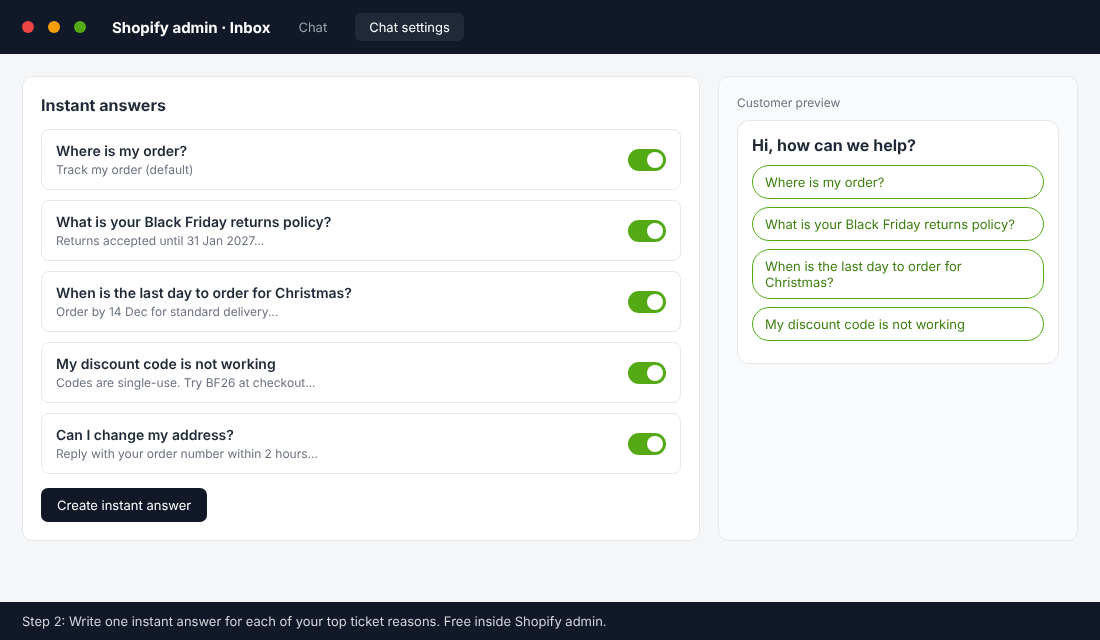
Two things to know. The default “Track my order” answer can be turned off but not deleted, and customers see up to 100 instant answers. Shopify can suggest answers from your store policies, but you are responsible for the accuracy of anything you publish, so read every one. If your policies are vague, the suggestions will be vague too.
Live chat is also worth staffing if you can. Gorgias data cited by Ringly shows a 12% conversion lift from adding live chat during BFCM. Treat that number with some caution because it comes from a helpdesk vendor, but the logic is sound: a shopper who gets an answer at the moment of doubt is less likely to leave.
Step 6: Roster the Week Like a Retail Store Would
Founders often plan to “just handle it”. That works until Friday morning when you also need to fix a broken discount, approve ad spend and check stock. Roster support as its own job.
A rough rule used by support vendors is that one human agent can work about 60 tickets a day. That figure is not independently verified, so use your own: look at how many tickets you personally cleared on your busiest recent day, and use 70% of that as your sustainable pace. Then divide your peak forecast by it.
A good example of what small teams can do with structure comes from UK retailer Vape Superstore. According to its Gorgias case study, ticket volume jumped from about 40 a day to over 200 a day at peak. With a two-person team, they moved to tagging, one-click macros and order details inside each ticket. First response time fell by 70%. It is a vendor case study, so take it as an illustration, not a guarantee. The lesson holds: tags and templates beat typing.
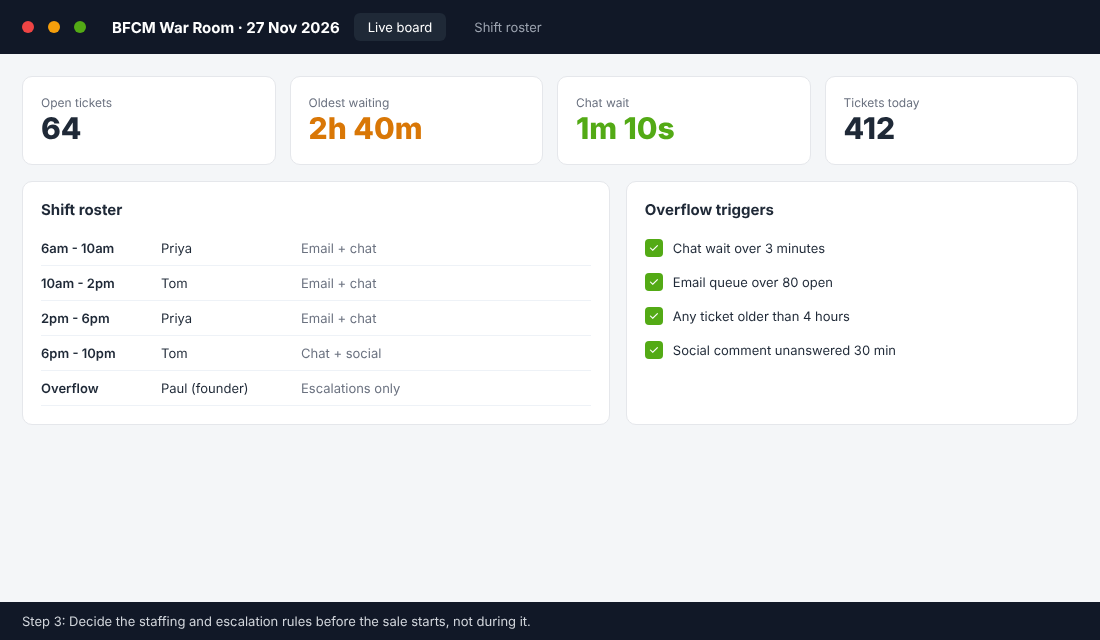
For the roster itself, I recommend:
- Cover 6am to 10pm AEDT on Friday and Monday. Australian shoppers buy early and late.
- Shifts of four hours or less on the front line. Tired people write bad replies.
- One escalation owner who does not answer routine tickets. That is usually you.
- A casual or VA for the week. Our home based store insurance article is about risk, but the same thinking applies to people risk: do not leave one person as the single point of failure.
Define overflow triggers now. For example: chat wait over 3 minutes, more than 80 open emails, any ticket older than 4 hours, or an unanswered social comment after 30 minutes. When a trigger fires, the escalation owner steps in. No debate.
Step 7: Cover Social and SMS, Not Just Email
Customers do not only email. During a sale they comment on your ads, message your Instagram and reply to your texts. If you are sending texts, read our Black Friday SMS marketing guide and decide who monitors replies. A customer replying “STOP” is fine. A customer replying “where is my order” to a promo text needs an answer.
Assign one person to check Meta comments and DMs every 30 minutes during the peak. Hide abusive comments, reply to genuine questions and point people to your tracking page. Unanswered ad comments quietly lower the trust of everyone scrolling past.
The Compound Effect: How the Pieces Fit Together
Each step above does a small job. Together they change the shape of your week.
- Honest delivery dates and proactive tracking cut the number one ticket type.
- Clear returns rules reduce the second and keep you compliant.
- Saved replies and instant answers deal with whatever is left in seconds.
- The roster and overflow triggers mean the rest gets a human, fast.
- Your data from this year tells you what to fix before next year.
Think about what happens to your numbers. Fewer tickets means lower response times. Faster responses mean happier customers, and happier customers come back for the January sale and the next BFCM. If you want the retention side, our repeat customer rate benchmarks article shows how to measure that.
Your Black Friday Support Readiness Checklist
Copy this into a document and tick it off. Dates assume Black Friday on 27 November 2026 and Cyber Monday on 30 November.
By Friday 30 October (4 weeks out)
- Tag 90 days of tickets by reason and find your top three.
- Calculate tickets per 100 orders and your peak forecast (2x base, 3x contingency).
- Record your current average first response time.
By Friday 6 November (3 weeks out)
- Audit your returns, refund and warranty wording against the ACCC list above.
- Decide and publish your sale returns window and any extended Christmas window.
- Write saved replies for your top five ticket types.
By Friday 13 November (2 weeks out)
- Publish instant answers in Shopify Inbox.
- Add a delay notification flow for orders with no scan after 3 days.
- Update the shipping page with Black Friday dispatch times and Christmas cut-off dates.
By Friday 20 November (1 week out)
- Lock the roster and escalation owner.
- Do a dry run: place a test order, ask a question, check that every reply and link works.
- Brief the team with a one-page cheat sheet of policies, discount rules and contacts.
During 27 to 30 November
- Check the queue against your overflow triggers every two hours.
- Check social comments and DMs every 30 minutes.
- Keep a running log of any question you had no answer for.
By Friday 4 December (after)
- Send a thank-you email after delivery and ask one question about the support experience.
- Review the ticket log and pick the top three things to automate next year.
- Add what you learned to your SOPs.
Common Mistakes to Avoid
- Promising delivery dates you cannot keep. If dispatch slips, tell customers early.
- Banning refunds on sale items. That is the exact claim the ACCC warns against for faulty goods.
- Making the founder the only person who can answer. It does not scale and it does not last past Friday.
- Waiting for the helpdesk tool to fix a process problem. Software speeds up a good system. It does not create one.
Inside eCommerce Circle, building a team and systems that hold up under pressure is one of the core pillars we work on with every member. If you want to see exactly where your store is being capped, take the free More Orders Scorecard. It takes two minutes and shows you which of the 10 P’s to fix first.