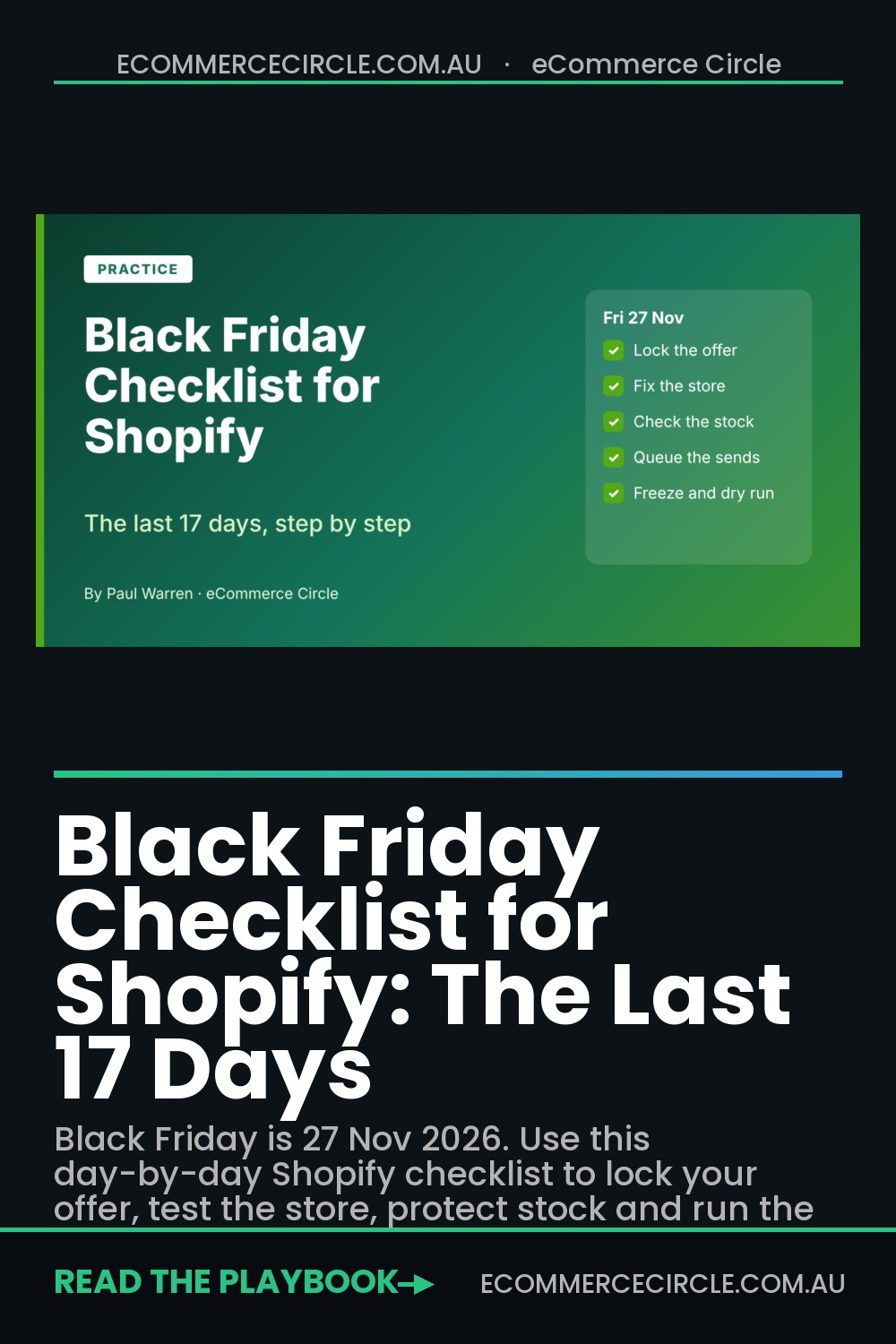
Black Friday 2026 is Friday 27 November, and Cyber Monday is Monday 30 November. As I write this on 10 November, you have 17 days. That is enough time to fix the things that actually decide your weekend, and not enough time to rebuild your store. This checklist is built for exactly that window.
Most Shopify brands treat the final fortnight like a creative sprint. They design more banners, write more emails and add another app. Then the weekend arrives, a code stacks with another code, the hero product sells out at 9am, and the founder spends Black Friday refunding orders instead of running ads.
The brands that have a good weekend do the opposite. They make their decisions early, spend the middle days testing, and freeze the store three days out. Everything below is sequenced that way, day by day, so you can work through it with a pen and a coffee.
The Aussie sale calendar you are working to
Your customers do not wait for the 27th. Retailers like Amazon Australia and Kogan start their Black Friday sales the week before, which pulls shopper attention forward. These are the dates to plan around, based on ShopBack’s Australian sale calendar. Treat the Click Frenzy and retailer dates as expected, because individual retailers confirm their own.
| Date (2026) | Event | What it means for you |
|---|---|---|
| Wed 11 Nov | Singles Day | Optional. Skip it unless you already have a list that buys on this date. |
| 10 to 12 Nov (expected) | Click Frenzy main sale | Shoppers are already in buying mode. Check your site speed now. |
| 18 to 22 Nov | Amazon AU and Kogan early Black Friday | Expect your own early-access list to get noisy. Send first. |
| Mon 23 Nov | Black Friday week starts | Teasers and VIP early access go out. |
| Fri 27 Nov | Black Friday | Your biggest single day. |
| Sat 28 Nov | Small Business Saturday | A natural angle for independent Aussie brands. |
| Sun 29 to Mon 30 Nov | Cyber Sunday and Cyber Monday | The second half of your revenue. Plan it, do not improvise it. |
| Mon 21 Dec | Australia Post standard parcel cut-off (within Australia) | Your last day for Christmas delivery promises. Check WA, NT and Tasmania. |
If you want the full strategic view across the weekend, our Black Friday Australia 2026 guide covers dates and deadlines in more detail. This post is the execution layer.
Why the last 17 days decide the weekend
Shopify merchants worldwide sold US$14.6 billion over BFCM 2025, up 27% on the year before, with a peak of US$5.1 million per minute on Black Friday (Shopify). In Australia, Australia Post reported a record $1.5 billion in online spend and 3.1 million households shopping over the 2025 Black Friday and Cyber Monday weekend. Roy Morgan forecast total pre-Christmas retail spending of $72.4 billion, up 4%.
Traffic like that does not forgive small problems. Baymard’s review of 50 studies puts average cart abandonment at 70.22%. When they asked shoppers why they left, 40% blamed extra costs, 20% said delivery was too slow, 18% did not want to create an account, 17% hit website errors or crashes, and 13% disliked the returns policy. Notice how few of those are about your ad creative. Almost every one is fixable before the weekend starts.
Mobile makes it sharper. Nosto data puts mobile at 54 to 57% of BFCM 2025 online sales, with mobile web converting at 3.3% against 6.5% on desktop. A slow or fiddly mobile store is not a small leak on this weekend. It is where more than half your customers are standing.
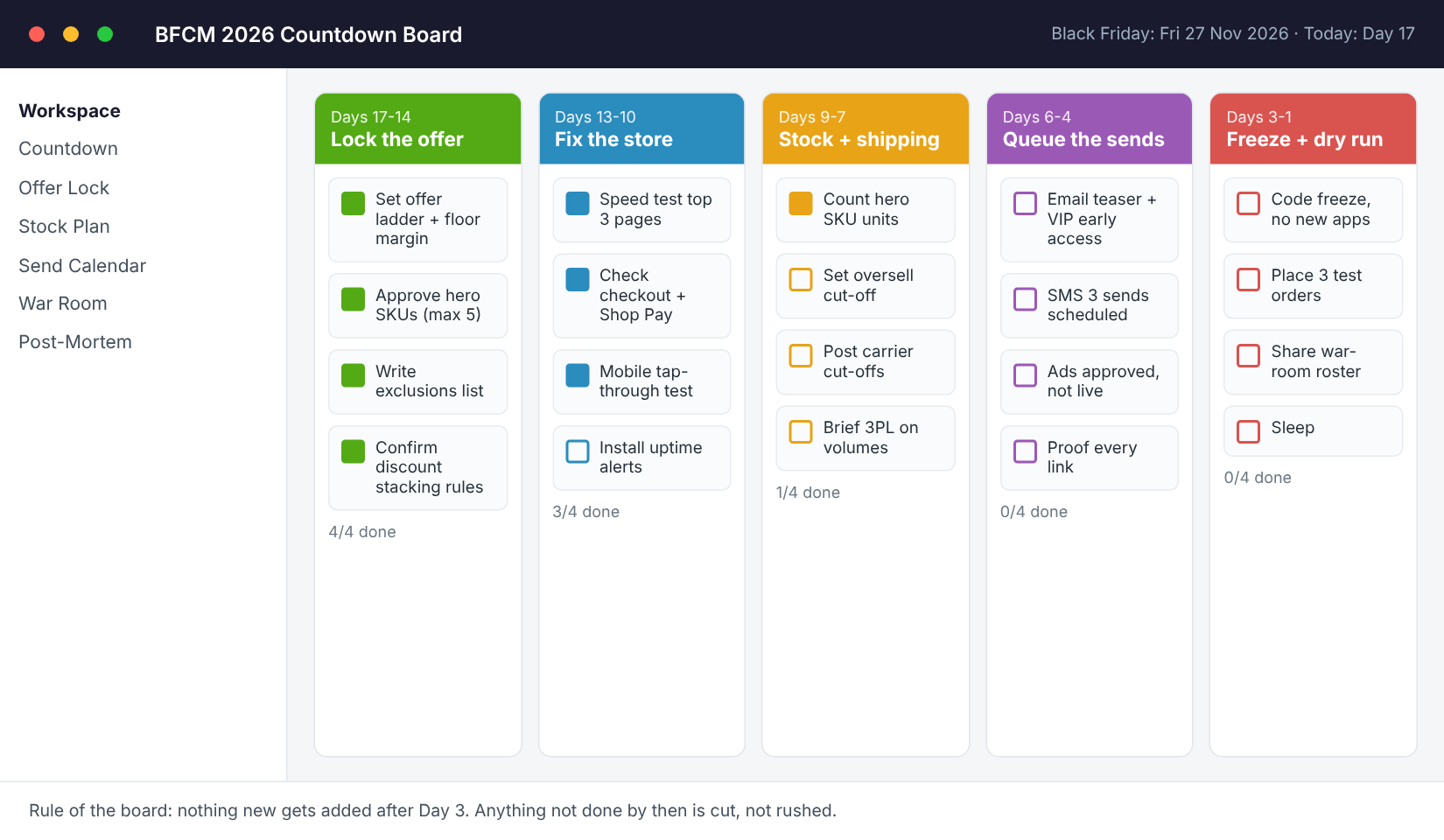
Days 17 to 14: Lock the offer before you touch anything else
Every other task on this list depends on the offer, so it comes first. Decide it now and write it down in one place. If your offer is still “we’ll see how it goes” on 20 November, your emails, ads and banners will all disagree with each other.
Set an offer ladder and a margin floor
Pick the one offer your whole weekend revolves around, then decide what you will add if sales run behind. A simple ladder: a headline offer for everyone, an early-access bonus for your list, and a Cyber Monday add-on (free gift or extended threshold). Next to each, write the lowest margin you will accept per hero product. Our Black Friday discount strategy post and the discount calculator will help you test the numbers.
Pick no more than five hero SKUs
Hero products are the ones you promote in every channel. Choose products with healthy stock, good reviews and a margin that survives the discount. Five is a ceiling, not a target. Three well-stocked heroes beat fifteen half-promoted products every time.
Write the exclusions list and the stacking rules
Decide which products are excluded from the sale, whether discount codes can stack with automatic discounts, and whether gift cards can be used. In Shopify, test this in a real cart with three different codes. The classic Black Friday mistake is a welcome code stacking on top of the sale price, and finding out when a thousand orders are already in.
Also write your shipping promise now. State the last order date for Christmas delivery and keep it consistent everywhere. Our Black Friday shipping plan has a carrier-by-carrier breakdown.
Finally, set your numbers. Work backwards from the revenue you want to the orders and traffic you need. If you have not done that yet, the BFCM target maths takes about 20 minutes and gives you the targets you will put on your war-room board later.
Days 13 to 10: Fix the store before the traffic arrives
This is your testing window. You are not redesigning anything. You are removing the things that make people leave.
Test your three money pages on a phone
Open your homepage, your best-selling product page and your cart on a mid-range phone using mobile data, not office Wi-Fi. Run each through Google PageSpeed Insights and note the mobile score. The goal is not a perfect number. It is finding the single heaviest thing on each page (usually a video, a slider or an app script) and removing it for the weekend. Our Shopify page speed guide shows how to find the culprit quickly.
Walk the checkout like a customer
Add a hero product to the cart and buy it, start to finish, on iPhone and Android. Count the taps from cart to payment. Check that Shop Pay, Apple Pay, Google Pay and your buy now pay later option (Afterpay, Zip) show up where expected. Check that shipping costs appear before the final step, because hidden costs are the single biggest abandonment reason in Baymard’s data. If guest checkout is off, switch it on.
Set up uptime alerts that text two people
Tools: UptimeRobot has a free plan that checks your site at regular intervals and alerts you when it goes down. Setup takes about ten minutes:
- Create an account and add a new HTTP(s) monitor for your homepage.
- Add two more monitors: one for your best-selling product page and one for /cart.
- Set alerts to SMS or push to two different people. If only the founder gets the alert and the founder is asleep, you have no alert.
- Test it by pausing a monitor and confirming the notification arrives.
Shopify’s own status page is worth bookmarking too, so you can tell the difference between “our store is slow” and “Shopify has an issue”.
Days 9 to 7: Stock, shipping and the oversell plan
Running out of your hero product on Black Friday morning is the most expensive mistake on this list, and it happens to brands of every size. This phase makes sure it does not happen to you. If you want the deeper version, see our BFCM inventory planning guide.
Count the hero SKUs against the shelf
Do a physical count of every hero SKU, not just a look at the Shopify number. Mismatches between system stock and shelf stock are common after a busy year, and Black Friday multiplies them. Reconcile now so you are not cancelling orders on Saturday.
Decide what happens when a product sells out
Pick one rule and set it up before the weekend. Options: hide the product, keep it visible with a “notify me” waitlist, or turn on continue-selling for a defined buffer with a clear delay message. Shopify Flow is free on all plans and can tag or hide a product automatically when inventory drops below a number you set. Setup: open Flow, start a workflow with the “Inventory quantity changed” trigger, add a condition (quantity at or below your threshold), then add an action to tag the product or notify your team in Slack or email.
Brief your warehouse or 3PL in writing
Send your warehouse a one-page brief: expected daily order volume (use your targets from Days 17 to 14), the hero SKUs, any new bundles, the daily cut-off time and the dates you need extra pick-and-pack capacity. If you handle fulfilment yourself, buy your packaging for double your expected orders now, because shortages in the final week are common.
Publish your cut-off dates in three places
Australia Post’s published 2026 cut-off for standard domestic parcels is 21 December within Australia, with earlier dates for Western Australia (14 to 18 December), the Northern Territory (14 to 17 December) and Tasmania (16 to 21 December). Confirm the current dates on auspost.com.au before you publish, then put your own last-order dates in the announcement bar, on the cart page and in your shipping FAQ.
Days 6 to 4: Queue every email, SMS and ad
By now, every message that will go out during the weekend should already be written, scheduled and proofed. If you are still writing copy on Wednesday night, you are behind.
Schedule the email and SMS sequence
A workable minimum: a teaser (what is coming and when), a VIP early-access send for your list and past buyers, a Black Friday launch, a mid-day reminder, a final-hours send, and a separate Cyber Monday email. Keep the volume realistic. Our email frequency guide explains how to avoid burning your list. Text messages should be tighter still, and our Black Friday SMS plan has six texts with exact send times. Subject lines are covered in the Black Friday subject lines list.
Proof every link on a real phone
Click every link in every scheduled email and text on a phone. Check the right discount is applied, the landing page loads quickly and the hero product images show up. One broken link in a launch email sent to your whole list is a very expensive typo.
Get ads approved and ready, but not live
Upload your creative early so review delays do not cost you launch-day hours. Set daily caps rather than lifetime budgets so a runaway ad set cannot spend a week of budget in an afternoon, and avoid editing live ad sets heavily during the weekend because big changes can reset the learning phase. If you advertise on Meta or Google, our Meta Ads Black Friday plan and Google Ads Black Friday plan cover budgets and timing.
Point the ads and emails at one landing page
Build a single sale page and send everything there. Put the offer, the hero products, the end date and the shipping cut-off above the fold. Our Black Friday landing page guide covers the layout.
Days 3 to 1: Freeze, dry run and rest
Three days before Black Friday, your store enters a freeze. No new apps, no theme edits, no new discount types, no “quick” changes. The only exceptions are fixes to something that is broken. Every change after this point carries risk and almost none carries reward.
Place three test orders
Run three real orders end to end: one with the sale discount, one using a discount code and one using a gift card. Use real payment methods if you can and refund the orders afterwards. Check the confirmation emails, the order notes in the admin and what your warehouse receives.
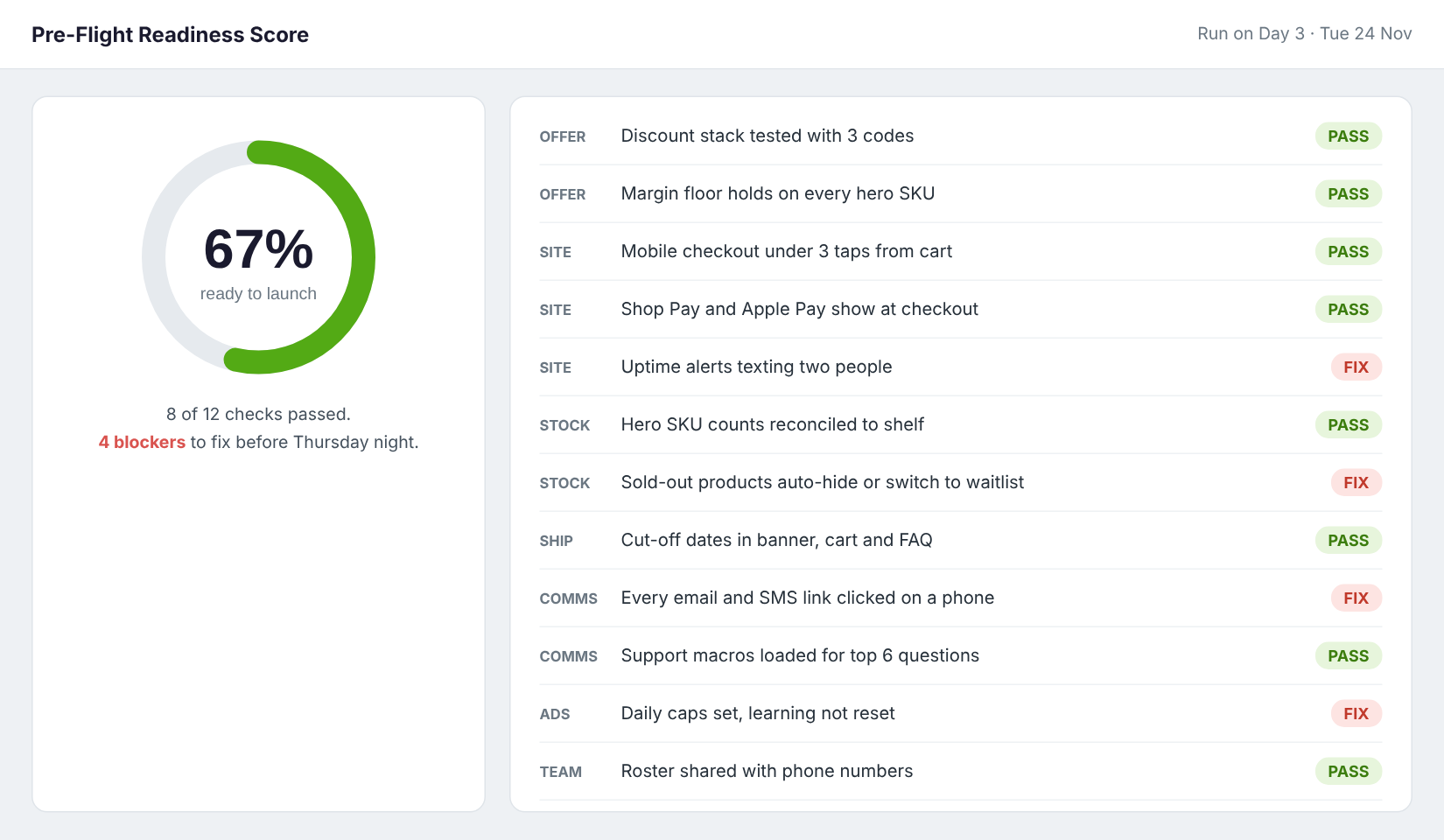
Run the readiness score
Go through the list below and mark each one as a pass or a fix. Anything that fails must be fixed by Thursday night, or cut from the plan.
Share the roster and cover support
Write down who is watching what, with phone numbers: site and checkout, support inbox, ads and budgets, warehouse. Load your support macros for the top six questions (delivery times, discount codes not working, order changes, returns, sizing, stock). Our Black Friday customer service plan has a full four-week version.
Black Friday and Cyber Monday: how to run the war room
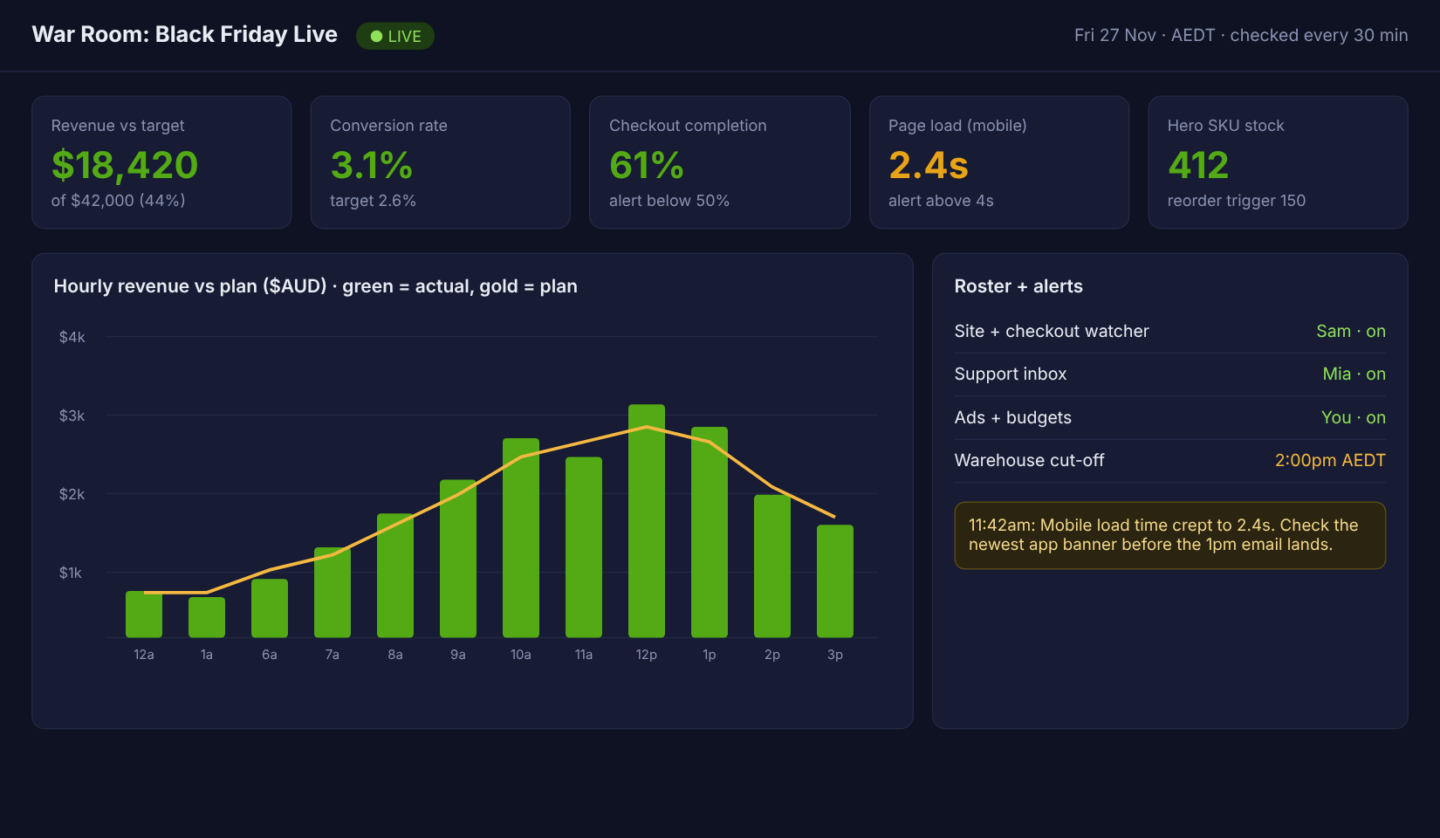
On the day, you are not creating, you are watching. Check five numbers every 30 minutes: revenue against your hourly plan, conversion rate, checkout completion rate, mobile page load time and hero SKU stock. Write each alert threshold next to the number before the day begins. For example: checkout completion under 50% means someone checks the checkout immediately, and mobile load time over 4 seconds means the newest banner or app gets switched off.
Shopify’s data shows Australian merchants peaked at around 10am AEST on Black Friday 2025, so your busiest hour may arrive earlier than you expect. Do not schedule the big email at 9:55am and then discover your site cannot handle it. Stagger the send, and keep one person free to do nothing but watch the checkout.
Real-world pattern: LSKD, the Queensland activewear brand, was reported by Power Retail to have hit peak checkouts of around 2,500 per minute during Black Friday 2025. At that kind of volume, nobody is manually fixing a code problem. It is the pre-built plan that keeps the store running. Closer to home for most readers, Socks for Living used Shopify Plus Launchpad to schedule its campaigns and set offer controls so conflicting promotions could not run at once, and reported sales up 228% on its 2018 Black Friday Cyber Monday weekend. That was a long time ago and a different scale, but the lesson holds: scheduled, tested, non-conflicting offers beat a founder clicking buttons at midnight.
Cyber Monday deserves its own mini plan. Our Cyber Monday Australia guide covers what to hold back for the final day so the weekend does not end on Saturday.
The compound effect: why the order matters
Notice how each phase protects the next one. A locked offer means your emails, ads and banners all say the same thing. A tested store means the traffic you pay for can actually buy. Reconciled stock means the products you promote are available. Queued messages mean you are free on the day. And the freeze means none of that gets undone in a rush at the last minute.
Skip one layer and the others get weaker. Great ads driving traffic to a slow mobile checkout waste money. A great email sent for a product that is already out of stock wastes goodwill. This is why we treat the weekend as a system, not a list of promotions. In the 10 P’s framework we teach inside eCommerce Circle, it sits in Practice, because execution and rhythm decide the result more than any single tactic.
The one-page Black Friday checklist (copy this)
Paste this into a doc, assign a name and a date next to every line, and tick items off as you go.
- Days 17 to 14, offer: offer ladder written, margin floor set per hero SKU, no more than five hero products, exclusions list, stacking rules tested with three codes, shipping promise drafted, revenue target and order target set.
- Days 13 to 10, store: top three pages tested on mobile data, heaviest element removed from each, checkout walked on iPhone and Android, payment options confirmed, guest checkout on, uptime monitors on homepage, product page and cart, alerts going to two phones.
- Days 9 to 7, stock and shipping: hero SKUs counted against the shelf, sold-out rule chosen and automated, warehouse or 3PL briefed in writing, packaging bought, cut-off dates in the announcement bar, cart and FAQ.
- Days 6 to 4, messages: email and SMS sequence scheduled, every link clicked on a phone, ads uploaded with daily caps, one sale landing page live, everything pointing to it.
- Days 3 to 1, freeze: freeze announced to the team, three test orders placed, readiness score run, roster shared, support macros loaded, alert thresholds written on the war-room board.
- Live days: five numbers checked every 30 minutes, one person watching checkout, big sends staggered, hero stock checked before each send.
- After Cyber Monday: within 48 hours write down what worked, what broke and what you would change, then start the win-back and Christmas plan.
What to do the week after
Do not let the weekend end in a pile of unanswered emails. Book a one-hour review within 48 hours. Record revenue against target, the busiest hour, the first thing that broke and the product that sold out first. Then send a thank-you email to first-time buyers within a week, because the second order is where the profit sits. Our Christmas cut-off guide helps you carry the momentum into December without blowing your delivery promises.
Inside eCommerce Circle, Black Friday execution is one of the core things we work on with every member, because it is where small process gaps cost the most. If you want to see exactly where your store is being capped heading into the weekend, take the free More Orders Scorecard. It takes two minutes and shows you which of the 10 P’s to fix first.